
PixlPal
Edit original photos with an AI assistant and fine-tune every adjustment manually
Gallery
About PixlPal
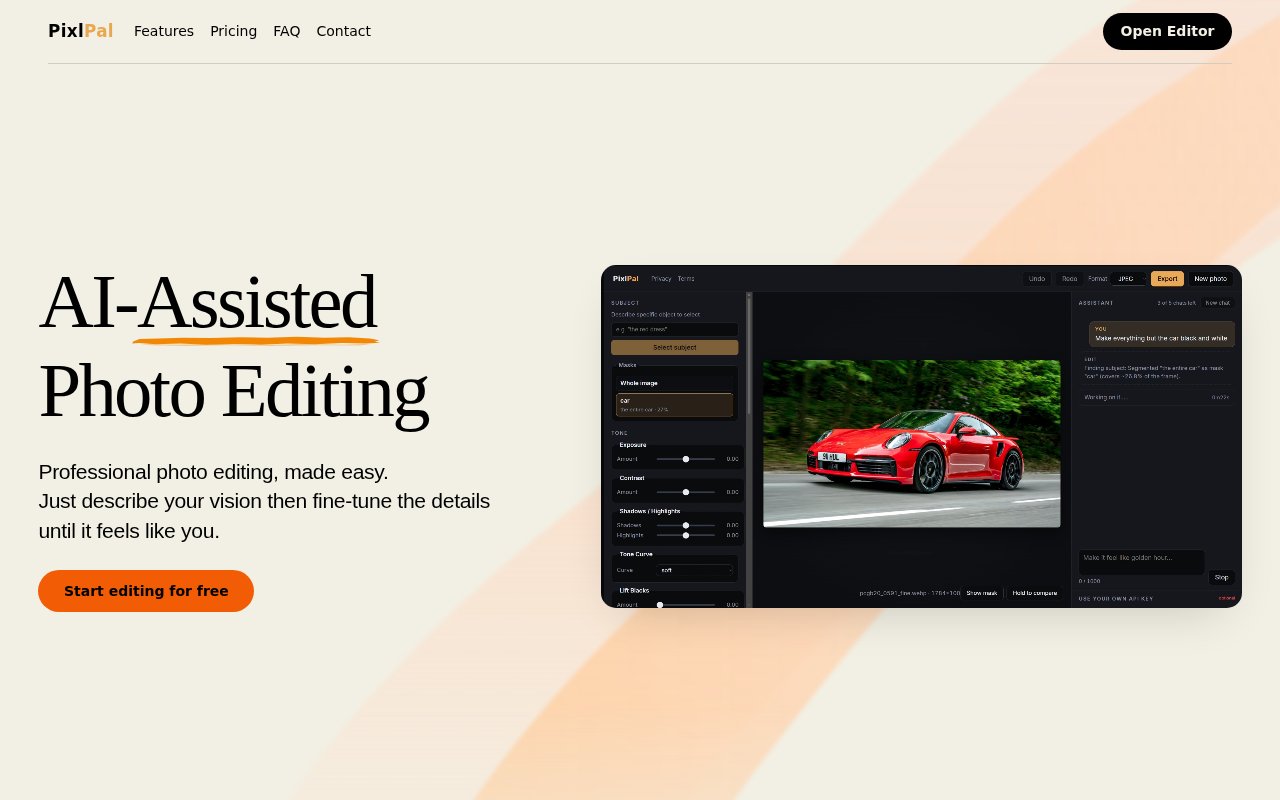
PixlPal is an AI-assisted photo editor built around direct adjustments to an original image. A user describes the look they want in ordinary language, and the assistant translates that request into edits such as exposure, contrast, color, and blur. The result remains editable in a manual image editor, so the user can inspect and fine-tune what the assistant did. This is a different approach from asking a general image model to regenerate a photograph, where familiar objects, textures, and background details can change along with the requested adjustment.
The assistant can apply broad changes across a photo or target a specific object. The site's example requests stronger emphasis on a red snack bag, and its FAQ gives changing the color of a dress as another localized instruction. PixlPal interprets the request and uses editing operations on the uploaded photo rather than creating a new version from scratch. Follow-up requests count as additional assistant messages, which makes a conversational refinement process possible while keeping usage tied to a simple message allowance. A request can therefore begin with an overall look and continue with smaller corrections, while each new instruction remains easy to understand in the usage total.
Manual editing is a complete part of the product rather than a locked finishing step. The website says the feature-rich editor is free, whether someone is adjusting an AI result or making direct changes without the assistant. That gives users control over the final appearance and keeps the service useful after their message allowance runs out. It also sets a clear boundary for what the AI is intended to do. The assistant speeds up common visual decisions, while the person can still correct or refine the image instead of accepting an opaque generated result. This combination is particularly useful when the first automatic pass is close but a user wants to make a small adjustment without spending another message.
PixlPal fits creators and casual photographers who know what they want a photo to feel like but don't want to map every request to technical controls. It can help someone balance exposure, adjust contrast, change color emphasis, or use blur to guide attention. It isn't presented as a text-to-image generator, and the site explicitly says it doesn't regenerate images. People who need synthetic objects, entirely new scenes, or broad generative composition should look elsewhere. The value here is preserving the source photo while making conventional edits easier to request. That preservation also makes the product relevant when the exact subject, background, and small scene details matter more than inventing a polished alternative.
The free access is useful enough to understand the workflow. Manual editing costs nothing, guests receive five assistant messages, and signing in adds five more. The page says no card is required for this allowance. A one-time message pack costs 2 dollars for 20 messages, and those purchased messages don't expire. The monthly plan costs 4 dollars for 50 messages in each billing month. Monthly messages don't roll over, the subscription renews automatically, and cancellation takes effect at the end of the current paid period. Subscribers can still buy an additional pack, so someone with occasional high usage doesn't have to change the base monthly plan.
Each user request to the assistant counts as one message, including follow-ups. Tool calls and automatic suggestions don't consume extra messages. The site says a request is counted after the first usable AI response. An initial error restores the message, but an error later in the editing process or a cancellation doesn't. Purchases require Google sign-in, and subscribers can add one-time message packs when needed. Free account messages are used first, followed by the current monthly allowance and then purchased messages. That order protects non-expiring purchased messages until the time-limited monthly allowance has been consumed.
The clearest reason to choose PixlPal is control over an existing photograph. It combines conversational instructions with direct image editing and keeps manual adjustments available at no cost. The main limits are its narrower focus on traditional photo changes, a message-metered assistant, and Google sign-in for purchases. Users should also expect to review edits, since preserving the original doesn't guarantee that every automatic adjustment matches the intended taste. For small batches of personal or creator photos, the low-cost packs and free editor make it easy to try without committing to a large subscription.
Key Features
- Natural-language photo adjustments
- Direct original image editing
- Object-specific edit requests
- Free manual photo editor
- Conversational follow-up changes
- One-time message packs
Pros & Cons
What we like
- Edits the original instead of regenerating it
- Manual editing remains completely free
- One-time purchased messages never expire
- Low-cost plans make testing accessible
Room for improvement
- Assistant usage is metered by message
- Monthly messages don't roll over
- Purchases require Google sign-in
- Focused on editing rather than image generation
Frequently Asked Questions
What is PixlPal?
Does PixlPal generate a new image?
Can PixlPal be used for free?
How much do additional messages cost?
Best For
Featured in
Alternatives to PixlPal
View all
Tailwind CSS
Rapidly build custom designs without leaving your HTML

Figma
Collaborative interface design tool
Apatero Studio
Creator studio for AI image, video, audio, 3D, and avatars. Every model worth using, in one workspace.
Pixel Painters
Unlimited graphic design subscriptions built only for churches and ministries
Reviews (0)
Badge builder
Add PixlPal to your website
Choose a badge style and size, preview it here, then copy the generated HTML. Badge images are self-contained SVGs and do not require an external script.

<a href="https://toolindex.net/tools/pixlpal?ref=badge" target="_blank" rel="noopener">
  <img src="https://toolindex.net/badge/pixlpal/medium.svg" alt="PixlPal - Listed on Tool Index" width="180" height="50" />
</a>How to use the badge
- 1. Pick the style, size, and theme that fit your layout.
- 2. Copy the generated HTML from the code block.
- 3. Paste it into your footer, homepage, or press page.
Standard badge available
The standard listing badge is available now. Score and circle badges are limited to tools currently ranked in the top 10 of a category.
Badge clicks return visitors to this profile with a referral tag so the source remains identifiable.
Related Tools
Apatero Studio
Creator studio for AI image, video, audio, 3D, and avatars. Every model worth using, in one workspace.
Tailwind CSS
Rapidly build custom designs without leaving your HTML
Figma
Collaborative interface design tool

Marvel
Lightweight prototyping platform for turning images and screens into clickable mobile and web prototypes.
Work on PixlPal? Request listing access or correction