
PressAudit
See how one news article fits into the wider coverage of its story
Gallery
About PressAudit
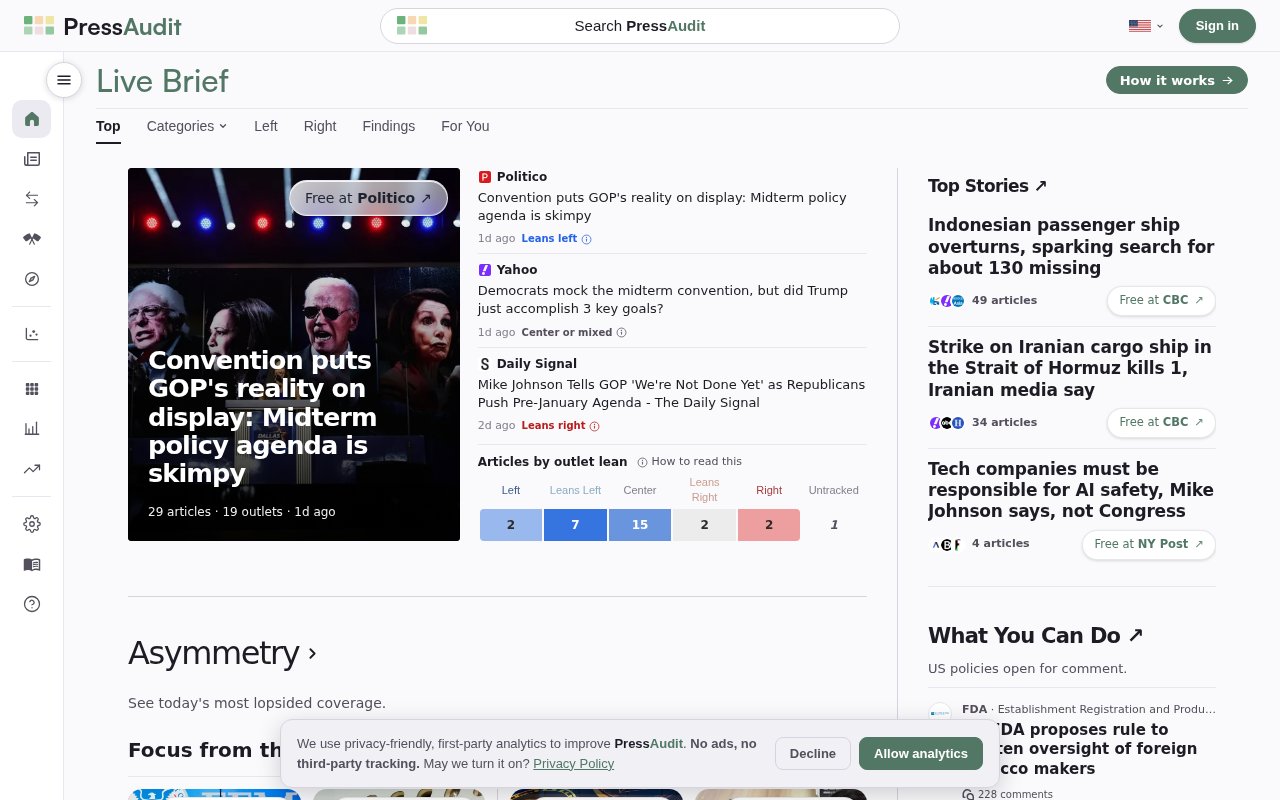
PressAudit is a news coverage comparison tool that helps readers place an individual article in the context of a larger story. Rather than asking someone to judge a report in isolation, it surfaces coverage from other outlets and shows how the article sits across a political spectrum. The goal is practical media literacy at the moment of reading. A person can see whether different publishers covered the same event, review the assessed lean of the current article and its outlet, and move to a broader coverage page when a headline leaves important context unclear.
The most direct way to use it is through the PressAudit Chrome extension. When a reader is on a news article, clicking the extension icon sends that article's URL and canonical URL variants to PressAudit's shared lookup service. If the article matches a story in the curated source set, the extension returns a compact view of the surrounding coverage. It doesn't run continuously in the background according to its official extension listing. The lookup happens when the user clicks, which keeps the interaction deliberate and makes the tool feel more like a reference check than another feed competing for attention.
The result brings together several kinds of context. PressAudit can show reporting across the political spectrum, the assessed political lean of the article, and the general lean associated with its outlet. It also includes public interest and political lean assessments, with reasoning when that reasoning is available. A short summary gives the reader a quick account of the underlying story. From there, the tool can point to the best available free read and link to the full PressAudit coverage view, where the user can explore reports from other sources instead of staying inside a single publisher's framing. That suggested free version can also help when the original page is inaccessible without a subscription.
That workflow is useful for readers who routinely hit a strong claim, a partisan headline, or a paywalled report and wonder how the event looks elsewhere. Journalists can use it for a quick scan of peer coverage before deeper reporting. Researchers and media analysts can use the comparisons as a starting point for examining framing patterns, though the product should not replace close reading or a formal content analysis. Teachers and students can also use a matched story as a concrete media literacy exercise by comparing outlet choices, summaries, and reported emphasis. Because the check begins on a specific article, a class can discuss concrete differences instead of talking about bias only in the abstract.
PressAudit is narrower than a general news aggregator. It begins with the article someone is already reading and tries to connect that page to a known story. This keeps the interface tied to a real reading decision and reduces the work of copying headlines into multiple searches. The output remains a starting point for comparison, not a verdict. Its political lean information also distinguishes between an assessment of the current article and the broader outlet, an important separation because one piece may not follow every tendency associated with its publisher. When explanatory reasoning is present, readers get more than a label and can inspect the basis for the assessment.
There are meaningful limits to keep in mind. PressAudit tracks a curated set of news sources, so some articles won't produce a match. Political lean and public interest assessments are interpretive aids rather than objective facts, even when reasoning accompanies them. The extension is built for Chrome, which leaves people on other browsers using the website rather than the same toolbar workflow. Its short summary and suggested free read are useful navigation aids, but anyone making a consequential judgment should still open the underlying reports, check primary evidence, and distinguish reporting from opinion.
PressAudit and its Chrome extension are free to use, and the extension requires no account. Its listing says it doesn't save browsing history or create a user profile in extension storage. It does send the current article URL and canonical variants to the shared lookup service so it can find a match, a detail privacy conscious readers should understand before installing it. The product is best treated as a focused layer of context over daily news reading. It helps a reader discover the spread of coverage quickly, while leaving the final work of evaluating evidence and credibility with the reader.
Key Features
- Cross-outlet coverage comparison
- Article and outlet lean context
- Public interest assessments
- Concise story summaries
- Recommended free article links
- On-demand Chrome lookup
Pros & Cons
What we like
- Adds wider coverage without leaving the reading workflow
- Separates article lean from outlet lean
- Offers reasoning for assessments when available
- Requires no account or payment
Room for improvement
- Curated sources mean some articles won't match
- Political lean assessments still require judgment
- Toolbar workflow is limited to Chrome
- Article URLs are sent to a lookup service
Frequently Asked Questions
What is PressAudit?
How does the PressAudit extension work?
Is PressAudit free?
Does PressAudit save browsing history?
Best For
Featured in
Alternatives to PressAudit
View allNotionlytics
Page-view analytics and reader feedback widgets for public Notion pages

Cometly
Marketing attribution for B2B SaaS that ties ad spend to pipeline and closed-won revenue

Amplitude
Digital analytics platform for product, growth, and marketing teams to analyze user behavior across web and mobile.

Simple Analytics
Cookieless, GDPR-friendly web analytics that needs no consent banner
Our take
Tool Index Editorial · Sep 2026· 3.5/5
PressAudit organizes major news coverage into story groups and shows how outlet attention falls across left, center, and right. We found the public heatmap immediately useful for seeing consensus, polarization, and stories that one part of the press emphasizes more than another. Links to free reads make it practical, not merely analytical, and the board was open without a paid gate.
Any lean or alignment label is an editorial model, not an objective property, and the site needs transparent methods to earn trust over time. Its curated outlets can also miss local reporting, specialist sources, and primary documents. PressAudit is best used as a prompt to read across coverage, not as a verdict on truth or credibility.
Editorial opinion from the Tool Index team, written from the public product pages. Not a user review.
Reviews (0)
Badge builder
Add PressAudit to your website
Choose a badge style and size, preview it here, then copy the generated HTML. Badge images are self-contained SVGs and do not require an external script.

<a href="https://toolindex.net/tools/pressaudit?ref=badge" target="_blank" rel="noopener">
  <img src="https://toolindex.net/badge/pressaudit/medium.svg" alt="PressAudit - Listed on Tool Index" width="180" height="50" />
</a>How to use the badge
- 1. Pick the style, size, and theme that fit your layout.
- 2. Copy the generated HTML from the code block.
- 3. Paste it into your footer, homepage, or press page.
Standard badge available
The standard listing badge is available now. Score and circle badges are limited to tools currently ranked in the top 10 of a category.
Badge clicks return visitors to this profile with a referral tag so the source remains identifiable.
Related Tools

Sleep Suivour
Track your sleep, improve your rest
Notionlytics
Page-view analytics and reader feedback widgets for public Notion pages
Mixpanel
Product analytics tool for tracking user events, funnels, retention, and cohorts to understand how people use your app.

Simple Analytics
Privacy-friendly web analytics with a clean dashboard, event tracking, and a strong stance against personal data collection.
Work on PressAudit? Request listing access or correction