
PromptSpend
Compare LLM API costs across models using a real or estimated workload
Gallery
About PromptSpend
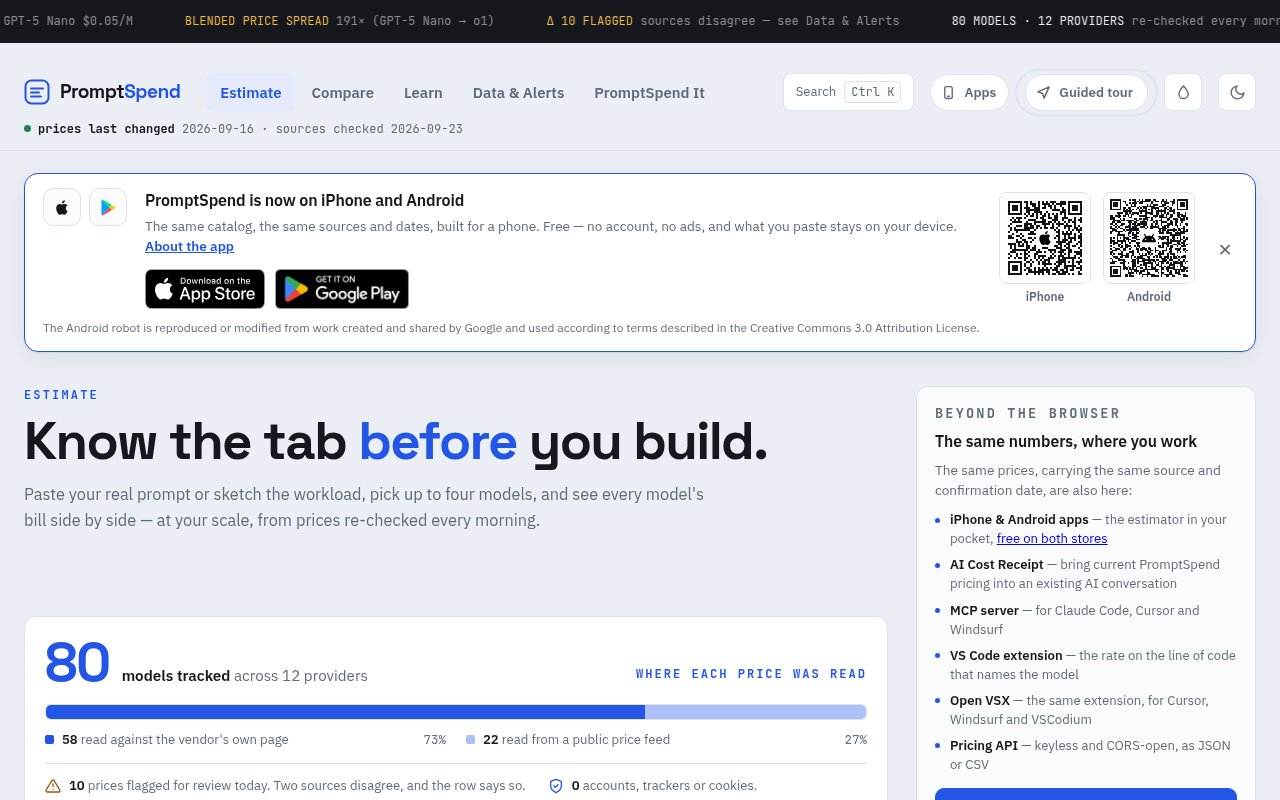
PromptSpend is an open-source calculator for estimating and comparing the API cost of large language models. A user can paste a real prompt or describe a workload, select as many as four models, and see what each option would cost at the expected scale. The goal is to make model pricing concrete before a team builds around a provider or discovers the bill in production. Instead of comparing input and output rates in isolation, PromptSpend applies those rates to conversations, token volumes, traffic, and revenue assumptions supplied by the user.
The estimate starts with one interaction. Users can set the size of a system prompt, user message, and model response with sliders, or paste text where they want a direct token count. Pasted content remains in the browser. They can add the number of turns per conversation, which matters because conversation history may be sent again on later turns. Scale controls then bring in conversations per day, monthly active users, and monthly revenue per user. This connects a rate card to product economics and makes it possible to compare the same workload across several models on equal assumptions. The calculator updates as those inputs change, so a team can see the effect of a shorter response or a different traffic level without rebuilding the scenario.
PromptSpend also exposes cost assumptions that simpler calculators often hide. Prompt caching is off by default, but users can model a stated cache-hit rate where providers publish cached input and write prices. A batch API option applies a lower rate when a provider offers it, and a reasoning-token multiplier accounts for hidden reasoning billed as output. These controls do not promise to predict an invoice perfectly. They make the user's choices visible, which is more useful than quietly assuming ideal caching or ignoring the extra work performed by a reasoning model.
Results go beyond one monthly total. Each selected model gets a per-conversation cost, monthly and yearly estimate, separate input and output amounts, and a cost per user. When revenue is supplied, PromptSpend calculates the remaining margin. It also explains which part of the workload is driving the number, such as response length or conversation history, and shows the difference between model choices. A team can export a scenario as CSV or share it, making the calculation easier to review during architecture, pricing, or budgeting discussions. That breakdown helps separate a cheap headline input rate from the actual mix of repeated context and output tokens. It can also show whether changing the model or changing the product's interaction design has the larger effect.
The underlying catalog is a major part of the product. PromptSpend tracks models from multiple providers and records where each price was read. The catalog is re-checked every morning by an automated GitHub process, and the interface shows when prices were last checked or changed. When sources disagree, affected entries are flagged rather than silently treated as clean. A public pricing catalog and source-check status make the data easier to inspect. Model and comparison pages also provide direct views of current rates and standard workloads without requiring someone to reconstruct every comparison manually. The source trail is valuable because provider rate cards change and can differ across feeds. Users can see the freshness of the evidence behind an estimate rather than treating every number as timeless.
PromptSpend is available beyond the browser calculator. The site lists a keyless, CORS-open pricing API in JSON or CSV, an MCP server for supported agent tools, a VS Code extension, an Open VSX version for compatible editors, and an AI Cost Receipt for bringing current prices into an AI conversation. These surfaces use the same catalog and retain source and confirmation dates. That is useful for developers who want model costs near the code or workflow where a model is selected, while the main site remains the place for detailed scenario modeling.
The project is MIT licensed and public, with no account, trackers, or cookies described on the site. No paid plan is presented. That makes PromptSpend useful for founders, engineers, and finance-minded product teams that need a defensible estimate without connecting provider billing accounts. Its limits are stated clearly. Calculations use standard global endpoint list prices in U.S. dollars and exclude items such as regional premiums, fast or priority tiers, server-side tool fees, and negotiated discounts. Actual provider bills can therefore differ. PromptSpend is best treated as a transparent planning and comparison tool, not a replacement for invoice monitoring after launch.
Key Features
- Side-by-side model cost comparison
- Real prompt token counting
- Caching and batch assumptions
- Traffic and margin modeling
- Daily checked pricing catalog
- Pricing API and MCP server
Pros & Cons
What we like
- Turns rate cards into workload-specific estimates
- Shows sources and confirmation dates for prices
- Keeps pasted prompt text in the browser
- Offers open data across several developer surfaces
Room for improvement
- Estimates exclude regional and priority pricing
- Negotiated provider discounts are not included
- Some catalog rows may be flagged for review
- No connected invoice monitoring is described
Frequently Asked Questions
What is PromptSpend?
How does PromptSpend calculate cost?
How current is PromptSpend pricing?
Is PromptSpend free?
Best For
Featured in
Alternatives to PromptSpend

Kevin Gabeci
Solo developer building web apps, cozy browser games, and AI creator toolkits.

SoloDevStack
A solo developer blog built on head-to-head tool comparisons, 580+ posts deep.

Codedex
A gamified, story-driven platform that teaches Python, web dev, and more like an RPG quest

Vibe Built
Building real apps with agentic AI. What worked, what broke, what shipped.
Reviews (0)
Badge builder
Add PromptSpend to your website
Choose a badge style and size, preview it here, then copy the generated HTML. Badge images are self-contained SVGs and do not require an external script.

<a href="https://toolindex.net/tools/promptspend?ref=badge" target="_blank" rel="noopener">
  <img src="https://toolindex.net/badge/promptspend/medium.svg" alt="PromptSpend - Listed on Tool Index" width="180" height="50" />
</a>How to use the badge
- 1. Pick the style, size, and theme that fit your layout.
- 2. Copy the generated HTML from the code block.
- 3. Paste it into your footer, homepage, or press page.
Standard badge available
The standard listing badge is available now. Score and circle badges are limited to tools currently ranked in the top 10 of a category.
Badge clicks return visitors to this profile with a referral tag so the source remains identifiable.
Related Tools
Kevin Gabeci
Solo developer building web apps, cozy browser games, and AI creator toolkits.

Coolify
Self-hostable, open source alternative to Heroku and Netlify

Warp
The modern terminal reimagined with AI and collaboration

Bolt.new
Prompt-to-deployed full-stack app inside the browser
Work on PromptSpend? Request listing access or correction