
Schemagic
Visual JSON Schema editor with validation tools and format converters
Gallery
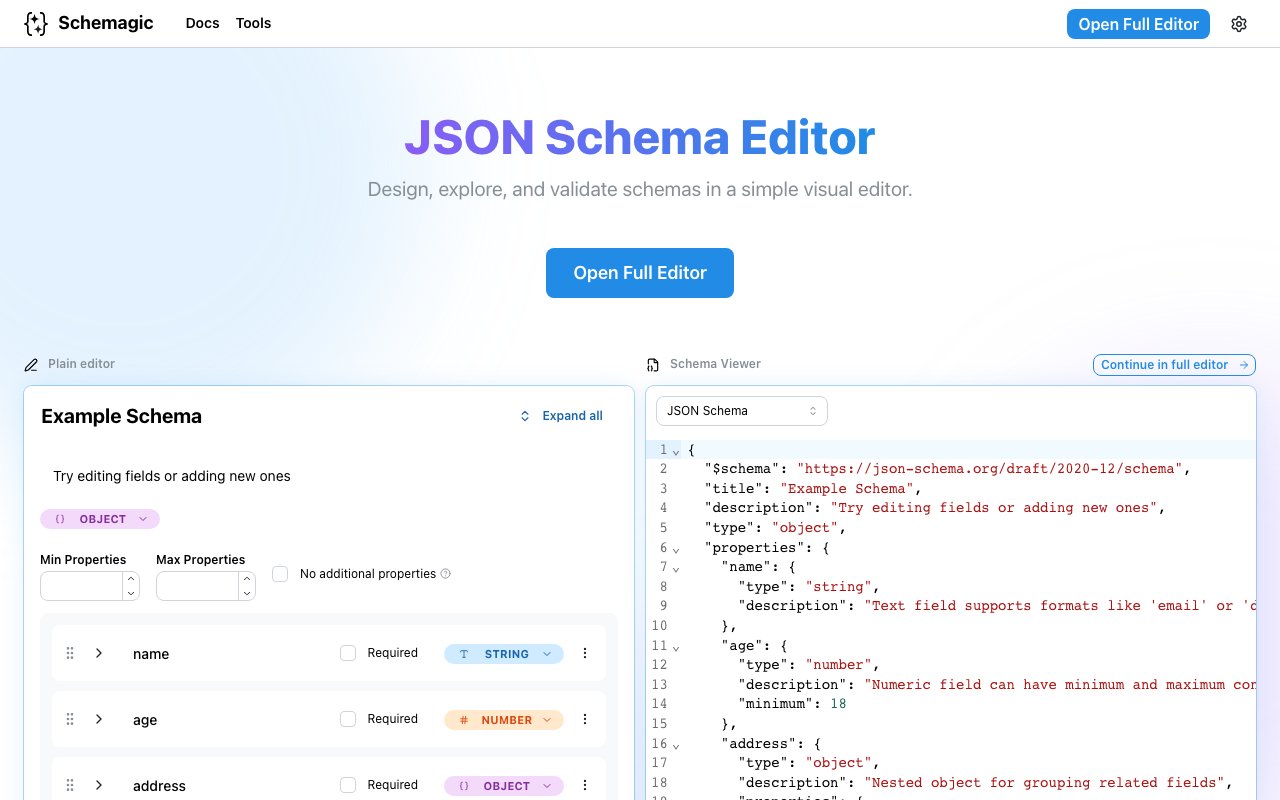
About Schemagic
Schemagic is a browser based tool for designing, exploring, and validating JSON schemas through a visual interface rather than editing raw JSON by hand. It takes the specification that defines how your data should be structured and presents it in a graphical editor where you can expand and collapse elements, add constraints, and see the shape of your schema at a glance. For developers who work with APIs, configuration files, or any structured data format, it removes the friction of remembering syntax and chasing missing brackets. The visual approach means you're working with the structure of your data directly instead of squinting at deeply nested curly braces trying to figure out where you went wrong.
JSON Schema is powerful but verbose. Writing one from scratch means dealing with nested objects, type declarations, format strings, required field arrays, and references that can be tedious to keep track of in a text editor. A single misplaced comma or an unbalanced bracket can break validation entirely, and tracking down that error in a 500 line schema file is nobody's idea of a good time. Schemagic addresses this by letting you work with the schema visually. You click to add properties, set types from a dropdown, define constraints like minimum values or pattern matching, mark fields as required, and the underlying JSON updates automatically. It's faster than typing and harder to make mistakes because the tool handles the syntax while you focus on the structure.
Beyond the visual editor, the platform includes validation tools that let you test your schema against real data. You paste a JSON payload and check it against your schema to see what passes and what fails, with clear feedback about which fields violated which constraints. Test cases can be saved so you can run the same checks again later, which is useful when you're iterating on a schema and want to make sure your changes don't break existing payloads. This makes it practical for teams building APIs who need to verify that request and response bodies conform to their spec before shipping. You can also add descriptions and examples to annotate your schema, which helps when other developers need to understand what each field is for.
The tool bundles several converters for related workflows. You can convert JSON Schema to Zod if you're working in TypeScript and want runtime validation that matches your schema definition. There's JSON to CSV, CSV to JSON, YAML to JSON Schema, and JSON to JSON Schema generation that infers a schema from a sample payload. These transformations are useful when moving between formats or bootstrapping a schema from existing data. The converters are accessible from the same interface, so you don't have to jump between different tools or remember the syntax for each format.
All work is stored locally in your browser. There's no account required, no cloud storage, and nothing leaves your machine unless you explicitly share it. Schemagic does offer shareable links for collaboration, which generate a URL others can open to view and edit the schema as their own copy. This is useful for code reviews, working through a spec with a teammate, or sending a schema to someone who needs to understand your data format. The local first approach also appeals to developers who are cautious about pasting sensitive schema information into cloud tools, since the data never hits a server unless you choose to create a share link.
The target audience is developers and technical teams who define or consume JSON schemas. API engineers use it to design request and response formats. Backend developers use it to validate configuration files. Frontend developers use it to understand the shape of data they're receiving. Anyone who maintains data contracts or needs to communicate structure across teams will find it useful. If you've ever inherited a large schema and struggled to understand its structure, the visual explorer alone is worth a look since you can expand sections, collapse others, and navigate the hierarchy without scrolling through raw JSON.
What sets Schemagic apart is the combination of visual editing, validation, and conversion in a single interface. Many schema validators exist, but few let you build schemas visually and validate data in the same place. The documentation includes guides on JSON Schema types, string formats, constraints, and definitions, making it a learning resource for developers who are new to the format as well as a working tool for those who use it daily. The platform is free to use with no visible pricing page or paid tier, and the entire workflow runs in your browser without requiring installation or signup.
Key Features
- Visual JSON Schema editor with expand and collapse
- Data validation against schemas
- Shareable links for collaboration
- JSON Schema to Zod converter
- Multiple format converters including YAML and CSV
- Local browser storage with no cloud requirement
Pros & Cons
What we like
- Visual interface makes schema editing faster and less error prone
- Validation and conversion tools in one place
- Data stays in your browser unless explicitly shared
- Free to use with no account required
Room for improvement
- Limited to JSON Schema and related formats
- Browser based so offline access depends on caching
- No team features beyond shareable links
- Focused tool that won't replace a full API design platform
Frequently Asked Questions
What is Schemagic?
Is Schemagic free?
Where is my data stored?
Who is Schemagic for?
Best For
Featured in
Alternatives to Schemagic

Kevin Gabeci
Solo developer building web apps, cozy browser games, and AI creator toolkits.

SoloDevStack
A solo developer blog built on head-to-head tool comparisons, 580+ posts deep.

Codedex
A gamified, story-driven platform that teaches Python, web dev, and more like an RPG quest

Vibe Built
Building real apps with agentic AI. What worked, what broke, what shipped.
Reviews (0)
Badge builder
Add Schemagic to your website
Choose a badge style and size, preview it here, then copy the generated HTML. Badge images are self-contained SVGs and do not require an external script.

<a href="https://toolindex.net/tools/schemagic?ref=badge" target="_blank" rel="noopener">
  <img src="https://toolindex.net/badge/schemagic/medium.svg" alt="Schemagic - Listed on Tool Index" width="180" height="50" />
</a>How to use the badge
- 1. Pick the style, size, and theme that fit your layout.
- 2. Copy the generated HTML from the code block.
- 3. Paste it into your footer, homepage, or press page.
Standard badge available
The standard listing badge is available now. Score and circle badges are limited to tools currently ranked in the top 10 of a category.
Badge clicks return visitors to this profile with a referral tag so the source remains identifiable.
Related Tools
Kevin Gabeci
Solo developer building web apps, cozy browser games, and AI creator toolkits.

Coolify
Self-hostable, open source alternative to Heroku and Netlify

Warp
The modern terminal reimagined with AI and collaboration

Bolt.new
Prompt-to-deployed full-stack app inside the browser
Work on Schemagic? Request listing access or correction