
Seam
Analyze thousands of Google Play reviews to surface what users actually complain about and praise
Gallery
About Seam
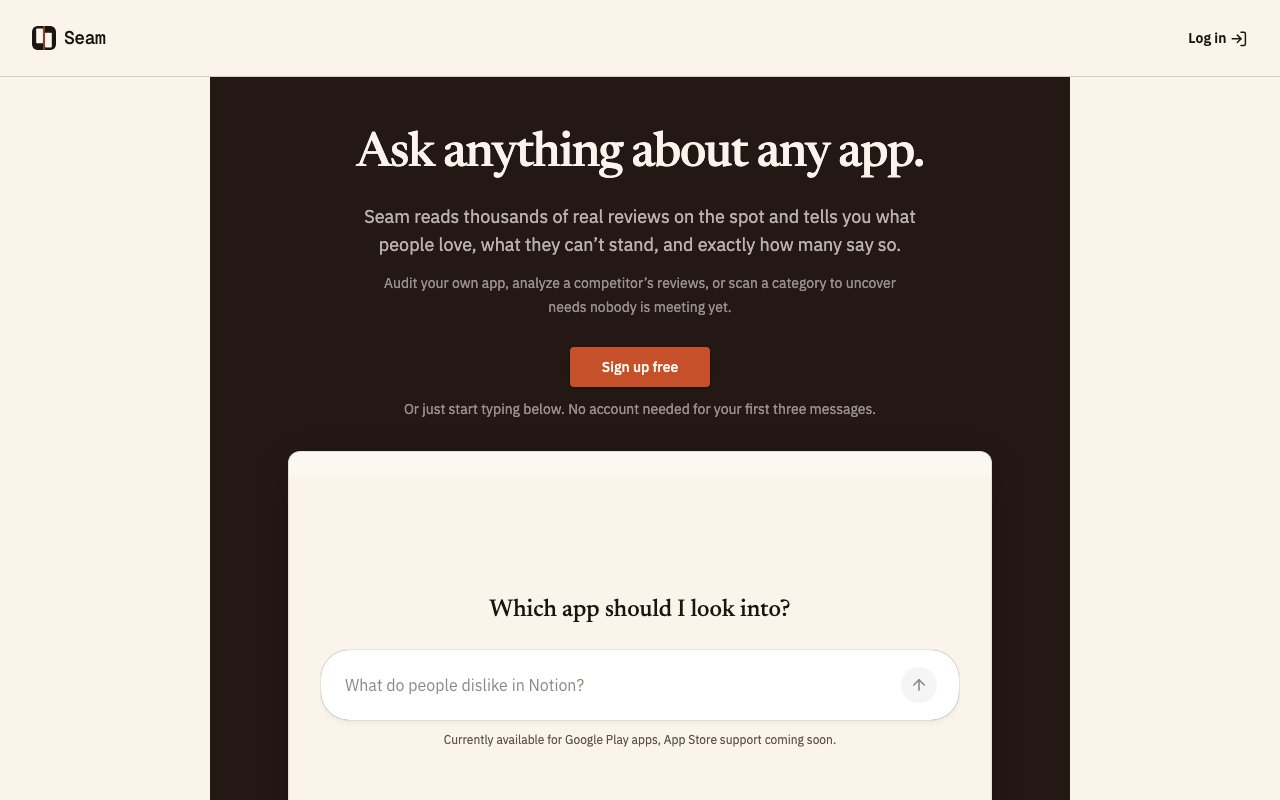
Seam is a web tool that analyzes Google Play Store reviews to show you what users are actually saying about an app. You search by app name, it fetches up to a thousand recent public reviews, and then it summarizes the recurring complaints and strengths with exact occurrence counts. Instead of scrolling through reviews one by one trying to spot patterns, you get a structured breakdown of what people love and what frustrates them. The output is specific enough to act on, telling you not just that users complain about performance but how many of them mentioned lag on specific device types or after particular updates. That kind of specificity is what turns review data into something you can actually use in a product meeting.
The problem it tackles is the noise in app store reviews. Any popular app has thousands of reviews, most of them short and not particularly informative. A lot of them are emotional reactions or single star rage posts that do not tell you much beyond the fact that someone was frustrated. Buried in that pile are real patterns, feature requests that keep coming up, bugs that multiple users hit, praise for things the developer might not realize matter. Seam pulls those signals out of the noise and quantifies them so you can act on actual data rather than anecdotes. When you see that forty seven users mentioned crashing after the latest update, that is a different signal than reading three random reviews and guessing at whether the issue is widespread. The numbers matter because they tell you where to prioritize.
Under the hood it searches Google Play, retrieves app metadata like ratings and install counts, fetches reviews with star ratings and timestamps, and runs analysis to cluster similar feedback. It captures the version number associated with each review, which lets you see how sentiment shifted after specific releases. That version tracking is particularly useful if you pushed an update and want to know whether it fixed the issues users were complaining about or introduced new ones. You can also point it at competitor apps to see what their users complain about, which is useful for finding gaps you could fill or pitfalls you could avoid. If a competitor's users consistently ask for a feature that you already have, that becomes a marketing angle. If they complain about something you were about to build the same way, that becomes a warning worth heeding before you commit resources.
Each query runs fresh analysis rather than pulling from a historical database, so you always see current sentiment. The tradeoff is that you cannot track trends over time without running separate queries and comparing them yourself. If you want to monitor how your app's review sentiment changes week over week, you would need to export results manually and build your own tracking layer. Seam gives you a snapshot, not a dashboard. For teams that need longitudinal data, this is a limitation. For teams that just want to know what users are saying right now, it is usually enough.
It is aimed at product managers, developers, and competitive analysts who want honest market feedback without the tedium of manual review reading. If you are trying to prioritize your roadmap based on what users actually want, or understand why a competitor's app has the rating it does, Seam gives you that in minutes rather than hours. It is also useful for pre launch research. If you are entering a market and want to know what frustrates users about the existing options, you can analyze the top five apps in the category and see where they all fall short. That kind of research used to take days of manual reading. Now it takes a few queries.
The scope is Google Play only. There is no iOS App Store support, so if your audience is primarily on Apple devices, you will need a different tool or a way to supplement the data. This limits usefulness for apps that skew heavily toward iPhone users, but for Android first products or cross platform apps where Android feedback is representative, it covers the ground you care about. The App Store has its own review ecosystem and different user behaviors, so the insights from Google Play do not always transfer directly, but for many apps the overlap is close enough to be useful.
Pricing is freemium. You get three messages without creating an account, thirty with a free account, and no credit card is required to sign up. For light usage or occasional competitive research, the free tier should be enough. Heavier users will likely hit the limit and need to contact the team about extended access. The free tier is generous enough to do a competitive audit or deep dive into your own app's reviews without paying, which makes it easy to evaluate whether the tool is worth building into your regular workflow. There is no trial period or artificial limitation on what features you can access, just a cap on how many queries you can run.
Key Features
- Analyze up to 1000 recent app reviews
- Occurrence counts for complaints and praise
- Competitor app analysis without restrictions
- App metadata including ratings and installs
- Version specific feedback extraction
- Fresh analysis on every query
Pros & Cons
What we like
- Turns thousands of reviews into actionable patterns in minutes
- Quantifies complaints with exact occurrence counts
- Works on competitor apps for market research
- Free tier available with no credit card required
Room for improvement
- Google Play only, no iOS App Store support
- No time series tracking for trend analysis
- Free tier limited to 30 messages per account
- Analysis depth depends on review volume available
Frequently Asked Questions
What is Seam?
Is Seam free?
Does Seam support the iOS App Store?
Who is Seam for?
Best For
Featured in
Alternatives to Seam
View allNotionlytics
Page-view analytics and reader feedback widgets for public Notion pages

Cometly
Marketing attribution for B2B SaaS that ties ad spend to pipeline and closed-won revenue

Amplitude
Digital analytics platform for product, growth, and marketing teams to analyze user behavior across web and mobile.

Simple Analytics
Cookieless, GDPR-friendly web analytics that needs no consent banner
Reviews (0)
Badge builder
Add Seam to your website
Choose a badge style and size, preview it here, then copy the generated HTML. Badge images are self-contained SVGs and do not require an external script.

<a href="https://toolindex.net/tools/seam?ref=badge" target="_blank" rel="noopener">
  <img src="https://toolindex.net/badge/seam/medium.svg" alt="Seam - Listed on Tool Index" width="180" height="50" />
</a>How to use the badge
- 1. Pick the style, size, and theme that fit your layout.
- 2. Copy the generated HTML from the code block.
- 3. Paste it into your footer, homepage, or press page.
Standard badge available
The standard listing badge is available now. Score and circle badges are limited to tools currently ranked in the top 10 of a category.
Badge clicks return visitors to this profile with a referral tag so the source remains identifiable.
Related Tools

Sleep Suivour
Track your sleep, improve your rest
Notionlytics
Page-view analytics and reader feedback widgets for public Notion pages
Mixpanel
Product analytics tool for tracking user events, funnels, retention, and cohorts to understand how people use your app.

Simple Analytics
Privacy-friendly web analytics with a clean dashboard, event tracking, and a strong stance against personal data collection.
Work on Seam? Request listing access or correction