
SnapPChart
Grade a trading setup from a chart screenshot before entering a trade
Gallery
About SnapPChart
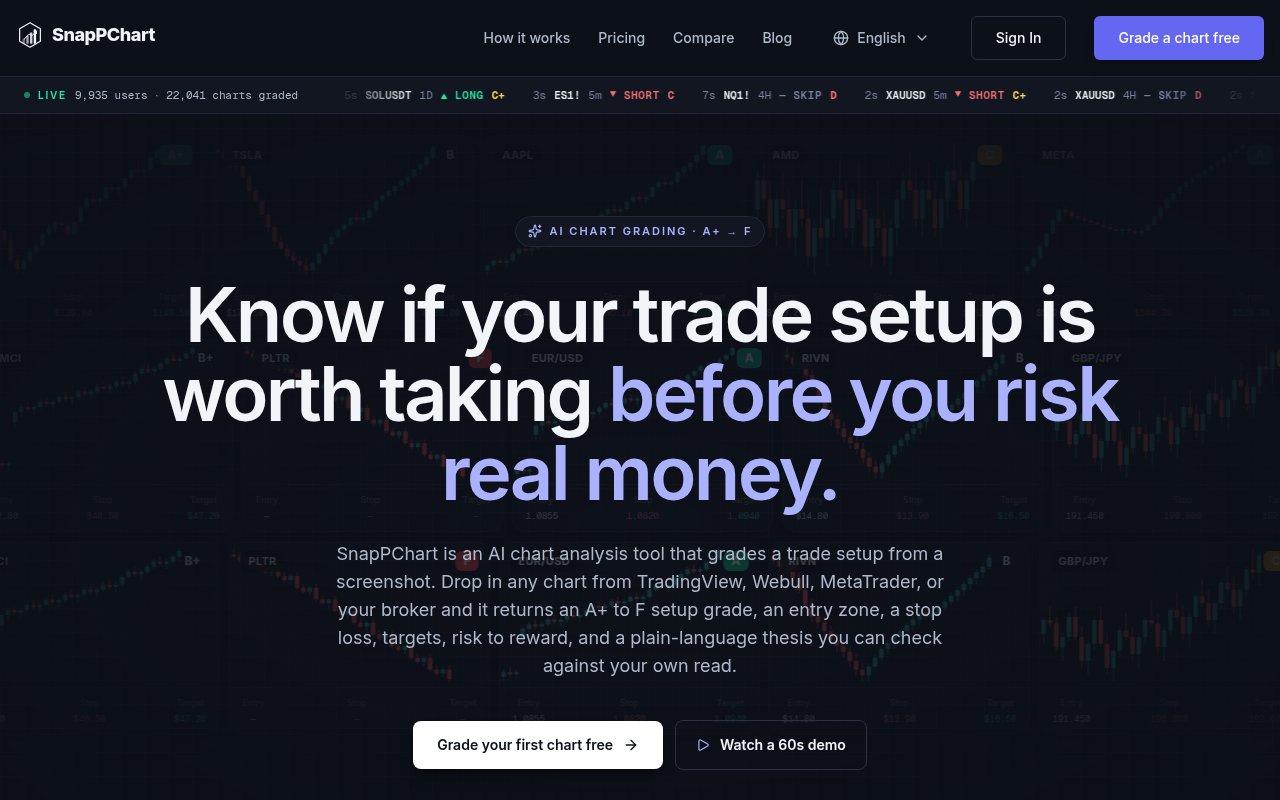
SnapPChart is an AI chart analysis tool that turns a trading chart screenshot into a structured second opinion. A trader uploads the chart they are already viewing, and the service grades the setup from A+ to F, explains the visible thesis, and can return an entry, stop, targets, and risk to reward. It is designed for the decision point before a trade rather than for discovering securities or placing orders. The product presents itself as an educational aid, not financial advice, and says its grade measures the quality of the setup shown in that moment. It doesn't promise what the market will do next or guarantee that a highly graded trade will be profitable.
The workflow starts with a PNG, JPG, or WebP screenshot up to 10 MB. Both the price and time axes need to be visible so the model can interpret levels accurately. SnapPChart reads the pixels in the image rather than requiring a broker connection or a typed symbol. It looks at the trend, price structure, candle patterns, visible moving averages, RSI, and volume, then applies a consistent grading shape. Screenshots can come from TradingView, Webull, ThinkOrSwim, Robinhood, Interactive Brokers, MetaTrader, or another platform that produces a legible chart. Since there is no live market feed behind the screenshot workflow, an old image produces an analysis of that old chart, not a current signal.
The output is more specific than a generic chart summary. Alongside the letter grade, it explains which confluence supports or weakens the setup. When the chart supports a trade plan, the result can include an entry price or zone, a structural stop with reasoning, one or more targets, an invalidation case, and an alternative entry if the first is missed. The service can also identify up to three nearby support ranges and three resistance ranges, ordered by proximity to the current price shown. Those zones are returned as ranges because a support or resistance area rarely sits on one exact tick. It doesn't force a complete plan onto every upload. If the setup is unclear or doesn't hold up, it can return a weak grade and explain the missing confluence, poor reward to risk, conflicting timeframe, or other visible issue instead of inventing attractive levels.
SnapPChart is aimed at active traders who already have a chart and want a repeatable checkpoint before committing capital. The profile settings can adapt grades to scalping, day trading, or swing trading, as well as stocks, futures, crypto, and forex. Traders can also add free-text notes about their preferred setups or directional bias. The analysis history keeps earlier grades for later review, while the AI Coach on the monthly plan is described as flagging repeated patterns after several setups. That makes the product relevant for building discipline and reviewing decisions, though it still depends on the user supplying a clear screenshot and interpreting the output within a broader risk process. A saved history may reveal which kinds of lower-grade setups a trader repeatedly takes, but it isn't a substitute for a complete journal of fills, position size, and outcomes.
Its clearest distinction is the fixed, opinionated review format. A general multimodal assistant may describe a chart differently with every prompt, while SnapPChart is built to return comparable grades and a familiar set of fields. It also pushes back on weak setups rather than treating the user's trade idea as the premise to defend. The narrow focus is useful when the question is whether a visible momentum or breakout setup has enough structure to consider. It is less suitable for live scanning across a market, automated execution, or research that depends on fundamentals and news. The site says the tool is optimized for momentum breakout setups, so traders using unrelated strategies should treat that focus as a fit question.
New users can try two lifetime chart reads without a card. The first includes the full analysis, while the second offers a more limited view of what the paid product adds. Paid access starts with a weekly plan at $4.99 for 15 grades. The monthly plan costs $19.99 for 100 grades, and the yearly plan costs $199.99 with unlimited grades. Plans can be canceled through account settings, with access continuing through the billing period. Pricing and limits can change, so the live page should be checked before subscribing. The low-friction trial is enough to test the screenshot workflow, but ongoing use requires a subscription and the output should remain one input to a trader's own judgment.
Key Features
- A+ to F setup grades
- Screenshot-based chart analysis
- Entry, stop, and targets
- Personalized trader profiles
- Saved analysis history
- Repeated trade pattern coaching
Pros & Cons
What we like
- Works with screenshots from many charting platforms
- Returns a consistent review format on each upload
- Explains weak grades instead of confirming every idea
- Offers two trial reads without a card
Room for improvement
- No live price feed or market-wide scanner
- Analysis quality depends on a clear screenshot
- Best aligned with momentum breakout setups
- Ongoing chart grading requires a subscription
Frequently Asked Questions
What is SnapPChart?
Does SnapPChart connect to a broker or live price feed?
Is SnapPChart free?
Can SnapPChart make trading decisions for me?
Best For
Featured in
Alternatives to SnapPChart
View all
Apatero AI
The creator studio for AI image, video, audio, 3D, and avatars, now at apatero.ai.

SoloDevStack
A solo developer blog built on head-to-head tool comparisons, 580+ posts deep.
Apatero Studio
Creator studio for AI image, video, audio, 3D, and avatars. Every model worth using, in one workspace.

Melodex
Turn your idea into an AI-generated music video
Our take
Tool Index Editorial · Sep 2026· 3.5/5
SnapPChart grades a trading setup from a chart screenshot and returns an entry zone, stop, targets, and a plain English thesis. We found a clear, repeatable workflow and unusually specific pricing, with two trial reads, $4.99 for 15 weekly grades, $19.99 for 100 monthly grades, or $199.99 a year for unlimited use. It suits active momentum traders who want a consistent checkpoint before entering a trade.
The fixed review format is more useful than an open ended chart prompt, especially because the product says it can reject weak setups. But it only sees the pixels supplied, not live prices, spreads, news, liquidity, or account risk. A neat grade can look more authoritative than it is, so this should remain a second opinion rather than a trade signal.
Editorial opinion from the Tool Index team, written from the public product pages. Not a user review.
Reviews (0)
Badge builder
Add SnapPChart to your website
Choose a badge style and size, preview it here, then copy the generated HTML. Badge images are self-contained SVGs and do not require an external script.
<a href="https://toolindex.net/tools/snappchart?ref=badge" target="_blank" rel="noopener">
  <img src="https://toolindex.net/badge/snappchart/medium.svg" alt="SnapPChart - Listed on Tool Index" width="180" height="50" />
</a>How to use the badge
- 1. Pick the style, size, and theme that fit your layout.
- 2. Copy the generated HTML from the code block.
- 3. Paste it into your footer, homepage, or press page.
Standard badge available
The standard listing badge is available now. Score and circle badges are limited to tools currently ranked in the top 10 of a category.
Badge clicks return visitors to this profile with a referral tag so the source remains identifiable.
Related Tools
Simple RMD
Calculate, aggregate, and manage your annual IRA required minimum distributions.
FreshBooks
Cloud accounting designed for service-based small businesses and freelancers
Apatero AI
The creator studio for AI image, video, audio, 3D, and avatars, now at apatero.ai.
Kevin Gabeci Toolkits
Seven AI toolkits for writing books, making music, cutting video, and building agents.
Work on SnapPChart? Request listing access or correction