
StripeKit
Infrastructure as code for Stripe billing, managing products, prices, and webhooks from a config file
Gallery
About StripeKit
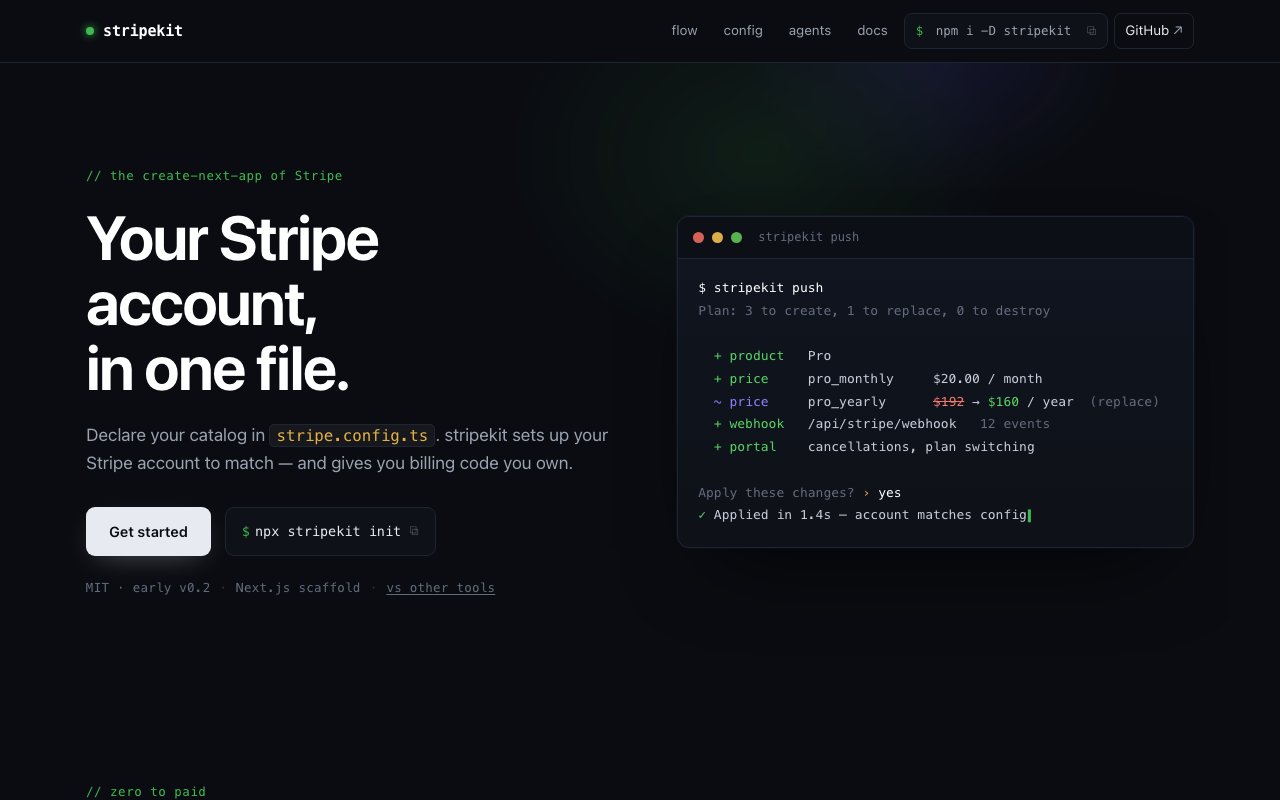
StripeKit is a developer tool that manages Stripe billing configuration through code rather than dashboard clicks. You declare your entire product catalog, pricing structure, webhook endpoints, and customer portal settings inside a single TypeScript configuration file called stripe.config.ts. Then you run a CLI command, and StripeKit reconciles your Stripe account to match that configuration exactly. It's the infrastructure as code approach applied to payment infrastructure, treating your billing setup with the same rigor you'd apply to your Terraform or Pulumi configs. The tool installs as a dev dependency via npm and scaffolds everything you need into a Next.js project with one init command. From there you're working with a typed config file rather than clicking through dashboard forms.
The problem it addresses is configuration drift. When billing lives in a dashboard, changes happen manually and leave no trace. Someone creates a test price during development, forgets to document it, and six months later nobody knows why it exists. A production price gets edited manually, and the change never shows up in version control. Webhooks accumulate ad hoc without a clear picture of what's listening for what. StripeKit moves the source of truth into your codebase. Every change goes through a pull request, gets reviewed by the team, and leaves a commit history. You can diff your billing configuration across branches, roll back a bad change with git revert, and know exactly what your Stripe account looks like just by reading the config file. This is familiar territory if you've worked with infrastructure as code for databases or cloud resources, and the same principles apply here.
The workflow mirrors what Terraform users expect. You edit your stripe.config.ts, run stripekit plan to preview a diff of what would change, then run stripekit push to apply those changes to Stripe. If you have an existing Stripe account and want to pull its current state into a config file, there's a pull command for that. The check command validates that your live Stripe account matches your config without making changes, which is useful for CI pipelines that want to catch drift before it causes problems. Both test and live environments are managed from the same configuration file, so you can keep them in sync without juggling separate configs. The plan output shows you exactly what will be created, updated, or archived before you commit to anything.
Pricing changes follow an immutable model. When you update a price, StripeKit archives the old price and creates a new one rather than mutating the existing record in place. This prevents the subtle bugs that happen when an active price changes under existing subscriptions. Customers already subscribed to the old price continue at that price. New customers get the new price. There's no ambiguity about what happened when. When you remove a product or price from your config, StripeKit archives it rather than deleting it, so historical data stays intact for reporting and compliance. Webhook handlers verify signatures and deduplicate events out of the box. These operations are idempotent, meaning you can run push multiple times without side effects, making it safe to include in automated deployment pipelines that might retry on transient failures.
The tool is also designed to work with AI coding assistants. StripeKit runs as an MCP server and is registered in the Model Context Protocol registry under io.github.rafaelcg/stripekit, so tools like Cursor and Claude Code can call plan, push, pull, and check commands directly. This means you can describe a billing change in natural language and let your AI assistant generate the config update and apply it to Stripe, with the safety net of the plan preview step. The integration is available through the Cursor and Claude Code marketplaces. For teams already using AI coding tools, this turns billing changes into conversational requests rather than manual config editing.
StripeKit positions itself as the independent alternative to merchant of record platforms and billing SaaS providers. State lives in your own database. There are no external runtime dependencies once the code is generated. The billing logic you ship is code you own, not a third party service you depend on. This matters to developers who want full control over their payment stack and want to avoid the vendor lock in that comes with abstracting Stripe away entirely. If the service shuts down, your code still works because there's nothing calling home. The generated code handles the Stripe API interactions, and you maintain it alongside the rest of your application.
The project is open source under the MIT license. There's no paid tier, no hosted service, and no usage based pricing. You install it, configure it, and run it against your own Stripe account. The target audience is developers building Next.js applications who want to go from zero to paid with a workflow they control. It's currently at version 0.2, which means it's early and the community is still small, but the core functionality of managing products, prices, webhooks, and portal settings through code is in place and working. The documentation walks through the config file format, the CLI commands, and the deployment workflow for teams that want to adopt it.
Key Features
- Declare billing setup in a TypeScript config file
- Terraform-style plan and push workflow
- Immutable pricing with automatic archival
- Webhook endpoint management from config
- MCP integration for AI coding assistants
- Idempotent operations safe to run repeatedly
Pros & Cons
What we like
- Moves billing config into version control with full history
- Open source with no paid tiers or hosted dependencies
- Immutable pricing prevents subtle subscription bugs
- Works with AI coding tools through MCP registry
Room for improvement
- Requires comfort with CLI and config-as-code workflows
- No visual dashboard for teams preferring GUI management
- Targeted at Next.js, less documented for other frameworks
- Younger project with a smaller community
Frequently Asked Questions
What is StripeKit?
Is StripeKit free?
How does StripeKit handle price changes?
Does StripeKit work with AI coding tools?
Best For
Featured in
Alternatives to StripeKit
View all
Kevin Gabeci
Solo developer building web apps, cozy browser games, and AI creator toolkits.

SoloDevStack
A solo developer blog built on head-to-head tool comparisons, 580+ posts deep.

Codedex
A gamified, story-driven platform that teaches Python, web dev, and more like an RPG quest

Vibe Built
Building real apps with agentic AI. What worked, what broke, what shipped.
Reviews (0)
Badge builder
Add StripeKit to your website
Choose a badge style and size, preview it here, then copy the generated HTML. Badge images are self-contained SVGs and do not require an external script.

<a href="https://toolindex.net/tools/stripekit?ref=badge" target="_blank" rel="noopener">
  <img src="https://toolindex.net/badge/stripekit/medium.svg" alt="StripeKit - Listed on Tool Index" width="180" height="50" />
</a>How to use the badge
- 1. Pick the style, size, and theme that fit your layout.
- 2. Copy the generated HTML from the code block.
- 3. Paste it into your footer, homepage, or press page.
Standard badge available
The standard listing badge is available now. Score and circle badges are limited to tools currently ranked in the top 10 of a category.
Badge clicks return visitors to this profile with a referral tag so the source remains identifiable.
Related Tools
Kevin Gabeci
Solo developer building web apps, cozy browser games, and AI creator toolkits.

Coolify
Self-hostable, open source alternative to Heroku and Netlify

Warp
The modern terminal reimagined with AI and collaboration

Bolt.new
Prompt-to-deployed full-stack app inside the browser
Work on StripeKit? Request listing access or correction