
SysAdmin Tools Nginx Config Generator
Free browser-based Nginx config generator with live preview for static, PHP, proxy and Node apps
Gallery
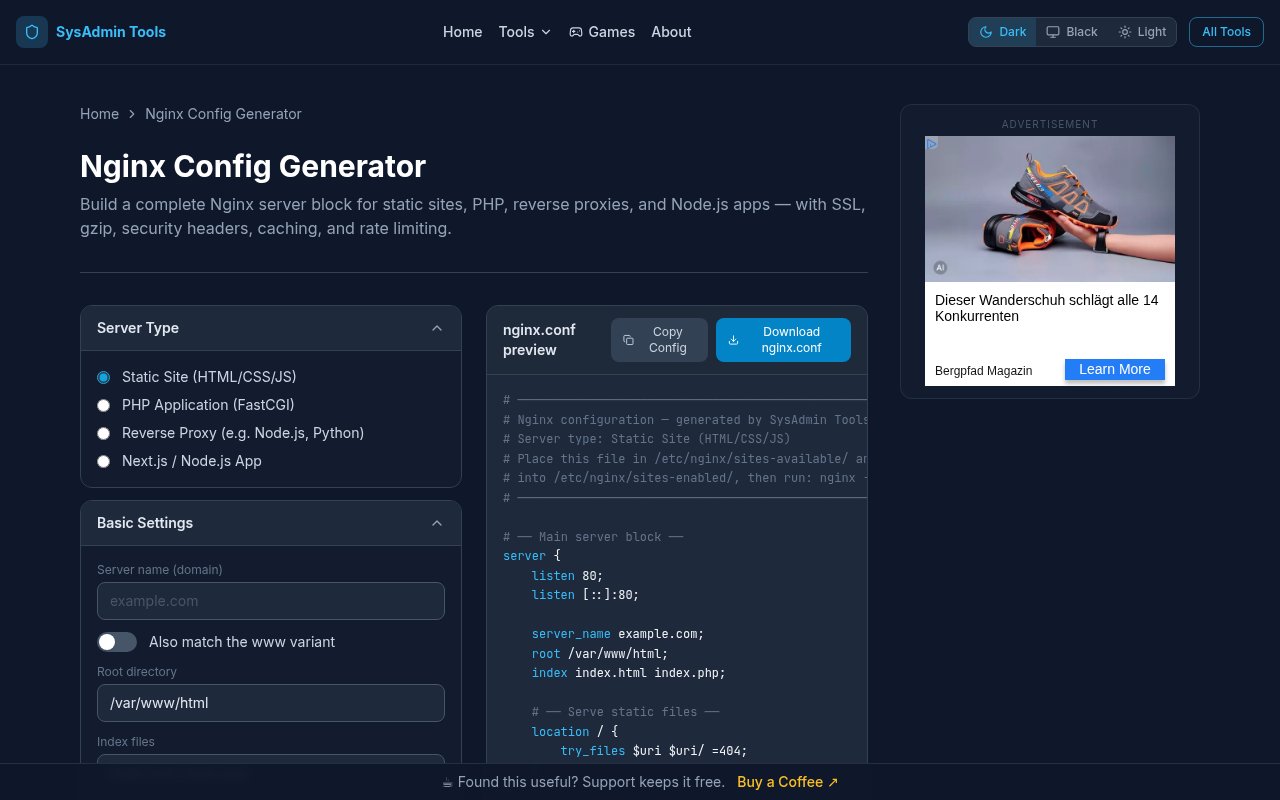
About SysAdmin Tools Nginx Config Generator
The Nginx Config Generator from SysAdmin Tools is a free web tool that builds a complete Nginx server block in the browser. You pick the kind of site you're serving, fill in a domain and a couple of paths, switch on the options you want, and a working configuration appears beside the form as you type. It exists because writing Nginx config by hand is one of those jobs that's easy to get almost right. A missing semicolon, a proxy header left out, or a TLS block copied from a five year old tutorial is enough to break a deploy or leave a server weaker than it should be, and you often don't find out until something is already live.
The generator starts with a server type. Static site, PHP application, reverse proxy, or a Next.js and Node.js app. From there you enter the domain name, the root directory and the index files, then toggle the pieces you need. SSL and HTTPS, gzip compression, security headers, browser caching, rate limiting, custom error pages and logging each have their own switch. Every change updates the preview in real time, and the output carries explanatory comments so you can see what each block is doing and why it's there. When it looks right you copy the text or download the file. Everything runs in the browser and nothing is sent to a server, which matters when the config contains internal hostnames, upstream ports or filesystem paths you'd rather not paste into a stranger's form.
The details it gets right are the ones people tend to forget. The generated config uses TLS 1.2 and 1.3, adds HSTS when HTTPS is enabled, sets the WebSocket-compatible headers a proxied app needs so socket connections don't silently fail, wires up PHP-FPM over FastCGI for PHP sites, and defines proper rate limiting zones rather than a lone directive that Nginx would reject. Those are the parts that usually go wrong in a hand-written file, and having them come out correct by default is most of the value.
Compared with copying a config from a blog post, the difference is that every option here is current and consistent with the others. Enabling HTTPS doesn't just add a listen directive, it brings the TLS protocol settings and HSTS with it, and choosing the proxy or Node type brings the upgrade headers a socket connection needs. The comments explain the intent of each block, so when you come back to the file in six months you can tell which lines were deliberate and which were defaults.
A typical session takes a minute. Say you're putting a Node app behind Nginx on a fresh VPS. Choose the Next.js and Node.js type, enter the domain, enable HTTPS, gzip, security headers and logging, and the preview shows a server block with TLS, the proxy headers a Node app needs and logging in place. Change your mind about browser caching and the relevant lines appear or disappear without you touching the rest. It's for anyone who stands up web servers without doing it every day. Developers deploying a side project to a VPS, people self-hosting a handful of services at home, sysadmins who want a sane baseline before tuning, and students learning how a server block fits together. The commented output doubles as a teaching aid, because you can flip a switch and watch exactly which directives appear, which is a faster way to learn Nginx than reading the reference top to bottom.
It's one piece of SysAdmin Tools, a collection of more than 38 free utilities built by Sachin, a Linux and DevOps engineer with over 14 years of experience. The same site covers DNS propagation and lookups, MX records, SPF, DKIM and DMARC checks and an email health checker, an SSL checker and security header analysis, WHOIS, port and redirect checkers, a subnet calculator and IP location, plus developer generators for cron expressions, .htaccess files and SSH config, and a Dockerfile linter. There are even a few browser games for sysadmins. Because the tools share a home, the config you generate here can be checked against the same site's SSL and security header tools once the server is up.
It's worth being clear about what it isn't. The output is a solid starting point, not a tuned production config for a high traffic cluster, and it doesn't validate against your specific Nginx version or the modules you have compiled in. It doesn't try to cover every directive either, so unusual setups will still need some hand editing. Treat the result as a reviewed base rather than a finished artifact, and test the file on the server before you reload.
Access is completely free. There are no accounts, no API keys and no rate limits on any of the tools, and the site is supported by a sponsored banner and a buy a coffee link rather than a paywall. There's an about page and a contact page, though no support email is published. Open the generator, build the block, copy it out, and you're done.
Key Features
- Four server types including reverse proxy
- Live nginx.conf preview with comments
- One-click SSL, gzip and security headers
- Rate limiting and browser caching toggles
- Runs entirely in the browser
- Part of a free sysadmin tool suite
Pros & Cons
What we like
- Free with no account or rate limits
- Commented output explains every directive
- Nothing leaves the browser
- Handles TLS, PHP-FPM and WebSocket headers correctly
Room for improvement
- A starting point, not a tuned production config
- Doesn't validate against your Nginx version
- Unusual setups still need hand editing
- Site carries a sponsored banner
Frequently Asked Questions
What is the SysAdmin Tools Nginx Config Generator?
Is it free?
Does it send my configuration anywhere?
Is the generated config production ready?
Best For
Featured in
Alternatives to SysAdmin Tools Nginx Config Generator
View all
Kevin Gabeci
Solo developer building web apps, cozy browser games, and AI creator toolkits.

SoloDevStack
A solo developer blog built on head-to-head tool comparisons, 580+ posts deep.

Codedex
A gamified, story-driven platform that teaches Python, web dev, and more like an RPG quest

Vibe Built
Building real apps with agentic AI. What worked, what broke, what shipped.
Our take
Tool Index Editorial · Sep 2026· 3.5/5
SysAdmin Tools Nginx Config Generator builds commented server blocks for static sites, PHP, reverse proxies, and Node applications. We found the live preview useful both for quick setup and for learning which directives each switch adds. SSL, gzip, headers, caching, rate limits, errors, and logging are available, and generation stays in the browser.
The tool is free with no signup or API key. Its output is still a starting point, not proof that a deployment is secure or compatible with a specific Nginx build. Unusual routing, modules, traffic patterns, and certificate setup will need manual review, followed by nginx -t before reload. Used with that discipline, it removes boilerplate without pretending to replace an administrator.
Editorial opinion from the Tool Index team, written from the public product pages. Not a user review.
Reviews (0)
No reviews yet
Be the first to share your experience with SysAdmin Tools Nginx Config Generator
Sign in to write a reviewBadge builder
Add SysAdmin Tools Nginx Config Generator to your website
Choose a badge style and size, preview it here, then copy the generated HTML. Badge images are self-contained SVGs and do not require an external script.

<a href="https://toolindex.net/tools/sysadmin-tools-nginx-config-generator?ref=badge" target="_blank" rel="noopener">
  <img src="https://toolindex.net/badge/sysadmin-tools-nginx-config-generator/medium.svg" alt="SysAdmin Tools Nginx Config Generator - Listed on Tool Index" width="180" height="50" />
</a>How to use the badge
- 1. Pick the style, size, and theme that fit your layout.
- 2. Copy the generated HTML from the code block.
- 3. Paste it into your footer, homepage, or press page.
Standard badge available
The standard listing badge is available now. Score and circle badges are limited to tools currently ranked in the top 10 of a category.
Badge clicks return visitors to this profile with a referral tag so the source remains identifiable.
Related Tools
Kevin Gabeci
Solo developer building web apps, cozy browser games, and AI creator toolkits.

Coolify
Self-hostable, open source alternative to Heroku and Netlify

Warp
The modern terminal reimagined with AI and collaboration

Bolt.new
Prompt-to-deployed full-stack app inside the browser
Work on SysAdmin Tools Nginx Config Generator? Request listing access or correction