
Tandem Terminal
Share a live macOS terminal with anyone through a browser link, no SSH keys or screen sharing
Gallery
About Tandem Terminal
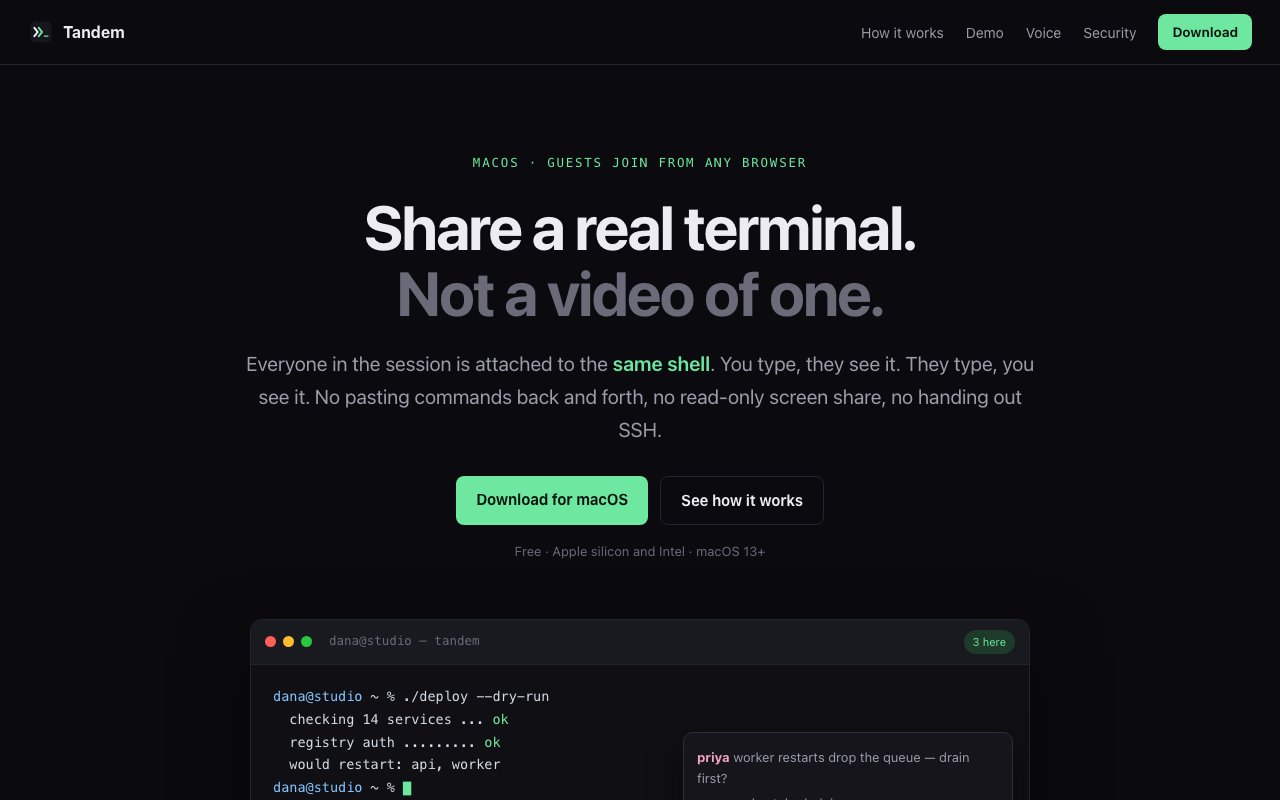
Tandem is a free macOS app that lets multiple people attach to the same live shell session at once. The host runs a login shell on their Mac, sends a link, and guests join from a browser on any operating system with nothing to install. Everyone sees the same terminal in real time, and the host decides, person by person, who can actually type.
The problem it solves is one every developer has felt. Collaborating in a terminal today means picking your poison. Video screen sharing gives you a compressed, read-only picture of a terminal where nobody else can act. Handing out SSH access is all-or-nothing and turns into a key-management chore. And pasting commands back and forth over chat is slow and error-prone. Tandem replaces all three with a shared session where every keystroke and every byte of output fans out to all connected guests through a relay server, so what people see is the actual terminal, not a video of one.
The security design is the most carefully argued part of the product. Traffic is end-to-end encrypted with AES-GCM, and the key lives in the URL fragment, the part of a link that never gets sent to a server, so Tandem's own relay can't read your terminal traffic. Guests are read-only by default and typing permission is granted per person, revocable at any time, which matches how trust actually works in a group, everyone watches, and only the people who need hands on the keyboard get them, only for as long as they need them. The chat panel is deliberately separated from the shell with no code path from messages to the terminal, so a pasted message can't become an executed command. The host app listens on loopback only and exposes no inbound ports, and a security log tracks joins, permission changes, kicks, and bans. For a category where the whole point is letting other people near your shell, that level of explicit threat modeling is reassuring.
It behaves like a real terminal, too. Vim works, colors work, job control works, because guests are interacting with an actual shell session rather than a re-rendered approximation. The host can run multiple simultaneous sessions in tabs, so a build watching in one tab and a debugging session in another can each have their own audience. And because guests get the raw byte stream rather than compressed video, small text stays crisp, scrollback behaves, and nobody has to ask you to zoom in. There's also a genuinely novel voice input feature, hold the right command key and speak, and your speech is transcribed by Deepgram, then converted into a shell command by Anthropic's models. It's an unusual addition for a terminal tool, and a convenient one when you're narrating what you want done mid-session.
The natural audience is development teams doing pair debugging, sysadmins walking someone through a production issue, mentors teaching inside a real environment, and anyone running incident response where three people need eyes and occasionally hands on the same box. Because guests join from a browser, the person on the other end doesn't need a Mac, doesn't need Tandem, and doesn't need an account on your machine. That asymmetry, native app for the host, plain link for everyone else, is what makes it practical for helping non-technical or differently-equipped collaborators. And because the session is a window into the host's shell rather than an account handed over, the host stays in control of the machine from the first join to the last kick.
Compared to alternatives, the positioning is clear. tmux sharing requires everyone on the same box with SSH already sorted. Screen sharing in Zoom or Meet is passive and blurry. Cloud IDE sharing pulls everyone into a hosted environment rather than the machine where the problem actually lives. Tandem sits in the middle, real shared terminal fidelity on the host's own Mac with link-level ease of access, watch by default, type when granted.
The pricing story is the easiest part, it's free. The download is a signed .dmg supporting both Apple silicon and Intel Macs running macOS 13 or later, with no paid tiers mentioned anywhere on the site. The obvious constraints are that hosting is Mac-only, so a Linux server session has to be reached through a shell on the host's Mac, and the session traffic transits Tandem's relay infrastructure, encrypted though it is. If you spend your collaboration time in a terminal and are tired of narrating commands over video calls, this is a low-risk tool to try, and there's a published contact address if you want to reach the developer.
Key Features
- Browser-based guest access on any OS
- Per-person typing permissions
- End-to-end AES-GCM encrypted sessions
- Voice-to-command input via Deepgram and Anthropic
- Multiple simultaneous sessions in tabs
- Security log of joins, kicks, and permission changes
Pros & Cons
What we like
- Completely free with no paid tiers
- Guests join from a link with nothing to install
- Relay can't read traffic since the key stays in the URL fragment
- Real terminal fidelity, vim, colors, and job control all work
Room for improvement
- Hosting requires a Mac on macOS 13 or later
- Sessions depend on Tandem's relay infrastructure
- Voice input relies on cloud transcription services
- Younger product with a smaller community
Frequently Asked Questions
What is Tandem Terminal?
Is Tandem free?
How secure is it?
Do guests need a Mac?
Best For
Featured in
Alternatives to Tandem Terminal

Kevin Gabeci
Solo developer building web apps, cozy browser games, and AI creator toolkits.

SoloDevStack
A solo developer blog built on head-to-head tool comparisons, 580+ posts deep.

Codedex
A gamified, story-driven platform that teaches Python, web dev, and more like an RPG quest

Vibe Built
Building real apps with agentic AI. What worked, what broke, what shipped.
Reviews (0)
Badge builder
Add Tandem Terminal to your website
Choose a badge style and size, preview it here, then copy the generated HTML. Badge images are self-contained SVGs and do not require an external script.

<a href="https://toolindex.net/tools/tandem-terminal?ref=badge" target="_blank" rel="noopener">
  <img src="https://toolindex.net/badge/tandem-terminal/medium.svg" alt="Tandem Terminal - Listed on Tool Index" width="180" height="50" />
</a>How to use the badge
- 1. Pick the style, size, and theme that fit your layout.
- 2. Copy the generated HTML from the code block.
- 3. Paste it into your footer, homepage, or press page.
Standard badge available
The standard listing badge is available now. Score and circle badges are limited to tools currently ranked in the top 10 of a category.
Badge clicks return visitors to this profile with a referral tag so the source remains identifiable.
Related Tools
Kevin Gabeci
Solo developer building web apps, cozy browser games, and AI creator toolkits.

Coolify
Self-hostable, open source alternative to Heroku and Netlify

Warp
The modern terminal reimagined with AI and collaboration

Bolt.new
Prompt-to-deployed full-stack app inside the browser
Work on Tandem Terminal? Request listing access or correction