
Tbook
Open source ebook format that lets readers tap any word for instant translation
Gallery
About Tbook
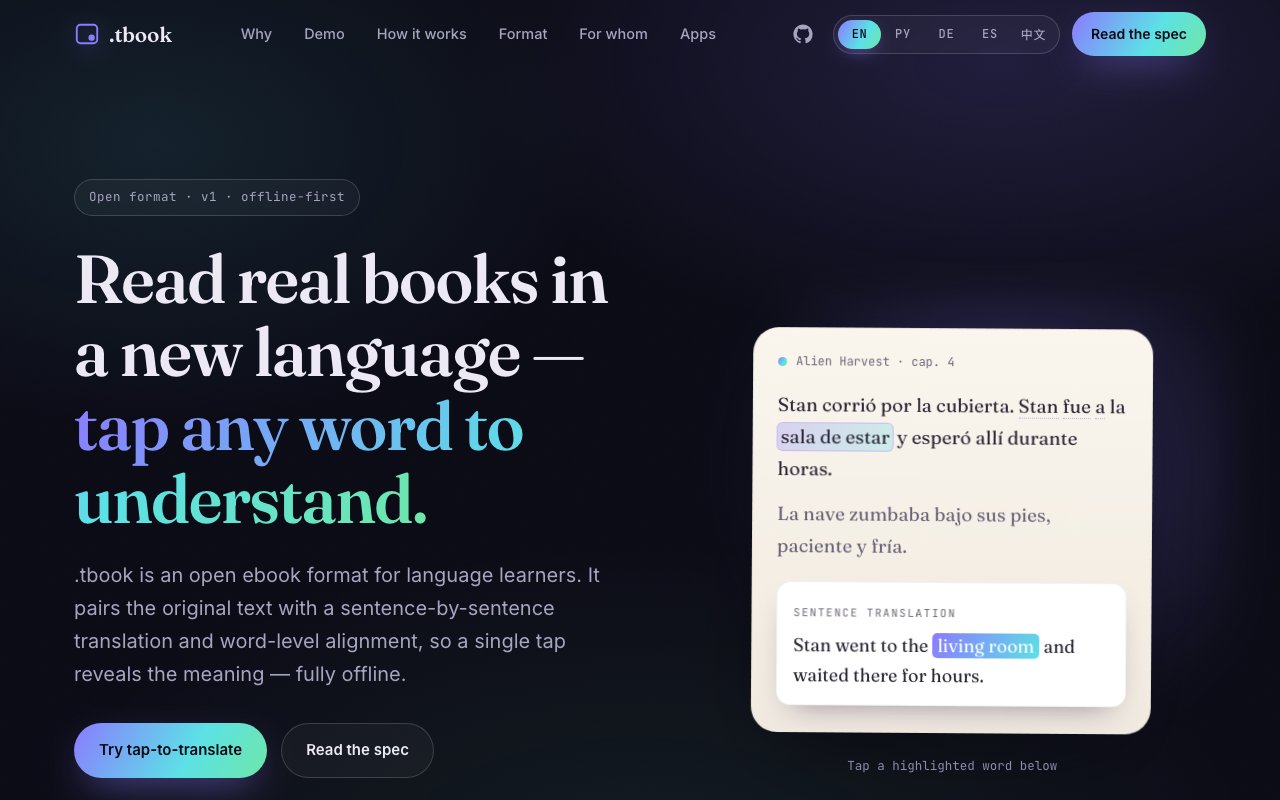
Tbook is an open source ebook format designed specifically for language learners. The core interaction is simple. You tap any word in the book, and the app instantly shows the full sentence translation with the matching target word highlighted. Every translation and word alignment is baked into the file at creation time, which means the entire experience works offline with no network connection, no API calls, and no user account required. The format pairs the original text with sentence-by-sentence translations and word-level alignment, making it possible to understand meaning in context without leaving the page.
The problem it solves is one that anyone who has tried reading in a foreign language will recognize. You hit an unfamiliar word, tab over to a dictionary app, lose your place in the text, and interrupt the reading flow that makes the experience enjoyable and effective. That friction compounds over hundreds of lookups until many learners simply give up or fall back to graded readers that feel too simple. Tbook removes that friction entirely by embedding translations directly into the ebook itself. The translations align at the word level, not just the sentence level, so you can see exactly which word in the target language corresponds to which word in the source. Even when word order differs between languages, the alignment holds.
Under the hood, the format is technically simple. A Tbook file is a ZIP archive containing a manifest and one JSON file per chapter. The JSON is human-readable UTF-8 with no proprietary encoding, no DRM, and no binary blobs. Each sentence entry contains the original text, character ranges for tappable tokens, translation data for each supported target language, and optional inline formatting for bold or italic spans. The specification is public, versioned, and designed for extensibility. Older readers can safely open newer files by ignoring unknown fields and clamping invalid offsets. Any developer can build a Tbook reader without licensing concerns or reverse-engineering.
A single Tbook file can contain translations for multiple target languages aligned to a single source language pivot. A Spanish novel, for example, can ship with English, French, German, and Chinese translations all embedded in one file, without exponential size growth. This multi-language architecture avoids the need to distribute separate editions for each language pair and makes the format practical for publishers who want to serve diverse audiences from a single asset.
The conversion process starts with a standard EPUB and runs through five stages. The parser extracts content in reading order and organizes it into chapters. The segmenter splits paragraphs into sentences with precise character offsets. The translator runs each sentence through a language model, tagging source words so the output can be aligned back. The resolver matches translated fragments to source indices, handling reordering and one-to-many word mappings. The assembler packages everything into a ZIP and validates offsets. Translations are cached on disk, so an interrupted conversion resumes where it left off. The result is a Tbook file that any compatible reader can open immediately.
Two reference readers ship with the project. TReader for Android supports IPA pronunciation hints, offline dictionaries, and text-to-speech. TReader for Desktop supports both paged and scrolled reading modes, in-book search, and keyboard navigation. Both readers are open source and serve as implementation references for anyone building third-party apps. Currently supported languages include English, Russian, German, Spanish, and Chinese, with the architecture designed to add more without changing the file format.
The target audience starts with language learners, particularly those reading slightly above their current level who want to absorb vocabulary in context rather than through isolated flashcards. Authors and publishers can convert existing EPUB catalogs into multilingual learning editions without rebuilding content from scratch. Developers building language learning apps benefit from a small, documented specification that handles the hard problem of word alignment so they can focus on the reading experience instead of the infrastructure.
Tbook takes a clear stance on where computation happens. Instead of relying on a cloud connection or an on-device translation model, all the work happens once at conversion time. The result is a static file that works anywhere, loads instantly, and doesn't depend on a service staying online or a company staying in business. It's a deliberate trade of flexibility for reliability. The format is free and open source under a permissive license. The GitHub repository includes the converter, both reader codebases, and the full specification. There is no paid tier, no subscription, and no lock-in. If you want to read in another language without interrupting yourself every few lines to look something up, this is the infrastructure to make that possible.
Key Features
- Word level translation alignment
- Full offline functionality
- Multi language support per file
- Open ZIP and JSON format
- EPUB to Tbook converter
- Reference readers for Android and desktop
Pros & Cons
What we like
- Entirely offline with no network dependency
- Open format with public specification
- Translations baked in at conversion time
- Free with no paid tier or lock in
Room for improvement
- Requires EPUB conversion before use
- Reader ecosystem still growing
- Conversion depends on LLM quality
- No iOS reader in the reference set
Frequently Asked Questions
What is Tbook?
Is Tbook free?
Who is Tbook for?
How do I create a Tbook file?
Best For
Featured in
Alternatives to Tbook
View all
SoloDevStack
A solo developer blog built on head-to-head tool comparisons, 580+ posts deep.

Confluence
Atlassian's long-running team wiki that anchors many enterprise knowledge stacks

Lunchbreak AI
Run text through six AI detectors at once, then humanize whatever gets flagged

Postdex
An exclusive marketplace for finished, human-made articles. Every piece sells once.
Our take
Tool Index Editorial · Oct 2026· 4.0/5
Tbook is an open ebook format that stores sentence translations and word alignment inside the file, letting language learners tap unfamiliar words without a network connection. It uses ordinary ZIP and JSON structures, supports several translations around one source text, and comes with reference readers for Android and desktop. We found the public version 2 specification and interactive demo unusually concrete for a new format.
No paid plan is presented. Authors still have to convert an EPUB, and that pipeline relies on a language model whose translation and alignment quality will vary. The reader ecosystem is small, with no reference iOS app shown, and larger multilingual files carry precomputed content that must be generated somewhere. The design is open and thoughtful, but adoption will determine whether it becomes more than a good specification.
Editorial opinion from the Tool Index team, written from the public product pages. Not a user review.
Reviews (0)
Badge builder
Add Tbook to your website
Choose a badge style and size, preview it here, then copy the generated HTML. Badge images are self-contained SVGs and do not require an external script.

<a href="https://toolindex.net/tools/tbook?ref=badge" target="_blank" rel="noopener">
  <img src="https://toolindex.net/badge/tbook/medium.svg" alt="Tbook - Listed on Tool Index" width="180" height="50" />
</a>How to use the badge
- 1. Pick the style, size, and theme that fit your layout.
- 2. Copy the generated HTML from the code block.
- 3. Paste it into your footer, homepage, or press page.
Standard badge available
The standard listing badge is available now. Score and circle badges are limited to tools currently ranked in the top 10 of a category.
Badge clicks return visitors to this profile with a referral tag so the source remains identifiable.
Related Tools
Confluence
Atlassian's long-running team wiki that anchors many enterprise knowledge stacks
SoloDevStack
A solo developer blog built on head-to-head tool comparisons, 580+ posts deep.

Logseq
An open-source outliner notes app where every bullet is a first-class block

Bear
A beautiful Markdown notes app for Apple devices that doubles as a writing tool
Work on Tbook? Request listing access or correction