
termkick
Run SSH sessions and local Mac terminals together with tabs, panes, and saved snippets
Gallery
About termkick
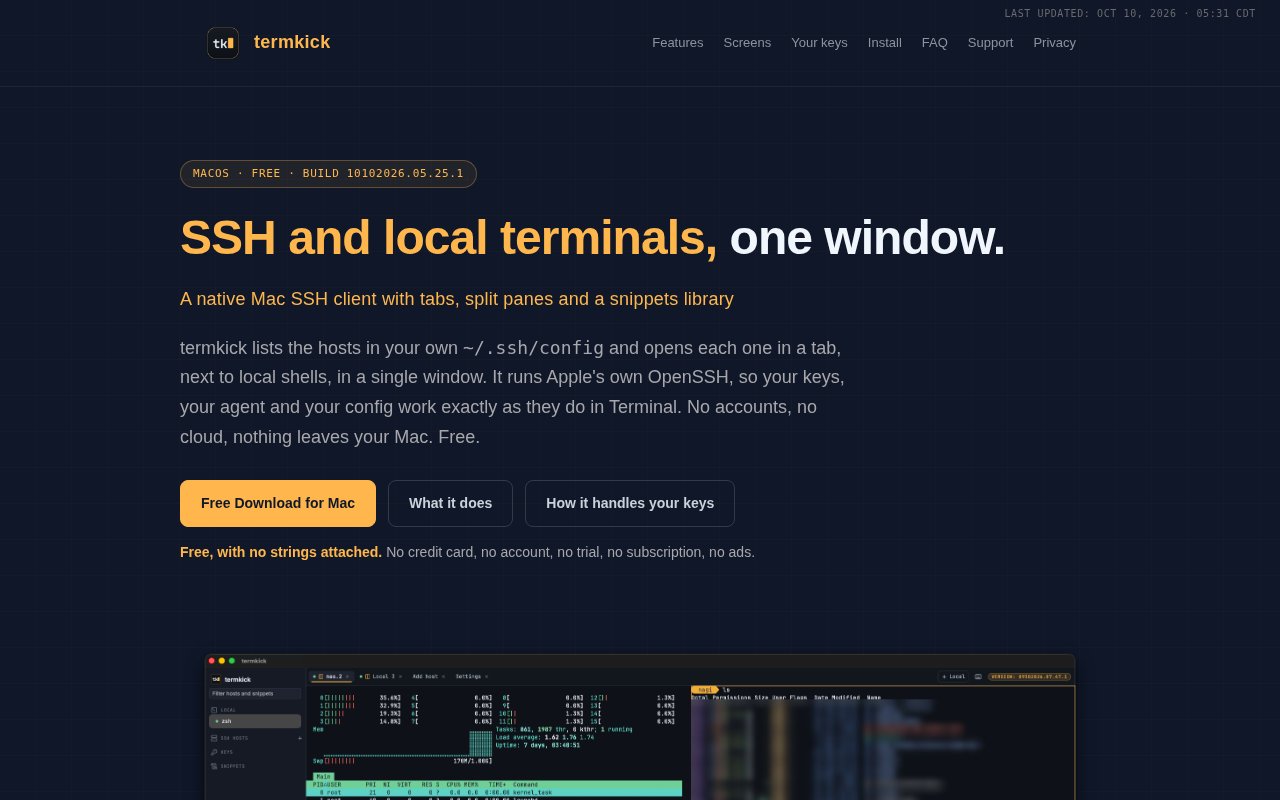
termkick is a native macOS app that puts SSH sessions and local terminal tabs in one uncluttered window. It reads the hosts a user already keeps in the standard SSH configuration file, shows them in a sidebar, and opens a connection through Apple's own OpenSSH. Existing host aliases, keys, agents, options, and ProxyJump arrangements therefore behave as they do in Terminal. The product does not try to become a fleet manager, automation system, or AI operations dashboard. Its focus is the everyday work of opening the right shell and keeping a small set of sessions organized.
Getting started is intentionally close to an existing command line setup. After installation, hosts from the user's SSH config appear automatically and the list updates when that file changes. Double clicking a host opens it in a tab, while a keyboard shortcut creates a local zsh session. Remote and local tabs can sit side by side in the same window. A user can split any two tabs vertically or stack them horizontally, resize the divider, switch panes from the keyboard, and jump to the first nine tabs with standard Mac shortcuts. That is enough structure for monitoring one server while working in another shell without adding a heavy project model.
A snippets library keeps frequently used commands grouped by category. Selecting a snippet types it at the prompt but does not press Return, which leaves one last chance to inspect or change the command before execution. Snippets are encrypted on the Mac using a key held in the login Keychain, and a passphrase encrypted export can move them to another computer. For local shells, termkick can copy everything printed by the most recent command without requiring a mouse drag through scrollback. It also offers optional copy on selection, terminal color schemes, light and dark appearances, a keyboard shortcut reference, and a bundled Nerd Font for prompts that use icons.
SSH key handling is conservative by design. termkick can show keys, fingerprints, whether the agent has loaded them, and which configured hosts use them, but the app says it never opens private key files or sees a passphrase. Actions such as generating a key, installing it on a host, or adding it to the agent run Apple's visible OpenSSH tools in a terminal tab. The user types secrets there. termkick stores no passwords, relies on the SSH agent and macOS Keychain, and makes no network connections of its own. Only the SSH sessions the user chooses to open connect outward, and the app reports no accounts, telemetry, analytics, or cloud service.
The app can help add or remove hosts without casually rewriting a carefully maintained configuration. Hosts added through the interface go into termkick's own included file. Before changing configuration it shows a preview, keeps a timestamped backup, and writes atomically. The host form covers details such as alias, host name, user, port, key file, and ProxyJump. Existing user managed entries stay in place, and removing the last host termkick added also removes its own setup. This makes the graphical host editor useful to someone who wants convenience while keeping the familiar OpenSSH files as the source of truth. A settings view also lets users choose appearance, fonts, terminal colors, and file locations with a live preview.
termkick fits developers, system administrators, homelab operators, and other Mac users who already work with SSH but want a tidier interface than several Terminal windows. Its boundaries are specific. It requires macOS 26.4 or later, has no Windows or Linux edition, and is distributed directly rather than through the Mac App Store. Copy last output is built for local zsh tabs and works over SSH only when the remote shell emits the same command markers. Teams looking for shared vaults, synchronized inventories, remote automation, audit workflows, or large scale server management will need a broader product.
The app is fully free. The developer states that there is no credit card, account, trial period, subscription, advertising, or paid tier attached to the download. It can be installed through the N0AGI Homebrew tap or downloaded as a signed and notarized Mac application from the official site. Homebrew handles later upgrades, while direct download users replace the app with a newer build and keep their hosts, snippets, and settings. For a Mac user whose SSH setup already lives in OpenSSH, termkick offers a careful layer of tabs, panes, snippets, and key visibility without moving credentials or configuration into somebody else's cloud.
Key Features
- SSH and local terminal tabs
- Vertical and horizontal split panes
- Existing SSH config discovery
- Encrypted command snippets library
- Visible SSH key tools
- Safe graphical host editing
Pros & Cons
What we like
- Uses existing OpenSSH configuration and agents
- Keeps private keys and passphrases outside the app
- Combines remote sessions with local zsh tabs
- Includes no accounts telemetry or advertising
Room for improvement
- Requires macOS 26.4 or later
- Available only as a Mac desktop app
- Omits fleet management and automation features
- Copy last output has shell marker limitations
Frequently Asked Questions
What is termkick?
Does termkick work with my existing SSH keys and ProxyJump setup?
Is termkick free?
Why isn't termkick in the Mac App Store?
Best For
Featured in
Alternatives to termkick

Kevin Gabeci
Solo developer building web apps, cozy browser games, and AI creator toolkits.

SoloDevStack
A solo developer blog built on head-to-head tool comparisons, 580+ posts deep.

Codedex
A gamified, story-driven platform that teaches Python, web dev, and more like an RPG quest

Vibe Built
Building real apps with agentic AI. What worked, what broke, what shipped.
Reviews (0)
Badge builder
Add termkick to your website
Choose a badge style and size, preview it here, then copy the generated HTML. Badge images are self-contained SVGs and do not require an external script.

<a href="https://toolindex.net/tools/termkick?ref=badge" target="_blank" rel="noopener">
  <img src="https://toolindex.net/badge/termkick/medium.svg" alt="termkick - Listed on Tool Index" width="180" height="50" />
</a>How to use the badge
- 1. Pick the style, size, and theme that fit your layout.
- 2. Copy the generated HTML from the code block.
- 3. Paste it into your footer, homepage, or press page.
Standard badge available
The standard listing badge is available now. Score and circle badges are limited to tools currently ranked in the top 10 of a category.
Badge clicks return visitors to this profile with a referral tag so the source remains identifiable.
Related Tools
Kevin Gabeci
Solo developer building web apps, cozy browser games, and AI creator toolkits.

Coolify
Self-hostable, open source alternative to Heroku and Netlify

Warp
The modern terminal reimagined with AI and collaboration

Bolt.new
Prompt-to-deployed full-stack app inside the browser
Work on termkick? Request listing access or correction