
TermRover
Use SSH, Mosh, tmux, and terminal coding agents comfortably from a phone
Gallery
About TermRover
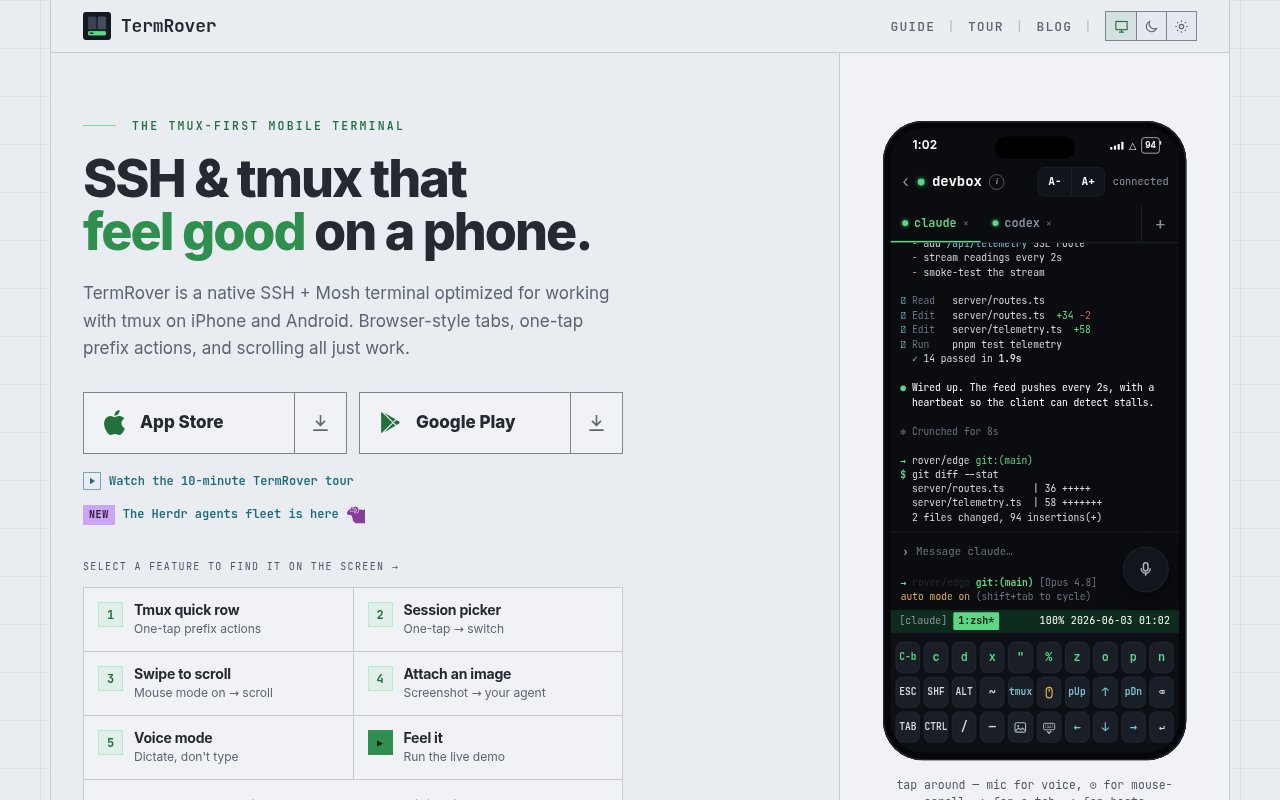
TermRover is a native mobile terminal for people who connect to remote machines from an iPhone, iPad, or Android device. It supports SSH and Mosh, with an interface designed around tmux rather than treating it as an afterthought. The product addresses the small frictions that make a normal terminal awkward on a touchscreen. Common prefix actions become one-tap controls, session switching gets a dedicated picker, and swiping through history works without manually editing server configuration. It can also work with Herdr and Zellij, giving users a way to choose the multiplexer that should open by default for each saved host.
The tmux quick row puts frequent actions just above the keyboard. Users can create or split a window, zoom the focused pane, and detach without assembling a Control key sequence on glass. TermRover detects the prefix used by each host, so the shortcuts don't depend on every machine using the default. A separate session picker makes it possible to jump between active sessions, star favorites, and reorder them for each host. Scrolling receives similar attention. When tmux mouse mode is off, the app offers to enable it and keeps an amber indicator visible while it is active. This gives a swipe gesture predictable behavior without requiring a permanent change to the remote tmux configuration.
Connections can use ordinary SSH or switch to Mosh when a phone is moving between networks or waking from sleep. Mosh is meant to keep the terminal usable as the device crosses between Wi-Fi and cellular service. If the remote machine doesn't yet have mosh-server, TermRover can help install it through the existing SSH connection. Work across hosts appears in browser-style tabs that can be opened, renamed, reordered, pinned, and moved between. On an iPad in landscape, the keyboard controls collapse into a slim rail so the terminal gets more screen space, while hardware keyboard users can leave the on-screen quick rows hidden.
Input tools are shaped around longer coding tasks and terminal agents. The standard terminal pane is flanked by Quick Commands and a Composer. Quick Commands holds editable tap-to-run chips for commands used often, with more frequent choices shown more prominently. The Composer provides a multiline field where a user can draft, paste, correct, and review a full prompt before sending it to the live shell. Voice mode places on-device dictation into the same editable field, so a transcription can be fixed before execution. Screenshots can be attached from the phone, annotated, and uploaded over the current SSH connection. TermRover then inserts the uploaded file path into the prompt, which gives a remote coding agent access to the image without a separate sharing workflow.
Port forwarding makes remote development servers usable from the mobile device. A user opens a new forwarding tab, enters the remote port, and loads the forwarded localhost service in the app's browser. The guide specifically presents this for agent-created development servers, including workflows that rely on hot reload. The free tier includes one active port forward. Pro removes that limit, which matters when several services need to remain accessible at once. This feature keeps the app focused on an actual terminal connection while still covering the common moment when command-line work produces a web interface that needs visual inspection.
TermRover 1.1 also adds a Herdr Agents Fleet view for users whose agents run across several SSH hosts. The app probes the saved hosts a user selects, looks for Herdr, and gathers their agents into one mobile view. It shows what is working and which agent needs input, then opens an agent's full-screen terminal over SSH or Mosh with one tap. Users can browse by machine or keep favorite agents and workspaces together. Opening a workspace exposes its surrounding panes, and leaving the mobile view doesn't stop the processes on their hosts. Pane-aware selection helps copy one agent's output without also collecting text from an adjacent pane. The product deliberately presents itself as a terminal first. It doesn't add agent notifications because its maker prefers to leave attention with the user rather than create another source of alerts. That choice separates it from remote agent monitors designed to pull someone back whenever a process pauses. TermRover suits developers who already rely on tmux, Herdr, or Zellij and want occasional, capable access from a phone. It isn't trying to replace a full desktop terminal, and Mosh still requires compatible software on the remote machine, but its touch controls solve specific problems that generic terminal interfaces often leave to users.
Pricing is freemium. The core terminal isn't locked behind a subscription, and SSH, Mosh, tmux, unlimited saved hosts, and the phone-oriented controls are free. Free users also receive a daily allowance for voice and image attachments, access to some themes, and one active port forward. TermRover Pro makes voice and image attachments unlimited, permits unlimited port forwards, and unlocks every theme. Pro is sold as a yearly plan or a lifetime purchase, with no monthly option. Both mobile platforms use the same app and feature approach, so buyers can start with the free terminal and decide whether the higher limits and additional customization justify an upgrade.
Key Features
- One-tap tmux controls
- SSH and Mosh transports
- Herdr and Zellij support
- Cross-host Herdr agent fleet
- Editable voice and image prompts
- In-app SSH port forwarding
Pros & Cons
What we like
- Core terminal features and unlimited hosts are free
- Mosh keeps sessions usable across network changes
- On-device dictation remains editable before sending
- The same app covers iOS and Android
Room for improvement
- Unlimited attachments and port forwards require Pro
- The free tier permits one active port forward
- Agent notifications are intentionally omitted
- Mosh may require installing software on the remote host
Frequently Asked Questions
What is TermRover?
Is TermRover free?
Can TermRover connect to coding agents across several hosts?
How does TermRover make tmux easier on a phone?
Best For
Featured in
Alternatives to TermRover
View all
Kevin Gabeci
Solo developer building web apps, cozy browser games, and AI creator toolkits.

SoloDevStack
A solo developer blog built on head-to-head tool comparisons, 580+ posts deep.

Codedex
A gamified, story-driven platform that teaches Python, web dev, and more like an RPG quest

Vibe Built
Building real apps with agentic AI. What worked, what broke, what shipped.
Our take
Tool Index Editorial · Sep 2026· 4.0/5
TermRover is a native mobile terminal that makes SSH, Mosh, tmux, Herdr, and Zellij workable on iPhone, iPad, and Android. We found the phone-specific decisions convincing, including one-tap tmux controls, clear scroll mode, multiline prompt composition, image upload, voice input, browser-style tabs, and port forwarding. The core terminal and unlimited saved hosts are free, while Pro adds higher limits and all themes.
It is best for developers checking persistent sessions or coding agents away from a desk, not for replacing a full desktop terminal. The free plan permits one active port forward, and unlimited attachments require Pro. Mosh may need server-side installation, and the product intentionally omits agent notifications. That last choice protects attention, but it will not suit users who want to be summoned the moment an agent blocks.
Editorial opinion from the Tool Index team, written from the public product pages. Not a user review.
Reviews (0)
Badge builder
Add TermRover to your website
Choose a badge style and size, preview it here, then copy the generated HTML. Badge images are self-contained SVGs and do not require an external script.

<a href="https://toolindex.net/tools/termrover?ref=badge" target="_blank" rel="noopener">
  <img src="https://toolindex.net/badge/termrover/medium.svg" alt="TermRover - Listed on Tool Index" width="180" height="50" />
</a>How to use the badge
- 1. Pick the style, size, and theme that fit your layout.
- 2. Copy the generated HTML from the code block.
- 3. Paste it into your footer, homepage, or press page.
Standard badge available
The standard listing badge is available now. Score and circle badges are limited to tools currently ranked in the top 10 of a category.
Badge clicks return visitors to this profile with a referral tag so the source remains identifiable.
Related Tools
Kevin Gabeci
Solo developer building web apps, cozy browser games, and AI creator toolkits.

Coolify
Self-hostable, open source alternative to Heroku and Netlify

Warp
The modern terminal reimagined with AI and collaboration

Bolt.new
Prompt-to-deployed full-stack app inside the browser
Work on TermRover? Request listing access or correction