Tessera
Give Claude Code a readable visual room with 25 open-source themes
Gallery
About Tessera
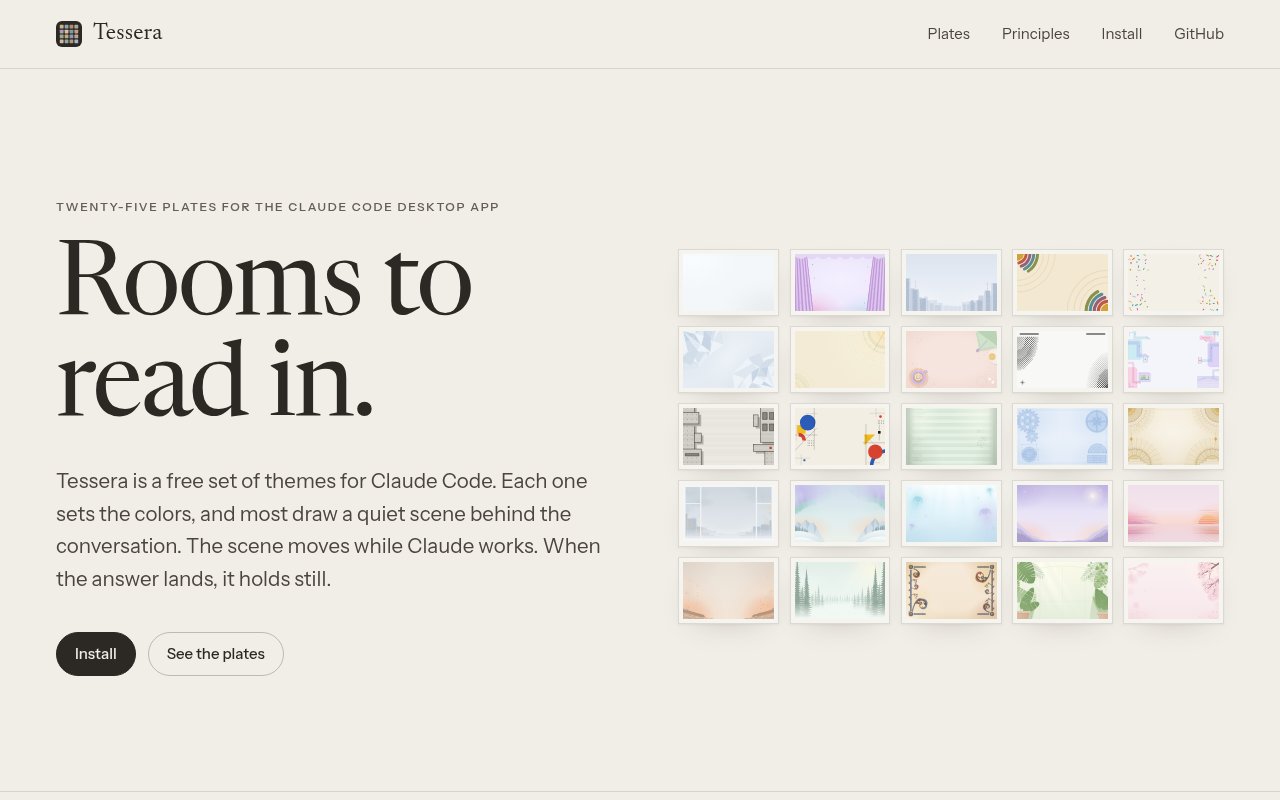
Tessera is a free collection of 25 themes for the Claude Code desktop and mobile apps. It changes the colors, code highlighting, background scene, working indicator language, and optional sounds around a Code session, giving people a more personal place to spend long stretches of development work. Each theme is presented as a room with its own visual and audio character rather than a simple palette swap. The key behavior is tied to the work itself. A scene can move while Claude is processing, then become still when the answer arrives, so the interface has energy during the wait without continuing to compete with the text while someone reads.
The collection is organized into three groups. Essentials offers clean defaults and familiar palette directions, including graphite, deep purple, indigo, warm earth colors, pastel tones, and high contrast. Bold themes lean into stronger ideas such as neon circuits, concrete slabs, primary shapes, an old green screen, a blueprint, or gold ornament. Places turns the background into a softer scene, with rain on a window, northern lights, deep water, a night sky, evening light, a hearth, misty woods, a writing room, a greenhouse, and spring flowers. The gallery also points users of well-known themes toward close starting matches, which makes choosing among 25 options less arbitrary.
Most rooms combine a palette with edge or corner artwork and restrained animation. The center of the conversation stays quiet so text has a stable surface. Motion is connected to Claude's working state and stops when the response is ready. People who prefer a completely static interface can disable motion with a command, then turn it back on later, while the operating system's reduced-motion setting also stops every scene. Tessera offers three sound levels. Quiet disables sound, the default setting plays a soft chime only after a turn lasting at least 20 seconds, and the optional music mode plays a theme-specific ambient loop while Claude works, then stops it when the answer arrives.
Installation uses the btahir/tessera plugin marketplace. One Tessera plugin contains the entire set, so users can add it once and change rooms by entering the Tessera command with a theme name. The current choice persists between sessions, and the command without a name lists the available themes and identifies the active one. Someone who wants only a single room can install that theme as its own plugin and use the room's own command instead. The same controls are available for stopping motion, restoring movement, choosing the completion chime, enabling the ambient bed, or making the experience silent.
Readability is treated as a measurable design requirement rather than an assumption. Every theme declares a contrast level, and the repository documents different ranges for calm, standard, and stark rooms. Muted interface text such as tool summaries and timestamps must maintain at least a four and a half to one contrast ratio across the brightest and darkest points of a scene at several moments in its animation. Main text uses higher floors. Artwork is kept away from the reading column, accents are checked for separation, and sound has an explicit purpose instead of playing after every small action. Each room still has room for its own illustration style, accent intensity, spinner words, chime, and loop within those shared constraints.
Tessera is for developers who like visual customization but do not want it to undermine legibility. It can make a familiar palette such as Dracula, Gruvbox, Nord, Solarized, Catppuccin, or Monokai feel at home around Claude Code, or give separate sessions a noticeably different atmosphere. The themes appear in supported Claude Code desktop and mobile clients, but the terminal keeps its own colors. Sound currently plays only on macOS. A theme also cannot replace the app's fonts, rearrange its layout, or change permission prompts, so this is focused visual and ambient customization rather than a full interface skin.
The project is open source under the MIT License and does not charge for the themes. Its repository includes the theme definitions, shared runtime, generated plugins, gallery, design rules, and scripts used to check, capture, package, and build the collection. Each theme is made from a definition, palette, SVG scene, chime, and optional ambient loop, and contributions are welcome when they pass the documented checks. Tessera is independent and not affiliated with Anthropic. ShipTiffin sponsors the project and hosts the gallery, but Tessera itself is the public product at the assigned site.
Key Features
- Twenty-five distinct visual themes
- Desktop and mobile theme support
- Work-state reactive animated scenes
- Persistent theme and motion controls
- Optional chimes and ambient loops
- Measured contrast and reduced motion
Pros & Cons
What we like
- Pairs distinctive art with measured readability
- Stops animation while the user reads
- Installs all themes through one plugin
- Free MIT license allows inspection and contribution
Room for improvement
- Themes work only in supported Claude Code apps
- Terminal colors remain unchanged
- Sound currently plays only on macOS
- Themes cannot change fonts or layout
Frequently Asked Questions
What is Tessera?
Is Tessera free?
How does Tessera handle motion and sound?
Where do Tessera themes appear?
Best For
Featured in
Alternatives to Tessera
View all
Kevin Gabeci
Solo developer building web apps, cozy browser games, and AI creator toolkits.
SoloDevStack
A solo developer blog built on head-to-head tool comparisons, 580+ posts deep.
Codedex
A gamified, story-driven platform that teaches Python, web dev, and more like an RPG quest

Vibe Built
Building real apps with agentic AI. What worked, what broke, what shipped.
Reviews (0)
Badge builder
Add Tessera to your website
Choose a badge style and size, preview it here, then copy the generated HTML. Badge images are self-contained SVGs and do not require an external script.

<a href="https://toolindex.net/tools/tessera?ref=badge" target="_blank" rel="noopener">
  <img src="https://toolindex.net/badge/tessera/medium.svg" alt="Tessera - Listed on Tool Index" width="180" height="50" />
</a>How to use the badge
- 1. Pick the style, size, and theme that fit your layout.
- 2. Copy the generated HTML from the code block.
- 3. Paste it into your footer, homepage, or press page.
Standard badge available
The standard listing badge is available now. Score and circle badges are limited to tools currently ranked in the top 10 of a category.
Badge clicks return visitors to this profile with a referral tag so the source remains identifiable.
Related Tools
Kevin Gabeci
Solo developer building web apps, cozy browser games, and AI creator toolkits.

Coolify
Self-hostable, open source alternative to Heroku and Netlify

Warp
The modern terminal reimagined with AI and collaboration

Bolt.new
Prompt-to-deployed full-stack app inside the browser
Work on Tessera? Request listing access or correction