
Toolbit
A private, local-first workspace for everyday developer utilities
Gallery
About Toolbit
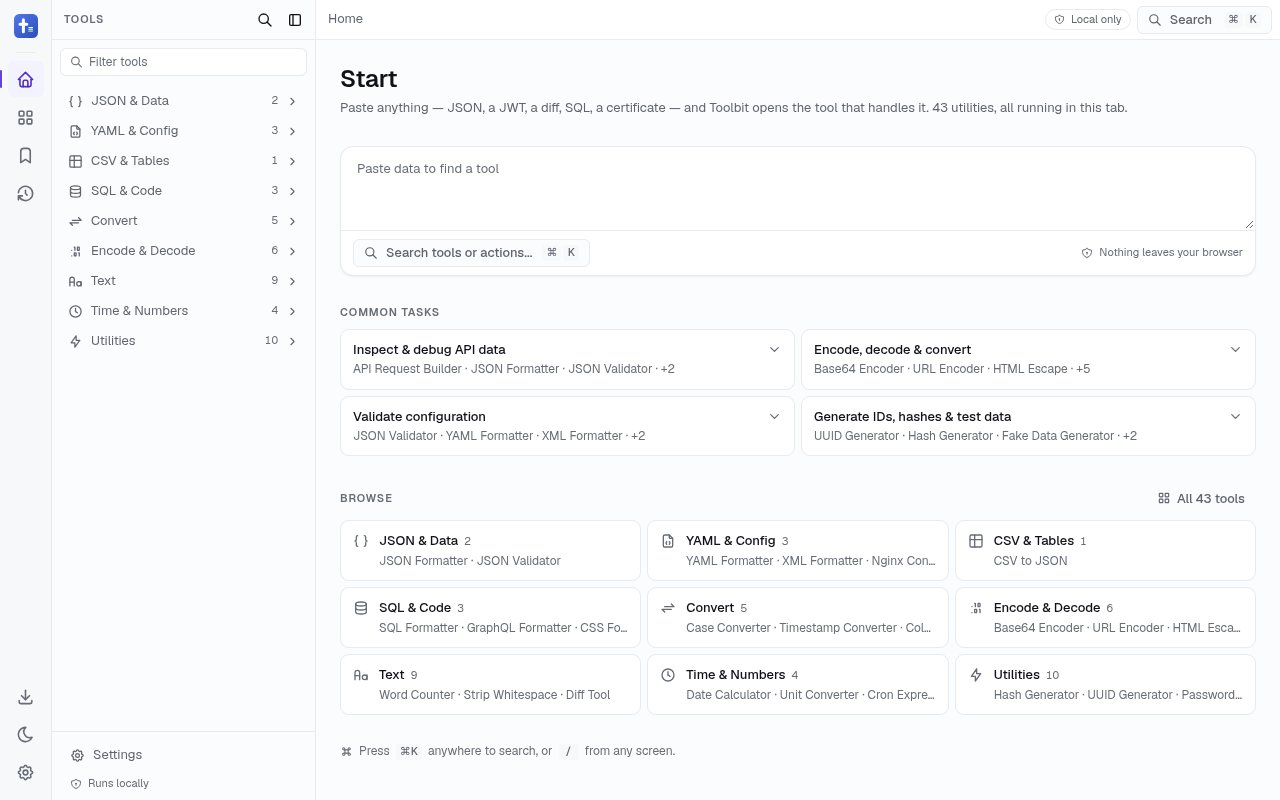
Toolbit is a browser based workspace that puts more than 40 small developer utilities behind one consistent interface. It covers the jobs that tend to interrupt deeper work, including formatting JSON, decoding a JWT, testing a regular expression, converting CSV to JSON, generating a UUID, inspecting a certificate, and building an API request. Instead of hunting for a different website each time, a developer can keep these utilities together in one tab. The central promise is unusually concrete. Most transformations run locally in the browser, so the text, code, and files being handled don't need to be uploaded to Toolbit's servers.
The collection is broad enough to replace a folder of one-off bookmarks. Format tools work with JSON, YAML, XML, SQL, GraphQL, CSS, and Nginx configuration. Encoding tools cover Base64, URLs, HTML, JWTs, certificates, and Protocol Buffers. There are generators for hashes, passwords, TOTP codes, QR codes, fake data, and placeholder text, along with converters for timestamps, units, colors, cases, images, and structured data. Inspection utilities include text comparison, a Git diff viewer, a cron expression parser, a word counter, and an HTTP status reference. Toolbit also provides practical builders and testers for HTTP requests, WebSocket sessions, crontab entries, and Docker commands. Text and document tools round out the set with whitespace cleanup, Markdown preview, notes, PDF utilities, and date calculations. This breadth means the workspace can support quick debugging as well as routine content preparation.
Toolbit is designed as a workspace rather than a bare directory of links. Several tools can stay open as tabs, and output from one utility can be passed into the next without repeatedly copying the same intermediate data between unrelated sites. A command palette and keyboard shortcuts help frequent users move around without leaving the keyboard. It can be installed as a progressive web app in a supported browser, and cached local tools continue working without a connection. That makes it useful on a plane, inside a restricted network, or anywhere a developer can't rely on an external service. Tools that intentionally contact another endpoint, such as the API request builder and WebSocket tester, still need network access.
The local-first design matters most when the input is sensitive. Pasting a token, certificate, configuration file, customer export, or internal API response into a generic online utility creates a question about where that material goes. Toolbit says local transformations use standard browser APIs, files are read from disk inside the tab, and tool input and output aren't collected. It also says there is no analytics or tracking. The important exception is easy to understand. If the user explicitly sends an HTTP request or opens a WebSocket connection, that chosen request has to leave the device and reach its destination. Ordinary formatters, decoders, converters, and generators don't require that transfer.
It fits software developers, data engineers, technical support staff, security conscious teams, and anyone who regularly touches encoded or structured information. A backend engineer can inspect a JWT and format an API response. A data analyst can turn a CSV file into JSON or normalize a timestamp. An operations engineer can validate Nginx configuration and inspect a cron schedule. The appeal isn't that any single utility is difficult to find elsewhere. It's that the set shares one predictable interface, stays available offline, and gives users a clearer privacy posture than a collection of unknown converter sites. The workspace model is especially handy when a task needs several transformations in sequence.
Toolbit is free to use, with no account, advertising, or paid tier. The project is also open source under the MIT license, and the site links directly to its source repository. That access model removes most of the friction from trying it, since a user can open a tool immediately and install the web app only if it earns a permanent place in the workflow. Its limitations follow from the same focused approach. It isn't a full integrated development environment, its network tools still communicate with endpoints the user selects, and browser support determines progressive web app behavior. For quick formatting, conversion, inspection, generation, and request building, though, it offers a coherent toolbox without asking users to surrender their working data or create another account.
Key Features
- Local browser processing
- Forty plus developer utilities
- Multi-tool workspace tabs
- Offline progressive web app
- Keyboard command palette
- MIT licensed source code
Pros & Cons
What we like
- Keeps ordinary transformations on the device
- Combines many utilities in one interface
- Works offline after installation
- Requires no account or payment
Room for improvement
- Network tools still contact chosen endpoints
- PWA behavior depends on browser support
- Utility depth varies across a broad collection
- Doesn't replace a full development environment
Frequently Asked Questions
What is Toolbit?
Does Toolbit upload files or tool input?
Can Toolbit work offline?
Is Toolbit free and open source?
Best For
Featured in
Alternatives to Toolbit

Kevin Gabeci
Solo developer building web apps, cozy browser games, and AI creator toolkits.

SoloDevStack
A solo developer blog built on head-to-head tool comparisons, 580+ posts deep.

Codedex
A gamified, story-driven platform that teaches Python, web dev, and more like an RPG quest

Vibe Built
Building real apps with agentic AI. What worked, what broke, what shipped.
Our take
Tool Index Editorial · Oct 2026· 3.5/5
Toolbit collects 43 everyday developer utilities in one browser workspace, including JSON validation, formatting, encoding, text cleanup, diffing, generators, and request tools. It is for developers who want a consistent desk drawer instead of a bookmark folder full of unrelated converter sites. The public page emphasizes local processing in the active tab and does not put an account or payment step in front of the tools.
We found the breadth useful without being shapeless because the tools are grouped around recognizable tasks and searchable from one command interface. Local handling is also the right default for tokens, configuration, and customer data. The privacy claim needs nuance for network utilities such as an API request builder, since traffic must leave the browser when the user deliberately contacts an endpoint. We also saw only the landing workspace, so depth and edge-case handling will vary across such a broad set. It is a practical free toolbox, not a replacement for a full development environment.
Editorial opinion from the Tool Index team, written from the public product pages. Not a user review.
Reviews (0)
Badge builder
Add Toolbit to your website
Choose a badge style and size, preview it here, then copy the generated HTML. Badge images are self-contained SVGs and do not require an external script.

<a href="https://toolindex.net/tools/toolbit?ref=badge" target="_blank" rel="noopener">
  <img src="https://toolindex.net/badge/toolbit/medium.svg" alt="Toolbit - Listed on Tool Index" width="180" height="50" />
</a>How to use the badge
- 1. Pick the style, size, and theme that fit your layout.
- 2. Copy the generated HTML from the code block.
- 3. Paste it into your footer, homepage, or press page.
Standard badge available
The standard listing badge is available now. Score and circle badges are limited to tools currently ranked in the top 10 of a category.
Badge clicks return visitors to this profile with a referral tag so the source remains identifiable.
Related Tools
Kevin Gabeci
Solo developer building web apps, cozy browser games, and AI creator toolkits.

Coolify
Self-hostable, open source alternative to Heroku and Netlify

Warp
The modern terminal reimagined with AI and collaboration

Bolt.new
Prompt-to-deployed full-stack app inside the browser
Work on Toolbit? Request listing access or correction