
Txta
Send end-to-end encrypted messages to any developer through their GitHub public keys
Gallery
About Txta
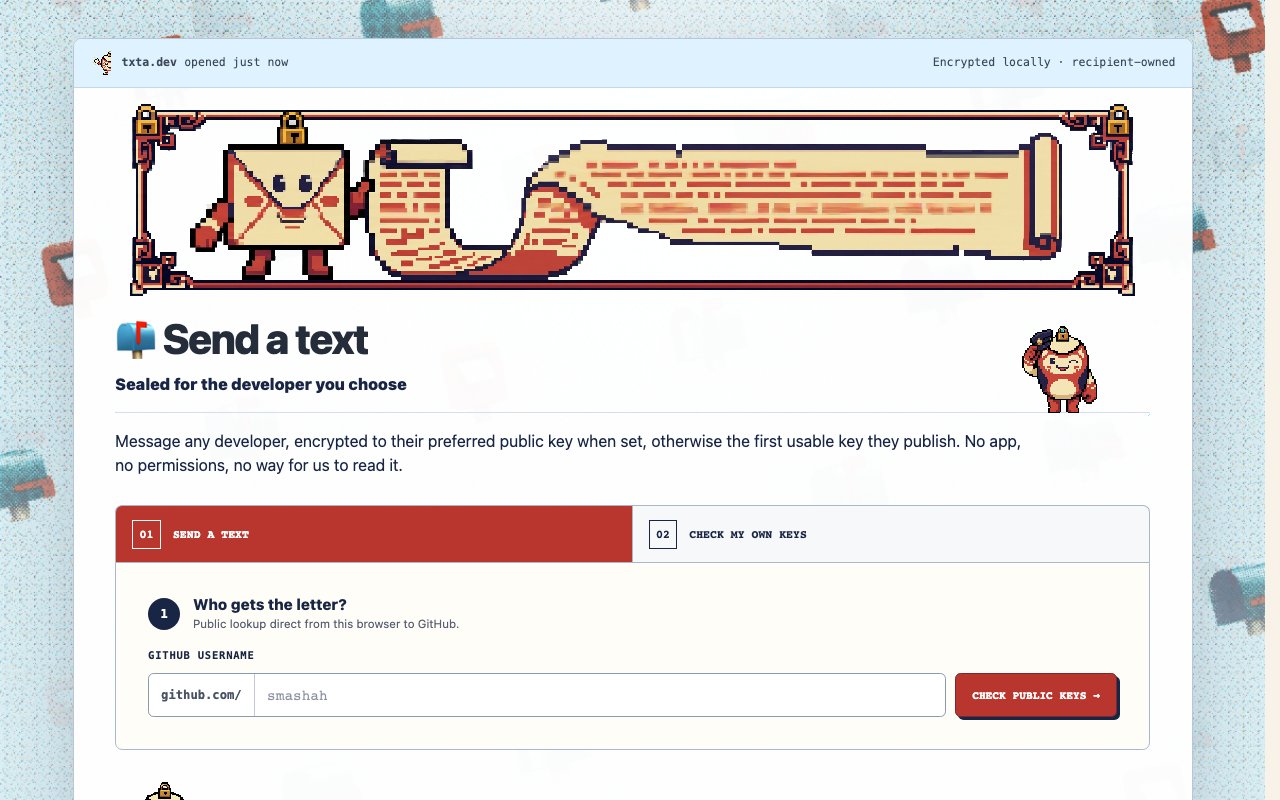
Txta is a small, playful tool for sending a private message to a developer when the only identity you have for them is a GitHub username. There's no signup, no inbox, and no messaging app on either side. You type in someone's GitHub handle, txta looks up the public keys they already publish on their profile, encrypts your message locally in the browser against one of those keys, and delivers the resulting ciphertext where the recipient will see it. Only the person holding the matching private key can ever read what you wrote, and that includes txta itself, which never sees your message in the clear.
The flow has three steps. First is lookup, which the site describes as a public lookup direct from your browser to GitHub, meaning txta's servers aren't brokering the key exchange. Second is encryption, done locally against the recipient's preferred public key when they've set one, or otherwise the first usable key they publish. Third is delivery, and this is the part with personality. The delivery itself is public, the site's example being a GitHub issue, but what lands there is a sealed letter. The shell is visible to anyone, the contents remain ciphertext. Anyone can see that a message was sent. Nobody but the recipient can open it.
That design produces an unusual trust model, which the site sums up as local encryption, recipient-owned delivery. Because encryption happens in your browser before anything leaves it, and because delivery lands somewhere the recipient already controls, txta itself has nothing to leak. The site puts it bluntly, no app, no permissions, no way for us to read it. You don't have to trust a messaging company's servers, retention policy, or acquisition risk, because the message is opaque from the moment it exists. The public delivery is also inspectable, so a skeptical recipient can look at exactly what arrived and verify there's nothing more to it than an encrypted blob.
The audience is developers, and the whole thing leans into that. GitHub is already where developers keep public keys, so txta piggybacks on infrastructure that exists rather than asking anyone to enroll in something new. The recipient doesn't need to have heard of txta to receive a message, they just need keys on their GitHub profile and the ability to decrypt with the corresponding private key. That makes it fit the awkward cases where you need to reach a maintainer or a stranger privately, a security disclosure, a sensitive heads-up about their project, or just a note you'd rather not put in a public issue in plaintext. Think about how those conversations usually start today. You open a public issue asking for a private channel, or you hunt for an email address that may not exist, or you give up and post the sensitive thing with details redacted. Txta collapses all of that into one step that works for any GitHub user with published keys, which in practice is a large share of the people you'd want to reach this way.
Beyond the browser flow there's a CLI, plus a documented DIY command for people who'd rather run the steps themselves, and the site notes that both produce the same frozen letter layout, with the visual assets served from assets.txta.dev. That option matters for the paranoid, in the complimentary sense. If you don't want to trust a web page with your plaintext even briefly, you can produce an identical sealed letter from your own terminal, using the DIY route to keep every step under your own eyes. The consistency between the three paths is a small but telling design choice, because it means the sealed letter is a format, not a feature of one particular client. It's also simply fun. The whole product has a deliberate sense of humor about itself, framing encrypted delivery as passing a sealed letter in public, and that tone is part of the appeal.
There's no pricing on the site and nothing gated, so as it stands txta is free to use. It's a young and intentionally narrow tool rather than a platform, and it shows in what's missing. There's no conversation threading, no notification system beyond wherever the delivery lands, and the recipient needs enough key literacy to decrypt, which is a given for its audience and a wall for anyone else. But as a way to get a genuinely private message to any developer on GitHub in about a minute, with nothing installed and nobody in the middle able to peek, it does exactly what it says. If you've ever needed to tell a maintainer something quietly and found only a public issue tracker between you, this is the gap it fills.
Key Features
- GitHub username to public key lookup
- Local in-browser encryption
- Public delivery with sealed ciphertext
- Preferred-key selection for recipients
- CLI with identical output
- DIY command for full self-service
Pros & Cons
What we like
- Recipient needs no account, app, or prior signup
- Service can't read messages, encryption is local
- Builds on keys developers already publish on GitHub
- Free with a CLI option for terminal-only workflows
Room for improvement
- Recipient must have usable public keys on GitHub
- Decryption assumes key literacy, so non-devs are out
- No threading or conversation features
- Young niche tool with a thin site and small community
Frequently Asked Questions
What is Txta?
Can Txta read my messages?
Does the recipient need to sign up for anything?
Is Txta free?
Best For
Featured in
Alternatives to Txta

Kevin Gabeci
Solo developer building web apps, cozy browser games, and AI creator toolkits.

SoloDevStack
A solo developer blog built on head-to-head tool comparisons, 580+ posts deep.

Codedex
A gamified, story-driven platform that teaches Python, web dev, and more like an RPG quest

Vibe Built
Building real apps with agentic AI. What worked, what broke, what shipped.
Reviews (0)
Badge builder
Add Txta to your website
Choose a badge style and size, preview it here, then copy the generated HTML. Badge images are self-contained SVGs and do not require an external script.

<a href="https://toolindex.net/tools/txta?ref=badge" target="_blank" rel="noopener">
  <img src="https://toolindex.net/badge/txta/medium.svg" alt="Txta - Listed on Tool Index" width="180" height="50" />
</a>How to use the badge
- 1. Pick the style, size, and theme that fit your layout.
- 2. Copy the generated HTML from the code block.
- 3. Paste it into your footer, homepage, or press page.
Standard badge available
The standard listing badge is available now. Score and circle badges are limited to tools currently ranked in the top 10 of a category.
Badge clicks return visitors to this profile with a referral tag so the source remains identifiable.
Related Tools
Kevin Gabeci
Solo developer building web apps, cozy browser games, and AI creator toolkits.

Coolify
Self-hostable, open source alternative to Heroku and Netlify

Warp
The modern terminal reimagined with AI and collaboration

Bolt.new
Prompt-to-deployed full-stack app inside the browser
Work on Txta? Request listing access or correction