
TypeSeer
Get private AI autocomplete across Mac apps with all suggestions generated on device
Gallery
About TypeSeer
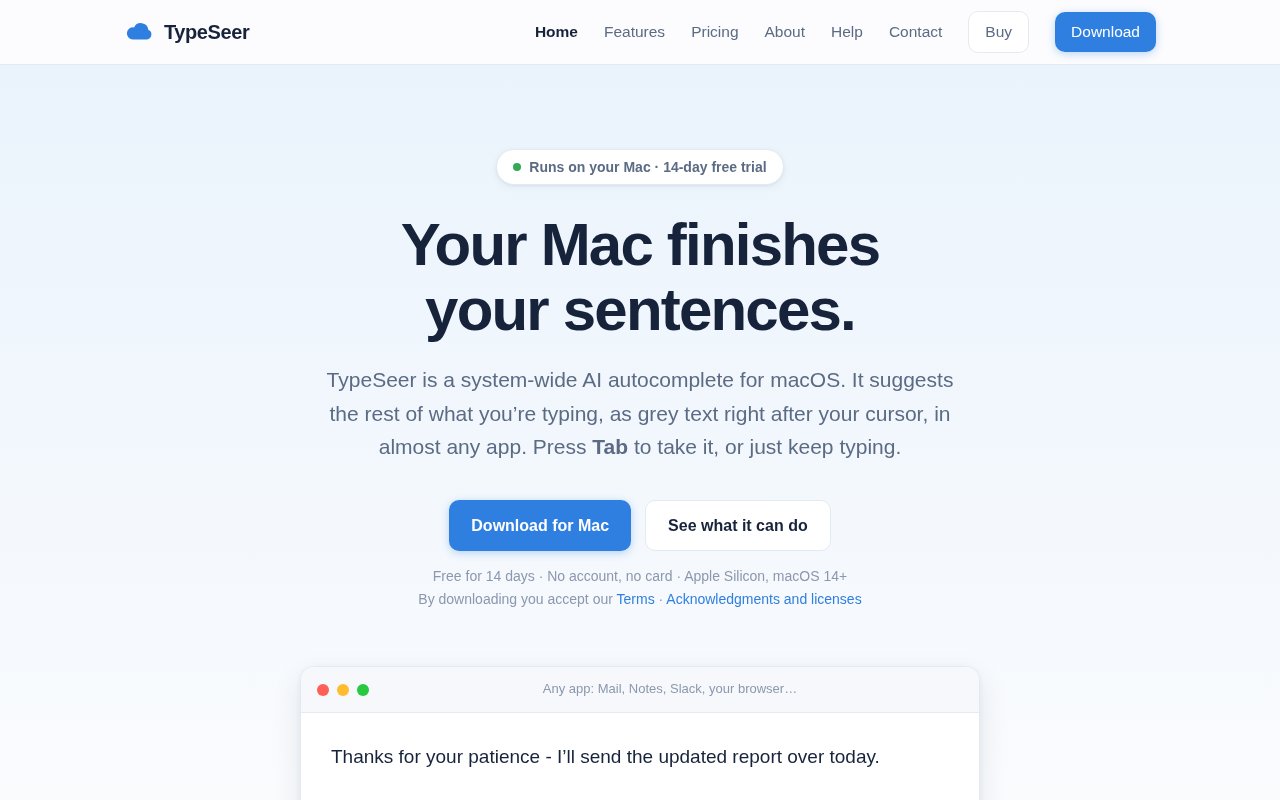
TypeSeer is a system wide AI autocomplete app for macOS. It places a suggested continuation as grey text directly after the cursor in most apps that use standard Mac text fields. A user can press Tab to accept the next word, press again to take more, or keep typing and let the suggestion disappear. That makes it closer to the completion experience in a code editor than to a separate chat or document generator. The assistant follows the user through Mail, Notes, Slack, browsers, Messages, Word, Pages, and other compatible apps, so there is no writing window to open and no text to paste back into the original application.
The core language model runs on the Mac rather than a remote inference service. Setup downloads a built in model of roughly 3.5 GB, and suggestions can continue when the internet is unavailable once that model is present. TypeSeer says typed words and documents are not sent to its servers. Network access is used to download the model, check daily for software updates, and validate a paid license. It also avoids password and secure fields. This local architecture is the product's main distinction for people who want predictive writing in email, notes, and private messages without routing every keystroke through a cloud provider.
Completion is designed to stay under the user's control. The grey text does not alter the document until it is accepted, and each Tab normally takes a single word. An option lets two quick Tab presses accept the full continuation. TypeSeer can use the content of the current conversation or window to make a reply fit the thread, and it can optionally use recently copied material as context. Setup asks for Accessibility permission because the app needs to observe supported text fields and place suggestions at the cursor. Compatibility varies with what each application exposes through macOS, and the site documents places where the assistant intentionally remains quiet or cannot position visual controls reliably.
Personalization is optional and disabled until the user turns it on. When enabled, TypeSeer learns from completed sentences, including recurring names, vocabulary, and phrasing, rather than from unfinished text or ignored suggestions. A review screen shows every sentence it has learned and where it came from. Entries can be exported, removed individually, or cleared as a group. Website learning can also be separated by site. These controls make the local memory inspectable instead of leaving a user to wonder what profile has been built from their writing.
The product includes several smaller typing aids around autocomplete. It provides spelling corrections, context aware completion for unfinished words, and text snippets with placeholders for details such as the date, time, or clipboard. It detects the language of each sentence and can follow a change of language inside the same document. Dedicated dictionaries and word tables cover 15 languages, including English, Polish, German, French, Spanish, Italian, Portuguese, Dutch, Russian, Swedish, Danish, Czech, Hungarian, Turkish, and Vietnamese. Optional grammar checking is available when the user adds a compatible instruction tuned or chat model, while the built in model focuses on completion.
TypeSeer is a good fit for Mac users who write many short messages, emails, support replies, notes, or routine documents and want help inside the apps they already use. It can be especially appealing when cloud autocomplete is unacceptable for privacy or connectivity reasons. The fit is narrow in hardware terms. It requires an Apple Silicon Mac with an M1 chip or newer and macOS 14 Sonoma or later. The model consumes several gigabytes of storage, the app needs Accessibility access, and there is no Windows, Linux, Intel Mac, iPhone, or browser only version shown. Suggestions can still be wrong or remain silent, and the site describes grammar help as useful for everyday errors rather than a professional editing replacement.
TypeSeer is paid software with a complete 14 day trial. The trial requires no account or payment card and unlocks every feature. After it ends, the current choices are £2.99 per month, £23.99 per year, or £59.99 for a lifetime license, with the same application features on each plan. One license covers two Macs. There is no ongoing free tier, and an activated paid license occasionally needs an internet check, though it can remain active offline for up to seven days after a successful validation. That model keeps advertisements and writing analytics out of the business, while giving prospective buyers enough time to test compatibility in their own daily applications.
Key Features
- System-wide grey text autocomplete
- On-device language model
- Inspectible local writing memory
- Automatic multilingual sentence detection
- Spelling snippets and word completion
- Optional local grammar checking
Pros & Cons
What we like
- Keeps writing and suggestions on the Mac
- Works across many standard macOS text fields
- Lets users inspect and delete learned sentences
- Unlocks every feature during the free trial
Room for improvement
- Requires Apple Silicon and macOS 14 or later
- Built in model uses about 3.5 GB
- Needs Accessibility permission for system-wide operation
- Has no permanent free tier
Frequently Asked Questions
What is TypeSeer?
Does TypeSeer send writing to the cloud?
Is TypeSeer free?
What Mac does TypeSeer require?
Best For
Featured in
Alternatives to TypeSeer
View all
SoloDevStack
A solo developer blog built on head-to-head tool comparisons, 580+ posts deep.

Confluence
Atlassian's long-running team wiki that anchors many enterprise knowledge stacks

Lunchbreak AI
Run text through six AI detectors at once, then humanize whatever gets flagged

Postdex
An exclusive marketplace for finished, human-made articles. Every piece sells once.
Our take
Tool Index Editorial · Sep 2026· 4.0/5
TypeSeer adds grey-text autocomplete to standard text fields across macOS, with its language model running on the Mac. It is for people who write a steady stream of email, messages, and routine documents but don't want every keystroke sent to a cloud service. We found thoughtful controls around accepting one word at a time, inspecting learned sentences, multilingual use, snippets, and per-app behavior. The complete trial lasts 14 days, then costs GBP 2.99 monthly, GBP 23.99 yearly, or GBP 59.99 once.
The on-device design is the reason to choose it, and the full trial makes app compatibility easy to test before paying. Hardware limits are significant. It requires Apple Silicon and macOS 14 or later, downloads a model of about 3.5 GB, and needs Accessibility permission. Suggestions also depend on what each app exposes through macOS, so it won't behave identically in every text field.
Editorial opinion from the Tool Index team, written from the public product pages. Not a user review.
Reviews (0)
Badge builder
Add TypeSeer to your website
Choose a badge style and size, preview it here, then copy the generated HTML. Badge images are self-contained SVGs and do not require an external script.

<a href="https://toolindex.net/tools/typeseer?ref=badge" target="_blank" rel="noopener">
  <img src="https://toolindex.net/badge/typeseer/medium.svg" alt="TypeSeer - Listed on Tool Index" width="180" height="50" />
</a>How to use the badge
- 1. Pick the style, size, and theme that fit your layout.
- 2. Copy the generated HTML from the code block.
- 3. Paste it into your footer, homepage, or press page.
Standard badge available
The standard listing badge is available now. Score and circle badges are limited to tools currently ranked in the top 10 of a category.
Badge clicks return visitors to this profile with a referral tag so the source remains identifiable.
Related Tools
Confluence
Atlassian's long-running team wiki that anchors many enterprise knowledge stacks
SoloDevStack
A solo developer blog built on head-to-head tool comparisons, 580+ posts deep.

Logseq
An open-source outliner notes app where every bullet is a first-class block

Bear
A beautiful Markdown notes app for Apple devices that doubles as a writing tool
Work on TypeSeer? Request listing access or correction