
Usage Buddy
Track Codex, Claude Code, and Cursor limits across multiple accounts from one desktop app
Gallery
About Usage Buddy
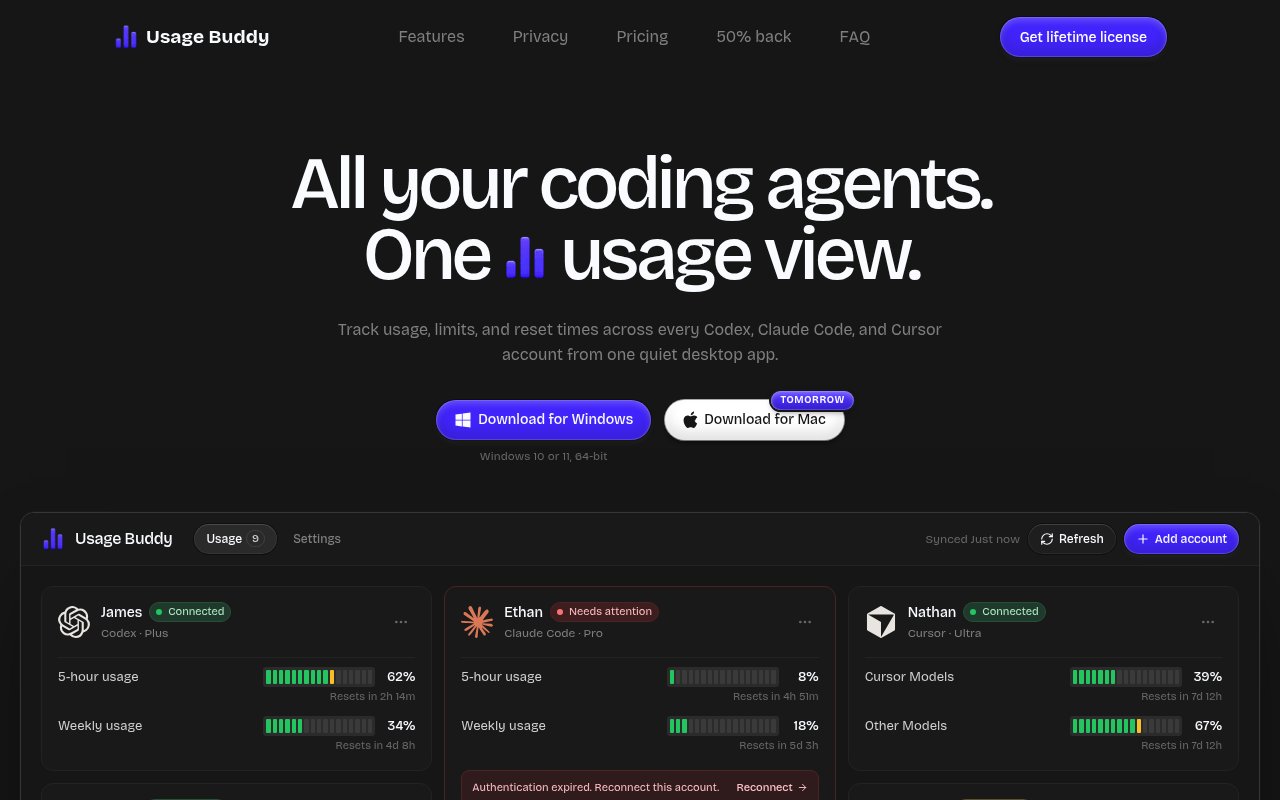
Usage Buddy is a Windows desktop app for seeing usage limits and reset times across OpenAI Codex, Claude Code, and Cursor accounts in one place. It is built for developers who use several coding agents or maintain separate personal, work, and team subscriptions. Rather than opening each provider and each account to find out what capacity remains, the app turns those limits into a single scannable dashboard. It answers a practical question before a long coding session starts, which account still has room and when will the others be ready again?
Users can connect an unlimited number of supported accounts and give each one a useful label such as Personal or Work. Each account remains separate in the dashboard, with its provider, plan, connection state, usage percentage, and reset countdown shown together. The exact periods depend on what the provider reports. Codex and Claude Code can expose short and weekly or monthly windows, while Cursor can separate Cursor model usage from other model usage. An expired connection is called out so it can be repaired instead of quietly returning stale information. This makes connection trouble visible beside the figures that depend on it.
The consolidated view is most useful when limits overlap. A developer can compare a nearly full Claude Code allowance with a healthier Codex account, check how long the next reset will take, and decide whether to switch before a request fails. The app isn't trying to route prompts or replace any coding agent. It is a monitoring companion that makes provider quotas easier to understand. That narrow scope keeps the interface focused and avoids adding another chat surface to an already crowded development setup. It also leaves the developer free to keep using each provider's normal coding interface.
Usage can refresh automatically every five, fifteen, or thirty minutes, and there is also a manual refresh control. Users choose a warning threshold for an account. Usage Buddy can then notify them when the allowance is running low and when it becomes available again after a reset. These alerts are helpful during concentrated work because the user doesn't need to keep the dashboard in view. They also reduce the chance of planning a demanding agent task around an account that is already close to its limit. A manual refresh remains useful when someone needs the latest reading immediately.
The app runs locally. The site says account credentials and usage data stay on the PC and aren't sent to Usage Buddy's servers. There is no cloud sync and no product usage tracking. That local posture is reassuring for a utility that needs authenticated access to several developer accounts, though users still need to be comfortable connecting those accounts to a desktop application. The lack of sync also means its dashboard isn't designed to follow a person across several computers.
Usage Buddy suits individual developers, contractors, and small teams whose agent access is spread across providers or logins. It can help someone choose the right account before a pair programming session, watch a team plan alongside a personal subscription, or see whether a provider will reset in minutes or days. It is less valuable for a person with one account and one simple limit. Organizations that need central policy, shared reporting, or administrator controls should also recognize that this is a local personal dashboard rather than a fleet management system.
The product currently supports only three agent families, so it won't unify every model vendor or API budget. It reads the allowance information exposed by Codex, Claude Code, and Cursor rather than calculating token costs for arbitrary services. Windows is the available platform, specifically 64 bit Windows 10 version 1809 or newer and Windows 11. The site mentions Mac availability as upcoming, while its FAQ says Mac and Linux aren't supported yet. Buyers on those systems should wait for an actual release rather than treating the roadmap as current compatibility. Usage Buddy is paid software and needs a license key to run. The site currently advertises a $4.99 lifetime license, discounted from $15, with unlimited connected accounts, automatic refresh, alerts, and future updates included. Checkout is handled by Dodo Payments, and existing customers can recover a missing key by email. There is no advertised free tier, so the low one time price is the route into the product. It is a compact purchase for a specific problem, with the clearest value going to Windows developers who regularly balance several coding agent subscriptions.
Key Features
- Multi-account usage dashboard
- Codex Claude and Cursor support
- Allowance reset countdowns
- Configurable low-usage alerts
- Automatic scheduled refresh
- Local credential storage
Pros & Cons
What we like
- Combines several agent accounts in one view
- Shows both usage levels and reset timing
- Keeps credentials and usage data on the PC
- Uses a low one time license price
Room for improvement
- Windows is the only supported platform
- Supports only three coding agent families
- No cloud sync across computers
- Requires a paid license key to run
Frequently Asked Questions
What is Usage Buddy?
Which services does Usage Buddy support?
Does Usage Buddy send credentials to its servers?
Is Usage Buddy free?
Best For
Featured in
Alternatives to Usage Buddy

Kevin Gabeci
Solo developer building web apps, cozy browser games, and AI creator toolkits.

SoloDevStack
A solo developer blog built on head-to-head tool comparisons, 580+ posts deep.

Codedex
A gamified, story-driven platform that teaches Python, web dev, and more like an RPG quest

Vibe Built
Building real apps with agentic AI. What worked, what broke, what shipped.
Our take
Tool Index Editorial · Oct 2026· 3.5/5
Usage Buddy gives Windows developers one dashboard for usage and reset times across Codex, Claude Code, and Cursor accounts. We found the narrow focus sensible. Multiple labeled accounts, automatic refresh, low allowance alerts, and visible authentication failures answer the practical question of which subscription can handle the next coding session. The advertised price is $4.99 for a lifetime license with future updates.
The app says credentials and usage stay on the PC, with no cloud sync or usage tracking. That local approach is reassuring, but buyers still have to trust a young desktop utility with authenticated developer accounts. It is Windows only, supports just three agent families, and offers little value to someone managing a single account.
Editorial opinion from the Tool Index team, written from the public product pages. Not a user review.
Reviews (0)
Badge builder
Add Usage Buddy to your website
Choose a badge style and size, preview it here, then copy the generated HTML. Badge images are self-contained SVGs and do not require an external script.

<a href="https://toolindex.net/tools/usage-buddy?ref=badge" target="_blank" rel="noopener">
  <img src="https://toolindex.net/badge/usage-buddy/medium.svg" alt="Usage Buddy - Listed on Tool Index" width="180" height="50" />
</a>How to use the badge
- 1. Pick the style, size, and theme that fit your layout.
- 2. Copy the generated HTML from the code block.
- 3. Paste it into your footer, homepage, or press page.
Standard badge available
The standard listing badge is available now. Score and circle badges are limited to tools currently ranked in the top 10 of a category.
Badge clicks return visitors to this profile with a referral tag so the source remains identifiable.
Related Tools
Kevin Gabeci
Solo developer building web apps, cozy browser games, and AI creator toolkits.

Coolify
Self-hostable, open source alternative to Heroku and Netlify

Warp
The modern terminal reimagined with AI and collaboration

Bolt.new
Prompt-to-deployed full-stack app inside the browser
Work on Usage Buddy? Request listing access or correction