Usermoods
A one-line widget that captures visitor mood and feedback on your site and charts the trend
Gallery
About Usermoods
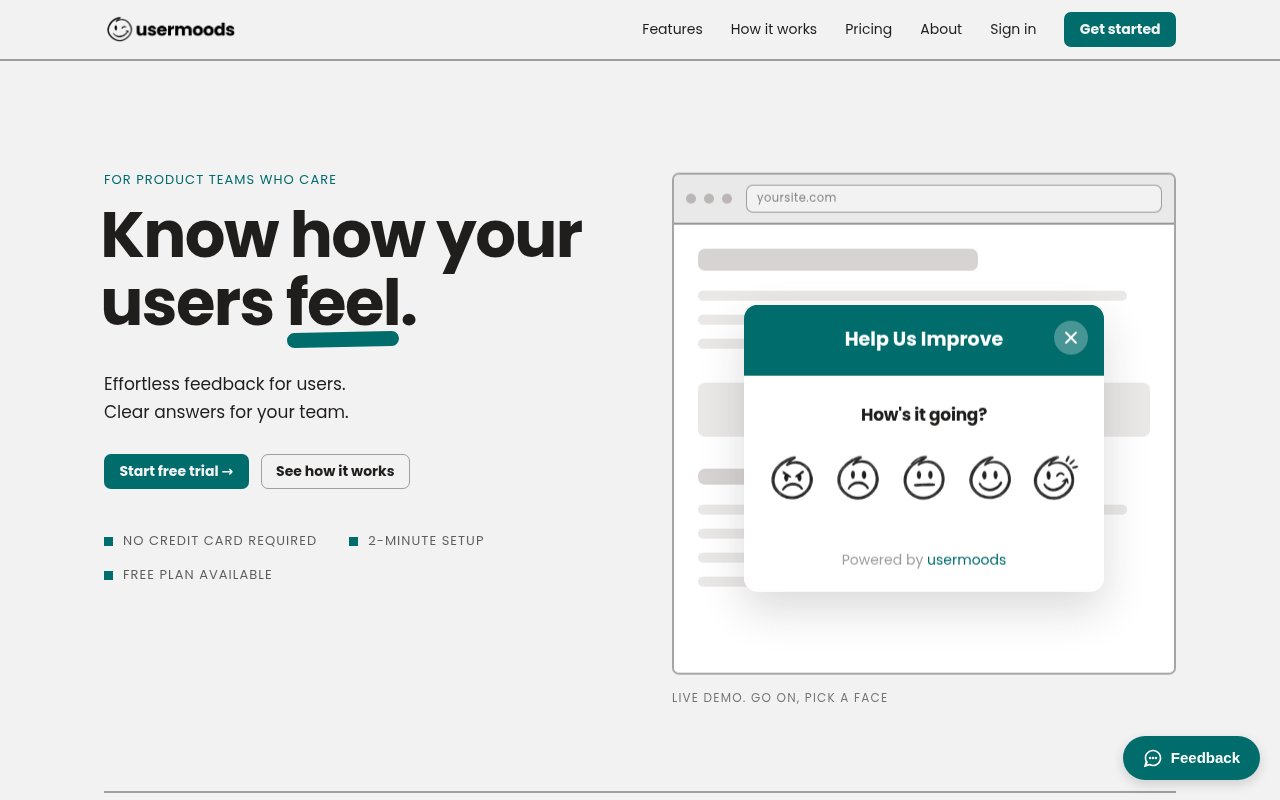
Usermoods is a lightweight feedback widget for websites. You drop one script tag on a page, and visitors see a small prompt with five mood faces. They click the face that matches how they feel, optionally type a sentence, and they're done in a few seconds. On your side, every response lands in an inbox sorted into likes, ideas and issues, and a dashboard charts the mood trend over time so you can see whether a change helped or hurt. The pitch on the site is that it's a super easy way to capture user sentiment and feedback, and the product matches the pitch, one script tag, one tap, one chart.
The problem it targets is that most feedback tools ask too much. A survey with twelve questions gets ignored, a support widget only hears from people with a problem, and analytics tell you what visitors did without telling you how they felt about it. Usermoods trades depth for volume. A single tap is a low enough bar that people actually respond, and enough of those taps add up to a signal you can watch week over week instead of guessing from bounce rates.
Setup is the script tag with your site token, and the widget is live from that point. Visitors don't need an account and aren't tracked with cookies, and the site says feedback is anonymous by default. Each tap records a mood on the five point scale, the dashboard averages those into a running number and plots the trend, and written comments sit alongside so a dip in the chart comes with the words that explain it. The inbox sorts written feedback into likes, ideas and issues, which is a coarse taxonomy but a useful one, since it separates praise from bug reports and feature requests without anyone tagging anything by hand. When someone leaves written feedback you can reply by email from the inbox on the paid plan, receive files and screenshots, and export everything to CSV for whatever analysis you want to run elsewhere. A working demo of the widget sits on the landing page, which is the quickest way to see what visitors will experience before you install anything.
It's for product teams, indie makers and small SaaS companies that want a steady read on sentiment without building a survey programme. It fits a marketing site where you want to know if a new page lands, a web app where you want the mood of a release, or a documentation site where a run of unhappy faces on one page tells you which article to rewrite. It's not a research suite. There are no integrations mentioned on the site, and the contact page describes a small team that answers through a form rather than a ticket queue, which tells you the scale of the operation.
The way to get value from it is to watch the trend around changes. Ship a redesign, note the date, and see whether the average mood moves and what the comments say in the days after. A support inbox tells you about the loudest problems, a mood chart tells you about the quiet ones, and the two together give a product team a better read than either alone. Because responses are anonymous you can't follow up with a specific visitor unless they leave written feedback and you reply by email, which is the paid plan's job, so the widget is a thermometer more than a conversation.
What makes it different from the heavier feedback platforms is restraint. There's no session recording, no heatmaps, no NPS machinery, just a face, an optional sentence and a chart. That means less to configure, less to explain to visitors, and less data to worry about, since nothing is collected that identifies the person. If you've tried to get a sentiment number out of a bigger tool and drowned in setup, the simplicity is the feature, and the anonymous default keeps the privacy conversation short.
Pricing is freemium. The free plan covers one website, twenty pieces of feedback a month and basic customisation at no cost, which is enough to see whether visitors engage. Pro covers five websites, unlimited feedback and unlimited team members, with full customisation, custom branding, email replies, file attachments and CSV export. Unlimited team members means the whole product team can read the inbox without seat pricing, and custom branding makes the widget look like part of the site rather than a third-party bolt-on. The site lists Pro at $12.67 a month billed yearly, shown as $152 a year under a four months free promotion against a standard $228, so the price you see may depend on when you look, and there's a 14 day free trial. There's no published email, so questions go through the contact form, where the site says a person replies, usually the same day.
Key Features
- Five-face mood selector widget
- One script tag install
- Inbox sorted into likes, ideas and issues
- Mood trend dashboard
- Email replies and file attachments
- CSV export of all feedback
Pros & Cons
What we like
- Visitors respond in seconds
- Anonymous by default with no tracking cookies
- Free plan for a single site
- Live demo widget on the landing page
Room for improvement
- Free plan caps at 20 responses a month
- No integrations mentioned on the site
- Pro pricing is quoted on yearly billing
- Sentiment is coarse, five faces and a sentence
Frequently Asked Questions
What is Usermoods?
Is Usermoods free?
Does it track visitors?
How do I install it?
Best For
Featured in
Alternatives to Usermoods
View allNotionlytics
Page-view analytics and reader feedback widgets for public Notion pages

Cometly
Marketing attribution for B2B SaaS that ties ad spend to pipeline and closed-won revenue

Amplitude
Digital analytics platform for product, growth, and marketing teams to analyze user behavior across web and mobile.

Simple Analytics
Cookieless, GDPR-friendly web analytics that needs no consent banner
Our take
Tool Index Editorial · Oct 2026· 3.5/5
Usermoods is a compact website feedback widget built around five mood faces, an optional comment, and a 30 day sentiment trend. One script tag installs it, and responses land in an inbox for product teams to label and review. The free plan covers one site and 20 responses a month. Pro costs $152 a year, or $12.67 a month when billed annually, for five sites, unlimited feedback, replies, attachments, branding, and CSV export.
We like the restraint. It asks less of visitors than a survey and collects no tracking cookies by default. That same simplicity is the limit. Five faces produce a coarse signal, anonymous responses are hard to follow up, and the public pages do not mention integrations with issue trackers or analytics tools. The free cap is suitable for testing engagement, but too small to establish a meaningful trend on an active site.
Editorial opinion from the Tool Index team, written from the public product pages. Not a user review.
Reviews (0)
Badge builder
Add Usermoods to your website
Choose a badge style and size, preview it here, then copy the generated HTML. Badge images are self-contained SVGs and do not require an external script.

<a href="https://toolindex.net/tools/usermoods?ref=badge" target="_blank" rel="noopener">
  <img src="https://toolindex.net/badge/usermoods/medium.svg" alt="Usermoods - Listed on Tool Index" width="180" height="50" />
</a>How to use the badge
- 1. Pick the style, size, and theme that fit your layout.
- 2. Copy the generated HTML from the code block.
- 3. Paste it into your footer, homepage, or press page.
Standard badge available
The standard listing badge is available now. Score and circle badges are limited to tools currently ranked in the top 10 of a category.
Badge clicks return visitors to this profile with a referral tag so the source remains identifiable.
Related Tools

Sleep Suivour
Track your sleep, improve your rest
Notionlytics
Page-view analytics and reader feedback widgets for public Notion pages
Mixpanel
Product analytics tool for tracking user events, funnels, retention, and cohorts to understand how people use your app.

Simple Analytics
Privacy-friendly web analytics with a clean dashboard, event tracking, and a strong stance against personal data collection.
Work on Usermoods? Request listing access or correction