
Webtoolio
Use free developer, document, image, and conversion tools without uploading data
Gallery
About Webtoolio
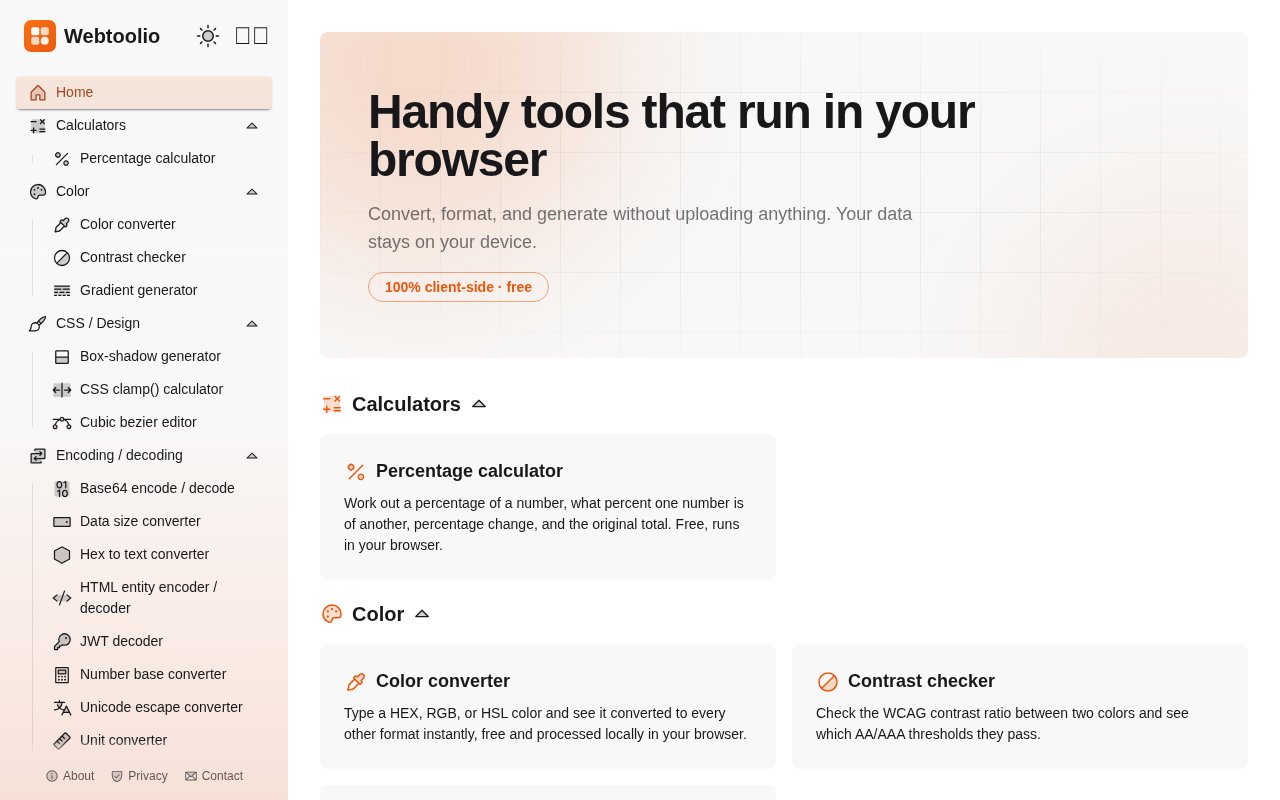
Webtoolio is a collection of small online utilities that run inside the browser. It covers the jobs that interrupt a larger task, such as formatting JSON, checking a color contrast ratio, converting an image, decoding a token, generating a UUID, or comparing two blocks of text. Instead of requiring an account or sending the input to a remote service, the site's tools process data locally on the user's device. That makes it useful when the task is too small to justify installing a dedicated app but the material shouldn't be pasted into an unknown server. The collection is free, has no advertising, and doesn't require sign-up.
The range is broad, though many of the strongest tools are aimed at developers and designers. Formatters handle JSON, XML, SQL, CSS, and HTML, with related converters for JSON, CSV, YAML, Markdown, and curl commands. Encoding utilities cover Base64, HTML entities, Unicode escapes, URLs, hexadecimal text, and number bases. Web and network helpers include a URL parser, a CIDR calculator, a cron expression reader, Unix timestamp conversion, and an HTTP status reference. These aren't presented as parts of a single workflow. They're focused pages that solve one problem, expose the relevant options, and return something that can be copied or downloaded.
The image and document section makes Webtoolio useful beyond text. It can resize and compress common image formats, convert between PNG, JPEG, and WebP, turn HEIC photos into JPEG files, remove EXIF metadata, create favicons, decode QR codes, and trace raster images into SVG. PDF tools can combine several documents or turn images into one PDF. Generators produce passwords, hashes, barcodes, QR codes, random numbers, placeholder text, and version 4 or version 7 UUIDs. The exact controls vary by tool. For example, the barcode and QR pages can export images, while formatters emphasize validation, readable output, or compact output.
Local processing is the central design choice, not a small privacy option. Webtoolio says nothing typed, pasted, or opened is uploaded, and invites users to confirm that in the browser's network panel. The tools are delivered as static pages from a content delivery network, with the working logic running on the machine that opened them. This is particularly relevant for JWT inspection, metadata removal, image conversion, encryption, or text comparison, where source material may contain information a user doesn't want to hand to another server. It also means performance for larger files depends on the browser and device, and there is no cloud workspace preserving a job for use elsewhere.
The site also pays attention to accessibility and everyday use. Its color tools include a WCAG contrast checker, CSS helpers provide visual editors for shadows, gradients, fluid clamp values, and easing curves, and the Markdown preview sanitizes rendered HTML. The interface is available in English, Japanese, Brazilian Portuguese, Spanish, German, French, and Polish. The maintainer says automated tests cover the logic and browser tests check pages in both themes and on mobile before changes are published. That doesn't turn the collection into a full development environment, but it gives these quick utilities a clearer quality posture than an assortment of unrelated converter pages.
Webtoolio fits developers, designers, support staff, students, and anyone who regularly searches for a one-off browser tool. It is especially convenient on a locked-down or temporary computer because there is nothing to install and no account to recover later. The flip side is that the site deliberately doesn't offer the collaboration, saved history, automation, or shared workspaces found in larger products. It is maintained by one person, and the contact page warns that replies can take a few days. Users with repeatable bulk jobs or an application integration will still be better served by a script, command line utility, or dedicated API.
Everything currently published is free to use, and the about page says the site will stay free. There are no paid upgrades, ads, or account gates in sight, so the correct pricing posture is free rather than freemium. New tools are being added over time, which makes the catalog a growing reference rather than a finished suite with a formal release schedule. The strongest reason to bookmark it is the combination of variety and a consistent client-side model. A user can move from cleaning JSON to checking a subnet or resizing an image without creating several accounts, while keeping the working data on the device throughout.
Key Features
- Client-side data processing
- Code and data formatters
- Private image conversion tools
- CSS and color helpers
- Generators for common assets
- Seven interface languages
Pros & Cons
What we like
- Keeps pasted text and opened files on the device
- Offers a wide range of focused utilities
- Requires no account or software installation
- Stays free without advertising
Room for improvement
- No account based history or device sync
- Local performance depends on the user's browser and hardware
- Single maintainer means support replies may take days
- Not designed for automated or bulk workflows
Frequently Asked Questions
What is Webtoolio?
Is Webtoolio free?
Does Webtoolio upload my files or text?
Who is Webtoolio for?
Best For
Featured in
Alternatives to Webtoolio
View all
Kevin Gabeci
Solo developer building web apps, cozy browser games, and AI creator toolkits.

SoloDevStack
A solo developer blog built on head-to-head tool comparisons, 580+ posts deep.

Codedex
A gamified, story-driven platform that teaches Python, web dev, and more like an RPG quest

Vibe Built
Building real apps with agentic AI. What worked, what broke, what shipped.
Our take
Tool Index Editorial · Oct 2026· 4.0/5
Webtoolio is a free collection of browser based utilities for structured data, text, images, PDFs, CSS, encoding, security, dates, and networking. It asks for no account, carries no ads, and says inputs and files stay on the device. Developers and designers who need a quick formatter, decoder, converter, or generator are the obvious audience.
We found the catalog unusually broad without becoming hard to scan. Useful entries range from JWT inspection and JSON schema validation to HEIC conversion, EXIF removal, PDF merging, contrast checks, and subnet calculations. Client side processing is a real advantage for sensitive snippets. It also means large jobs depend on the local browser, with no saved history, sync, API, or bulk automation. For occasional work it is an excellent bookmark, while repeatable pipelines still belong in scripts or dedicated applications.
Editorial opinion from the Tool Index team, written from the public product pages. Not a user review.
Reviews (0)
Badge builder
Add Webtoolio to your website
Choose a badge style and size, preview it here, then copy the generated HTML. Badge images are self-contained SVGs and do not require an external script.

<a href="https://toolindex.net/tools/webtoolio?ref=badge" target="_blank" rel="noopener">
  <img src="https://toolindex.net/badge/webtoolio/medium.svg" alt="Webtoolio - Listed on Tool Index" width="180" height="50" />
</a>How to use the badge
- 1. Pick the style, size, and theme that fit your layout.
- 2. Copy the generated HTML from the code block.
- 3. Paste it into your footer, homepage, or press page.
Standard badge available
The standard listing badge is available now. Score and circle badges are limited to tools currently ranked in the top 10 of a category.
Badge clicks return visitors to this profile with a referral tag so the source remains identifiable.
Related Tools
Kevin Gabeci
Solo developer building web apps, cozy browser games, and AI creator toolkits.

Coolify
Self-hostable, open source alternative to Heroku and Netlify

Warp
The modern terminal reimagined with AI and collaboration

Bolt.new
Prompt-to-deployed full-stack app inside the browser
Work on Webtoolio? Request listing access or correction