
Whiboard
Turn plain-language ideas into editable diagrams on a collaborative whiteboard
Gallery
About Whiboard
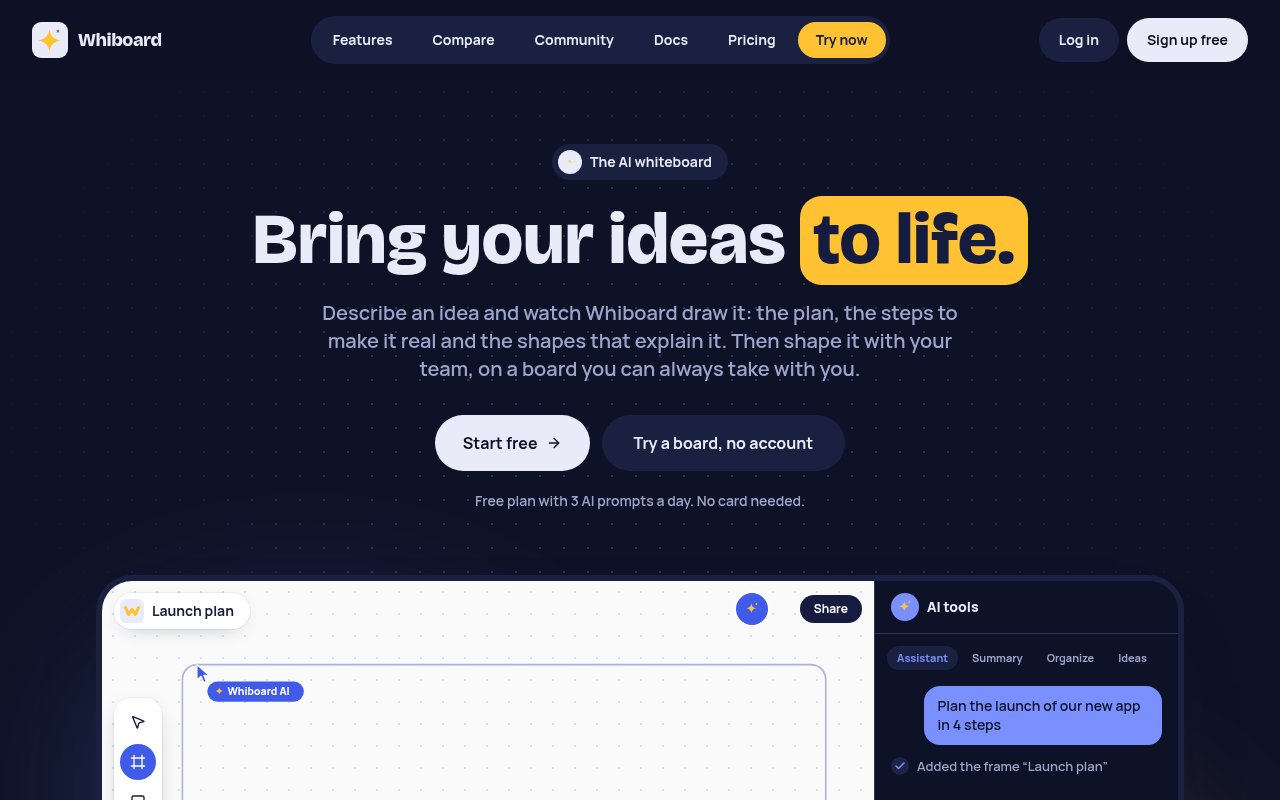
Whiboard is a collaborative online whiteboard with an AI assistant that draws directly on the canvas. A person can describe a signup flow, product launch, system architecture or mind map in ordinary language, and the assistant turns that request into frames, shapes, connectors, text and sticky notes. The result is real board content rather than a flat generated picture, so the team can move objects, change colors, rewrite labels and delete anything that doesn't fit. It tackles the awkward first minutes of a visual planning session, when everyone knows what they want to discuss but someone still has to lay out the board.
The assistant works with more than a one-line prompt. It can use pasted notes, a photo of a physical whiteboard, attached images or video, and documents already sitting on the board. It can turn rough material into an ordered plan, a flowchart with decisions, an org chart, a roadmap or a system diagram with cloud and brand logos. Prompts can also change existing material, such as recoloring every pricing note or turning a loose cluster into one column. It can read the current canvas to summarize decisions and action items, group sticky notes into themes, or suggest ideas that don't simply repeat what is already there. After drawing, it checks a picture of the board, and each batch of changes remains a single undo step. That makes experimentation less risky than accepting a large pile of individually committed edits.
Once a draft exists, Whiboard behaves like a regular team canvas. Editors see live cursors, can leave comments and mentions, and can return to earlier versions through version history. Viewers can open a shared link without creating an account, while editor access is managed at the workspace level. On the Team plan, guests can also edit from a link without an account. Boards can be shared as links or embedded elsewhere for people who only need to follow along. The canvas is useful for product managers mapping a customer journey, engineers explaining an architecture, facilitators organizing workshop notes, and small teams turning a discussion into a concrete sequence of work. It stays deliberately focused on whiteboarding, so it isn't trying to replace a task tracker, document editor or team chat alongside the visual workspace.
Portability is one of its clearest differentiators. Every plan can export boards as PNG, SVG, PDF, draw.io or plain versioned JSON. A whole account or workspace can also be downloaded as JSON, and the site says a downgrade won't delete existing boards. Existing draw.io files and Whiboard backups can be dropped onto a board, while a Miro importer copies up to 10,000 common frames, sticky notes, text, shapes, cards and connectors through Miro's API. The token used for that import is used once and isn't stored. Those exits matter for teams that want to adopt a younger tool without putting years of planning work into an unreadable proprietary format. They also make it practical to continue polishing a technical diagram in draw.io or archive a board outside the service.
The product fits teams that want AI to create and reorganize visual material, not just answer in a chat panel beside an empty canvas. Its generated objects remain individually editable and collaborative, which keeps people in control of layout and wording. There are still tradeoffs. Whiboard doesn't have a mobile app, a workshop voting mode or a timer, and two people can't safely type in the same note at exactly the same moment because the later edit wins. It is also a young product with a smaller template and integration ecosystem than long-established whiteboard suites. The no-account demo is a sensible way to test whether its drawing style matches a team's work before moving boards over.
Access is freemium. The free plan includes unlimited boards, five editors per workspace, 256 MB of file storage, seven-day version history and three AI prompts a day, with a 250,000-token monthly allowance also applied. A user can own five free workspaces, and each workspace can include 15 read-only guests. It requires no card, and the public demo includes two AI prompts without signup. The Team plan starts at $5 per editor each month and increases AI capacity, version history and collaboration options, while Business is listed at $12 per editor each month for larger allowances and administrative needs. Guests and viewers don't consume paid editor seats. The generous board limit and permanent export options make the free tier useful on its own, though frequent AI diagram generation will push an active team toward a paid workspace.
Key Features
- Prompt-to-diagram canvas drawing
- Editable shapes and connectors
- Live cursors and comments
- Board summaries and note grouping
- Miro and draw.io imports
- Five open export formats
Pros & Cons
What we like
- AI output stays editable as ordinary board content
- Free plan includes unlimited boards and five editors
- Every plan supports portable file exports
- No-account demo shows the drawing workflow quickly
Room for improvement
- Free accounts get only three AI prompts daily
- No native mobile app is available
- Workshop voting and timers are absent
- Simultaneous editing of one note can overwrite changes
Frequently Asked Questions
What is Whiboard?
Is Whiboard free?
Can Whiboard import and export other board formats?
Who is Whiboard for?
Best For
Featured in
Alternatives to Whiboard
View all
CalendHub
Smart scheduling and calendar management for teams
Kevin Gabeci Toolkits
Seven AI toolkits for writing books, making music, cutting video, and building agents.

Eased Into AI
Learn AI from zero. No jargon, no hype, just steps that work.

Zielor
German exam preparation for DTZ, Leben in Deutschland, Goethe and telc. Waitlist open.
Reviews (0)
Badge builder
Add Whiboard to your website
Choose a badge style and size, preview it here, then copy the generated HTML. Badge images are self-contained SVGs and do not require an external script.

<a href="https://toolindex.net/tools/whiboard?ref=badge" target="_blank" rel="noopener">
  <img src="https://toolindex.net/badge/whiboard/medium.svg" alt="Whiboard - Listed on Tool Index" width="180" height="50" />
</a>How to use the badge
- 1. Pick the style, size, and theme that fit your layout.
- 2. Copy the generated HTML from the code block.
- 3. Paste it into your footer, homepage, or press page.
Standard badge available
The standard listing badge is available now. Score and circle badges are limited to tools currently ranked in the top 10 of a category.
Badge clicks return visitors to this profile with a referral tag so the source remains identifiable.
Related Tools

Confluence
Atlassian's long-running team wiki that anchors many enterprise knowledge stacks
Asana
Project management for teams that live in projects, tasks and dependencies
Kevin Gabeci Toolkits
Seven AI toolkits for writing books, making music, cutting video, and building agents.

Logseq
An open-source outliner notes app where every bullet is a first-class block
Work on Whiboard? Request listing access or correction