
Whizra
Run everyday Mac file jobs from a plain-language command bar without uploading files
Gallery
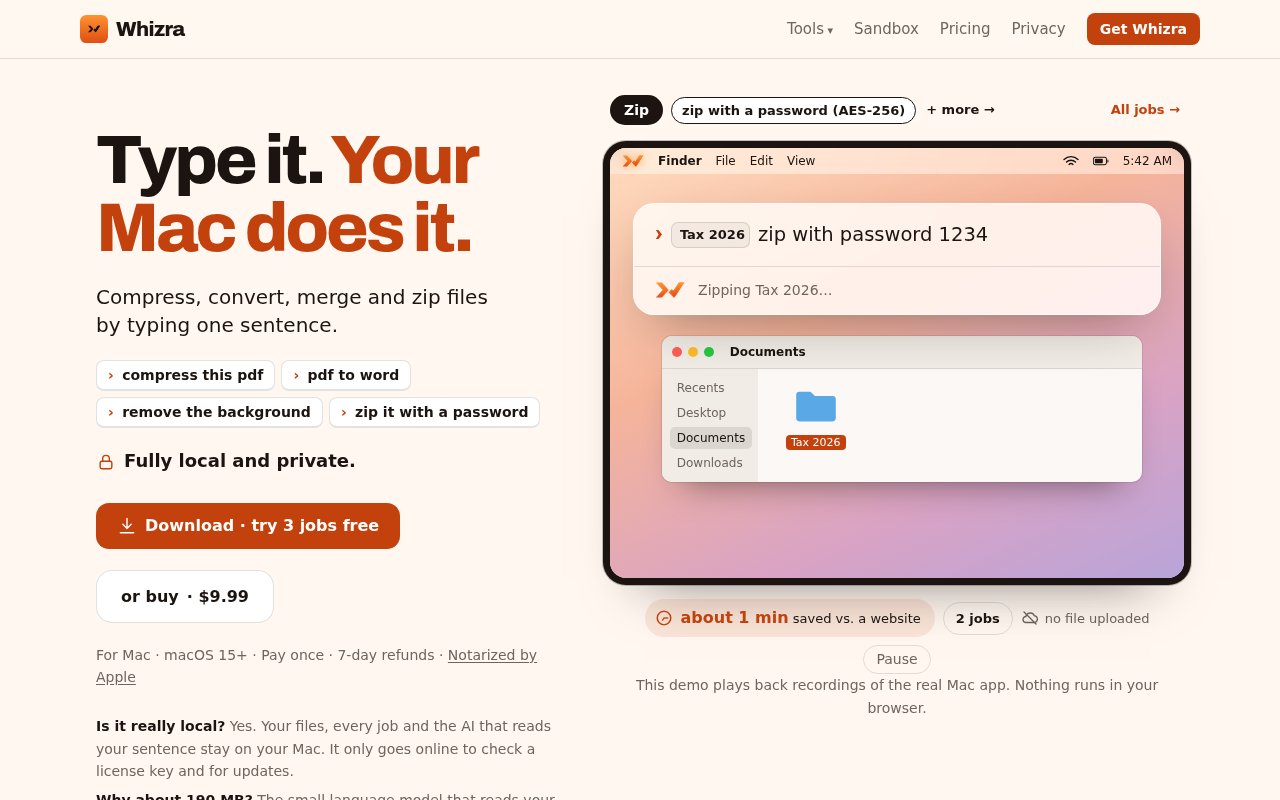
About Whizra
Whizra is a native Mac utility for handling everyday file work from a small plain-language command bar. Instead of opening a different website or application to compress a PDF, convert an image, split a document, or build an archive, the user double-taps the Option key from any app and describes the job. Whizra interprets the request, runs the matching local operation, and places the result beside the source file. It is aimed at people who know what they want done but don't want to remember which menu, command, or single-purpose web converter performs it.
The current app covers 27 file jobs across documents, images, and archives. Its published examples include compressing PDFs, converting PDFs to Word, turning HEIC photos into JPG files, merging and splitting documents, rotating pages, running OCR, resizing images, renaming files, unzipping archives, extracting images from papers, and removing image backgrounds. It can also create password-protected ZIP files with AES-256 encryption that open in Finder. Requests can refer naturally to a recent file or a selected group, which makes the command bar useful when a task begins in Finder or another Mac app rather than inside a dedicated file editor. In launch tests shared by the developer, it reduced a 3.1 MB PDF to 361 KB and extracted 705 images from 20 research papers. These are examples rather than guaranteed performance, but they show the batch and document workloads the app is meant to handle.
Privacy is central to how Whizra works. File processing happens on the Mac and the files aren't uploaded to a remote service. The app uses rules to understand straightforward requests, then a small language model included with the application when those rules aren't certain on Apple silicon Macs. Intel Macs use the rules-based path. This local design lets the core jobs work offline and avoids sending the contents of personal photos, work documents, or research papers to a conversion site. According to the developer, the app only goes online for license checks and updates, and automatic update checks can be turned off. It also doesn't require an account.
Whizra adds some sensible boundaries around file changes. It creates a new result rather than overwriting an original, so a compression or conversion shouldn't destroy the source that came before it. Rename and move operations include Undo, which matters when a short natural-language instruction matches more files than the user expected. The application is written in native Swift and notarized by Apple. It supports macOS 15 or later on both Apple silicon and Intel, though the language interpretation differs between those architectures. The download is around 190 MB because the local model is shipped inside the app.
The best fit is routine file preparation rather than deep editing. A student can combine readings and extract figures from papers. An office worker can make a PDF smaller before emailing it, turn a document into another format, or package files with a password. A photographer or iPhone owner can batch-convert HEIC images without uploading them. The app is also attractive when confidentiality rules make public converter sites a poor choice. It doesn't replace a full PDF editor, image editor, or automation platform, but it groups the quick operations that often interrupt other work behind one consistent interaction.
What makes Whizra different is the combination of natural phrasing, local execution, and a deliberately narrow job set. General AI assistants can explain a shell command, while file utilities expose buttons and menus for each operation. Whizra sits between those approaches. It accepts a sentence but maps it to controlled file actions rather than giving a language model unrestricted command execution. The copy-first behavior and Undo support further limit the consequences of a mistaken interpretation. That focus should suit people who want conversational convenience without handing an agent broad access to their computer.
Whizra is a young, independently built product, so buyers should expect a smaller feature set and community than established Mac utilities. There is a browser sandbox for trying the interaction before downloading, and three sandbox jobs can run on a user's own files inside the browser tab. The desktop app also includes the first three jobs free. Continued use is sold as a one-time purchase rather than a subscription. At launch, the published price was $9.99 for a license covering three Macs, with a seven-day refund period. That launch price may change, but the access model is straightforward and the free allowance is best treated as a brief trial rather than a lasting free tier.
Key Features
- Plain-language Mac command bar
- Twenty-seven local file jobs
- Offline private file processing
- Non-destructive result copies
- Undo for moves and renames
- Password-protected ZIP creation
Pros & Cons
What we like
- Files stay on the Mac during processing
- One interface covers many routine file jobs
- Original files aren't overwritten
- One license covers three Macs
Room for improvement
- Requires macOS 15 or later
- Intel Macs don't use the bundled language model
- Free desktop use ends after three jobs
- Young product with a small community
Frequently Asked Questions
What is Whizra?
Does Whizra upload files?
What Macs can run Whizra?
Is Whizra free?
Best For
Featured in
Alternatives to Whizra
View all
CalendHub
Smart scheduling and calendar management for teams
Kevin Gabeci Toolkits
Seven AI toolkits for writing books, making music, cutting video, and building agents.

Eased Into AI
Learn AI from zero. No jargon, no hype, just steps that work.

Zielor
German exam preparation for DTZ, Leben in Deutschland, Goethe and telc. Waitlist open.
Reviews (0)
Badge builder
Add Whizra to your website
Choose a badge style and size, preview it here, then copy the generated HTML. Badge images are self-contained SVGs and do not require an external script.

<a href="https://toolindex.net/tools/whizra?ref=badge" target="_blank" rel="noopener">
  <img src="https://toolindex.net/badge/whizra/medium.svg" alt="Whizra - Listed on Tool Index" width="180" height="50" />
</a>How to use the badge
- 1. Pick the style, size, and theme that fit your layout.
- 2. Copy the generated HTML from the code block.
- 3. Paste it into your footer, homepage, or press page.
Standard badge available
The standard listing badge is available now. Score and circle badges are limited to tools currently ranked in the top 10 of a category.
Badge clicks return visitors to this profile with a referral tag so the source remains identifiable.
Related Tools

Confluence
Atlassian's long-running team wiki that anchors many enterprise knowledge stacks
Asana
Project management for teams that live in projects, tasks and dependencies
Kevin Gabeci Toolkits
Seven AI toolkits for writing books, making music, cutting video, and building agents.

Logseq
An open-source outliner notes app where every bullet is a first-class block
Work on Whizra? Request listing access or correction