
XConnect
Manage SSH, RDP, SFTP, tunnels, scripts, and AI terminal work from one app
Gallery
About XConnect
XConnect is a cross-platform client for reaching servers and Windows desktops without keeping a separate app for every protocol. It combines SSH, Telnet, SFTP, and Remote Desktop Protocol access with connection groups, a local shell, an SSH key library, and server monitoring. Native apps are available for Windows, macOS, Linux, Android, iPhone, and iPad. The result is one workspace for opening a terminal, moving files, checking whether a host is reachable, or taking control of a remote desktop from a computer or phone. It is aimed at developers, system administrators, and technically minded users who regularly move between several machines and connection types.
The terminal is more than a basic SSH window. XConnect supports password and key authentication, jump hosts for servers behind bastions, and port-forwarding tunnels that continue running after the terminal tab closes. Multiple tunnels can share a single SSH connection, while a central key library lets one private key be linked to several servers instead of entering a file path on every connection. Global search covers connections, groups, and scripts, and the built-in local shell keeps quick work on the current computer beside remote sessions. A server monitor can scan saved hosts, show latency, refresh on a schedule, and filter the result by group before anyone opens a session.
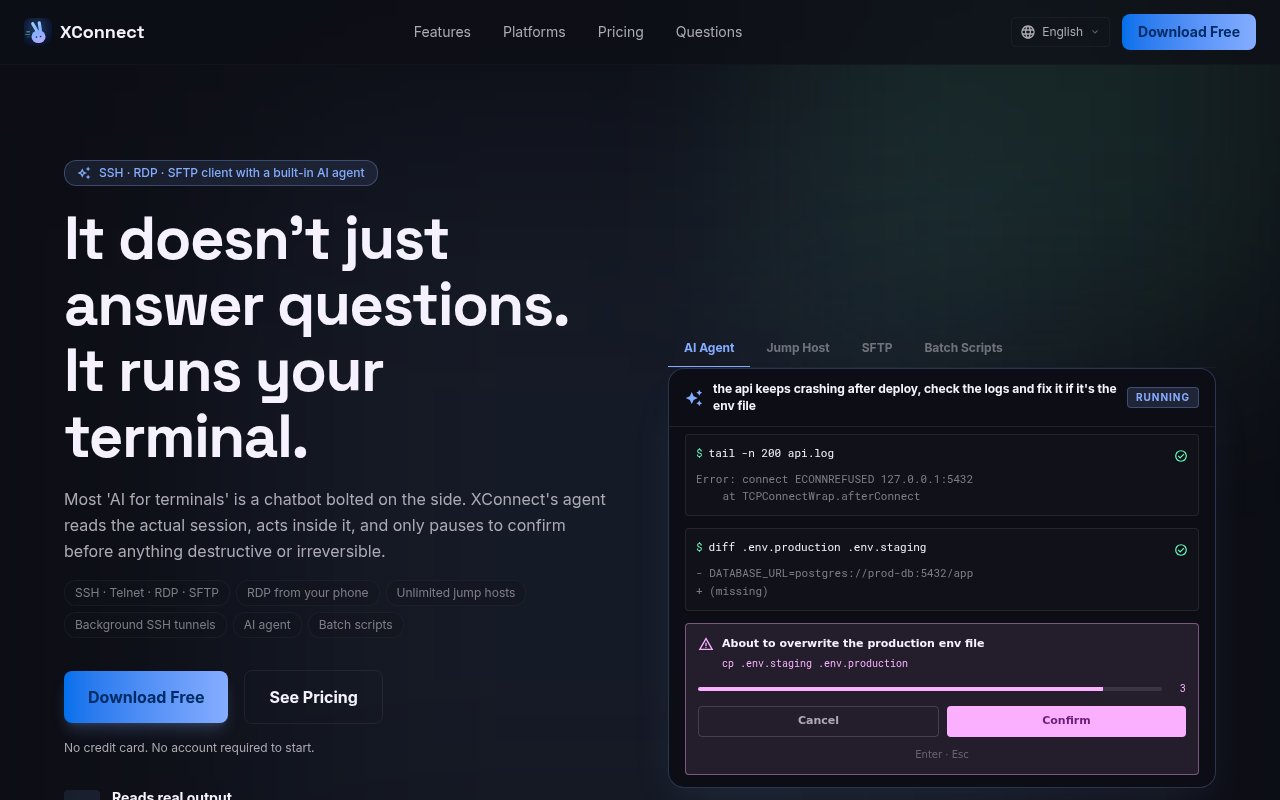
Its AI agent works inside an active terminal rather than in a detached chat panel. A user describes a task in plain language, the agent reads the output visible in that session, runs commands, and reports from the actual result. XConnect says destructive or irreversible commands stop for explicit confirmation. Users can connect a supported provider with their own key, point the app at a compatible or local endpoint, or use the included allowance where available. This approach avoids repeatedly copying logs between a shell and a chatbot, but it also means the selected model may receive terminal context. The privacy policy makes that boundary clear and advises against using the assistant on output that should not be shared with the chosen provider.
Routine operations can move into the script center. It accepts Bash, Python, and JavaScript, organizes scripts into categories, keeps version history and changelogs, and can run jobs across a selection of servers in parallel or in sequence. Scheduled runs cover work that should happen on a timer. The built-in SFTP manager handles remote browsing plus drag-and-drop uploads and downloads with concurrent transfer progress. For accountability, XConnect maintains an exportable command audit trail arranged as a cryptographic chain and offers an integrity check that identifies an altered record. These pieces make the product useful for repeatable maintenance as well as one-off terminal access.
Remote desktop support is unusually broad for an SSH-focused client. XConnect includes its own RDP client on desktop and mobile, so it does not require a gateway or relay computer. On a phone it offers trackpad and direct-touch modes, pinch zooming, two-finger scrolling, right click, hardware keyboard support, and modifier locks. A desktop-resolution session is letterboxed instead of being squeezed into the phone's aspect ratio. The same connection inventory can therefore cover Linux servers reached over SSH and Windows machines reached over RDP. SFTP follows the same jump-host route as the terminal, which is helpful when a private server can only be reached through a bastion.
The local posture is a meaningful part of the product. Connections, groups, scripts, keys, and app preferences work without an account, and sensitive values are stored separately from the main database. On iOS, secrets live in the Keychain and direct server sessions do not pass through XConnect's servers. Optional cross-device sync encrypts records before they leave the device, and the service says it cannot read the synced connections, passwords, keys, scripts, or notes. Users can mark items for one device only or point sync at a self-hosted server. That keeps the basic client useful offline while making cloud involvement an explicit choice tied to synchronization.
Pricing is freemium. The free plan includes unlimited SSH connections and groups, SFTP, local encrypted storage, one jump host, two tunnels, five scripts, batch execution, and a limited number of AI agent uses. Pro removes the jump-host, tunnel, and script limits, adds RDP, monthly AI usage, custom model providers, role-based access controls, encrypted export, and cross-device sync. The site lists Pro at $8 per month or $68 per year, with an $88 lifetime desktop license that includes future major updates. The main caveats are that advanced remote access and synchronization require a paid plan, AI work depends on a model provider, and the wide feature set is more than someone who only needs an occasional SSH prompt will require.
Key Features
- SSH, Telnet, RDP, and SFTP
- In-session AI terminal agent
- Persistent SSH tunnel management
- Batch and scheduled scripts
- Encrypted cross-device synchronization
- Tamper-evident command audit log
Pros & Cons
What we like
- Combines terminal, file transfer, and remote desktop access
- Works locally without requiring an account
- Asks for approval before destructive AI commands
- Supports official cloud or self-hosted synchronization
Room for improvement
- RDP and unlimited infrastructure features require a paid plan
- AI tasks can expose terminal context to the selected provider
- Mobile and desktop purchases may follow different store pricing
- Feature depth may be excessive for occasional SSH use
Frequently Asked Questions
What is XConnect?
Can XConnect be used without an account?
How does the AI terminal agent work?
Is XConnect free?
Best For
Featured in
Alternatives to XConnect
View all
Kevin Gabeci
Solo developer building web apps, cozy browser games, and AI creator toolkits.

SoloDevStack
A solo developer blog built on head-to-head tool comparisons, 580+ posts deep.

Codedex
A gamified, story-driven platform that teaches Python, web dev, and more like an RPG quest

Vibe Built
Building real apps with agentic AI. What worked, what broke, what shipped.
Our take
Tool Index Editorial · Sep 2026· 3.5/5
XConnect combines SSH, Telnet, RDP, SFTP, tunnels, scripts, server monitoring, and an in-session AI agent across desktop and mobile platforms. It is built for developers and administrators managing a mixed set of Linux and Windows machines. We found the breadth useful rather than random, especially persistent tunnels, jump-host routing, phone-based RDP, and an agent that reads the active terminal and asks before risky commands. The site says it is free to start without an account, but the captured page didn't expose the full paid pricing.
The all-in-one approach should suit people who genuinely use several protocols, and native apps on five platforms are a strong practical advantage. Still, terminal context may be sent to the selected AI provider, so sensitive sessions need care. The feature density will also be excessive for anyone who only wants a clean SSH prompt, and some of the most attractive capabilities are presented as Pro features.
Editorial opinion from the Tool Index team, written from the public product pages. Not a user review.
Reviews (0)
Badge builder
Add XConnect to your website
Choose a badge style and size, preview it here, then copy the generated HTML. Badge images are self-contained SVGs and do not require an external script.

<a href="https://toolindex.net/tools/xconnect?ref=badge" target="_blank" rel="noopener">
  <img src="https://toolindex.net/badge/xconnect/medium.svg" alt="XConnect - Listed on Tool Index" width="180" height="50" />
</a>How to use the badge
- 1. Pick the style, size, and theme that fit your layout.
- 2. Copy the generated HTML from the code block.
- 3. Paste it into your footer, homepage, or press page.
Standard badge available
The standard listing badge is available now. Score and circle badges are limited to tools currently ranked in the top 10 of a category.
Badge clicks return visitors to this profile with a referral tag so the source remains identifiable.
Related Tools
Kevin Gabeci
Solo developer building web apps, cozy browser games, and AI creator toolkits.

Coolify
Self-hostable, open source alternative to Heroku and Netlify

Warp
The modern terminal reimagined with AI and collaboration

Bolt.new
Prompt-to-deployed full-stack app inside the browser
Work on XConnect? Request listing access or correction