Yrkit
Browser-based IDE with terminal, deployment, database, and AI assistance
Gallery
About Yrkit
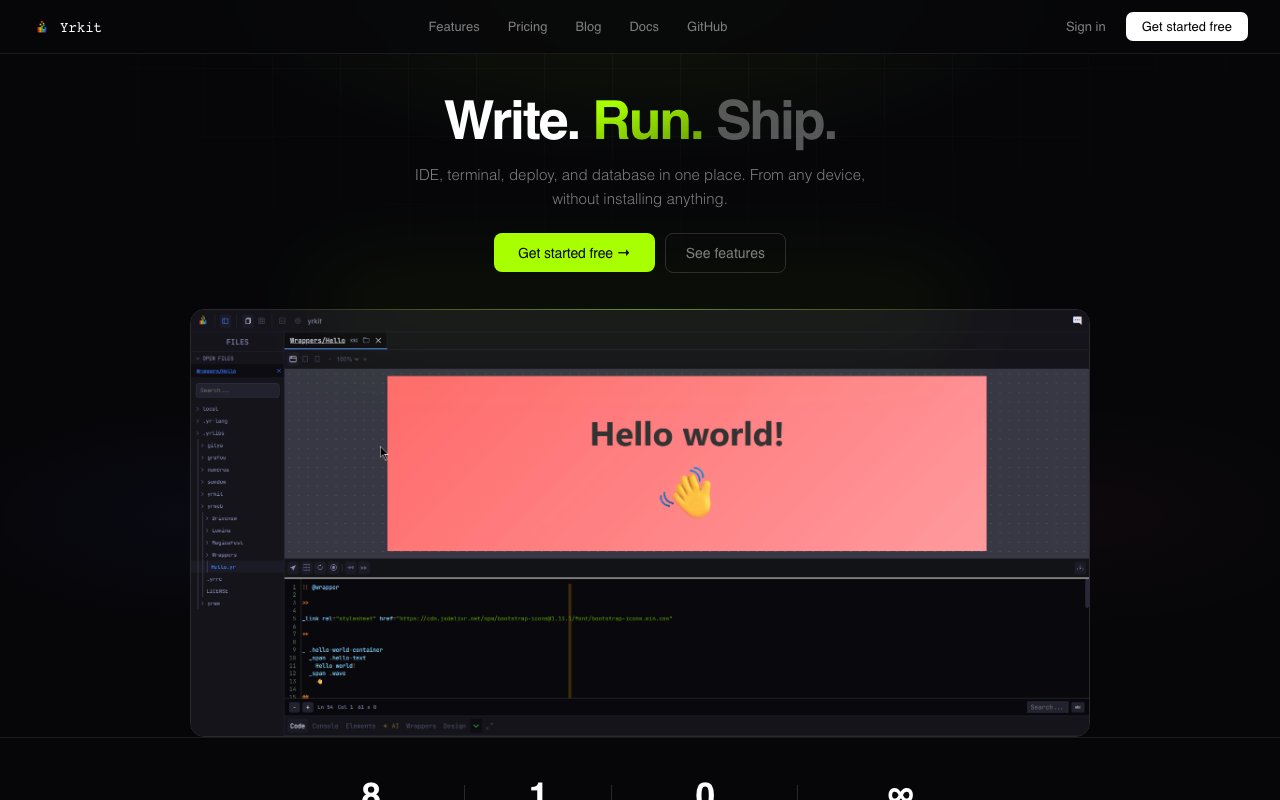
Yrkit is a browser-based development platform that puts a code editor, real terminal, deployment pipeline, database access, project management tools, and AI assistance into a single interface accessible from any device. Instead of maintaining a local development environment with IDE, terminal emulator, Git client, database tools, and deployment scripts, you open a browser tab and start working. The pitch is that you can write, test, and ship code from a laptop, tablet, or borrowed computer without installing anything locally or configuring toolchains before you can be productive.
The code editor runs in the browser but connects to a real PTY terminal with full SSH access, so you can work with remote machines the same way you would from a local shell. That means running build commands, tailing logs, managing processes, and connecting to servers all happen within the same interface rather than switching between your editor and a separate terminal application. The terminal isn't a simulation or a constrained web shell. It behaves like the real thing because it is the real thing running server side.
Deployment happens with one click through a built in CI/CD pipeline. You push your code, the platform handles the build and serve steps, and your project goes live without writing deployment scripts or configuring a separate hosting provider. For developers who have spent afternoons debugging why their local build works but the production deploy fails, that simplification removes a real friction point. The tradeoff is that you're working within Yrkit's deployment model rather than having full control over your infrastructure.
The visual builder lets you design interfaces with drag and drop, preview changes live, and export the result as code. It's positioned as a way to sketch layouts quickly before diving into implementation details, bridging the gap between mockups and working components. You can switch between the visual view and the code editor, making adjustments in whichever mode fits what you're trying to do at the moment.
AI assistance runs throughout the platform through an integrated copilot that understands your project structure and can make suggestions relevant to what you're actually building rather than generic completions. The AI knows about your files, dependencies, and recent changes, so its recommendations fit your context instead of requiring you to explain everything from scratch each time you ask a question. Yrkit positions this as a pairing tool that handles repetitive work and surfaces relevant information while leaving the real decisions to you.
Database access and monitoring are built in as part of the environment. You don't need to spin up a separate Postgres instance, configure connection strings, or set up external logging infrastructure before you can store data and see what your application is doing. For smaller projects where provisioning infrastructure would take longer than writing the actual code, having these pieces ready by default keeps the friction low. Larger projects with specific infrastructure requirements might find the built in options limiting, but for prototypes and side projects it removes steps that would otherwise slow you down.
Yrkit also introduces its own domain-specific language called Yr, designed specifically for web development. You're not required to use it, and you can stick with JavaScript, TypeScript, or whatever you prefer, but it's there as an option if you want to try their take on streamlined syntax for web projects. The language is optimized for the kinds of tasks web developers do repeatedly, though adopting a proprietary DSL means accepting some lock in and learning curve.
The platform targets individual developers, freelancers, solo founders, and small teams who want a unified environment without maintaining local toolchains or switching between multiple services. If you've ever wished you could code from a tablet on the couch or a borrowed laptop while traveling, this is the pitch. Pricing runs across four tiers. The free plan gives you the cloud IDE with local or cloud saving. At nine dollars a month, the Light plan adds the AI copilot, visual builder, and Git integration. The Pro plan at twenty-three dollars a month unlocks database access, CI/CD deployment, the terminal with SSH, and project management tools. Teams pay forty-nine dollars a month for multiple projects, direct developer access, and priority support. If you're a solo developer testing an idea, the free tier lets you get started. Anyone deploying to production or needing the database and terminal features will need to upgrade to Pro or higher.
Key Features
- Cloud IDE with PTY terminal and SSH access
- One-click build, serve, and deploy
- Visual builder with live preview and code export
- AI copilot with project context awareness
- Integrated database and monitoring
- Custom Yr language for web projects
Pros & Cons
What we like
- Code from any device without local setup
- Deployment, database, and monitoring all in one place
- AI assistant understands your project structure
- Free tier available for solo experimentation
Room for improvement
- Proprietary Yr language has a learning curve
- AI features locked behind paid plans
- Browser-based editing may feel slower than native IDEs
- Less ecosystem and plugin support than established editors
Frequently Asked Questions
What is Yrkit?
Is Yrkit free?
Who is Yrkit for?
What is the Yr language?
Best For
Featured in
Alternatives to Yrkit

Kevin Gabeci
Solo developer building web apps, cozy browser games, and AI creator toolkits.

SoloDevStack
A solo developer blog built on head-to-head tool comparisons, 580+ posts deep.

Codedex
A gamified, story-driven platform that teaches Python, web dev, and more like an RPG quest

Vibe Built
Building real apps with agentic AI. What worked, what broke, what shipped.
Reviews (0)
Badge builder
Add Yrkit to your website
Choose a badge style and size, preview it here, then copy the generated HTML. Badge images are self-contained SVGs and do not require an external script.

<a href="https://toolindex.net/tools/yrkit?ref=badge" target="_blank" rel="noopener">
  <img src="https://toolindex.net/badge/yrkit/medium.svg" alt="Yrkit - Listed on Tool Index" width="180" height="50" />
</a>How to use the badge
- 1. Pick the style, size, and theme that fit your layout.
- 2. Copy the generated HTML from the code block.
- 3. Paste it into your footer, homepage, or press page.
Standard badge available
The standard listing badge is available now. Score and circle badges are limited to tools currently ranked in the top 10 of a category.
Badge clicks return visitors to this profile with a referral tag so the source remains identifiable.
Related Tools
Kevin Gabeci
Solo developer building web apps, cozy browser games, and AI creator toolkits.

Coolify
Self-hostable, open source alternative to Heroku and Netlify

Warp
The modern terminal reimagined with AI and collaboration

Bolt.new
Prompt-to-deployed full-stack app inside the browser
Work on Yrkit? Request listing access or correction