
Zulip
Threaded team chat that treats topics as a first-class concept
Gallery
About Zulip
Zulip is the team chat platform that organizes conversations by topic, not just by channel. It is open-source, self-hostable, and used by some of the most thoughtful engineering teams as a deliberate alternative to Slack and Discord. Zulip's pitch is that team chat done right looks more like email threads inside channels than a single live stream.
If that sounds wonky, that is correct. Zulip is wonky. The wonkiness is the entire point, and once it clicks, you understand why people who switch rarely switch back.
I have used Slack, Discord, Microsoft Teams, and Zulip on real teams. The honest take follows.
What Zulip does
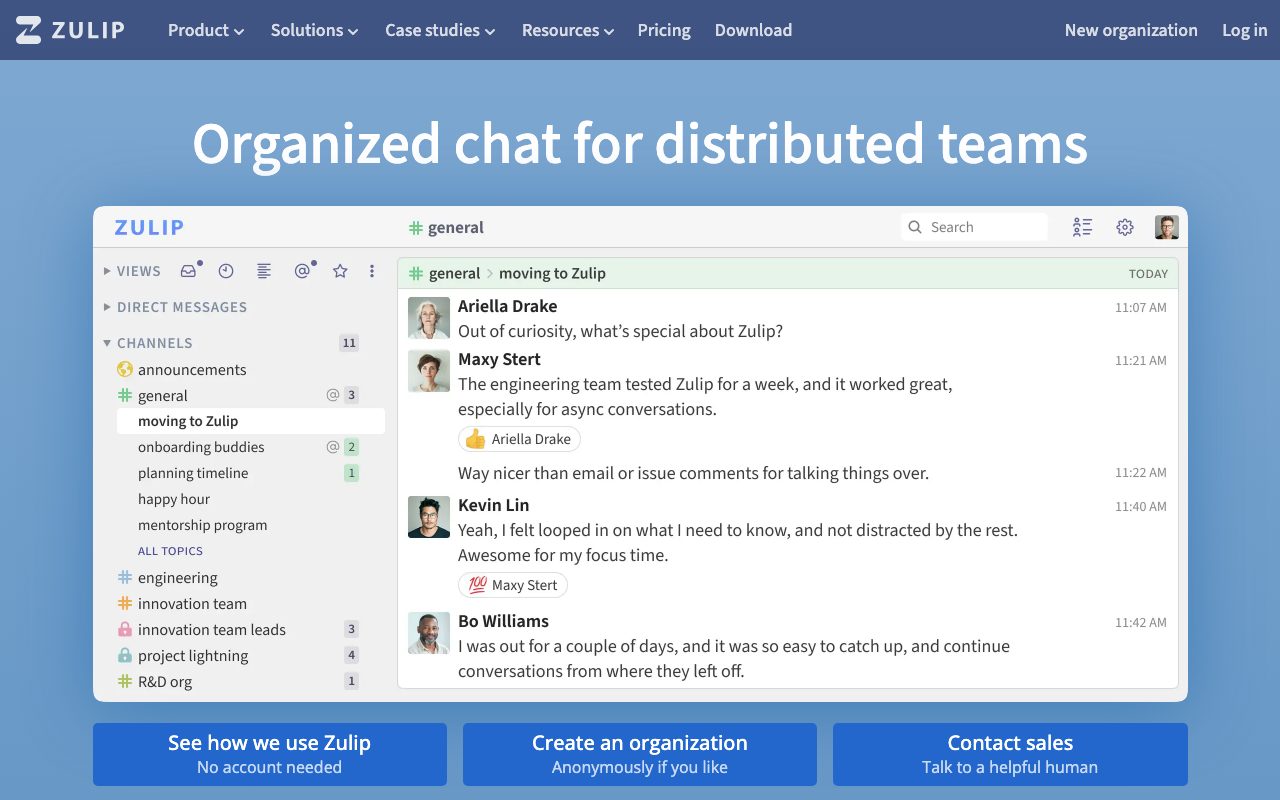
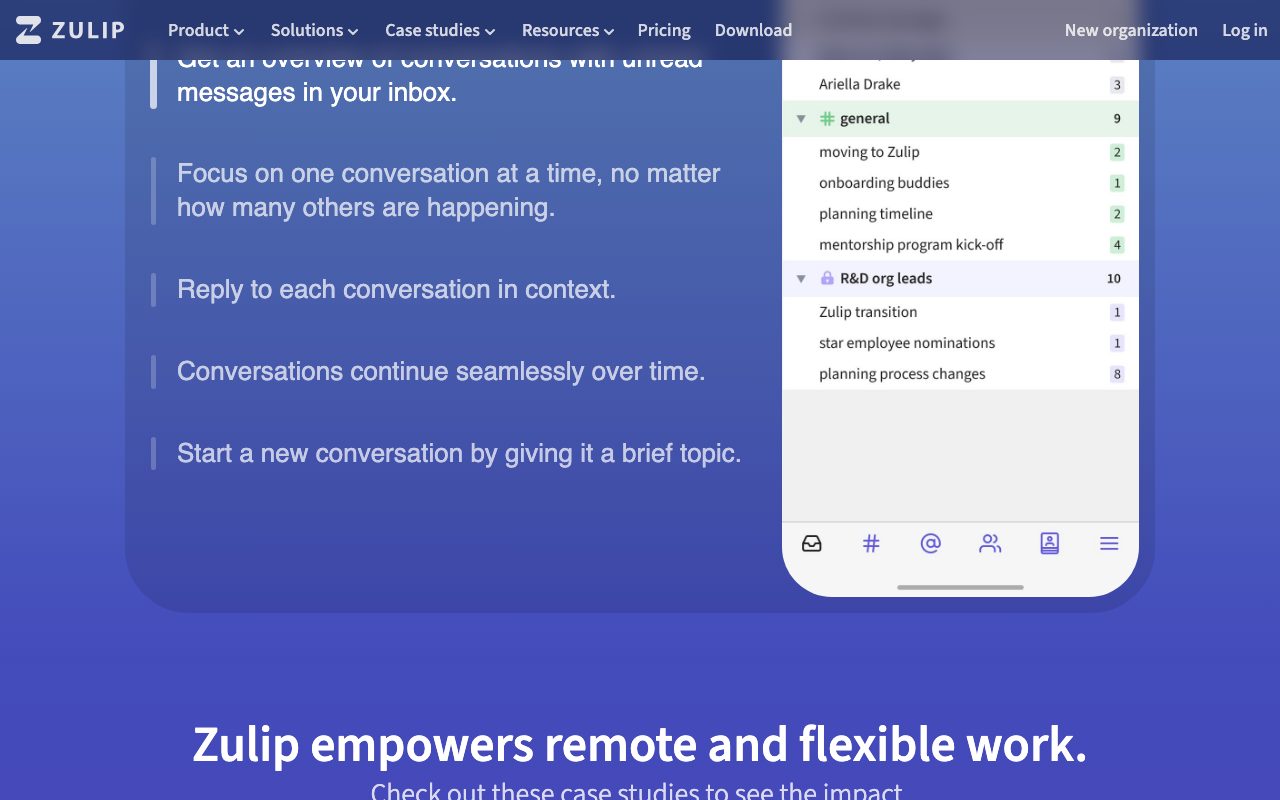
Zulip organizes chat into streams (channels) and topics (threads inside channels). Every message belongs to a topic, and the topic shows up in the sidebar like a thread headline. You can scan unread topics, catch up on the ones that matter, and skip the rest.
This sounds small. The effect on async teams is large. Conversations stay coherent across days; you can come back from a meeting and quickly see the new topics rather than scrolling a chronological mess.
Beyond the topic model, Zulip ships the standard chat features: DMs, group chats, file uploads, integrations with hundreds of services, code formatting that handles syntax highlighting, video calls, and audio. The breadth is comparable to Slack.
Who Zulip is for
Engineering teams that work async. Open-source projects that need long-term searchable archives. Distributed teams across time zones that cannot all be online at once. Communities that want better long-running discussions than Discord's chronological model.
It is less of a fit for high-energy small teams that thrive on Slack's chaos. The topic model has a learning curve; some users never internalize it and treat Zulip like Slack, which is a frustrating experience for everyone.
Pricing
The self-hosted version is open-source under Apache 2.0. You run it on your hardware, own your data, and the cost is your time and infrastructure. Production deployments are not trivial; they are also not unreasonable for a competent team.
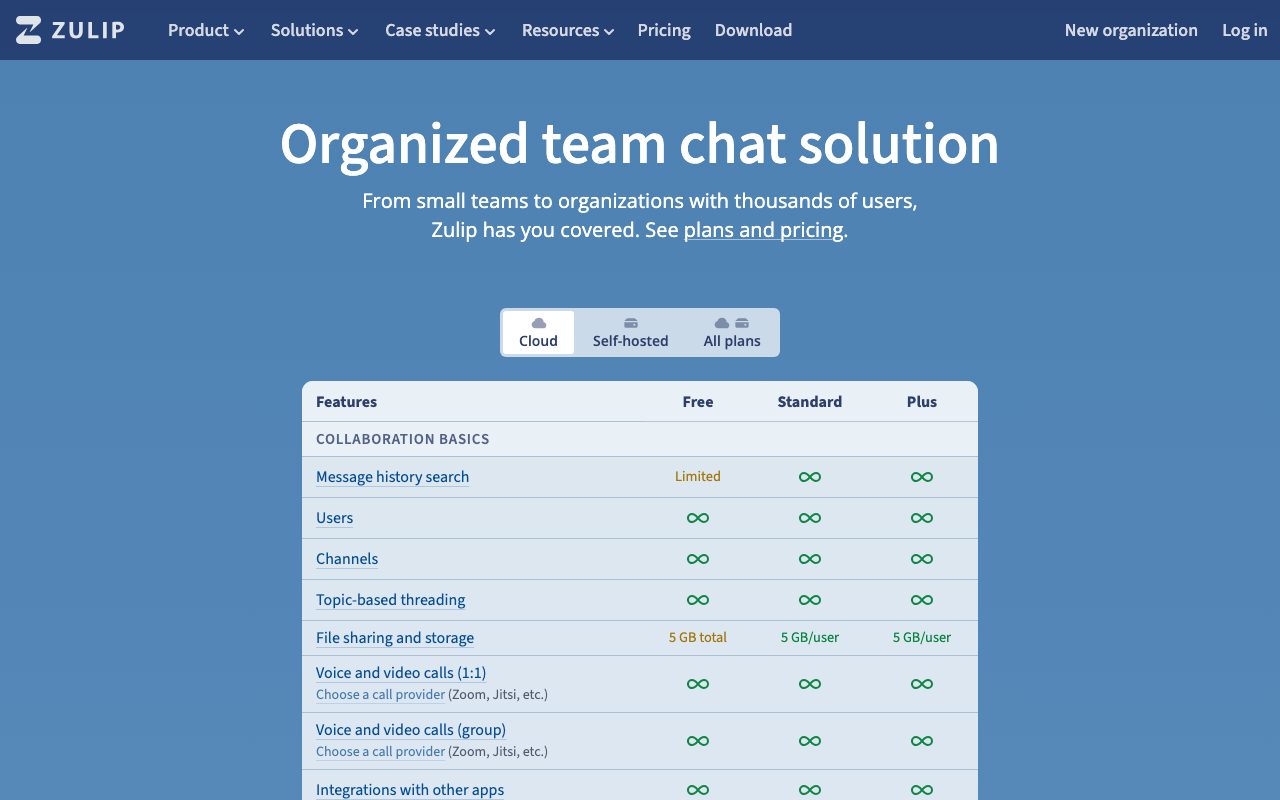
Zulip Cloud is the managed hosted version. Free tier for small teams; standard and plus tiers add features and seats. Open-source projects, academic users, and certain nonprofits get free hosting.
Features that earn the conversion
The topic model is the headline. After a week, scanning new topics in a stream is dramatically faster than scrolling a Slack channel. Long-running discussions keep their identity; archived discussions remain searchable and structured.
Search is excellent. You can search by stream, topic, sender, time range, and content. Old conversations are findable in a way that Slack, with its retention limits and weak search, never matches.
Permissions are granular. Streams can be private, public, web-public, or invite-only. Roles are configurable. Compliance and security settings are deeper than most chat tools.
The integrations are real. GitHub, GitLab, Jira, Trello, PagerDuty, and hundreds more out of the box. Webhooks are first-class.
Self-hosting is a serious option. Open-source, well-documented installation, and a real upgrade path. Some of the largest deployments in the world run on premise.
Tradeoffs
The learning curve is real. Topic-based chat takes a week to internalize. Teams that switch from Slack go through a phase of "this is weird" before they get to "oh, this is better." Some teams give up before they get there.
The UI moves slower than Slack's. Some interactions feel less polished. The Zulip team is small relative to Slack's; they ship steadily and they do not ship faster than the well-funded competitor.
Mobile and desktop apps are good and not great. Notification handling and certain edge cases lag the competition.
Zulip is the rare team chat tool that gets better the bigger the team and the longer the timescale. Most chat tools optimize for the moment; Zulip optimizes for the month.
Zulip vs alternatives
Versus Slack, Zulip's topic model is genuinely better for async work. Slack is more polished, more popular, and easier to drop a team into. Pick Slack for default; pick Zulip if you have async pain.
Versus Discord, Discord is voice-and-community-first; Zulip is async-text-first. Different tools for different shapes.
Versus Microsoft Teams, Teams is bundled into Microsoft 365 and locked into that ecosystem. Zulip is independent and open.
Versus Mattermost and Rocket.Chat (other open-source chat), Zulip's topic model is the differentiator. Mattermost and Rocket.Chat are Slack-shaped open-source clones; Zulip is its own thing.
See best team chat tools, Slack alternatives, and Zulip vs Slack.
Common questions
Is Zulip really open source? Yes, Apache 2.0. Can I self-host it? Yes, with documented installation. Is there a free hosted tier? Yes, for small teams. Does it work for distributed teams? That is its sweet spot. Is it as good as Slack? On most features yes; on the topic model, much better.
Bottom line
Zulip is the right pick for engineering and async-first teams that have felt the pain of Slack at scale. The topic model has a learning curve and is worth it. Self-hosted Zulip is the strongest open-source team chat option for teams that want data ownership.
If your team's chat feels like a firehose and meetings are about catching everyone up, Zulip might be the structural fix. Browse tools for devops teams and the Zulip profile for current pricing.
Onboarding a team to Zulip
The first week is hard. Slack-trained users open Zulip and try to use it like Slack, ignoring topics. Conversations get messy; people complain. This is the predictable phase.
Set the topic-first norm explicitly. "Every message gets a topic. Yes, even short messages. Yes, even now." After the first week, the team starts to feel the benefit.
Document the convention in your handbook. New hires need the explicit rule, not just observation.
Lead by example. If admins post without topics, everyone does. If admins set good topics, everyone learns.
Streams and topics, structured
Streams are stable: one per team or one per project. Topics are ephemeral: one per conversation, one per question, one per decision.
The right test for whether to start a new topic: would this be a new email thread? If yes, new topic. If no, post in the existing topic.
Long-running topics that span weeks are normal in Zulip and weird in Slack. The async-friendly model rewards patience.
Integrations and bots
GitHub: PRs, commits, and CI results post to a topic per repo. The topic structure means the repo's activity is one searchable thread, not a firehose.
Alerts and monitoring: route to a stream with topic-per-incident. Find old incidents by searching the topic name.
Bot tooling: Zulip bots are easy to write; the API is documented and the patterns are clear.
Self-hosting Zulip
The official installation script handles a single-server setup well. Postgres, RabbitMQ, Tornado, all wired up. For most small to mid teams this is enough.
Backup is straightforward but not automatic. Cron a Postgres dump and an uploads sync to S3.
Upgrades happen via the install script in place. Test in staging before production.
Mobile push notifications require Zulip's gateway service or a self-hosted equivalent. The gateway is free with terms; the self-hosted version requires Apple/Google push setup.
Zulip for open source projects
Many open-source projects use Zulip for community discussion. The topic model archives conversations in a way that is searchable for years.
The free hosted tier for open-source projects covers the basics. Larger projects often run their own Zulip instance.
Web-public streams let casual visitors read without an account. New contributors can browse before joining.
The async-first nature suits global open-source communities where contributors are in every time zone.
Zulip mobile experience
Mobile apps for iOS and Android cover the topic-and-stream model. Notifications respect topic mute settings.
Push notifications require the gateway service or self-hosted push setup for self-hosted instances. Cloud users get push out of the box.
The mobile UI is functional and a step behind native apps in some interactions. Acceptable for a chat tool; not best in class.
Zulip integrations and bots worth setting up
GitHub: PRs, issues, releases per repo into one stream with topics per item.
Sentry, PagerDuty, or alert manager: incidents into a stream with topic per incident. Searchable later.
Calendar: meeting reminders into a personal stream so you do not miss them.
Custom bots: the API is documented; writing a bot for your own service is an afternoon.
Zulip in regulated industries
Self-hosted Zulip keeps chat data inside your network. Required for some compliance frameworks.
The Apache 2.0 license allows whatever modifications and deployments your security team requires.
Audit logs and retention policies are configurable. Compliance teams can verify before approving.
Zulip's long-term bet
The bet is that async work will keep growing. Distributed teams, global hiring, less synchronous overhead.
If that bet pays off, Zulip's structural advantages compound. The topic model is the right shape for async; Slack will keep approximating.
If the future swings back to synchronous chat, Zulip is less of a fit. Both worlds exist; Zulip is for one of them.
Zulip migration tooling
Importers exist for Slack, Mattermost, Rocket.Chat, and a few others. Quality of import varies; expect some manual cleanup.
The export from Zulip is full and clean if you ever need to leave. Data ownership is real.
Migration projects are real work. Plan a few weeks for a serious team move.
Tutorial / Demo
Key Features
- Streams plus topics for threaded discussion
- Powerful keyboard navigation and search
- Self-hosted or cloud-hosted
- Markdown, code blocks and LaTeX
- Bots, integrations and webhooks
- Mobile, desktop and web clients
Pros & Cons
What we like
- Topic model genuinely scales for async teams
- Open source with a long track record
- Excellent search and history
- Strong fit for technical orgs
Room for improvement
- Topic discipline takes some onboarding
- UI feels less polished than Slack
- Smaller integration marketplace
Frequently Asked Questions
Is Zulip open source?
Zulip vs Slack, what's the real difference?
Can I self-host Zulip?
Does Zulip have mobile apps?
Is Zulip a good fit for a small startup?
Best For
Featured in
Tags
Alternatives to Zulip
View all


Our take
Tool Index Editorial · May 2026· 4.8/5
Zulip is the kind of tool you adopt when you want threaded team chat that treats topics as a first-class concept.
On the strengths side: Topic model genuinely scales for async teams, Open source with a long track record, and Excellent search and history. Honest gripes: Topic discipline takes some onboarding and UI feels less polished than Slack.
In short: Zulip is a strong pick when you need distributed open-source projects, and a harder sell if topic discipline takes some onboarding would be a dealbreaker.
Editorial opinion from the Tool Index team, written from the public product pages. Not a user review.
Reviews (5)
Quietly excellent
Tried half a dozen options before landing on Zulip. The thing I keep coming back to: open source with a long track record. Found it works best for distributed open-source projects. Still recommending it to people in similar setups.
Pros
- Strong fit for technical orgs
Solid daily driver
Zulip has quietly become part of my daily flow. Real selling point: strong fit for technical orgs. Hard to imagine going back to my previous setup.
Pros
- Topic model genuinely scales for async teams
- Open source with a long track record
Maybe in a year when they fix the basics
Six months of using Zulip, here's what holds up. The thing I keep coming back to: excellent search and history. Got real value out of self-hosted or cloud-hosted. Mostly using it for self-hosters who want a Slack alternative. Honest gripe: smaller integration marketplace. Might revisit when they iterate further.
Cons
- UI feels less polished than Slack
Solid daily driver
Picked Zulip for the lower price, stayed for the actual quality. Genuine strength: excellent search and history. Main use case: distributed open-source projects. Sticking with Zulip.
Pros
- Excellent search and history
Easy 5 from me
Have been using Zulip for a while, here's where I land. Genuine strength: excellent search and history. Worth calling out the bots, integrations and webhooks too. Main use case: self-hosters who want a Slack alternative. Glad I made the switch.
Pros
- Excellent search and history
- Open source with a long track record
- Topic model genuinely scales for async teams
Badge builder
Add Zulip to your website
Choose a badge style and size, preview it here, then copy the generated HTML. Badge images are self-contained SVGs and do not require an external script.

<a href="https://toolindex.net/tools/zulip?ref=badge" target="_blank" rel="noopener">
  <img src="https://toolindex.net/badge/zulip/medium.svg" alt="Zulip - Listed on Tool Index" width="180" height="50" />
</a>How to use the badge
- 1. Pick the style, size, and theme that fit your layout.
- 2. Copy the generated HTML from the code block.
- 3. Paste it into your footer, homepage, or press page.
Standard badge available
The standard listing badge is available now. Score and circle badges are limited to tools currently ranked in the top 10 of a category.
Badge clicks return visitors to this profile with a referral tag so the source remains identifiable.
Related Tools

Substack
Hosted newsletter and publication platform with built-in payments, recommendations, and an audience network for writers.

MailerLite
Friendly, affordable email marketing tool with newsletters, automations, landing pages, and a growing creator toolkit.

Twist
Calmer team messaging where threads replace the firehose of channels

Buttondown
Minimalist newsletter tool built for writers who prefer Markdown, plain text, and quietly powerful tooling under the hood.
Work on Zulip? Request listing access or correction