
Accomplishments
Track your work wins so you never blank on a performance review again
Gallery
About Accomplishments
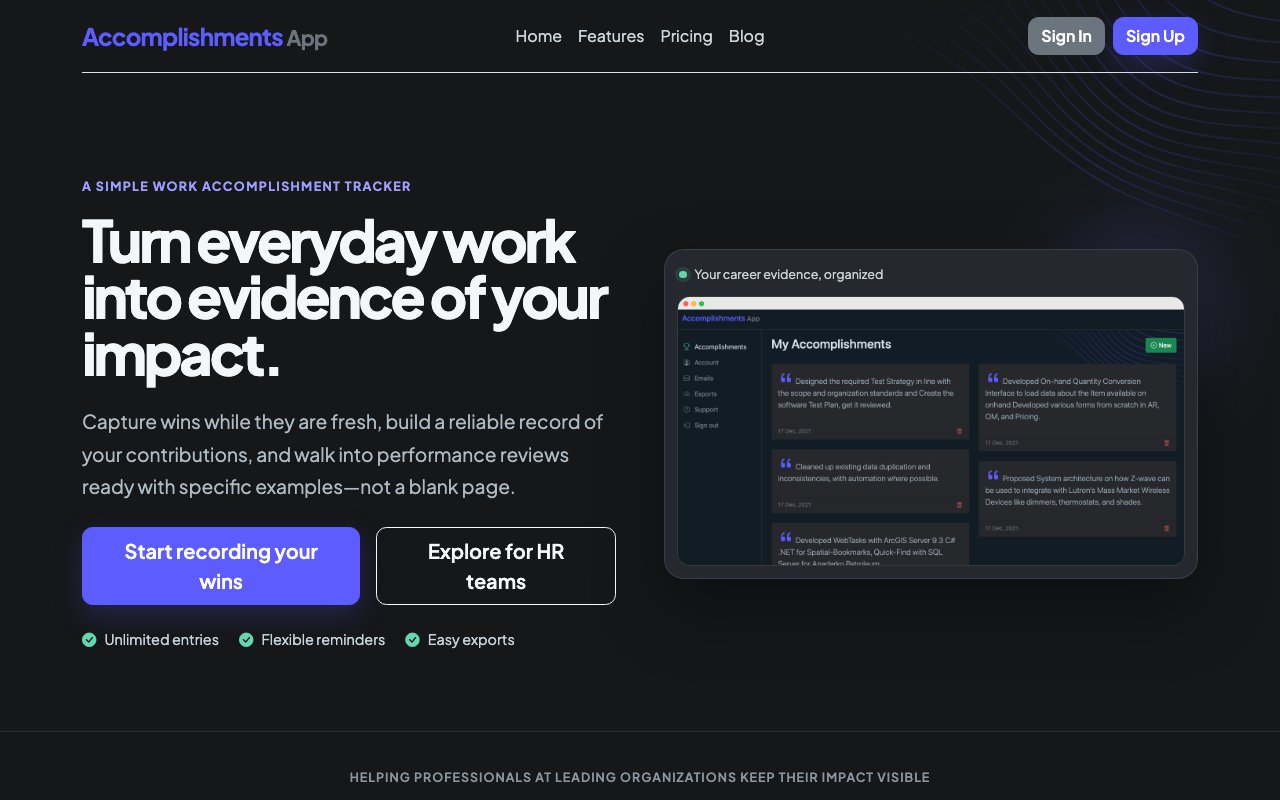
Accomplishments is a work achievement tracker built for professionals who dread performance review season. It gives you a single place to log your wins throughout the year so when self-review time hits you have an organized, searchable history of everything you contributed instead of a frantic scroll through old Slack messages, calendar invites, and email threads. The entire product exists to solve the problem of career amnesia, where you do meaningful work all year but can only recall a fraction of it when someone finally asks.
The underlying problem is one most knowledge workers recognize immediately. You ship a feature, close a deal, fix a critical bug, lead a difficult conversation, or mentor a colleague through something hard. In the moment it feels significant. Three months later it is gone from memory, buried under everything that came after. When performance review season arrives or you sit down to update your resume, you are left reconstructing your contributions from fragments. Some people try to solve this with a notes app or a spreadsheet, but those tools lack any structure for this specific job, so the habit fades. Accomplishments exists to make logging your wins so low friction that you actually keep doing it, then makes retrieving and presenting those wins painless when the time comes.
The workflow is simple. You open the app, jot down what you did in a quick entry with optional markdown formatting for structure, and move on with your day. Entries support context like dates, projects, or categories so you can filter later. The app can send you email reminders on a daily, weekly, or monthly cadence so the habit sticks. These prompts land in your inbox asking what you accomplished recently, and you can reply directly or click through to the app. Over months, the log builds into a detailed record of your professional contributions without requiring much active effort beyond those brief moments of capture.
When review season arrives or you have a career conversation coming up, the export feature becomes the payoff. You pull your history as a CSV, PDF, or HTML document and walk into the meeting with evidence instead of vague recollections. The exports are formatted for professional contexts, meaning you can hand a PDF to a manager or paste CSV rows into a self-evaluation form. Having this record changes the dynamic of performance conversations from memory contests to discussions grounded in documented outcomes.
Individuals use it to build a personal career record that follows them across jobs. Teams use the Team plan to create shared spaces where managers and reports can track accomplishments together, making one on ones and formal reviews more substantive. Enterprise customers from companies like J.P. Morgan, REI, Cedars Sinai, Hitachi, and Lindt have adopted it for exactly this purpose. The shared workspace model means managers can see what their reports are logging and can add their own notes, which helps surface wins that might otherwise go unacknowledged. HR teams have also adopted it to improve the quality of self-evaluations across the organization.
What sets it apart from a generic notes app or spreadsheet is the focus. It is purpose built for this single job, with reminders tuned to the habit, exports formatted for professional contexts, and a structure that keeps entries findable over years. It is not trying to be a second brain, a task manager, or a knowledge base. It is just an accomplishment log, and it does that well. The blog on the site offers guidance on what kinds of wins to capture and how to write them effectively, which helps users get more value from the tool over time. The advice covers framing accomplishments in terms of impact rather than just activity, which matters when those entries eventually land in front of a manager or appear on a resume.
Pricing is unusually straightforward for a SaaS product. The Personal plan is a one time ten dollar payment for lifetime access, which covers unlimited entries, all export formats, the reminder system, and email support. There is no subscription, no annual renewal, and no feature gating. The Team plan runs twelve dollars per month per team and supports up to twenty five members, adding shared workspaces and collaboration features. Teams larger than twenty five can upgrade the member limit. There is no free tier, but the one time personal fee is low enough that the barrier to trying it is minimal, and the team pricing is competitive with similar productivity tools.
Key Features
- Unlimited accomplishment entries with markdown support
- Daily, weekly, or monthly email reminders
- Export to CSV, PDF, or HTML formats
- Searchable history across all entries
- Team workspaces for shared tracking
- One time payment for lifetime personal access
Pros & Cons
What we like
- One time ten dollar payment means no subscription fatigue
- Purpose built for performance reviews, not a general notes app
- Reminder system helps build the logging habit
- Export formats designed for professional contexts
Room for improvement
- No free tier to try before paying
- Team plan limited to twenty five members
- Narrow focus may not appeal to users wanting broader note taking
- No native mobile app mentioned, browser based only
Frequently Asked Questions
What is Accomplishments?
Is Accomplishments free?
Who is Accomplishments for?
How does Accomplishments help with performance reviews?
Best For
Featured in
Alternatives to Accomplishments
View all
CalendHub
Smart scheduling and calendar management for teams
Kevin Gabeci Toolkits
Seven AI toolkits for writing books, making music, cutting video, and building agents.

Eased Into AI
Learn AI from zero. No jargon, no hype, just steps that work.

Fix It Gently
Calm, plain-English fixes for everyday tech problems.
Our take
Tool Index Editorial · Oct 2026· 3.5/5
Accomplishments is a focused work log for recording outcomes before performance review season erases the details. It is for employees who want searchable evidence for reviews, promotion discussions, and resume updates, and for people teams encouraging more specific conversations. We found the daily, weekly, or monthly reminders and CSV, PDF, and HTML exports well matched to that single job.
The page lists personal access at $10 and a team option at $12 per month. Its limitation is also its appeal. A disciplined notes or spreadsheet habit can cover much of the same ground, and the site does not show a native mobile app. Accomplishments earns its keep through prompts and structure, but it will only help if users consistently record concrete results rather than vague activity.
Editorial opinion from the Tool Index team, written from the public product pages. Not a user review.
Reviews (0)
Badge builder
Add Accomplishments to your website
Choose a badge style and size, preview it here, then copy the generated HTML. Badge images are self-contained SVGs and do not require an external script.

<a href="https://toolindex.net/tools/accomplishments?ref=badge" target="_blank" rel="noopener">
  <img src="https://toolindex.net/badge/accomplishments/medium.svg" alt="Accomplishments - Listed on Tool Index" width="180" height="50" />
</a>How to use the badge
- 1. Pick the style, size, and theme that fit your layout.
- 2. Copy the generated HTML from the code block.
- 3. Paste it into your footer, homepage, or press page.
Standard badge available
The standard listing badge is available now. Score and circle badges are limited to tools currently ranked in the top 10 of a category.
Badge clicks return visitors to this profile with a referral tag so the source remains identifiable.
Related Tools

Confluence
Atlassian's long-running team wiki that anchors many enterprise knowledge stacks
Asana
Project management for teams that live in projects, tasks and dependencies
Kevin Gabeci Toolkits
Seven AI toolkits for writing books, making music, cutting video, and building agents.

Logseq
An open-source outliner notes app where every bullet is a first-class block
Work on Accomplishments? Request listing access or correction