
Actual Plan
Connect roadmaps, tasks, team capacity, and project updates for small organizations
Gallery
About Actual Plan
Actual Plan is a project planning and task management workspace for small organizations that need more structure than a spreadsheet but less machinery than an enterprise platform. It keeps roadmaps, goals, milestones, tasks, ownership, schedules, and dependencies in one model so a project can move from intent to weekly execution without being split across unrelated documents. Board, list, timeline, and people views show the same underlying work from different angles. The product is designed for teams where coordination itself takes significant effort, including nonprofit campaigns, volunteer groups, startups with customer commitments, and operations teams managing recurring assignments.
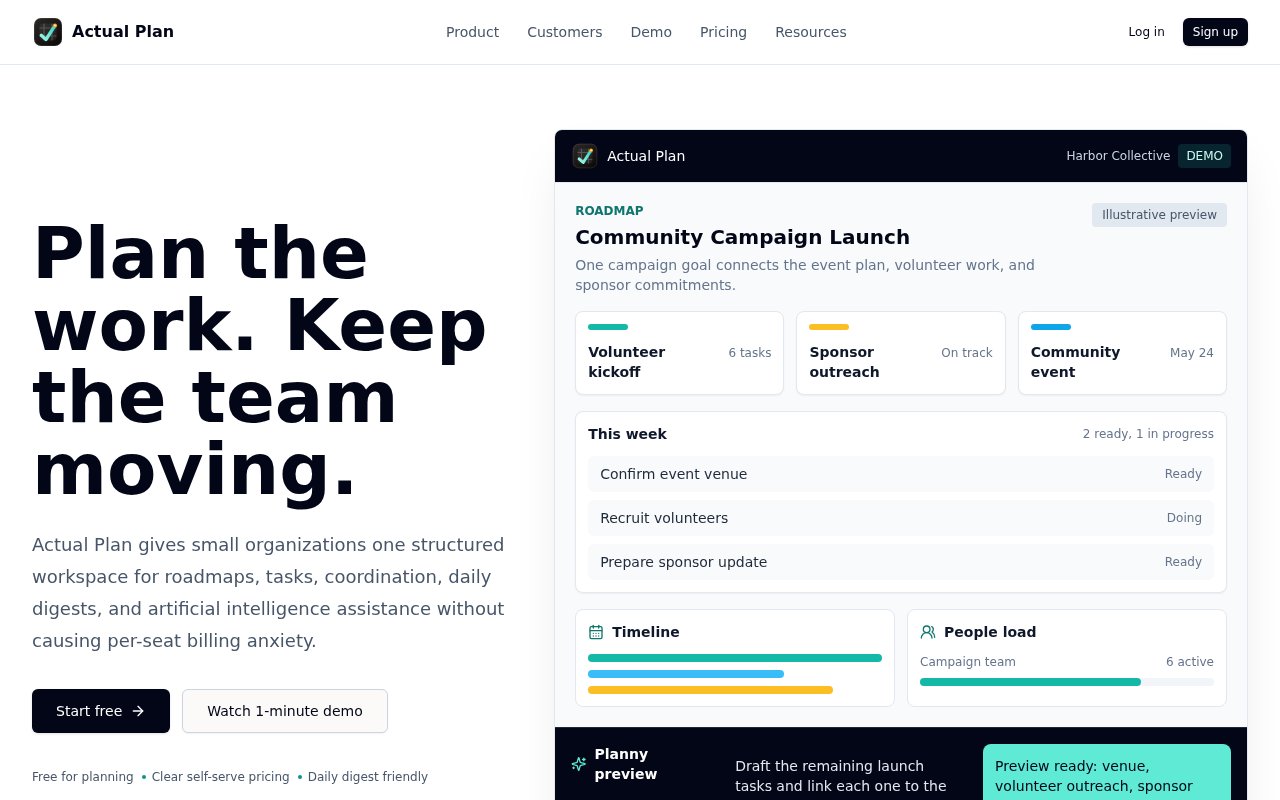
The roadmap provides the strategic layer. Teams can connect initiatives and goals to milestones and active work, then use task owners, dates, and dependencies to make the plan operational. Board and list views support day-to-day execution, the timeline surfaces schedule relationships, and the people view shows workload and availability. Actual Plan also identifies work that is ready to move, helping a coordinator see where dependencies or missing ownership are slowing progress. Because these views share one task model, a status change does not depend on maintaining a separate roadmap slide, staffing sheet, and ticket board. A campaign goal, for example, can remain connected to the event plan, volunteer tasks, and sponsor commitments while each contributor works from the view that suits the immediate job.
Communication is designed to stay informative without turning every edit into a notification. Daily digests and project pulses summarize activity for people who need awareness but do not need to watch the workspace constantly. That makes the product suited to contributors who participate at different frequencies, such as volunteers, advisors, or colleagues who join only for a particular phase. Organization settings, permissions, billing controls, and audit trails give administrators a defined place to manage the workspace. The site also mentions imports, along with a command-line interface and API for managing Actual Plan through automation workflows as well as through the web application. Templates for campaigns, grants, startup roadmaps, and internal operations are included across plans, giving a new workspace a more concrete starting point than an empty task list.
Planny is the built-in artificial intelligence planning assistant. It can draft tasks, subtasks, and milestones from a goal or rough plan, inspect dependencies and schedule pressure, point out unclear ownership, summarize progress, and prepare exports or team updates. Its proposed changes remain in a preview until a user confirms them. That review step is important because the assistant is positioned as a way to shape and inspect structured work, not as an autonomous system that silently changes the plan. Teams can use it to turn an early project idea into a reviewable task structure or to prepare a status update from work that is already tracked. This is particularly relevant when a coordinator has a useful outcome in mind but has not yet broken it into owners, dates, and connected steps.
Actual Plan's billing model is based on monthly contributors rather than every invited person. The service calls a contributor an active member. Someone becomes active for a month after creating, editing, or completing a task, commenting, using Planny, or making another tracked project change. People who only view work can remain collaborators without taking one of the included active-member spots, and the count resets in the next monthly period. The site says exceeding the included number does not suddenly block work. Instead, Actual Plan alerts the workspace and helps it choose a more suitable plan if the higher level of activity continues. This structure is designed for organizations whose participant list is larger than the group that actively edits work every month.
The service is freemium, with free access intended for planning a real first project and paid tiers for teams that begin relying on shared coordination, digests, Planny, and automations. Sign-up does not require a sales call or payment card, and the first project remains private until the user invites someone. At the time of review, the public pricing page described the model but its live plan catalog was still loading, so exact tier amounts and allowances could not be verified without entering the product. That limits upfront price comparison, but the site clearly distinguishes free planning access from paid coordination. Actual Plan is most compelling for a small team that values a connected roadmap and calm updates, and does not need the full breadth of a large enterprise suite.
Key Features
- Connected roadmap and task model
- Board, list, and timeline views
- People workload and availability
- Daily digests and project pulses
- Planny AI planning assistant
- CLI and API access
Pros & Cons
What we like
- Keeps strategy and weekly execution connected
- Lets unlimited viewers remain collaborators
- Previews AI changes before applying them
- Supports web, command-line, and automated workflows
Room for improvement
- Public pricing does not expose current plan amounts
- Activity-based billing may vary between months
- Focused on small organizations rather than enterprises
- AI suggestions still require human review
Frequently Asked Questions
What is Actual Plan?
What does Planny do?
Is Actual Plan free?
How does Actual Plan count paid users?
Best For
Featured in
Alternatives to Actual Plan
View all
CalendHub
Smart scheduling and calendar management for teams
Kevin Gabeci Toolkits
Seven AI toolkits for writing books, making music, cutting video, and building agents.

Eased Into AI
Learn AI from zero. No jargon, no hype, just steps that work.

Fix It Gently
Calm, plain-English fixes for everyday tech problems.
Our take
Tool Index Editorial · Sep 2026· 3.5/5
Actual Plan connects roadmaps, goals, tasks, dependencies, schedules, and team capacity in one small-team workspace. We found the shared task model and preview-before-apply behavior for its Planny assistant sensible, especially for volunteer groups and small organizations that need structure without an enterprise rollout. The free plan supports one project, 250 tasks, and three active members. Starter is $19 per month and Team is $49.
Billing counts people who contribute during the month rather than everyone invited, which is fairer for occasional collaborators but less predictable than fixed seats. The product is also early enough that its examples are largely illustrative and its first-five-paying-teams invitation is still visible. Teams should trial one real project and test imports, digests, permissions, and workload views before moving a critical operation into it.
Editorial opinion from the Tool Index team, written from the public product pages. Not a user review.
Reviews (0)
Badge builder
Add Actual Plan to your website
Choose a badge style and size, preview it here, then copy the generated HTML. Badge images are self-contained SVGs and do not require an external script.

<a href="https://toolindex.net/tools/actual-plan?ref=badge" target="_blank" rel="noopener">
  <img src="https://toolindex.net/badge/actual-plan/medium.svg" alt="Actual Plan - Listed on Tool Index" width="180" height="50" />
</a>How to use the badge
- 1. Pick the style, size, and theme that fit your layout.
- 2. Copy the generated HTML from the code block.
- 3. Paste it into your footer, homepage, or press page.
Standard badge available
The standard listing badge is available now. Score and circle badges are limited to tools currently ranked in the top 10 of a category.
Badge clicks return visitors to this profile with a referral tag so the source remains identifiable.
Related Tools

Confluence
Atlassian's long-running team wiki that anchors many enterprise knowledge stacks
Asana
Project management for teams that live in projects, tasks and dependencies
Kevin Gabeci Toolkits
Seven AI toolkits for writing books, making music, cutting video, and building agents.

Logseq
An open-source outliner notes app where every bullet is a first-class block
Work on Actual Plan? Request listing access or correction