
AirmailAI
Private browser chat for multiple AI providers using your own API keys
Gallery
About AirmailAI
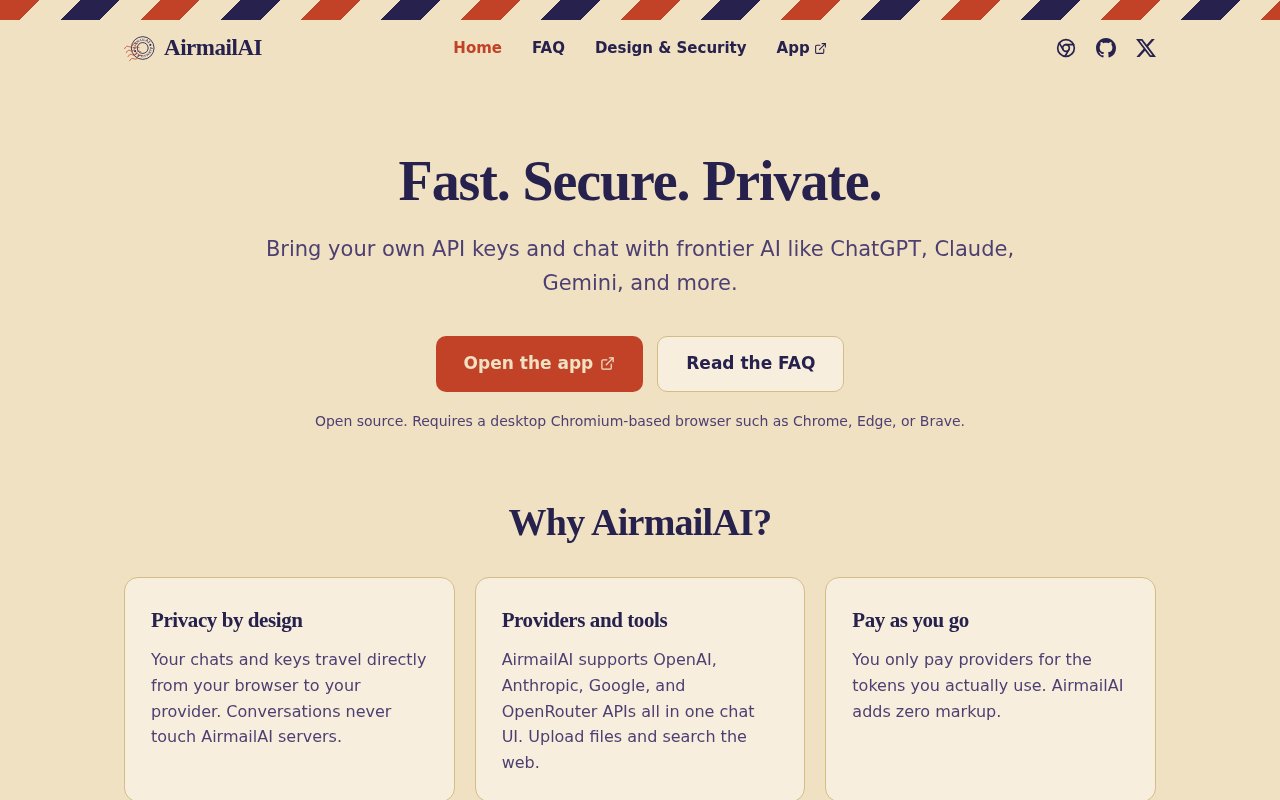
AirmailAI is an open-source, bring-your-own-key chat client for using several AI providers from one browser interface. It supports OpenAI, Anthropic, Google, and OpenRouter, so a user can move among their available models without maintaining a separate chat application for each provider. There is no AirmailAI account and no AirmailAI subscription. Users supply API credentials from the providers they want, then pay those providers for the tokens they consume. The product is aimed at people who value a lightweight common interface and want their conversations kept out of another hosted application database.
The product has a two-part architecture. A static website supplies the chat interface, model choices, provider configuration, and other visible controls. A Chromium browser extension acts as the local backend. It stores API keys and conversation data, accepts requests from the official AirmailAI site, and sends each request directly to the chosen provider over HTTPS. The provider streams its response back through the extension to the page. AirmailAI says its own servers never receive the messages, attachments, system prompts, model settings, or raw API keys involved in a conversation.
The extension is also the boundary that keeps saved credentials away from normal website code. Its protocol lets the AirmailAI page save a key, check whether one exists, ask the extension to make a provider request, or delete the key. It does not include a method for returning the stored raw key to the website. Keys remain in non-synchronized extension storage, while chats, attachments, and file metadata stay in a local IndexedDB database. Interface settings may sync through a signed-in browser profile, but chat history, files, and API credentials do not. Users can export individual chats or perform a bulk export, import AirmailAI, LM Studio, and SillyTavern histories, and delete local data from the settings.
As a chat client, AirmailAI goes beyond plain text prompts. The site lists file uploads and web search, with actual file support depending on the selected provider. OpenRouter can provide access to additional models, including some free options, while the other supported APIs use their own billing and feature rules. AirmailAI does not host models, run inference, or control the answers it displays. That keeps the client focused, but it also means provider terms, retention settings, supported file types, tool behavior, and model quality still govern anything sent outside the browser.
The security design addresses content as well as credentials. Release builds verify the identity of both sides of the website and extension connection, and the extension accepts external messages only from the official site. Imported chats are parsed into a limited schema with bounds on files, chats, messages, and field sizes. Markdown messages are sanitized before display, while raw HTML is shown as text instead of being executed. AirmailAI also says the application does not load third-party analytics or remotely hosted application scripts. These measures reduce exposure inside the client, though they cannot protect data from someone who controls the device or browser profile. Once a request reaches a provider, that provider's security and data policies take over.
The current experience is designed for desktop Chromium-based browsers such as Chrome, Edge, and Brave, and the extension is required. It does not currently work on mobile. That is a meaningful constraint for anyone who expects the same chat history across a phone, laptop, and multiple browser profiles. Local storage also makes the user responsible for exports and device continuity. In return, the setup avoids creating another account, installing a full desktop application, or routing conversations through an AirmailAI backend. It is a particularly good fit for technical users who already understand provider API keys and prefer usage billing to several overlapping chat subscriptions.
AirmailAI itself is free and published under the Apache 2.0 license. It does not add a markup or per-request fee, although paid model usage is still billed directly by the relevant provider and consumer chat subscriptions do not include API access. Users who want to avoid paid inference can choose free models available through OpenRouter, subject to those providers' data practices. The project accepts bug reports and feature requests through GitHub. Its security documentation is unusually specific about browser boundaries, local storage, untrusted chat content, and the point at which responsibility passes to the model provider.
Key Features
- Multiple AI provider support
- Locally stored API keys
- Direct provider requests
- File uploads and web search
- Chat import and export
- No account required
Pros & Cons
What we like
- Keeps conversations off AirmailAI servers
- Combines four provider APIs in one interface
- Charges no markup on provider usage
- Publishes its source under Apache 2.0
Room for improvement
- Requires a desktop Chromium browser extension
- Does not currently support mobile devices
- Users must obtain and fund provider API keys
- Local chat storage does not sync across devices
Frequently Asked Questions
What is AirmailAI?
Does AirmailAI store chats or API keys on its servers?
Is AirmailAI free?
Which devices and browsers support AirmailAI?
Best For
Featured in
Alternatives to AirmailAI
View all
Apatero AI
The creator studio for AI image, video, audio, 3D, and avatars, now at apatero.ai.

SoloDevStack
A solo developer blog built on head-to-head tool comparisons, 580+ posts deep.
Apatero Studio
Creator studio for AI image, video, audio, 3D, and avatars. Every model worth using, in one workspace.

Melodex
Turn your idea into an AI-generated music video
Our take
Tool Index Editorial · Sep 2026· 4.0/5
AirmailAI puts OpenAI, Anthropic, Google, and OpenRouter in one browser chat while keeping keys and conversations out of its own servers. It is free and open source, with users paying providers directly for API usage. We like the unusually clear model and the absence of another account or subscription.
The tradeoff is substantial. It requires a desktop Chromium extension, has no mobile experience, and local chat history does not follow the user across devices. Provider retention rules still apply once a prompt leaves the browser. For technical users who already manage API keys, this is a thoughtful and credible common front end.
Editorial opinion from the Tool Index team, written from the public product pages. Not a user review.
Reviews (0)
Badge builder
Add AirmailAI to your website
Choose a badge style and size, preview it here, then copy the generated HTML. Badge images are self-contained SVGs and do not require an external script.

<a href="https://toolindex.net/tools/airmailai?ref=badge" target="_blank" rel="noopener">
  <img src="https://toolindex.net/badge/airmailai/medium.svg" alt="AirmailAI - Listed on Tool Index" width="180" height="50" />
</a>How to use the badge
- 1. Pick the style, size, and theme that fit your layout.
- 2. Copy the generated HTML from the code block.
- 3. Paste it into your footer, homepage, or press page.
Standard badge available
The standard listing badge is available now. Score and circle badges are limited to tools currently ranked in the top 10 of a category.
Badge clicks return visitors to this profile with a referral tag so the source remains identifiable.
Related Tools
Apatero AI
The creator studio for AI image, video, audio, 3D, and avatars, now at apatero.ai.
Kevin Gabeci Toolkits
Seven AI toolkits for writing books, making music, cutting video, and building agents.

Warp
The modern terminal reimagined with AI and collaboration

Bolt.new
Prompt-to-deployed full-stack app inside the browser
Work on AirmailAI? Request listing access or correction