
AppScreenshots
Create localized app store screenshots, device mockups, and icons in a browser
Gallery
About AppScreenshots
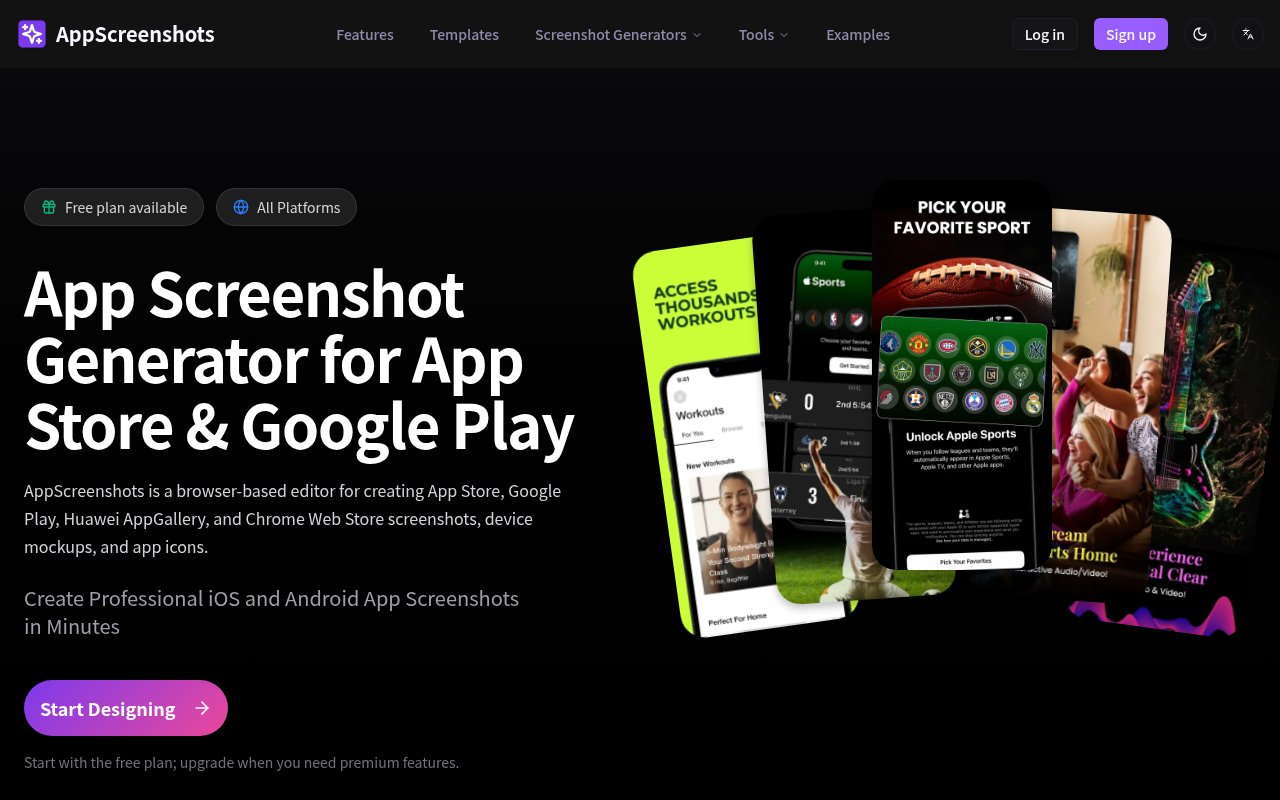
AppScreenshots is a browser-based design tool for turning raw product screens into finished marketing images for mobile and browser extension stores. It focuses on the exact assets developers need for Apple App Store, Google Play, Huawei AppGallery, and Chrome Web Store listings. Instead of rebuilding the same composition for every required canvas, a maker can work from one project, place screenshots into device frames, add explanatory copy, and export the store sizes needed for release. The product also includes related tools for app icons, mockups, and resizing, so the visual work around a launch can stay in one focused environment.
The normal workflow starts with a template or a blank composition. A user brings in app screens, chooses from supported phone, tablet, watch, or desktop frames, then adjusts text and visual treatment to match the app. Backgrounds can use solid colors, gradients, or uploaded images. Highlight elements help call attention to a particular control or feature, while the template library provides an existing layout when a blank canvas would take too long. Because the editor runs in the browser, there isn't a desktop package to install or a separate design file to keep in sync before returning to a screenshot project.
Export is built around marketplace requirements rather than generic image dimensions. AppScreenshots lists presets for current iPhone and iPad sizes, Android phones and tablets, and Apple Watch, then produces PNG or JPG files. A single design can be exported across App Store and Play Store sizes, which removes much of the repetitive resizing that comes with a mobile release. The separate mockup creator adds more than 50 device frames and can be used without signing up. Free plan exports don't carry a watermark, an important practical detail for a small developer who wants to test the editor on a real listing before paying.
AI features provide a faster starting point when the user doesn't already have a composition in mind. The generator accepts a description of the app and creates store screenshot layouts, while smart layout logic arranges the elements. This is best treated as a draft that can be edited, not a replacement for knowing what the app page needs to communicate. AI usage is metered by plan. The free account includes one lifetime AI workflow, Pro includes 30 workflows in each billing cycle, and the Lifetime plan refreshes five workflows monthly. Those limits make the conventional editor and templates important parts of the product rather than secondary features.
Localization is another substantial part of the workflow. A project can hold versions for more than 14 languages, including English, Chinese, Japanese, Korean, Spanish, French, German, Portuguese, Russian, Arabic, Hindi, Thai, and Vietnamese. Built-in AI translation can update screenshot copy in batches, with font recommendations intended to handle writing systems such as CJK, Cyrillic, and Arabic. Batch export then packages the translated versions in a ZIP, organized by language folders or filename suffixes. Teams publishing in several regions can avoid maintaining a separate design document for every locale, although batch translation and batch export require a paid plan.
The clearest fit is an indie developer, product marketer, or small app team that ships to multiple stores and revises listing graphics with each release. A general design suite can produce the same pixels, but it usually leaves the size matrix, device framing, and localized copies to the user. AppScreenshots narrows the workspace to those recurring jobs. That focus makes routine updates approachable, while also making it less suitable for broader brand systems or unusual illustration work. Teams with an established design process may use it mainly for final framing, translation, and export rather than for the original campaign concept.
Access is freemium. The free plan allows up to two screenshot projects, includes store size presets, templates, device frames, one lifetime AI workflow, and watermark-free PNG and JPG export. Pro costs $99 per year and adds unlimited projects, 30 AI workflows per billing cycle, batch translation and export, and Pro templates. A $199 Lifetime option offers unlimited projects, eligible premium templates, priority support, batch tools, and five AI workflows refreshed each month. The site also sells nonexpiring credits for permanently unlocking individual templates, which gives occasional users another route besides a subscription.
Key Features
- Multi-store size presets
- Device mockup creator
- AI screenshot layouts
- Batch language translation
- Localized ZIP export
- App icon generation
Pros & Cons
What we like
- Covers Apple, Google, Huawei, and Chrome stores
- Free exports have no watermark
- One project can serve multiple languages
- Lifetime purchase is available alongside Pro
Room for improvement
- Free plan is limited to two projects
- Batch translation and export require payment
- AI workflows are capped on every plan
- Focused on store assets, not general design
Frequently Asked Questions
What is AppScreenshots?
Is AppScreenshots free?
Can AppScreenshots create localized store images?
Which store and device sizes does it support?
Best For
Featured in
Alternatives to AppScreenshots
View all
Framer
Visual website builder that lets designers ship production-grade marketing sites with real CMS, SEO controls, and code components.

Tailwind CSS
Rapidly build custom designs without leaving your HTML

Apatero Studio
Creator studio for AI image, video, audio, 3D, and avatars. Every model worth using, in one workspace.

Pixel Painters
Unlimited graphic design subscriptions built only for churches and ministries
Our take
Tool Index Editorial · Oct 2026· 4.0/5
AppScreenshots is a browser editor for building localized store images, device mockups, and icons for Apple, Google, Huawei, and Chrome listings. It fits indie developers and small product teams that repeatedly need the same design in several device sizes and languages. The free plan allows two projects, one lifetime AI workflow, and watermark free PNG or JPG export.
We found the store specific workflow more useful than a generic design canvas for this job. Device presets, batch localization, templates, and organized export remove repetitive release work. Pro costs $99 a year, while a $199 lifetime plan includes unlimited projects and five AI workflows refreshed monthly. Batch translation and export are paid features, and every plan caps AI use. It will not replace a full brand design tool, but its narrow focus and honest free tier make it easy to recommend.
Editorial opinion from the Tool Index team, written from the public product pages. Not a user review.
Reviews (0)
Badge builder
Add AppScreenshots to your website
Choose a badge style and size, preview it here, then copy the generated HTML. Badge images are self-contained SVGs and do not require an external script.

<a href="https://toolindex.net/tools/appscreenshots?ref=badge" target="_blank" rel="noopener">
  <img src="https://toolindex.net/badge/appscreenshots/medium.svg" alt="AppScreenshots - Listed on Tool Index" width="180" height="50" />
</a>How to use the badge
- 1. Pick the style, size, and theme that fit your layout.
- 2. Copy the generated HTML from the code block.
- 3. Paste it into your footer, homepage, or press page.
Standard badge available
The standard listing badge is available now. Score and circle badges are limited to tools currently ranked in the top 10 of a category.
Badge clicks return visitors to this profile with a referral tag so the source remains identifiable.
Related Tools
Apatero Studio
Creator studio for AI image, video, audio, 3D, and avatars. Every model worth using, in one workspace.
Tailwind CSS
Rapidly build custom designs without leaving your HTML

Figma
Collaborative interface design tool

Marvel
Lightweight prototyping platform for turning images and screens into clickable mobile and web prototypes.
Work on AppScreenshots? Request listing access or correction