Artificial Analysis Optima
Build custom AI benchmarks on your own tasks and compare frontier models on quality, cost, and speed
Gallery
About Artificial Analysis Optima
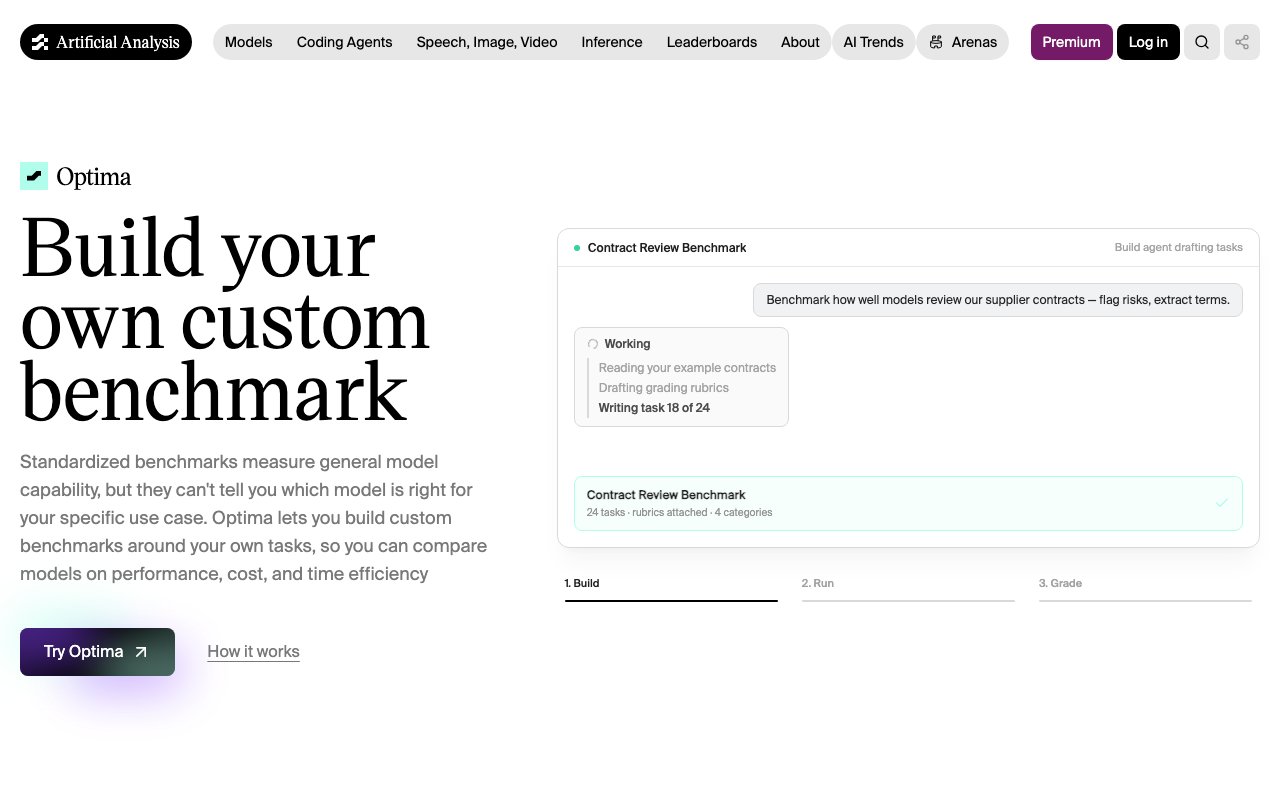
Artificial Analysis Optima is a custom benchmark builder from Artificial Analysis, the independent evaluation group whose model leaderboards have become a standard reference point for comparing frontier AI. Optima takes that same evaluation discipline and points it at your own work instead of generic test sets. You describe the tasks your team actually runs, the platform helps you turn them into a proper benchmark, and then it executes that benchmark across frontier models so you can see which one genuinely performs best for your workload, and what it costs to get there.
The problem it goes after is one every AI team has hit by now. Public benchmarks measure average capability across broad academic tasks, but your workload isn't average. The model that tops a general leaderboard isn't necessarily the model that best handles your contracts, your support transcripts, or your agent pipelines. So teams end up picking models on reputation, then discovering in production that a cheaper model would have done the job just as well, or that the expensive one quietly fails on their edge cases. Optima replaces that guesswork with measurement on the tasks that actually matter to you.
The workflow runs in four steps. First you input context, which means describing your work, attaching examples, or importing traces from real usage. A build agent helps draft the tasks and the evaluation rubrics, so you're not staring at a blank page trying to invent an eval from scratch. Second you pick an evaluation type. Optima supports question-and-answer tasks with objective grading, document processing, agentic task completion, and interactive simulations, which between them cover most of the ways teams actually put models to work. Third you run the benchmark across frontier models, and the platform records tokens consumed, cost per task, and execution time for every run. Fourth you grade and compare, with performance scores and efficiency metrics laid out side by side in a unified leaderboard view that looks a lot like the public Artificial Analysis pages, except it's built entirely from your data.
Grading is flexible. You can lean on rubric-based automated grading for objective tasks, or bring in human evaluation panels when the work calls for judgment that a rubric can't capture. There's also support for testing your own agent over HTTP, so you're not limited to benchmarking bare models. If you've already built an agent and want to know how it holds up when you swap the underlying model, or how your system compares against a stock model on the same tasks, Optima can run that comparison too. That agent testing angle matters more than it sounds, because most eval tooling stops at the model layer while the thing you actually ship is a system wrapped around the model, with its own prompts, tools, and retries.
The evaluation types deserve a closer look, because they map to distinct kinds of work. Q&A with objective grading suits tasks where there's a verifiably right answer. Document processing covers extraction and transformation jobs, the bread and butter of enterprise AI. Agentic task completion evaluates multi-step work where the model has to plan and use tools. Interactive simulations go further still, testing behavior across a back-and-forth rather than a single shot. Picking the right type up front shapes everything downstream, and having all four in one platform means you're not bolting together separate harnesses for each.
It fits companies that are past the experimentation phase and need to make a defensible model decision before deployment. That might be an engineering team choosing between three frontier models for a document pipeline, a platform team trying to justify or cut model spend, or an AI lead who wants a grounded answer to the question of why this model over that one, backed by numbers from their own workload rather than a generic capability score.
What sets it apart is the pedigree and the framing. Artificial Analysis has spent years building evaluation methodology that the industry actually cites, and Optima is that methodology productized for private use cases. It also refuses to treat quality as the only axis that matters. Every result carries cost and time alongside the score, which reflects how model choice really works in production, where a slightly less capable model at a third of the price and half the latency is often the right call. Seeing all three dimensions on one leaderboard makes those tradeoffs visible instead of anecdotal.
Pricing is usage-based. You pay the raw model costs for the tokens your benchmark consumes, with no markup, plus $0.125 per grading criterion and $0.375 per pairwise comparison. There are no seat-based plans advertised, so cost scales with how much benchmarking you run rather than how many people are on your team. For anyone making a six-figure model decision, a modest grading bill to get a measured answer is an easy trade, and because the benchmark persists you can rerun it whenever a new frontier model ships and know within hours whether it's worth switching.
Key Features
- Custom benchmark builder with build agent
- Four evaluation types including agentic tasks
- Rubric-based and human panel grading
- Cost and latency tracked per task
- Bring-your-own-agent testing over HTTP
- Unified quality, cost, and speed leaderboard
Pros & Cons
What we like
- Built on Artificial Analysis's widely cited evaluation methodology
- Measures cost and speed alongside quality, not just scores
- Build agent drafts tasks and rubrics so setup isn't from scratch
- Raw model token costs pass through with no markup
Room for improvement
- No free tier, all runs incur token and grading costs
- Benchmark quality still depends on the examples you provide
- Younger product than the core Artificial Analysis leaderboards
- Usage-based pricing makes large evaluation suites harder to budget
Frequently Asked Questions
What is Artificial Analysis Optima?
Is Optima free?
Who is Optima for?
How is Optima different from public AI benchmarks?
Best For
Featured in
Alternatives to Artificial Analysis Optima

Apatero AI
The creator studio for AI image, video, audio, 3D, and avatars, now at apatero.ai.

SoloDevStack
A solo developer blog built on head-to-head tool comparisons, 580+ posts deep.
Apatero Studio
Creator studio for AI image, video, audio, 3D, and avatars. Every model worth using, in one workspace.

Melodex
Turn your idea into an AI-generated music video
Reviews (0)
No reviews yet
Be the first to share your experience with Artificial Analysis Optima
Sign in to write a reviewBadge builder
Add Artificial Analysis Optima to your website
Choose a badge style and size, preview it here, then copy the generated HTML. Badge images are self-contained SVGs and do not require an external script.

<a href="https://toolindex.net/tools/artificial-analysis-optima?ref=badge" target="_blank" rel="noopener">
  <img src="https://toolindex.net/badge/artificial-analysis-optima/medium.svg" alt="Artificial Analysis Optima - Listed on Tool Index" width="180" height="50" />
</a>How to use the badge
- 1. Pick the style, size, and theme that fit your layout.
- 2. Copy the generated HTML from the code block.
- 3. Paste it into your footer, homepage, or press page.
Standard badge available
The standard listing badge is available now. Score and circle badges are limited to tools currently ranked in the top 10 of a category.
Badge clicks return visitors to this profile with a referral tag so the source remains identifiable.
Related Tools
Apatero AI
The creator studio for AI image, video, audio, 3D, and avatars, now at apatero.ai.
Kevin Gabeci Toolkits
Seven AI toolkits for writing books, making music, cutting video, and building agents.

Warp
The modern terminal reimagined with AI and collaboration

Bolt.new
Prompt-to-deployed full-stack app inside the browser
Work on Artificial Analysis Optima? Request listing access or correction