
Banquish
Pull live pieces out of websites and arrange them into one workspace on your Mac
Gallery
About Banquish
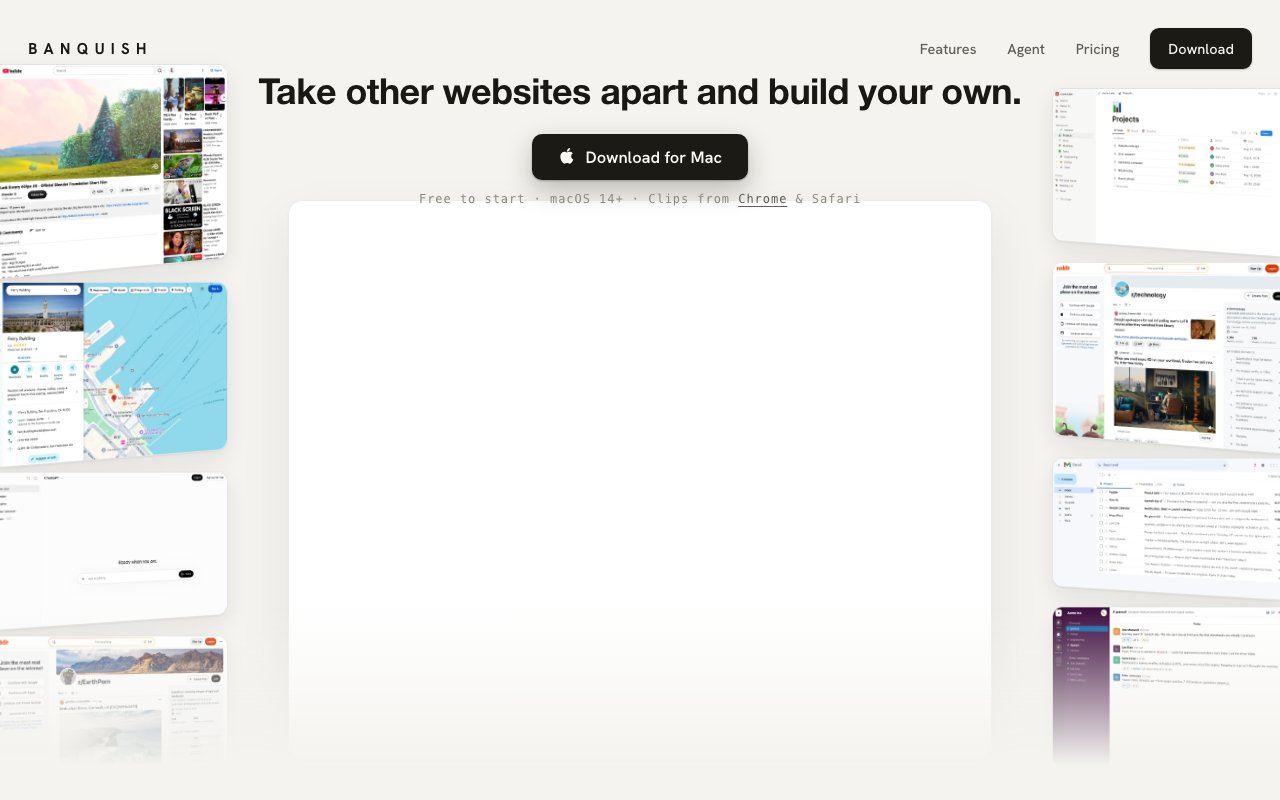
Banquish is a macOS app that lets you pull individual pieces out of websites and arrange them on a single canvas, turning a sprawl of browser tabs into one purpose-built workspace. Point at a search box, a video, a price widget, or a chat thread on any page, and it lands on the canvas as a live panel that still scrolls, still updates, and still knows you are logged in. The pitch is to make the web your workspace, and unusually for a tagline, that is a fairly literal description of what the product does. Because picking works from inside the app as well as from Chrome and Safari, you can find and extract new pieces without ever leaving the canvas you are building.
The problem it attacks is the fifteen-tab research session. Comparing three product listings means three full tabs, plus a notes app, plus whatever dashboard you are watching on the side, and every one of those tabs shows an entire page when you actually care about one region of it. Switching between them costs attention every single time, and the thing you wanted to keep an eye on is always buried behind the thing you are currently reading. Banquish inverts that arrangement. You keep only the fragments that matter and lay them side by side, so the whole task is visible at once instead of hidden behind a row of favicons. The usual workarounds, split screens, pinned tabs, a second monitor, all still show whole pages, so the noise scales with the number of sources rather than with the size of the actual task.
The workflow comes down to three steps. First you pick an element on a webpage, either in Chrome through a clipper extension, in Safari through native integration, or from inside the app itself. Then you drop it, and the selected piece arrives on the canvas as a functional panel rather than a screenshot or a bookmark. Finally you arrange, positioning as many panels as the task demands until the canvas looks like a control room built for exactly what you are doing. Because the panels stay live, session state carries over, which means a logged-in dashboard stays logged in and a price keeps updating without you touching anything. The result reads less like a browser and more like a dashboard you assembled by hand, except every widget on it is a working piece of the real web rather than a static embed.
What separates Banquish from a tiling window manager or a split-screen browser is the agent that sits on top. It reads across everything on the canvas and takes instructions in plain language, so you can ask it to compare prices across the three listings you have pulled in and it works with the panels in front of it rather than going off to search the web from scratch. On the Pro plan the agent also runs scheduled tasks, so recurring checks can happen on their own instead of depending on you remembering to look. That is a meaningful difference from a generic chatbot, because the agent's context is the exact set of sources you curated onto the canvas, not whatever a search engine happens to surface that day.
Pro also unlocks Decks, which group related panels together and display them as a carousel, as tabs, or as a grid. That keeps a big canvas from turning into the same mess it was meant to replace, since a research project, a shopping comparison, and a set of monitoring panels can each live in their own deck and be flipped through in whichever view suits them. Device syncing and support for custom API keys round out the paid tier for people who want the agent running on their own model access. Custom API keys matter for heavier users in particular, since routing agent requests through your own account keeps costs predictable once you are regularly working past the bundled allowance.
The natural audience is knowledge workers whose day is spread across web tools that were never designed to sit together. Researchers collecting sources, analysts watching several dashboards, shoppers comparing listings, and anyone who keeps rebuilding the same pile of tabs every morning will recognize the problem immediately. It is a workflow change rather than a plugin, so it rewards people willing to rethink how they use the web rather than those looking for a small tweak to their current browser. It also suits people who keep a handful of long-running web sessions, support queues, admin panels, chat threads, the kind of pages that deserve permanent screen space rather than a tab that keeps getting lost.
Access is freemium. The free tier includes the workspace tools, the browser clipper, and 25 agent requests per month, which is enough to build canvases and get a feel for the agent. Pro costs ten dollars a month, or 96 dollars a year, and raises the allowance to 1,000 agent requests monthly while adding scheduled tasks, Decks, device syncing, and custom API keys. The app requires macOS 14 or newer on Apple Silicon, so Windows, Linux, and Intel Mac users are out of luck for now. Support is reachable at a published support address, and downloads are available directly from the site.
Key Features
- Live element extraction from any webpage
- Panels that keep sessions and stay logged in
- Plain-language agent that reads across panels
- Decks with carousel, tab, and grid views
- Scheduled recurring agent tasks
- Chrome clipper and native Safari integration
Pros & Cons
What we like
- Extracted panels stay live and functional instead of becoming screenshots
- Free tier includes the full workspace tools and clipper
- Agent works across everything on the canvas at once
- Pro is affordable at ten dollars a month with custom API key support
Room for improvement
- macOS 14 on Apple Silicon only, no Windows or Linux
- Free tier caps the agent at 25 requests per month
- Decks, scheduling, and syncing are locked behind Pro
- Younger product that asks you to change how you browse
Frequently Asked Questions
What is Banquish?
Is Banquish free?
What does the agent actually do?
What are the system requirements?
Best For
Featured in
Alternatives to Banquish

CalendHub
Smart scheduling and calendar management for teams
Kevin Gabeci Toolkits
Seven AI toolkits for writing books, making music, cutting video, and building agents.

Eased Into AI
Learn AI from zero. No jargon, no hype, just steps that work.

Fix It Gently
Calm, plain-English fixes for everyday tech problems.
Reviews (0)
Badge builder
Add Banquish to your website
Choose a badge style and size, preview it here, then copy the generated HTML. Badge images are self-contained SVGs and do not require an external script.

<a href="https://toolindex.net/tools/banquish?ref=badge" target="_blank" rel="noopener">
  <img src="https://toolindex.net/badge/banquish/medium.svg" alt="Banquish - Listed on Tool Index" width="180" height="50" />
</a>How to use the badge
- 1. Pick the style, size, and theme that fit your layout.
- 2. Copy the generated HTML from the code block.
- 3. Paste it into your footer, homepage, or press page.
Standard badge available
The standard listing badge is available now. Score and circle badges are limited to tools currently ranked in the top 10 of a category.
Badge clicks return visitors to this profile with a referral tag so the source remains identifiable.
Related Tools

Confluence
Atlassian's long-running team wiki that anchors many enterprise knowledge stacks
Asana
Project management for teams that live in projects, tasks and dependencies
Kevin Gabeci Toolkits
Seven AI toolkits for writing books, making music, cutting video, and building agents.

Logseq
An open-source outliner notes app where every bullet is a first-class block
Work on Banquish? Request listing access or correction