
Bee
Manage Google Calendar and Tasks by texting through iMessage or WhatsApp
Gallery
About Bee
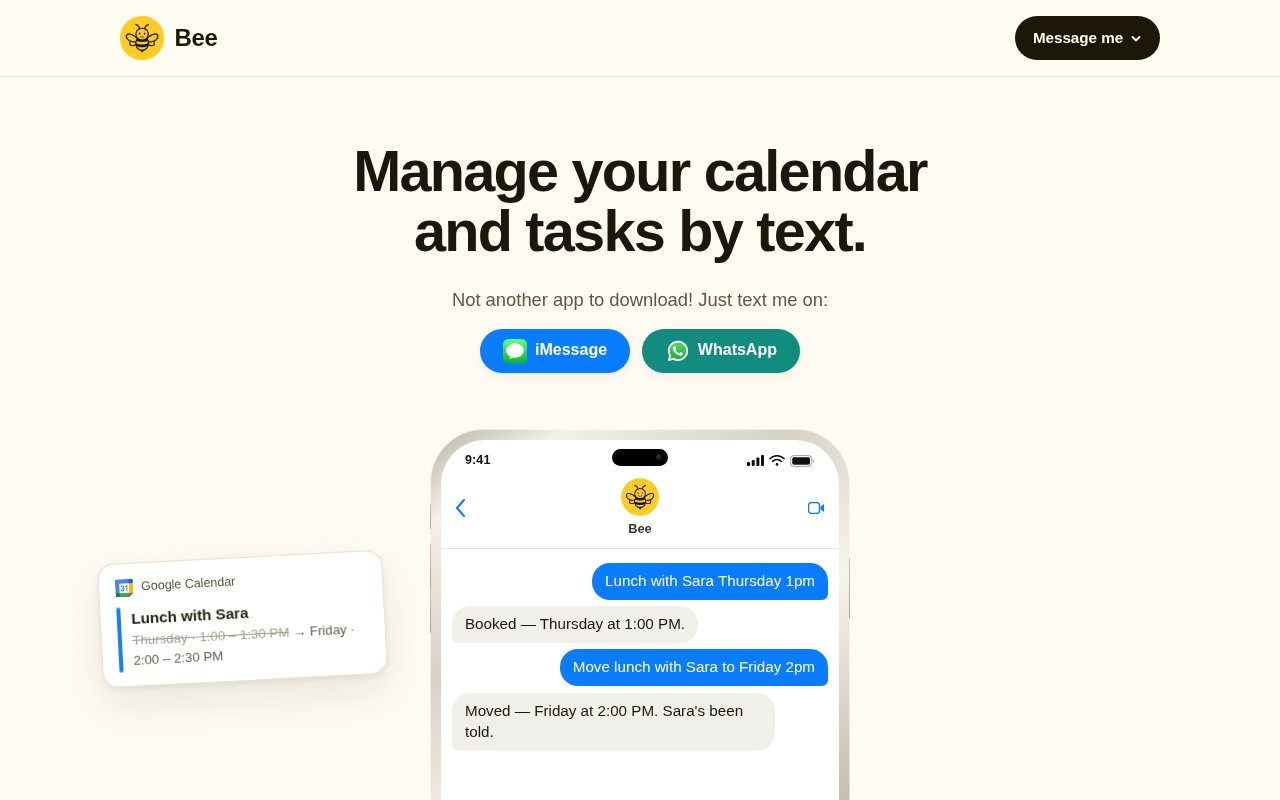
Bee is a text based assistant for managing a calendar and task list without opening another productivity app. A user messages it through iMessage or WhatsApp in ordinary language, and Bee turns the request into an event in Google Calendar or a to-do in Google Tasks. The idea is intentionally small and direct. Scheduling something like lunch or a dentist visit can be written as one sentence instead of entered through several form fields, while a task such as renewing a passport can be sent to the same conversation with a due date. It is designed for fast capture when opening a full calendar form would interrupt the moment.
The setup centers on tools many people already have. Bee lives inside the chosen messaging app, then connects to a Google account when calendar or task access is needed. There is no separate Bee app to download and the free start doesn't require a card or a signup form. The website says connecting the Google account takes one tap when the user is ready. That makes the first interaction feel closer to texting an assistant than configuring a traditional planner, although Google Calendar and Google Tasks remain the systems where the resulting items live. Users can start in either of the two supported chat channels from links on Bee's site.
For calendar events, Bee can take a short natural language instruction and sync the event directly to Google Calendar. It can invite guests and attach a Google Meet link when the user asks for one. For to-dos, it sends the item to Google Tasks rather than keeping a second proprietary list. This matters for anyone who already relies on Google's apps across a phone and computer. Bee becomes the quick input layer, while existing Google views, notifications, and organization continue to handle the records after they have been created. The conversational input is especially useful when the date, time, and purpose can all be stated cleanly in one message.
The assistant also closes the loop with proactive messages. It sends a reminder 15 minutes before something starts and provides a morning summary of the day ahead. Those nudges make the conversation useful after the original event has been added, not only at capture time. A busy user can text an appointment while walking, get it onto the right calendar, and later receive a concise prompt in the same kind of channel used to create it. The design is particularly suited to people who remember commitments in the middle of another activity and want to record them before the thought disappears. Morning summaries also give users a predictable overview without asking them to inspect every calendar block.
Bee fits individual professionals, freelancers, students, and anyone whose personal workflow already sits on Google Calendar and Google Tasks. It can reduce friction for quick capture, routine appointments, small errands, guest meetings, and calls that need a Meet link. It is less compelling for teams that need a shared project database, complex dependencies, or detailed calendar administration. The product doesn't present itself as a complete project manager. Its appeal comes from narrowing the job to common scheduling and task actions that can be expressed clearly in a text. People who already spend much of the day in iMessage or WhatsApp are the most natural fit.
The main difference from an ordinary calendar interface is where the work begins. Bee doesn't ask the user to switch context, locate a date, open an event form, and tap through every field. A sentence is the interface, and iMessage or WhatsApp provides the familiar shell. Because the event and task destinations are Google's own products, users don't need to maintain a parallel planner just to gain conversational capture. That focus also creates boundaries. The website names Google Calendar and Google Tasks, not other calendar providers, and both the free and paid plans impose daily message limits. Users with elaborate workflows may still need the full Google interfaces for review and detailed editing.
Bee has a free tier with up to 10 messages a day, available without a card. The Pro plan costs $9 per month and raises the allowance to 100 messages a day, which the site describes as about 3,000 per month. Pro includes Google Calendar and Google Tasks sync, guest invitations, Google Meet links, event reminders, and the morning summary. A subscriber can cancel through a text. The free allowance is enough to test whether conversational scheduling suits a daily routine, while frequent users will need to decide whether the larger quota and included workflow are worth an ongoing subscription.
Key Features
- Natural-language event capture
- Google Calendar sync
- Google Tasks sync
- Guest and Meet invitations
- Fifteen-minute event reminders
- Daily morning summaries
Pros & Cons
What we like
- Works through familiar messaging apps
- Stores events and tasks in Google tools
- Handles guest invites and Meet links
- Offers a card-free permanent tier
Room for improvement
- Supports Google Calendar and Tasks only
- Free use is capped at ten messages daily
- Pro still has a daily message ceiling
- Narrower than a full project manager
Frequently Asked Questions
What is Bee?
Does Bee require another app?
Is Bee free?
Can Bee invite people to meetings?
Best For
Featured in
Alternatives to Bee
View all
CalendHub
Smart scheduling and calendar management for teams
Kevin Gabeci Toolkits
Seven AI toolkits for writing books, making music, cutting video, and building agents.

Eased Into AI
Learn AI from zero. No jargon, no hype, just steps that work.

Fix It Gently
Calm, plain-English fixes for everyday tech problems.
Our take
Tool Index Editorial · Sep 2026· 3.5/5
Bee lets a user add Google Calendar events and Google Tasks by texting through iMessage or WhatsApp. It can invite guests, attach a Meet link, send a reminder, and summarize the day. We like that it uses Google's existing records rather than creating another calendar to maintain. The free tier allows 10 messages daily, while Pro costs $9 monthly for up to 100 a day.
The narrow scope is both its appeal and its limit. It supports Google's calendar and task products, not a wider project system, and even the paid plan has a daily cap. Natural language dates can be ambiguous, so important bookings still need confirmation. For people who already live in messaging apps and Google Calendar, Bee offers genuinely lower friction for quick capture.
Editorial opinion from the Tool Index team, written from the public product pages. Not a user review.
Reviews (0)
Badge builder
Add Bee to your website
Choose a badge style and size, preview it here, then copy the generated HTML. Badge images are self-contained SVGs and do not require an external script.

<a href="https://toolindex.net/tools/bee?ref=badge" target="_blank" rel="noopener">
  <img src="https://toolindex.net/badge/bee/medium.svg" alt="Bee - Listed on Tool Index" width="180" height="50" />
</a>How to use the badge
- 1. Pick the style, size, and theme that fit your layout.
- 2. Copy the generated HTML from the code block.
- 3. Paste it into your footer, homepage, or press page.
Standard badge available
The standard listing badge is available now. Score and circle badges are limited to tools currently ranked in the top 10 of a category.
Badge clicks return visitors to this profile with a referral tag so the source remains identifiable.
Related Tools

Confluence
Atlassian's long-running team wiki that anchors many enterprise knowledge stacks
Asana
Project management for teams that live in projects, tasks and dependencies
Kevin Gabeci Toolkits
Seven AI toolkits for writing books, making music, cutting video, and building agents.

Logseq
An open-source outliner notes app where every bullet is a first-class block
Work on Bee? Request listing access or correction