
Gallery
About BonBook Travel
BonBook Travel is a custom Claude connector for finding and booking flights in a conversation. Instead of opening several search tabs, copying itinerary details, and filling another booking form, a traveler can describe the trip in a new Claude chat, review the options, and tell Claude which one to book. The connector brings BonBook's flight service into the assistant a user is already talking to. It's aimed at people who value speed and continuity more than a traditional grid of fares, especially frequent flyers who repeatedly search, choose, and adjust itineraries.
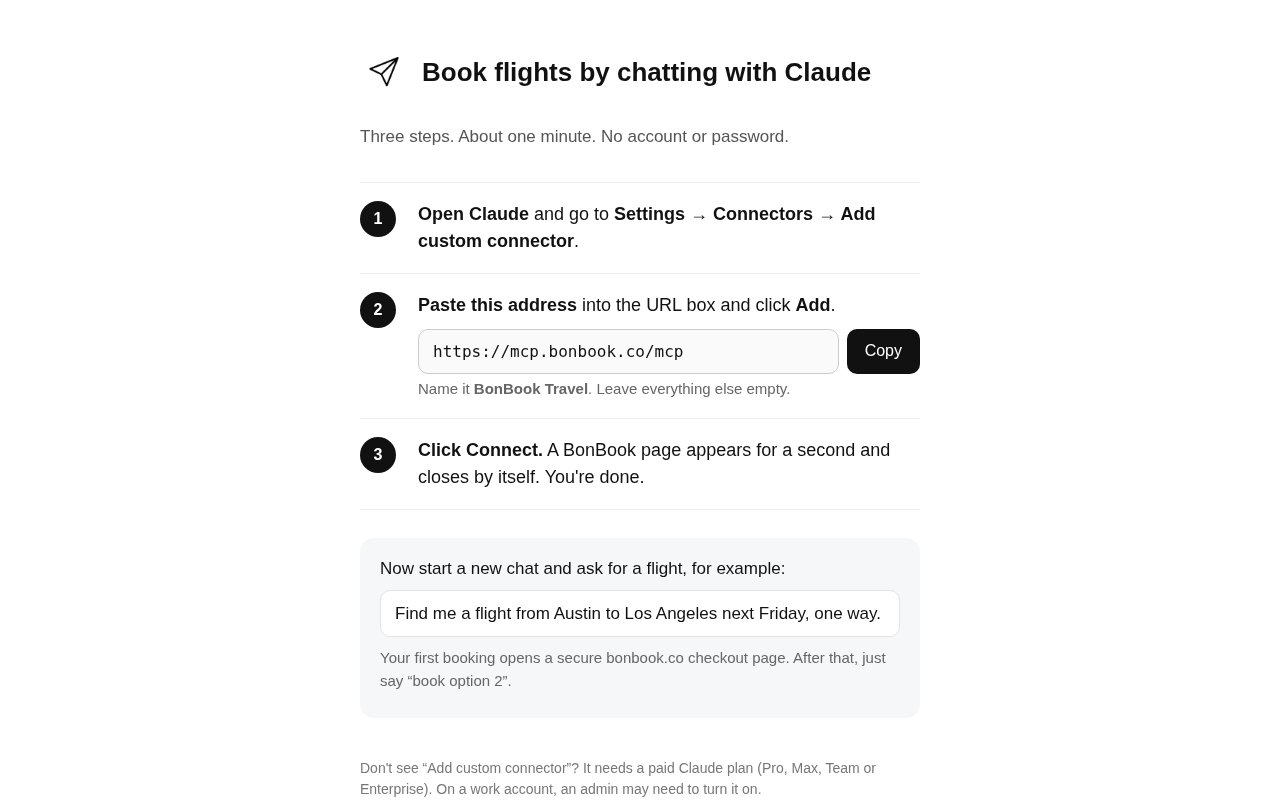
Setup is short and doesn't require a separate BonBook account or password. In Claude, the user opens Settings, goes to Connectors, chooses to add a custom connector, and pastes the address provided on BonBook's setup page. The connector is named BonBook Travel with the remaining fields left empty. Clicking Connect briefly opens a BonBook page, which closes when the connection is complete. The main requirement comes from Claude rather than BonBook. Custom connectors need a paid Claude Pro, Max, Team, or Enterprise plan, and an administrator may need to enable the capability for a managed work account.
Once connected, the traveler starts a fresh chat and asks for a flight in ordinary language. BonBook's launch description says the search can take as much or as little detail as the user wants, while the setup page illustrates a request with origin, destination, date, and direction. The connector returns flight options inside the workflow, and the user can choose one conversationally. The first purchase opens a secure checkout page on bonbook.co. Later, the user can give a short instruction such as booking the second option. That makes the chat useful for moving from intent to purchase, not only for generating links to another search engine.
The connector sits on top of BonBook's broader flight service. BonBook says it can find, book, and change flights, monitor trips, notice delays, and rebook when disruption requires it. It also advertises automatic rebooking and refunds when the fare drops after purchase. Access to airline flight inventory and direct partnerships are part of the underlying offer, and BonBook says this can surface fare options that aren't available to the public through the usual consumer tools. These claims matter because the value isn't simply natural-language search. The service is intended to keep working after the ticket is issued and help when a trip changes.
Loyalty benefits are another explicit part of the positioning. BonBook says travelers keep their card points, airline miles, status, and seat upgrades on flights booked through the service. That makes it more relevant to frequent flyers who don't want convenience to erase the benefits attached to direct airline relationships. The product is also designed around minimal form filling. After the secure checkout needed for the first booking, the conversational selection can become much shorter. A buyer should still review the actual flight, fare rules, and checkout terms before confirming because a natural-language interface doesn't remove the restrictions attached to an airline ticket.
BonBook advertises zero service fees and zero commissions, so the connector is best understood as free access to a booking service rather than a subscription product. The traveler still pays the airline fare and any charges associated with the selected ticket. A paid Claude plan is also required to use this particular interface. The public setup page doesn't describe hotels, rental cars, rail, or a broad expense-management suite, so the current listing should be evaluated as a focused flight tool. That narrow scope can make the interaction clearer, but it won't replace a full travel platform for someone coordinating every part of a trip.
This connector fits founders, consultants, touring teams, and other frequent travelers who already use Claude and want to turn a chat into a live flight booking. Its strongest quality is the compact path from request to options to purchase, backed by a service that says it can continue monitoring the itinerary. The tradeoff is reliance on Claude's paid custom-connector feature and BonBook's checkout for transactions. Work users may also face an administrator approval step before setup is possible. For the right user, it removes repeated searching and form entry while preserving the loyalty details that make frequent travel manageable. Occasional travelers without a paid Claude plan can still use BonBook's email-based service, but they won't get this particular one-click conversational workflow.
Key Features
- Live conversational flight search
- Claude custom connector setup
- Secure first-booking checkout
- Direct airline inventory access
- Automatic disruption monitoring
- Fare-drop rebooking and refunds
Pros & Cons
What we like
- Moves from flight request to booking in chat
- Requires no separate account or password
- Preserves airline status and loyalty benefits
- Charges no service fee or commission
Room for improvement
- Requires a paid Claude plan
- Managed accounts may need administrator approval
- The current workflow focuses only on flights
- The first booking still uses web checkout
Frequently Asked Questions
What is BonBook Travel for Claude?
Do I need a BonBook account?
Is the BonBook connector free?
Will I keep my airline points and status?
Best For
Featured in
Alternatives to BonBook Travel
View allRememori
Embedded memory engine for AI agents in TypeScript with zero dependencies

Demi AI
Demi helps busy professionals eliminate repetitive admin work across their favorite tools.

Lindy
No-code AI agents that handle email, meetings, and recurring workflows
Vapi
Build voice AI agents that take and place phone calls
Reviews (0)
Badge builder
Add BonBook Travel to your website
Choose a badge style and size, preview it here, then copy the generated HTML. Badge images are self-contained SVGs and do not require an external script.

<a href="https://toolindex.net/tools/bonbook?ref=badge" target="_blank" rel="noopener">
  <img src="https://toolindex.net/badge/bonbook/medium.svg" alt="BonBook Travel - Listed on Tool Index" width="180" height="50" />
</a>How to use the badge
- 1. Pick the style, size, and theme that fit your layout.
- 2. Copy the generated HTML from the code block.
- 3. Paste it into your footer, homepage, or press page.
Standard badge available
The standard listing badge is available now. Score and circle badges are limited to tools currently ranked in the top 10 of a category.
Badge clicks return visitors to this profile with a referral tag so the source remains identifiable.
Related Tools

OpenBenchmarks
Public, externally validated benchmarks that help agents pick SaaS APIs

Almanac
A hosted, source-cited wiki that turns your files into context your AI agents can use

Wizard
Self-extending Rust terminal AI agent that works with any model

Chariot
Elastic cloud infrastructure for deploying and scaling AI agent fleets with persistent storage
Work on BonBook Travel? Request listing access or correction