
Box Blanks
Free parametric dieline generator for FEFCO and ECMA box styles with PDF, SVG, and DXF export
Gallery
About Box Blanks
Box Blanks is a free parametric packaging dieline generator that runs in the browser. You pick a box style, enter your dimensions, select a board type, and download a cutting file ready for print or production. It covers both major packaging standards, the full range of FEFCO corrugated codes and 206 ECMA folding carton designs, which puts several hundred box styles behind one tool. FEFCO is the international catalogue of corrugated box constructions, the shipping and mailer end of the packaging world, while ECMA covers folding cartons, the retail boxes products actually sit in on a shelf, so between the two standards the coverage runs from plain shippers to display packaging.
The problem it solves is one every packaging designer, print shop, and small product brand knows well. Dielines are usually either locked inside expensive structural design software like ArtiosCAD, scattered across the internet as fixed-size templates drawn for someone else's dimensions, or ordered from a box supplier who takes days to send back a file. Stretching a downloaded template to new dimensions is exactly where mistakes creep in, because flap lengths, glue tabs, and crease allowances don't scale linearly with panel size, and a dieline that's wrong by a few millimeters only reveals itself after you've cut board. Box Blanks sidesteps all of that by generating the geometry fresh for your exact numbers every time.
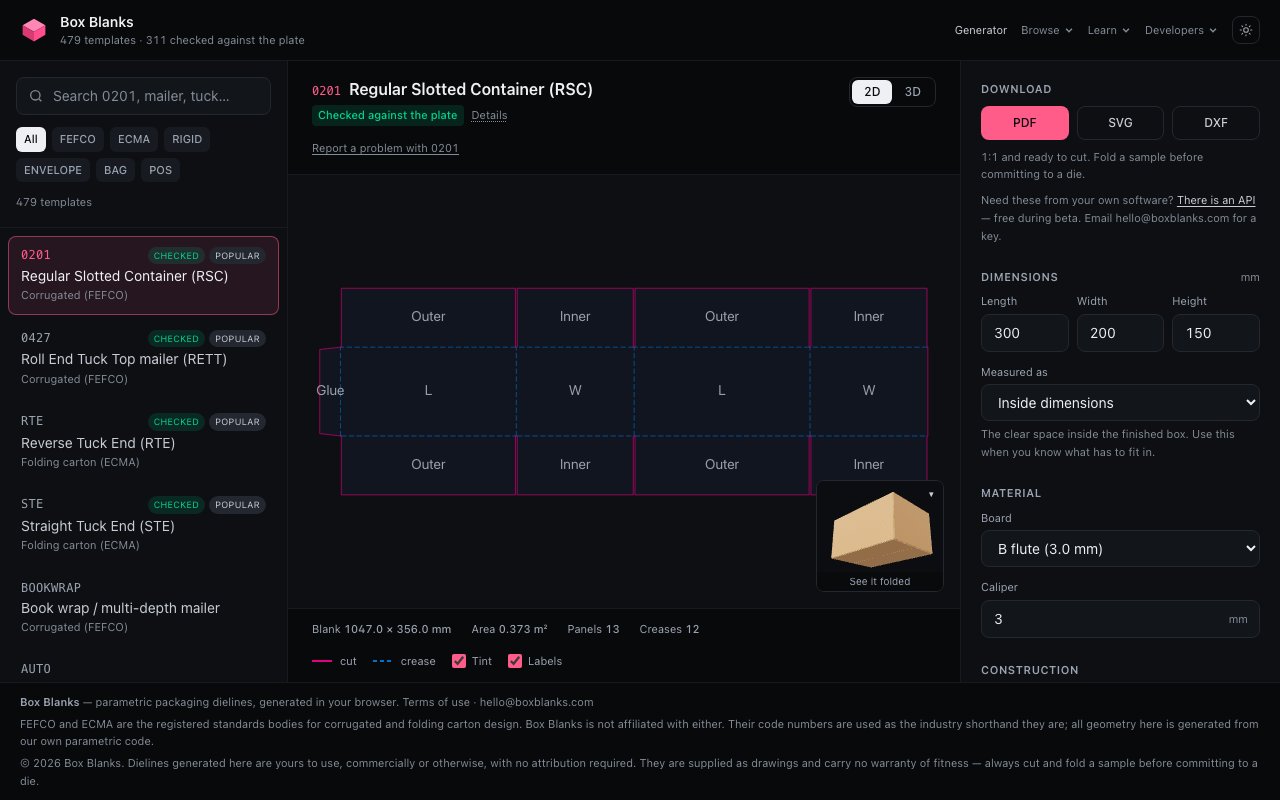
That parametric approach is the core of the product. Rather than resizing a stored drawing, each template declares its panels and hinges, which panel folds against which, and everything else is derived from there. Change the length, width, or depth and the whole dieline recalculates. It's the difference between a drawing and a program that draws. As you adjust dimensions you get a live 2D preview of the flat blank plus an interactive 3D fold, so you can watch the box assemble on screen and confirm the structure closes properly before committing anything to board. For anyone who has ever folded a paper mockup only to find a tuck flap a centimeter too short, seeing the fold happen digitally first is the feature that pays for itself, except of course nothing here needs paying for.
Export covers the three formats production actually needs. PDF output is true 1:1 vector, so you can print at 100% and cut directly against it, which matters for anyone hand-cutting prototypes with a knife and straightedge. SVG drops cleanly into design and laser-cutting software. DXF is the CAD route, with separate CUT, CREASE, and PERF layers so a cutting table or plotter operator can assign the right tool to the right line without relayering the file by hand. That layer separation sounds like a small detail, but it's the difference between a file that goes straight to the machine and one that costs someone twenty minutes of cleanup first.
It fits a wide spread of users. Structural packaging designers get a fast way to spin up standard FEFCO and ECMA constructions without opening heavier CAD tools. Print shops and converters can hand a customer a correct dieline in minutes instead of days. Makers with laser cutters or cutting plotters get production-ready files for custom boxes. And small e-commerce brands prototyping their own packaging can go from a product's measurements to a foldable mockup in one sitting, no structural design background required, printing the 1:1 PDF, cutting it out, folding it around the product, and adjusting dimensions until it fits.
What makes it stand out is the combination of breadth and restraint. Plenty of free template sites offer a dozen popular styles as static downloads. Covering the whole FEFCO catalogue plus the ECMA folding carton range, parametrically, with proper layered CAD export, is the kind of coverage you'd normally expect from paid structural design software. At the same time it doesn't try to be an artwork tool. There's no graphics editor bolted on, it generates the structure and hands you a clean file to finish in whatever design software you already use, which is exactly the right division of labor.
The access story is as simple as it gets. Box Blanks is completely free, and the site states the dielines are yours to use, commercially or otherwise, with no attribution required. There's no account, no paywall on styles or export formats, and no watermarking. For a category where the incumbent tools cost serious money, a free, no-strings generator covering both major standards is an easy bookmark, and questions go to hello@boxblanks.com.
Key Features
- Full FEFCO corrugated code coverage
- 206 ECMA folding carton designs
- Parametric geometry from your exact dimensions
- Live 2D preview and interactive 3D fold
- True 1:1 vector PDF export
- DXF with separate CUT, CREASE, and PERF layers
Pros & Cons
What we like
- Completely free with commercial use and no attribution required
- Generates fresh geometry instead of stretching fixed templates
- Layered DXF export is ready for cutting tables
- Covers both major packaging standards in one tool
Room for improvement
- Structure only, artwork has to happen in other software
- Narrow focus on standard styles rather than fully custom constructions
- No account or cloud saving mentioned on the site
- Younger tool without the ecosystem of established CAD suites
Frequently Asked Questions
What is Box Blanks?
Is Box Blanks really free?
What file formats can I export?
How is it different from downloading a box template?
Best For
Featured in
Alternatives to Box Blanks
View all
Framer
Visual website builder that lets designers ship production-grade marketing sites with real CMS, SEO controls, and code components.

Tailwind CSS
Rapidly build custom designs without leaving your HTML

Apatero Studio
Creator studio for AI image, video, audio, 3D, and avatars. Every model worth using, in one workspace.

Pixel Painters
Unlimited graphic design subscriptions built only for churches and ministries
Our take
Tool Index Editorial · Oct 2026· 4.0/5
Box Blanks is a free browser generator for dimensioned packaging dielines, with live 2D and folding 3D previews plus PDF, SVG, and layered DXF export. It is for packaging designers, print shops, makers, and small brands working from FEFCO, ECMA, and related standard constructions. No signup or per-download fee is required.
We found 479 templates, with 311 marked as checked against published plates, and we like that the site distinguishes checked from unchecked work. Parametric panel geometry is a better foundation than stretching a fixed drawing, while separate CUT, CREASE, and PERF layers make the DXF useful in production. The limitation is important. This creates structural starting points, not finished artwork or fully custom packaging engineering. Users should prototype the fold and have a converter verify material allowances before committing to a production run.
Editorial opinion from the Tool Index team, written from the public product pages. Not a user review.
Reviews (0)
Badge builder
Add Box Blanks to your website
Choose a badge style and size, preview it here, then copy the generated HTML. Badge images are self-contained SVGs and do not require an external script.

<a href="https://toolindex.net/tools/box-blanks?ref=badge" target="_blank" rel="noopener">
  <img src="https://toolindex.net/badge/box-blanks/medium.svg" alt="Box Blanks - Listed on Tool Index" width="180" height="50" />
</a>How to use the badge
- 1. Pick the style, size, and theme that fit your layout.
- 2. Copy the generated HTML from the code block.
- 3. Paste it into your footer, homepage, or press page.
Standard badge available
The standard listing badge is available now. Score and circle badges are limited to tools currently ranked in the top 10 of a category.
Badge clicks return visitors to this profile with a referral tag so the source remains identifiable.
Related Tools
Apatero Studio
Creator studio for AI image, video, audio, 3D, and avatars. Every model worth using, in one workspace.
Tailwind CSS
Rapidly build custom designs without leaving your HTML

Figma
Collaborative interface design tool

Marvel
Lightweight prototyping platform for turning images and screens into clickable mobile and web prototypes.
Work on Box Blanks? Request listing access or correction