
Bulletlist
Free keyboard-first outliner where every bullet point is its own infinitely nested page
Gallery
About Bulletlist
Bulletlist is a web-based outliner where every bullet point can become its own page. You create nested lists, zoom into any item to focus on just that branch, and navigate the whole structure with keyboard shortcuts. There's no depth limit, so a bullet can contain an outline that contains another outline, as deep as your thinking requires. The interface is keyboard-first, meaning every action from indenting to searching has a shortcut, and you can move through your notes without reaching for a mouse. It's built for people who think in hierarchies and want a tool that keeps up with how they actually work.
The problem Bulletlist addresses is familiar to anyone who's tried to manage complex information in traditional note apps. Most outliners either cap nesting at a few levels or make deep structures awkward to navigate. You hit a wall, or the interface becomes slow, or the navigation breaks down when you're twenty levels deep. You end up fighting the tool instead of using it. Bulletlist removes those limits entirely. Every node functions as both an item in a larger list and a standalone page when you focus on it. Zoom in, and the current bullet becomes your entire workspace. Zoom out, and it slots back into the hierarchy. This makes it natural to work at whatever level of detail you need without losing context of the bigger picture.
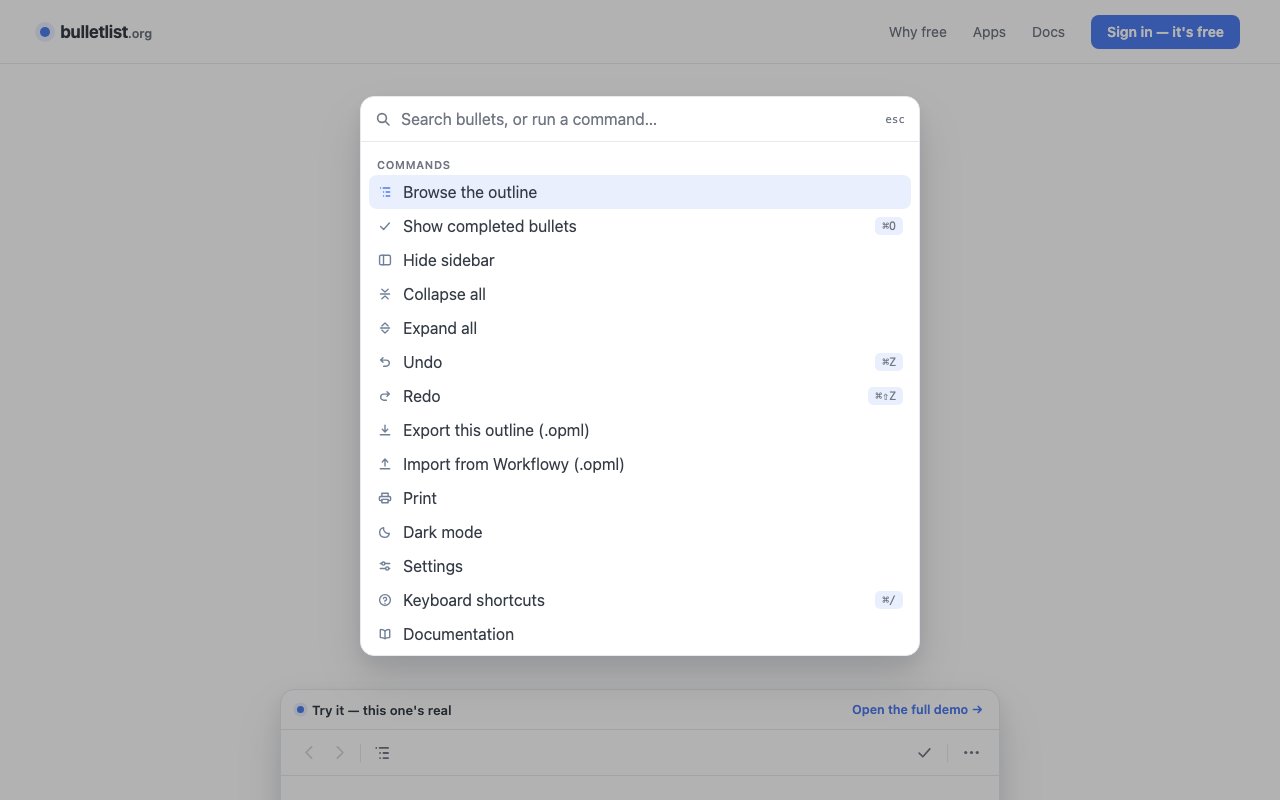
Keyboard navigation is thorough and well designed. Indent and outdent with Tab and Shift-Tab. Move items up and down with keyboard combinations. Expand and collapse branches without touching the mouse. Jump to any item through full-text search that works across your entire outline. A command palette, triggered with Cmd-K or Ctrl-K, lets you run commands and jump to locations without hunting through menus. If you've used code editors like VS Code or tools like Workflowy, the interaction model will feel familiar. If you haven't, there's a learning curve, but the payoff is speed once the shortcuts are in your fingers. Power users will appreciate that almost everything can be done without leaving the keyboard.
Data portability is treated as a feature rather than an afterthought. Bulletlist imports from Workflowy, Notion, markdown files, and OPML format. Exports go to OPML and plain text, so you can take your notes elsewhere without format lock-in. This matters because outliners tend to accumulate years of thinking, and nobody wants to be trapped in a tool that won't let them leave. If the product ever shuts down or changes in ways you don't like, you can take your data with you. The import path also makes it easy to switch from another outliner without starting over, which removes one of the biggest barriers to trying something new.
Storage is device-first with offline support. Your outlines save locally, which means you can keep working without an internet connection. If you're on a plane, in a cafe with spotty wifi, or just prefer not to depend on cloud availability, the app works anyway. Cross-device sync is available if you want the same notes on your laptop, phone, and tablet. The offline capability isn't an afterthought bolted on; it's central to how the app works. You're not dependent on a server to access your own thinking. Your data lives on your device first, with sync as an optional layer on top.
Bulletlist is completely free. There's no paywall, no freemium tier where the good features are locked behind a subscription, and no upsell prompts. The site explicitly states that there should be no paywall on creativity. This is unusual in the productivity tool space, where free tiers usually exist to funnel you toward a paid plan with the features you actually need. Here, the full feature set is available without paying anything. The tool is developed by Nozemans Software and runs on web, iOS, and Android. The cross-platform availability combined with sync means you can capture ideas on your phone and expand them on your laptop without paying for the privilege.
Who should use Bulletlist? Students organizing research notes with complex hierarchies. Writers building outlines that will eventually become documents, articles, or books. Project managers breaking work into tasks and subtasks without worrying about depth limits. Researchers collecting and structuring sources, quotes, and ideas. Developers managing technical notes across multiple projects. Really, anyone who thinks in nested lists and has been frustrated by tools that cap nesting or charge monthly for features that should be standard.
The tradeoff is scope. This is an outliner, not a full knowledge management system. There are no databases, calendars, embedded media, or collaboration features. You can't share an outline with a team or assign tasks to people. If you need those capabilities, you need a different tool. But if you need fast, deep outlining with strong keyboard navigation, solid import and export, offline support, and zero cost, Bulletlist delivers on all of those without asking for your credit card. For the narrow problem it solves, it solves it well.
Key Features
- Infinitely nested bullet points as pages
- Keyboard shortcuts for all actions
- Command palette navigation with Cmd+K
- Import from Workflowy, Notion, markdown, OPML
- Offline-first with device sync
- Full-text search across outlines
Pros & Cons
What we like
- Completely free with no feature locks
- Keyboard-first interface for fast navigation
- Strong import and export for data portability
- Offline support with cross-device sync
Room for improvement
- Focused on outlining, not rich note-taking
- No collaboration or sharing features
- Minimal formatting options by design
- Smaller community than established tools
Frequently Asked Questions
What is Bulletlist?
Is Bulletlist free?
What platforms does it support?
Can I import my existing notes?
Best For
Featured in
Alternatives to Bulletlist

CalendHub
Smart scheduling and calendar management for teams
Kevin Gabeci Toolkits
Seven AI toolkits for writing books, making music, cutting video, and building agents.

Eased Into AI
Learn AI from zero. No jargon, no hype, just steps that work.

Fix It Gently
Calm, plain-English fixes for everyday tech problems.
Reviews (0)
Badge builder
Add Bulletlist to your website
Choose a badge style and size, preview it here, then copy the generated HTML. Badge images are self-contained SVGs and do not require an external script.

<a href="https://toolindex.net/tools/bulletlist?ref=badge" target="_blank" rel="noopener">
  <img src="https://toolindex.net/badge/bulletlist/medium.svg" alt="Bulletlist - Listed on Tool Index" width="180" height="50" />
</a>How to use the badge
- 1. Pick the style, size, and theme that fit your layout.
- 2. Copy the generated HTML from the code block.
- 3. Paste it into your footer, homepage, or press page.
Standard badge available
The standard listing badge is available now. Score and circle badges are limited to tools currently ranked in the top 10 of a category.
Badge clicks return visitors to this profile with a referral tag so the source remains identifiable.
Related Tools

Confluence
Atlassian's long-running team wiki that anchors many enterprise knowledge stacks
Asana
Project management for teams that live in projects, tasks and dependencies
Kevin Gabeci Toolkits
Seven AI toolkits for writing books, making music, cutting video, and building agents.

Logseq
An open-source outliner notes app where every bullet is a first-class block
Work on Bulletlist? Request listing access or correction