
byosynch
Continuous two-way folder sync over SSH to storage you already own, for macOS and Linux
Gallery
About byosynch
byosynch keeps one folder in sync across your machines using SSH storage you already own, such as an rsync.net account or a server you run, instead of a cloud provider's drive. It's for people who like the convenience of a synced folder but don't want a third party holding their files or their keys. Your SSH private keys stay on your devices, and files travel directly between your machines and your storage without passing through byosynch's servers, which only handle accounts, licensing and support.
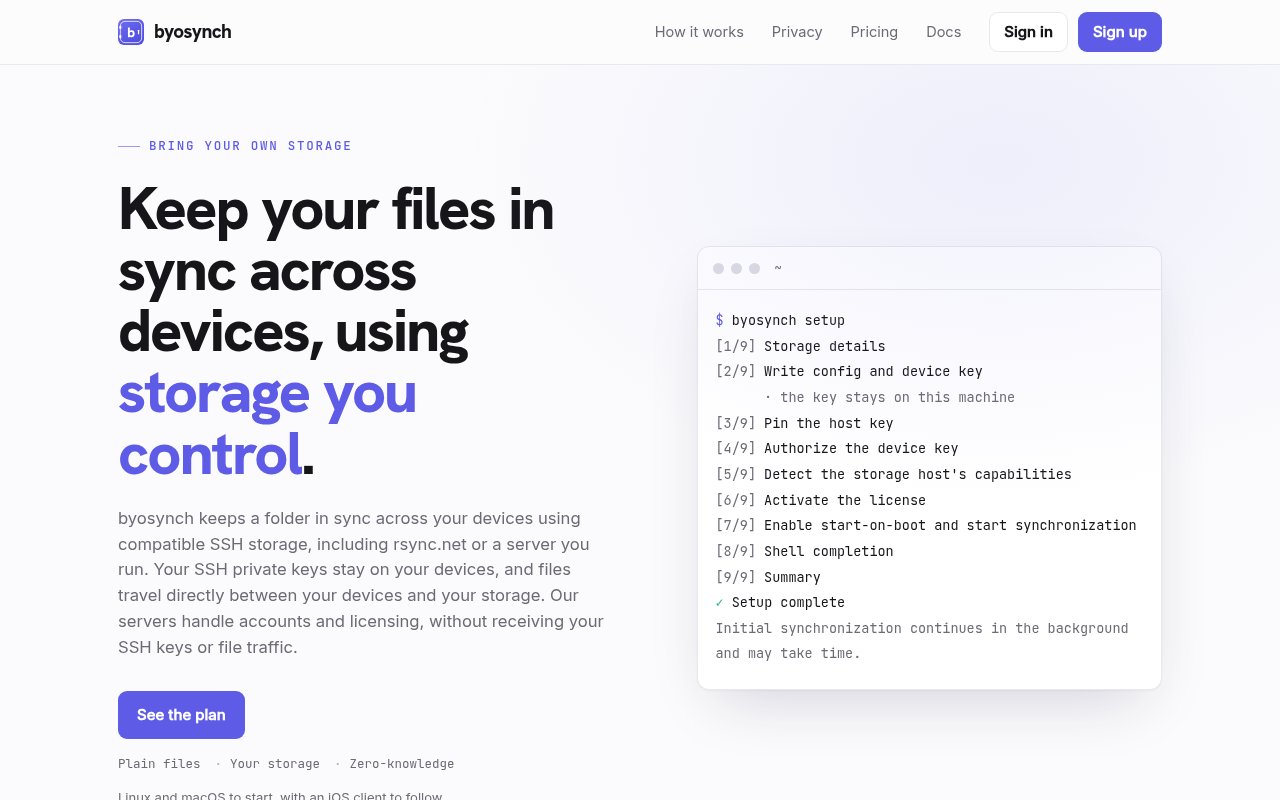
Install is a shell script, curl piped to sh, followed by a guided byosynch setup command that generates a per-device SSH key, points the client at your storage and enables a background daemon. From then on filesystem events and periodic scans drive a bidirectional sync. When a file changes on one side, the change is carried to the other. When the same file changes on both sides, byosynch keeps both versions rather than picking a winner, so nothing is silently overwritten and the merge is yours to do. Everything converges to one current tree, and the files on your storage remain ordinary files you can reach with any SSH client, so there's no proprietary format and no lock-in.
In practice the setup looks like this. You run the installer on the laptop and answer the setup prompts, which produce that device's key and connect it to your storage. Do the same on the desktop. Pick the folder, and from then on the daemon watches it, pushes changes up as they happen, and pulls down whatever the other machine sent. Because sync is driven by filesystem events and backed by periodic scans, a change made while a machine was asleep gets picked up on the next scan rather than lost.
The docs are candid about what it isn't. byosynch does not keep history and it is not a backup, so a deletion syncs like any other change and you'll want separate backups of the storage. It also doesn't add end-to-end encryption. Transport is SSH, but whoever runs the storage can read what's stored there, which on rsync.net means rsync.net and on your own server means you. It's a sync tool that trusts your storage provider by design, and the about page says so rather than burying it.
Today it runs on Linux and macOS as a CLI-driven daemon, with a native macOS menu bar app and an iOS client both described as planned. There are no per-device limits, so one account covers every machine you sync, and the storage side is any SSH host that provides what the compatibility page asks for, with rsync.net called out as the reference case. It's independently built and operated. It's for privacy-conscious individuals and small teams who already pay for rsync.net or run a server with SSH, and who'd rather keep their working folder on infrastructure they control. If you don't have SSH storage yet, you'll need to arrange that first, because byosynch brings the sync and not the disk. That's a feature for the intended audience and a hurdle for everyone else. The trial is the practical way to find out whether your host qualifies, since the compatibility page describes what an SSH host needs to provide rather than naming a short list of approved vendors.
Compared with a peer-to-peer sync tool, it uses your storage as the meeting point, so each device only needs to reach the SSH host rather than every other device. Compared with a cloud drive, the difference is who holds the data and who can read it, and the answer here is you and your storage provider, never byosynch. Compared with running rsync from cron yourself, the difference is the continuous two-way daemon, the conflict handling and the setup that produces per-device keys instead of one shared key everywhere. A few things follow from the design. Because both versions are kept on a conflict, a folder shared between people who edit the same files often will accumulate duplicates until someone tidies them. Because there's no history, an accidental overwrite that syncs cleanly is gone from both sides. None of this is hidden, which is to byosynch's credit, but it does shape who the tool is right for.
Pricing is a subscription, $4.99 a month or $49 a year, with a 30-day free trial that takes a card up front. There's no free tier. The docs cover a quickstart, storage compatibility, what an SSH host needs to provide, and conflicts, and there's a security page alongside the privacy policy and terms. Support is reachable at hello@byosynch.com, with separate addresses published for support, security, privacy, billing, legal and abuse, which is more contact surface than most products this size publish.
Key Features
- Two-way sync over SSH to your own storage
- Filesystem events plus periodic scans
- Conflicts keep both versions
- Per-device SSH keys generated at setup
- Background daemon on Linux and macOS
- No per-device limits on one account
Pros & Cons
What we like
- Your keys and files never touch byosynch's servers
- Works with rsync.net or any server you run
- Files stay ordinary files, so there's no lock-in
- Guided setup handles keys and the daemon
Room for improvement
- No version history and not a backup
- No end-to-end encryption, the storage host can read files
- macOS menu bar app and iOS client are still planned
- Subscription only, with a card required for the trial
Frequently Asked Questions
What is byosynch?
Is byosynch free?
Is byosynch end-to-end encrypted?
Which platforms does byosynch support?
Best For
Featured in
Alternatives to byosynch
View all
CalendHub
Smart scheduling and calendar management for teams
Kevin Gabeci Toolkits
Seven AI toolkits for writing books, making music, cutting video, and building agents.

Eased Into AI
Learn AI from zero. No jargon, no hype, just steps that work.

Fix It Gently
Calm, plain-English fixes for everyday tech problems.
Our take
Tool Index Editorial · Sep 2026· 3.5/5
byosynch keeps a folder synchronized across Linux and macOS machines through SSH storage the user already controls. It is for self hosters and small teams that want continuous two way sync without routing files or private keys through the vendor. Setup creates a key for each device and a background daemon combines file system events with periodic scans. The page offers a 30 day trial, but our capture did not expose the subscription price.
We like that remote files remain ordinary files and conflicts preserve both versions instead of silently choosing one. The documentation is also blunt about the limits. This is not a backup and keeps no history, so deletions propagate and clean overwrites cannot be recovered through the tool. SSH protects transit but the storage operator can read stored files. Users also need compatible SSH storage, and the iOS client is still only planned.
Editorial opinion from the Tool Index team, written from the public product pages. Not a user review.
Reviews (0)
Badge builder
Add byosynch to your website
Choose a badge style and size, preview it here, then copy the generated HTML. Badge images are self-contained SVGs and do not require an external script.

<a href="https://toolindex.net/tools/byosynch?ref=badge" target="_blank" rel="noopener">
  <img src="https://toolindex.net/badge/byosynch/medium.svg" alt="byosynch - Listed on Tool Index" width="180" height="50" />
</a>How to use the badge
- 1. Pick the style, size, and theme that fit your layout.
- 2. Copy the generated HTML from the code block.
- 3. Paste it into your footer, homepage, or press page.
Standard badge available
The standard listing badge is available now. Score and circle badges are limited to tools currently ranked in the top 10 of a category.
Badge clicks return visitors to this profile with a referral tag so the source remains identifiable.
Related Tools

Confluence
Atlassian's long-running team wiki that anchors many enterprise knowledge stacks
Asana
Project management for teams that live in projects, tasks and dependencies
Kevin Gabeci Toolkits
Seven AI toolkits for writing books, making music, cutting video, and building agents.

Logseq
An open-source outliner notes app where every bullet is a first-class block
Work on byosynch? Request listing access or correction