
Classic Ads
Restyle Google sponsored results with clear labels and nostalgic colors
Gallery
About Classic Ads
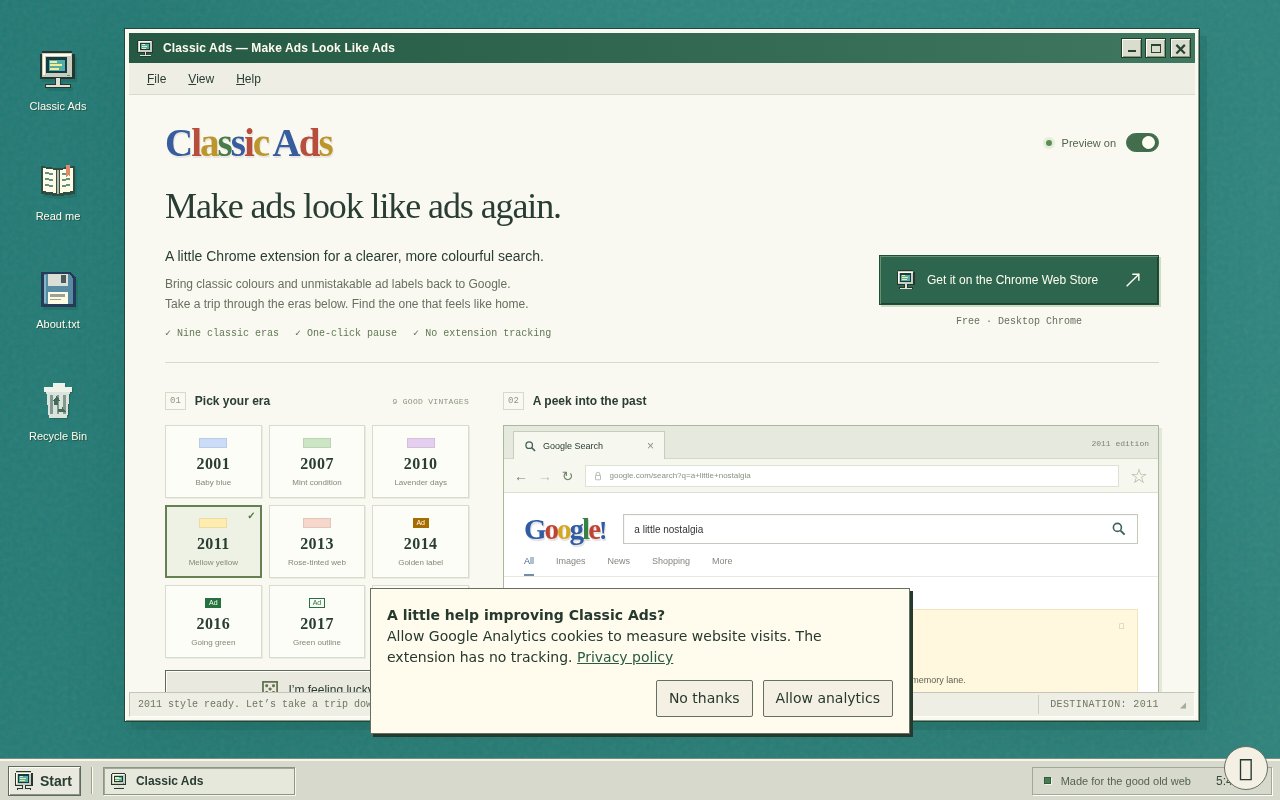
Classic Ads is a Chrome extension that makes sponsored results on Google Search easier to distinguish from organic results. It doesn't block advertising or replace Google's content. Instead, it restyles existing ads with clearer labels, colored backgrounds, and visual treatments inspired by earlier eras of search. The idea is both practical and nostalgic. Search ads have become visually close to ordinary results, so Classic Ads restores some of the contrast that older interfaces used while letting the user choose how far back the page should look.
The extension includes nine styles inspired by search advertising from 2001 through 2019. Choices include baby blue, mint, lavender, mellow yellow, rose, golden labels, green labels, green outlines, and black labels. A retro desktop preview lets users see a style before applying it to real results. There is also an option for stronger shading and another for classic blue, underlined titles. Users who don't want to choose can ask the extension to pick a different era through its playful lucky option, while a simplified modern treatment provides a point of comparison.
Classic Ads works on several kinds of sponsored content within Google Search. Its listing names text ads, sponsored product and hotel carousels, and sponsored local place listings. The original ad copy, destination, position, images, prices, controls, and Google's own disclosures remain intact. Organic results are left alone. That narrow intervention is an important part of the product. It changes presentation so ads stand out, but it doesn't claim to judge advertisers, improve relevance, remove tracking from destination sites, or act as an ad blocker. If another extension has removed an ad, Classic Ads can't bring it back. This makes the extension closer to a personal readability layer than an advertising control system. Someone who finds current sponsored labels too subtle can apply a strong background without losing product prices, images, or destination information. Someone who likes the look of early search pages can choose an era for aesthetic reasons and still get the same underlying results. The preview helps avoid repeated trial and error on live searches, and pausing returns the page to its original state. There is no separate dashboard to maintain and no list of blocked advertisers, filters, or rules to tune.
Controls are available through a compact toolbar popup and a full settings tab. The extension can be paused at any time to restore Google's original appearance. When Chrome browser sync is enabled, it can sync four preferences covering the chosen year, enabled state, contrast, and link style. Otherwise, those are the only settings it keeps. The extension works on HTTPS Google Search pages across google.com and 27 supported regional domains, including the United States, Australia, New Zealand, the United Kingdom, Canada, and India. That coverage makes it useful outside a single country without pretending to support every search product.
The extension's restrained behavior also limits the risk of confusing a cosmetic change with a content change. Preview examples are fictional, but on a real result page the listing says the original text, placement, imagery, controls, and disclosures remain Google's. The visual treatment is applied after the page loads by identifying supported sponsored elements. This is useful for readers who want a more obvious cue but still want to inspect the result as served. It also explains why unrecognized formats may remain unchanged when Google experiments with new markup. The extension needs to recognize the element before it can style it.
Its privacy posture is unusually simple because there is no service behind the interface. Classic Ads says it has no account system, analytics, remote code, or backend. It reads page elements locally to identify supported ads and doesn't record or transmit searches, search results, browsing history, or ad clicks. The Chrome Web Store disclosure says the extension handles website content for its core function while declaring that data isn't sold or transferred for unrelated uses. People should still review the browser permission request, but the local design and limited stored preferences reduce the moving parts compared with an extension tied to an online account.
Classic Ads is free, and neither its site nor store listing presents a paid upgrade. It is best for people who still want access to sponsored results but want them marked with stronger visual boundaries. The scope is deliberately limited. Full Google Maps, video, display, and AI ad placements are outside the current version, and Google can change its markup in ways that leave an unfamiliar format unstyled until the extension catches up. It is also a very young extension with few users and no public rating history yet. Within those limits, it does one understandable job, gives users meaningful visual choices, and leaves both the ad content and organic results where Google put them.
Key Features
- Nine nostalgic ad styles
- Retro style preview
- Stronger contrast controls
- One-click pause switch
- Chrome preference syncing
- Local private page styling
Pros & Cons
What we like
- Makes sponsored results easier to identify
- Leaves organic results and ad content intact
- Works without accounts or a backend
- Offers quick controls and detailed settings
Room for improvement
- Limited to supported search ad formats
- Google markup changes can delay styling
- Doesn't cover Maps video or display ads
- Very small user base and no ratings yet
Frequently Asked Questions
What does Classic Ads do?
Does Classic Ads collect browsing data?
Which ads can Classic Ads style?
Is Classic Ads free?
Best For
Featured in
Alternatives to Classic Ads
View all
CalendHub
Smart scheduling and calendar management for teams
Kevin Gabeci Toolkits
Seven AI toolkits for writing books, making music, cutting video, and building agents.

Eased Into AI
Learn AI from zero. No jargon, no hype, just steps that work.

Fix It Gently
Calm, plain-English fixes for everyday tech problems.
Our take
Tool Index Editorial · Oct 2026· 3.5/5
Classic Ads is a free Chrome extension that makes sponsored Google results look sponsored again. Nine styles drawn from older search layouts, stronger shading, classic link treatment, and a one-click pause give users useful control without altering ad copy or organic results. Its narrow scope is a virtue, and the claimed lack of an account, backend, or extension tracking keeps the design easy to understand.
This is a presentation layer, not an ad blocker or privacy tool. It covers supported Google Search formats on desktop Chrome, not Maps, video, display, or every regional surface, and changes to Google's markup can leave new ad formats untouched. The audience is specific, but the extension solves that small readability problem cleanly and costs nothing.
Editorial opinion from the Tool Index team, written from the public product pages. Not a user review.
Reviews (0)
Badge builder
Add Classic Ads to your website
Choose a badge style and size, preview it here, then copy the generated HTML. Badge images are self-contained SVGs and do not require an external script.

<a href="https://toolindex.net/tools/classic-ads?ref=badge" target="_blank" rel="noopener">
  <img src="https://toolindex.net/badge/classic-ads/medium.svg" alt="Classic Ads - Listed on Tool Index" width="180" height="50" />
</a>How to use the badge
- 1. Pick the style, size, and theme that fit your layout.
- 2. Copy the generated HTML from the code block.
- 3. Paste it into your footer, homepage, or press page.
Standard badge available
The standard listing badge is available now. Score and circle badges are limited to tools currently ranked in the top 10 of a category.
Badge clicks return visitors to this profile with a referral tag so the source remains identifiable.
Related Tools

Confluence
Atlassian's long-running team wiki that anchors many enterprise knowledge stacks
Asana
Project management for teams that live in projects, tasks and dependencies
Kevin Gabeci Toolkits
Seven AI toolkits for writing books, making music, cutting video, and building agents.

Logseq
An open-source outliner notes app where every bullet is a first-class block
Work on Classic Ads? Request listing access or correction