
Cogram Studio
A CAD and BIM workspace where people and AI agents turn descriptions into 3D models and drawings
Gallery
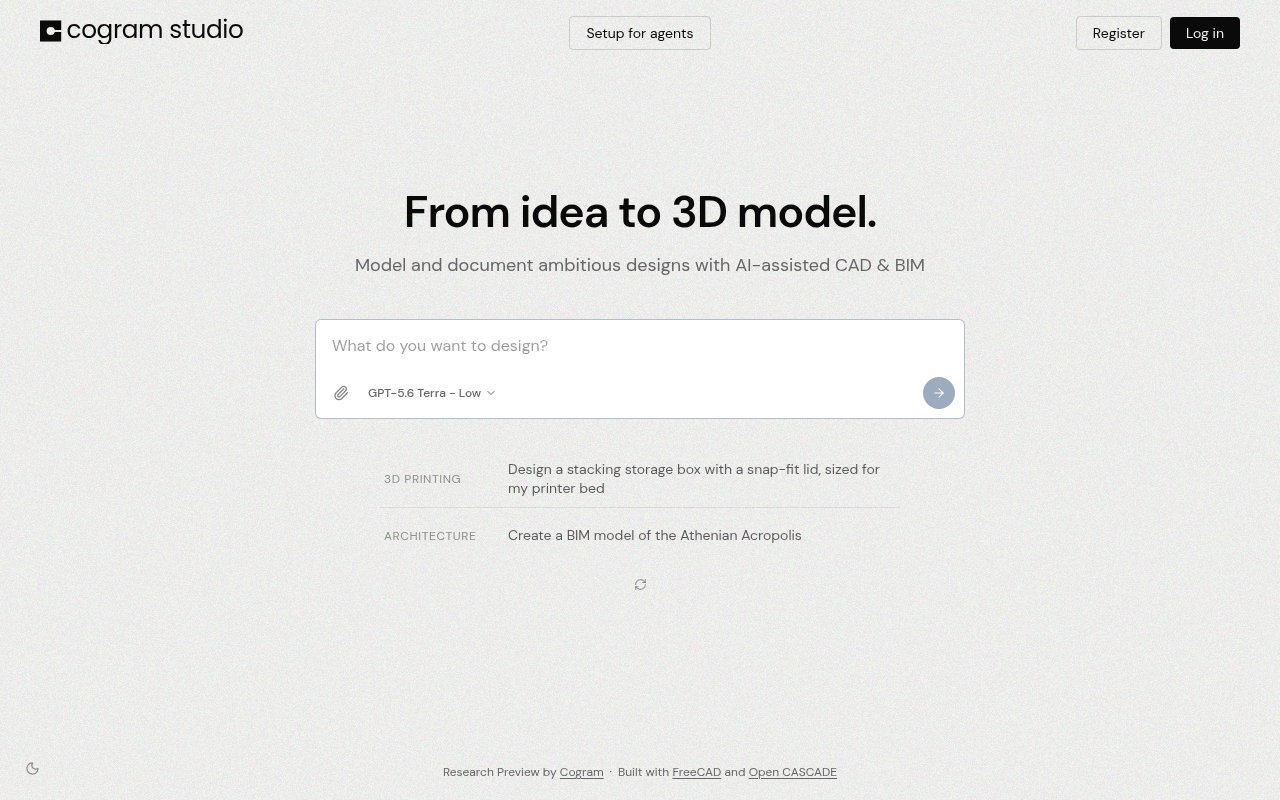
About Cogram Studio
Cogram Studio is a CAD and BIM workspace built for both people and AI agents. You describe a part or a building in plain language and Studio produces an exact 3D model of it, along with dimensioned drawings of the kind a contractor can actually build from. It comes from Cogram, a company that says it has been building AI tools for architects and engineers since 2021, and it's currently offered as a research preview rather than a finished product.
The problem it goes after is the gap between what an AI model can describe and what an engineer can use. Language models are good at talking about a steel bracket or a two-storey extension, but a description isn't a deliverable. Design and construction run on geometry with real dimensions, and on drawings that carry those dimensions in a form the site team can check. Studio is an attempt to close that gap by making the model and the drawing the output, not the paragraph. That's also why the preview pairs the model with drawings, since a model on its own is only half of what a project needs.
In practice you open a project in the web app at studio.cogram.com, describe what you want, and Studio generates the corresponding 3D model, which you can then take through to dimensioned drawings. The agent side is where it gets more interesting for technical teams. Studio exposes its modelling capabilities through the Model Context Protocol, so a custom agent you've built, whether that's a coding assistant or a workflow bot inside your firm, can drive the same workspace. That means the modelling step can sit inside a longer automated process instead of being a manual stop in the middle of it. A sensible way to evaluate it is to start with something you already know the answer to. Take a part or a small structure with a drawing on file, describe it the way you'd brief a junior, and compare what Studio produces against the original. Dimensions are the thing to check first, because that's where a generated model earns or loses trust. If your team already runs an agent, pointing it at Studio over MCP is the second test, since the value of an agent-driven workspace depends on how well it fits the automation you've built around it. The one free project is enough for both tests. Check the drawing as well as the model, since correct geometry with a sloppy drawing still means rework on site.
It's aimed at architects and engineers, and by extension at the technical people inside those firms who are experimenting with agents for design work. If you've been wondering how an agent would produce something more concrete than a summary or a spreadsheet, a workspace where the output is geometry is the missing piece. Firms already using Cogram's other tools, which cover document analysis, meeting minutes, RFIs and submittals, email management and field reports for architects, engineers, consultants and contractors, will find Studio sits naturally beside them, though it's a separate product with its own access.
What makes it different is the framing. Plenty of text-to-3D tools exist, but most produce meshes meant for visualisation, and plenty of CAD packages have added a chat box so a person can ask for a change. Studio does neither of those things exactly. It treats the agent as a first-class user of the workspace, with the same ability to create models and drawings as a person sitting at the screen, and it aims at exact geometry with dimensioned drawings rather than something that merely looks right in a render. That's a different bet, and it's why the MCP integration is front and centre rather than an afterthought.
The honest caveats are the ones that come with any research preview. The public page doesn't yet list supported file formats or which CAD and BIM packages it exchanges data with, so anyone with a strict Revit or IFC pipeline should test that before committing. Documentation lives at docs.cogram.com, and the product is young enough that the workflows will change. It's also a specialised tool. If your work doesn't involve producing models and drawings, there's nothing here for you. Expect to give feedback too; that's what a research preview is for.
Access is freemium during the preview. One project is free with no credit card required, which is enough to see whether the generated models hold up for the kind of work you do. Firms that want wider licensing are asked to get in touch directly, and pricing for firm licences isn't published. The wider Cogram platform runs on a self-serve 14-day trial and guided demos, and the company publishes hi@cogram.com as its contact address along with a US phone line for weekday hours.
Key Features
- 3D models generated from text descriptions
- Dimensioned drawings for construction
- Agent access over the Model Context Protocol
- Shared workspace for people and agents
- One free project with no credit card
- Documentation at docs.cogram.com
Pros & Cons
What we like
- Output is geometry and drawings, not just text
- Agents can drive the workspace over MCP
- Comes from a team that has built AEC tools since 2021
- Free project to test before any licensing talk
Room for improvement
- Research preview, so workflows will change
- Supported file formats aren't listed yet
- Narrow focus on architects and engineers
- Firm licensing requires contacting the company
Frequently Asked Questions
What is Cogram Studio?
Is Cogram Studio free?
Can my own AI agent use Cogram Studio?
Who is Cogram Studio for?
Best For
Featured in
Alternatives to Cogram Studio
View all
Framer
Visual website builder that lets designers ship production-grade marketing sites with real CMS, SEO controls, and code components.

Tailwind CSS
Rapidly build custom designs without leaving your HTML

Apatero Studio
Creator studio for AI image, video, audio, 3D, and avatars. Every model worth using, in one workspace.

Pixel Painters
Unlimited graphic design subscriptions built only for churches and ministries
Our take
Tool Index Editorial · Oct 2026· 2.5/5
Cogram Studio is a research preview for creating CAD and BIM models and documents with AI assistance. The public workspace presents prompts for a printable storage box and an architectural model, identifies FreeCAD and Open CASCADE underneath, and includes an agent setup path. We see an interesting direction for technical teams that want agents to produce geometry rather than prose.
The current public page is too thin for a confident recommendation. It does not show supported formats, export paths, dimensional validation, collaboration details, or pricing, and a research preview should not be trusted for buildable output without expert checking. Architects and engineers can treat it as an experiment. Everyone else should wait for documentation and verified examples.
Editorial opinion from the Tool Index team, written from the public product pages. Not a user review.
Reviews (0)
Badge builder
Add Cogram Studio to your website
Choose a badge style and size, preview it here, then copy the generated HTML. Badge images are self-contained SVGs and do not require an external script.

<a href="https://toolindex.net/tools/cogram-studio?ref=badge" target="_blank" rel="noopener">
  <img src="https://toolindex.net/badge/cogram-studio/medium.svg" alt="Cogram Studio - Listed on Tool Index" width="180" height="50" />
</a>How to use the badge
- 1. Pick the style, size, and theme that fit your layout.
- 2. Copy the generated HTML from the code block.
- 3. Paste it into your footer, homepage, or press page.
Standard badge available
The standard listing badge is available now. Score and circle badges are limited to tools currently ranked in the top 10 of a category.
Badge clicks return visitors to this profile with a referral tag so the source remains identifiable.
Related Tools
Apatero Studio
Creator studio for AI image, video, audio, 3D, and avatars. Every model worth using, in one workspace.
Tailwind CSS
Rapidly build custom designs without leaving your HTML

Figma
Collaborative interface design tool

Marvel
Lightweight prototyping platform for turning images and screens into clickable mobile and web prototypes.
Work on Cogram Studio? Request listing access or correction