
Compass
Open-source template and planning kit for launching a customer knowledge base
Gallery
About Compass
Compass is a free, open-source launch kit for teams that need a customer knowledge base but don't want to begin with an empty page. Created by the people behind HelpCenter.io and published through Knowledgebase.dev, it combines a working static help center with practical material for planning, writing, migrating, and handing off support content. The central idea is refreshingly concrete. A useful help center needs sensible categories, articles that answer the real question, search, and an owner who will keep the material current. Compass gives each of those jobs a starting structure instead of pretending that a polished home page is enough.
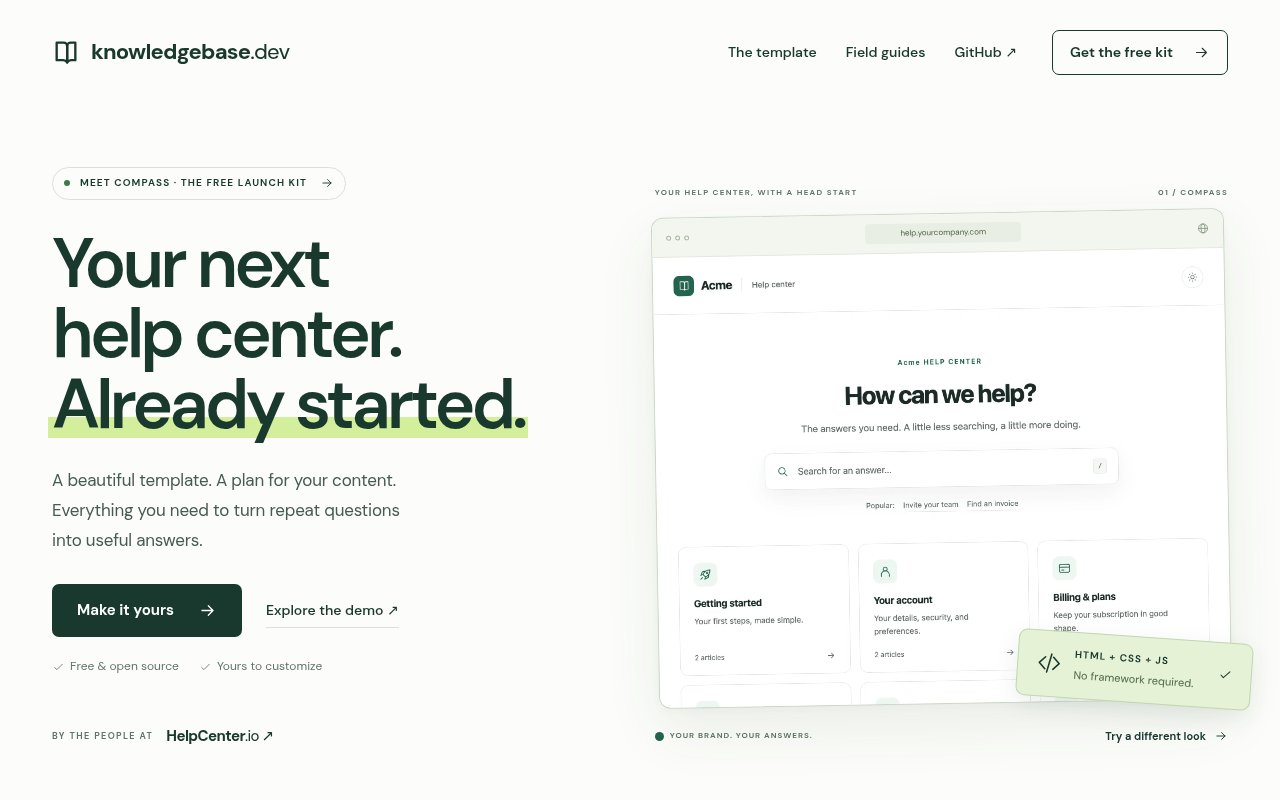
The downloadable template contains 20 HTML pages. That set includes a home page, a search page, six topic pages, and 12 editable example articles. The example site uses a fictional product called Acme to demonstrate both layout and writing patterns, so teams are expected to verify and replace the sample material before publishing. The interface includes topic cards, article pages, and working search, with color choices and light or dark presentation available through the site's customizer. A team can add its own name and visual choices before downloading, which reduces the amount of basic cleanup needed to turn the template into a branded support destination.
Compass is built with plain HTML, CSS, and JavaScript and doesn't require a runtime framework or build tool. The downloaded site can be opened directly and hosted as a static site. Node.js is only needed when someone wants to regenerate pages from the editable source. That approach keeps deployment options broad and makes the finished help center easier to understand than a theme tied to a specific support platform. It also means Compass isn't a Zendesk Guide theme or a directly installable HelpCenter.io template. It stands on its own, while the writing blueprints and planning documents can be carried into another system if the team eventually chooses a managed product.
The kit goes further than the site files. Six Markdown article blueprints cover how-to instructions, troubleshooting, frequently asked questions, billing, integrations, and product changes. Five operational tools address the parts of a launch that often get missed, including a launch checklist, content audit, redirect map, translation tracker, and client handoff. Three planning CSV files are included as part of the complete package. Knowledgebase.dev also publishes field guides on structuring a knowledge base, writing articles that help someone recover from a problem, and preparing content that can serve as a reliable source for human readers and AI answers.
It fits product and operations teams launching their first support center, agencies building one for a client, and teams moving useful articles away from an existing suite. The static format is especially appealing when a company wants ownership of the files and hosting rather than another recurring platform bill. Agencies get a repeatable handoff structure, while a small product team gets enough editorial guidance to avoid filling a nice layout with vague copy. It can also act as a prototype for a larger help operation. A team can establish categories, redirects, and article conventions with Compass before deciding whether managed editing, analytics, or multilingual publishing are worth paying for.
What distinguishes Compass is the combination of front-end files and content operations. Many templates solve the visible page and leave every article, migration decision, and maintenance habit to the buyer. This kit makes those less glamorous tasks part of the product. The tradeoff is that it remains a static, self-managed starting point. It doesn't include the collaborative editor, managed hosting, analytics, translations, or grounded AI answers that HelpCenter.io offers as a separate service. Teams also need to follow the GPL-3.0 terms when distributing modified versions and should review all sample content before launch.
Compass itself is free and open source under GPL-3.0, including for commercial and client work. The source is published on GitHub, and the downloaded files can be customized and hosted wherever a static site can run. If a team later needs a managed workflow, the maker positions HelpCenter.io as the paid next step and offers that service on a 14-day trial. Compass doesn't require that upgrade to be useful. It's a practical choice for teams willing to own publishing and maintenance in exchange for a complete, adaptable starting kit.
Key Features
- Twenty-page static help center
- Six Markdown article blueprints
- Knowledge base search
- Launch and migration planning tools
- Custom colors and themes
- Plain HTML, CSS, and JavaScript
Pros & Cons
What we like
- Combines a finished template with useful content planning material
- Runs as a static site without a runtime framework
- Permits commercial and client use under GPL-3.0
- Includes practical migration and agency handoff files
Room for improvement
- Static publishing requires the team to manage hosting and updates
- Sample Acme content must be verified and replaced
- Not directly installable as a Zendesk or HelpCenter.io theme
- Redistributed modifications must follow the GPL-3.0 terms
Frequently Asked Questions
What is Compass?
What comes with the Compass download?
Does Compass require a framework?
Can Compass be used for commercial client work?
Best For
Featured in
Alternatives to Compass


Our take
Tool Index Editorial · Oct 2026· 4.0/5
Compass is a free, GPL licensed starter kit for teams building a customer knowledge base. It combines a 20 page static HTML site with six article blueprints, launch and migration tools, working search, and basic visual customization. We think it is especially useful for small product teams and agencies that want owned files and a sensible editorial structure without committing to a support platform.
The kit holds up because it addresses content planning as well as page design, and it can run without a framework. It is still a self managed static site. Hosting, updates, analytics, collaboration, translations, and ongoing article maintenance remain the team's job, while the sample Acme content must be replaced carefully. Teams that redistribute changes also need to understand the GPL terms.
Editorial opinion from the Tool Index team, written from the public product pages. Not a user review.
Reviews (0)
Badge builder
Add Compass to your website
Choose a badge style and size, preview it here, then copy the generated HTML. Badge images are self-contained SVGs and do not require an external script.

<a href="https://toolindex.net/tools/compass-knowledge-base-kit?ref=badge" target="_blank" rel="noopener">
  <img src="https://toolindex.net/badge/compass-knowledge-base-kit/medium.svg" alt="Compass - Listed on Tool Index" width="180" height="50" />
</a>How to use the badge
- 1. Pick the style, size, and theme that fit your layout.
- 2. Copy the generated HTML from the code block.
- 3. Paste it into your footer, homepage, or press page.
Score badge available
Compass qualifies for the score and circle badges based on its current top-10 positionin Customer Support.
Badge clicks return visitors to this profile with a referral tag so the source remains identifiable.
Related Tools

Probed
Customer chat, feedback, and public roadmaps in one shared space

QuickPing
A dead-simple contact link so customers can message you and you reply from one inbox

Zendesk
Enterprise customer service suite for ticketing, chat, and voice
Crisp
Multichannel customer messaging platform with a generous free tier
Work on Compass? Request listing access or correction