
QuickPing
A dead-simple contact link so customers can message you and you reply from one inbox
Gallery
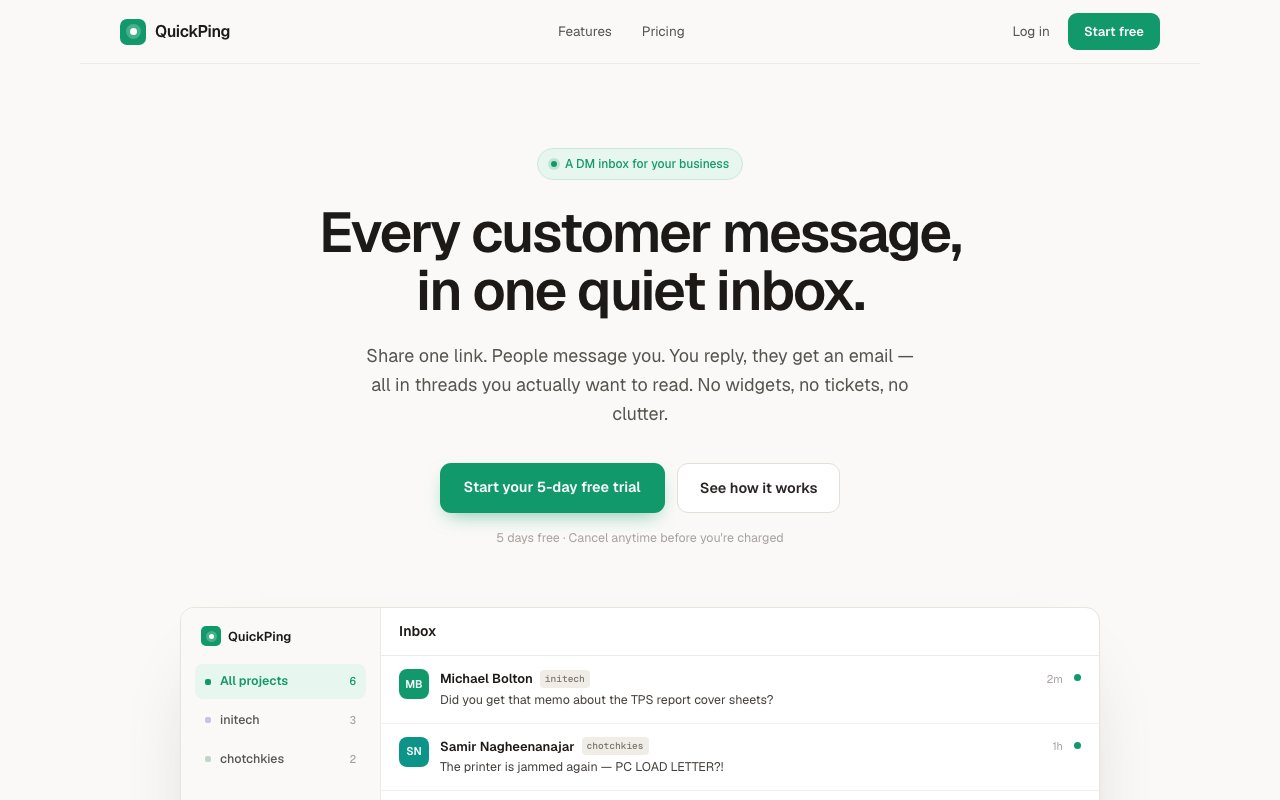
About QuickPing
QuickPing is a lightweight way to let customers reach you without standing up a full support suite to do it. You get a shareable contact link, visitors leave a message through a simple form with no account required, and every conversation lands in one clean inbox where you reply. It's the contact widget for people who want a real, organized channel to their customers but have no interest in running a help desk with queues, statuses, and a knowledge base they will never finish filling in.
The problem it solves shows up the moment a small business outgrows a raw mailto link but has no appetite for a ticketing platform. A plain email address gets buried in a personal inbox, tangles threads together, and gives the visitor no signal their message actually went anywhere. A full support tool, on the other end, is wildly over-specified for a solo operator or a side project and comes with a price and a learning curve to match. QuickPing sits squarely in that gap, giving you tidy, thread-based conversations without the setup, cost, or ongoing maintenance of enterprise software.
The flow is deliberately minimal. You share your QuickPing link in a bio, a site footer, or an email signature, a visitor writes you a short message, and it arrives as a thread in your inbox. You reply from there, and the person on the other end receives your response by email with a link back to the very same conversation, so the back-and-forth stays in one continuous place instead of scattering across a dozen separate email chains. Because the visitor never has to create an account or remember a password, the friction that quietly kills most contact forms simply is not there.
Everything is organized around projects, which lets you run more than one presence from a single account. Each project can carry its own contact page and its own stream of messages, so a freelancer juggling a few client sites, or a founder with a couple of small products, can keep conversations cleanly separated without logging in and out of different tools all day. Email notifications mean you never have to sit and watch the inbox either, since a new message pings you wherever you already do your work and you drop in only when there is actually something to answer.
It's built for small business owners, indie makers, and entrepreneurs who want streamlined customer communication rather than a queue, an SLA, and a reporting dashboard nobody asked for. If your support volume is measured in a handful of messages a week rather than tickets an hour, the trimmed-down approach fits the reality of that scale far better than an enterprise tool ever could. The whole thing is framed as a friendly front door for customers, a way to stay reachable and responsive, not the control room of a call center.
What sets it apart is the restraint. Plenty of tools will happily sell a small team a platform several sizes too big, packed with features that sit unused and priced as if every one of them mattered. QuickPing keeps its surface area small on purpose, a contact link, threaded replies, email notifications, and multiple projects, so the whole product is understandable in about a minute and never turns into another system you have to babysit. On the higher tier you can strip the QuickPing branding, add custom links, and set up auto-replies, which covers the extra polish a growing business tends to reach for next without bolting on complexity you do not need yet.
It is worth being clear about what it is not. This is not a live-chat widget that expects you to be online and typing in real time, and it is not a shared team helpdesk with assignment rules and internal notes. It is asynchronous by design, closer to a tidy contact form wired to a proper threaded inbox, which is exactly right for a one-person shop or a small team that answers messages in batches rather than the second they land. Because replies travel over email in both directions, the customer does not have to keep a tab open or remember to check back on a portal, and you do not have to babysit a chat window all day. For a lot of small operators, that asynchronous rhythm is the feature, not a compromise they are settling for.
Access is trial-then-paid. A five-day free trial with no credit card lets you set up a link and run the full flow before committing to anything. After that the Starter plan runs nine dollars a month for up to three projects with unlimited messages and QuickPing branding, while the Pro plan at nineteen dollars a month unlocks unlimited projects, a fully branded experience with the QuickPing marks removed, custom links, and auto-replies. The pricing sits comfortably in indie-tool territory, which lines up neatly with the small operators and side projects the whole product is clearly designed to serve.
Key Features
- Shareable contact link
- No-account visitor messaging
- Unified threaded inbox
- Email notifications and replies
- Multiple projects per account
- Auto-replies and custom links
Pros & Cons
What we like
- Simpler than a full help desk
- Visitors message you without signing up
- Conversations stay threaded in one inbox
- Cheap plans built for indie budgets
Room for improvement
- No permanent free tier, only a 5-day trial
- Branding stays until the Pro plan
- Light on automation versus big support suites
- Best for low message volume, not busy queues
Frequently Asked Questions
What is QuickPing?
Is QuickPing free?
Who is QuickPing for?
How is QuickPing different from a help desk?
Best For
Featured in
Alternatives to QuickPing

Help Scout
Email-first shared inbox and help center for small teams
Crisp
Multichannel customer messaging platform with a generous free tier

Intercom
Customer service platform with messenger, helpdesk, and AI agent

Probed
Customer chat, feedback, and public roadmaps in one shared space
Reviews (8)
Two months in, no regrets
QuickPing has quietly become part of my daily flow. The core workflow is smooth once you are set up. Performance has been steady even when I lean on it hard. Glad I made the switch.
Quietly excellent
Tried QuickPing on a side project first, then rolled it out everywhere. Support actually answered when I had a question, which surprised me. Worth it for what I get out of it.
Exactly what I needed
Hadn't planned on switching, but QuickPing was hard to ignore. What stands out is how it handles auto-replies and custom links. Performance has been steady even when I lean on it hard. Found it works best for running contact pages for several products. Easy yes for anyone weighing the same trade offs.
Genuinely impressed
Picked QuickPing for the price, stayed for the quality. It slotted into my routine without much fuss. It fits well for running contact pages for several products. Easy yes for anyone weighing the same trade offs.
Quietly excellent
Hadn't planned on switching, but QuickPing was hard to ignore. The defaults are sensible, so I was not fighting settings on day one. No regrets so far.
Does the job, a few gripes
Have been running QuickPing for a while, here is where I land. The interface stays out of my way, which I appreciate. The core workflow is smooth once you are set up. Found it works best for adding a contact channel to a small site. The catch is branding stays until the pro plan. No regrets so far.
Exactly what I needed
Found QuickPing on a Show HN thread and I am glad I clicked. Where it really wins is simpler than a full help desk. Glad I made the switch.
Finally something that fits
QuickPing solves a real problem for me without making a fuss about it. Got real value out of multiple projects per account. It does what it says, which is rarer than it should be.
Badge builder
Add QuickPing to your website
Choose a badge style and size, preview it here, then copy the generated HTML. Badge images are self-contained SVGs and do not require an external script.

<a href="https://toolindex.net/tools/quickping?ref=badge" target="_blank" rel="noopener">
  <img src="https://toolindex.net/badge/quickping/medium.svg" alt="QuickPing - Listed on Tool Index" width="180" height="50" />
</a>How to use the badge
- 1. Pick the style, size, and theme that fit your layout.
- 2. Copy the generated HTML from the code block.
- 3. Paste it into your footer, homepage, or press page.
Score badge available
QuickPing qualifies for the score and circle badges based on its current top-10 positionin Customer Support.
Badge clicks return visitors to this profile with a referral tag so the source remains identifiable.
Related Tools
Probed
Customer chat, feedback, and public roadmaps in one shared space

Zendesk
Enterprise customer service suite for ticketing, chat, and voice
Crisp
Multichannel customer messaging platform with a generous free tier

Front
Customer operations platform built on a shared inbox
Work on QuickPing? Request listing access or correction