
Convolens
Mac app that fact-checks a live conversation and builds slides and infographics as you talk
Gallery
About Convolens
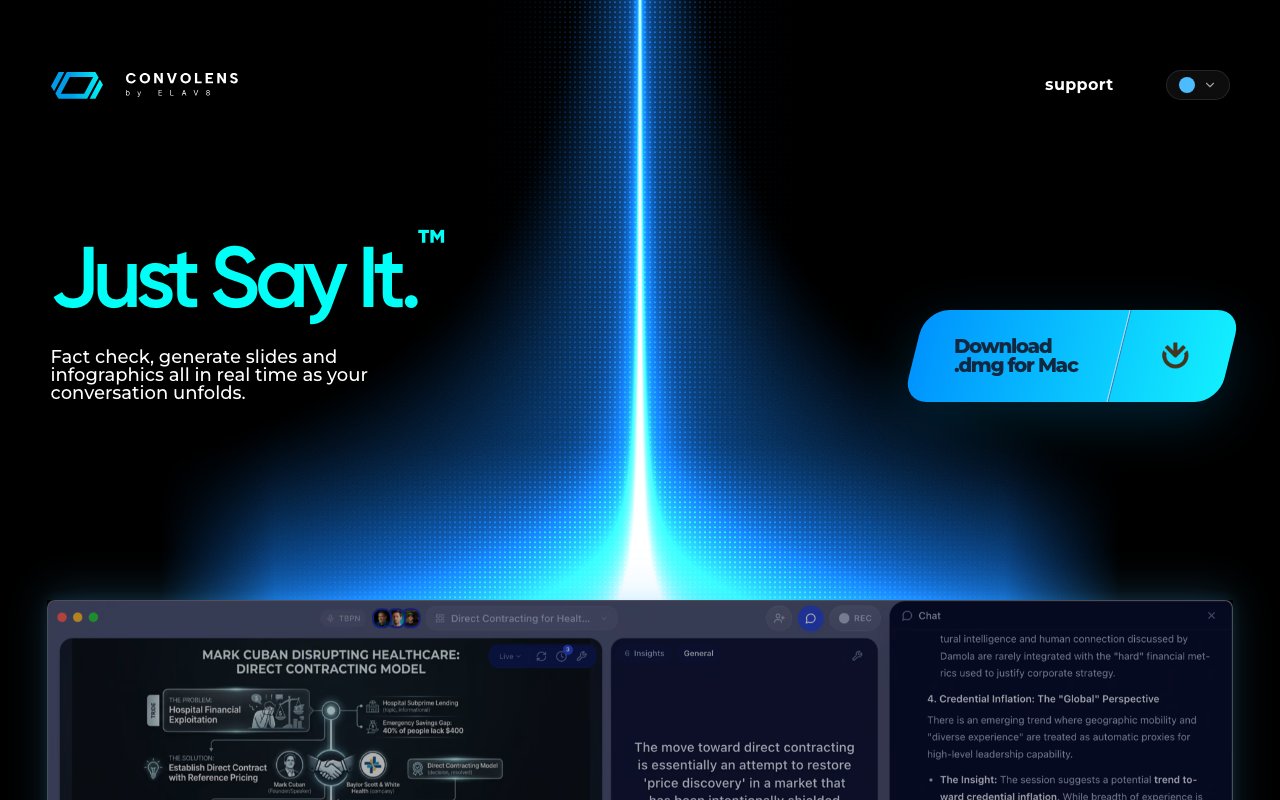
Convolens is a Mac app that sits alongside a live conversation and does its work while you're still talking. It listens, shows a live transcription, and turns what's being said into slides and infographics as the conversation unfolds. At the same time it fact-checks claims as they're spoken and suggests the next question worth asking. The tagline is Just Say It, and the pitch is an AI co-host rather than a recorder, something that hands you facts, visuals and prompts during the conversation instead of a transcript you'll get around to reading later.
The problem it goes after is that important conversations move too fast to research. You can't pause a podcast, a class, or a sales call to check a figure, build a chart, or remember which project a guest mentioned two months ago. So either the moment passes unaddressed or you break the flow to go looking, and neither option is good. Convolens closes that gap by doing the lookup and the layout in the background while you keep the conversation going, which is a different job from the transcription tools that mostly hand you text after the fact. The company describes the category as Streaming Intelligence, meaning the output arrives while it can still change what you say next.
The organizing idea is what the team calls Lenses. Each Lens watches the conversation for a different signal, a live fact, a fresh insight, a graphic worth making, a quotable line, and the relevant one surfaces the second it would actually help rather than five minutes after the topic has moved on. Follow-up questions appear in your peripheral vision, tuned to the guest's background and whichever thread you're on, so you can glance, ask, and keep flowing. You can also ask the app something mid-conversation and it reasons across the transcript, the guest, and the current thread to answer. That question-first framing is what keeps the app from turning into another panel of noise competing with the person in front of you.
The graphics side is more than a slide export. Infographics refresh as you talk and follow whichever thread you choose to spotlight, and you can aim the tone and the layout your own way, then share the result without opening a separate editor. That's the part that makes it feel like a production tool rather than a note-taker, because the artifact your audience sees is being built during the conversation instead of assembled afterwards from notes nobody wants to revisit. For anyone who has ever promised a recap deck and delivered it three days late, that alone is the argument.
It also keeps memory across sessions. Every session, thread and decision you talked through stays inside the app, so when the same person, project or topic comes up again the relevant pieces resurface on their own, with no scrolling, searching, or re-explaining. Before a recording you can pull a guest's recent work, talking points and previous appearances into a private brief that sits next to your show notes, and the app raises the relevant bit at the moment it's worth mentioning rather than leaving you to scan a document while somebody is mid-sentence.
Podcasts are the obvious home and the demo site leads with them, but the same engine is being tuned for teachers, speakers, meetings, sales calls, design reviews and weekly all-hands. Anyone who has to talk and think at the same time is in scope. It can be customized for a particular user, role or purpose, which matters more than it sounds, because the follow-up question a teacher wants surfaced is nothing like the one a sales rep needs, and a single generic assistant would serve both of them badly. The company's line is that one conversation gets captured once and stays useful everywhere afterwards, which is the reason the same tool is being pointed at meetings and classrooms rather than staying a podcast accessory.
Access is a free open alpha on macOS, distributed as a .dmg you download from the site, with a signup form that emails the link if you're on a phone or a PC and a waitlist for Windows. Browser and other surfaces are on the roadmap. The team ships over the air with new Lenses landing weekly and same-day patches when needed, and says real bug reports get fixed in the next build while feature requests are triaged at the end of each week. The vendor is ELAV8 AI LLC, the same company behind ELAV8 Voice, and it states that the app uses enterprise-grade encryption, gives you control over your data, and never sells personal data to third parties. Alpha carries the usual caveats, no published pricing for what comes after the free period, rapid change between builds, and real-time fact-checking that still deserves a human sanity check before you repeat it on air.
Key Features
- Real-time fact-checking of spoken claims
- Live slides and infographics from speech
- Suggested follow-ups in peripheral vision
- Lenses that each watch for one signal
- Persistent memory across sessions and topics
- Private guest briefs beside show notes
Pros & Cons
What we like
- Works during the conversation, not after it
- Turns talk into shareable graphics without another editor
- Remembers people, projects and prior decisions
- Free to use during the open alpha on macOS
Room for improvement
- Open alpha, so expect rough edges and frequent changes
- macOS only, with Windows on a waitlist
- No pricing published for life after the alpha
- Real-time fact checks still need a human eye
Frequently Asked Questions
What is Convolens?
Is Convolens free?
Who is Convolens for?
How is it different from a transcription tool?
Best For
Featured in
Alternatives to Convolens
View all
Apatero AI
The creator studio for AI image, video, audio, 3D, and avatars, now at apatero.ai.

SoloDevStack
A solo developer blog built on head-to-head tool comparisons, 580+ posts deep.
Apatero Studio
Creator studio for AI image, video, audio, 3D, and avatars. Every model worth using, in one workspace.

Melodex
Turn your idea into an AI-generated music video
Our take
Tool Index Editorial · Oct 2026· 3.0/5
Convolens is a Mac conversation workspace that transcribes live speech, structures notes, checks public claims, and generates slides or images before the discussion ends. It is pitched at hosts, teachers, sales teams, and meeting participants who need useful prompts and artifacts while they can still affect the conversation. The captured page describes a free open alpha for Mac, while headings mention future Base, Pro, and Enterprise plans without showing prices.
We found the live-output angle more distinctive than another after-the-call summary. A source-backed claim check or draft slide can be useful while a topic is still active. The alpha label matters, though, and all comparisons on the page come from the vendor itself. Automated fact checks must still be opened and verified before anyone repeats them, particularly in a live setting where a confident error can travel quickly. Mac-only availability and unpublished post-alpha pricing make this an intriguing test product rather than a settled purchase.
Editorial opinion from the Tool Index team, written from the public product pages. Not a user review.
Reviews (0)
Badge builder
Add Convolens to your website
Choose a badge style and size, preview it here, then copy the generated HTML. Badge images are self-contained SVGs and do not require an external script.

<a href="https://toolindex.net/tools/convolens?ref=badge" target="_blank" rel="noopener">
  <img src="https://toolindex.net/badge/convolens/medium.svg" alt="Convolens - Listed on Tool Index" width="180" height="50" />
</a>How to use the badge
- 1. Pick the style, size, and theme that fit your layout.
- 2. Copy the generated HTML from the code block.
- 3. Paste it into your footer, homepage, or press page.
Standard badge available
The standard listing badge is available now. Score and circle badges are limited to tools currently ranked in the top 10 of a category.
Badge clicks return visitors to this profile with a referral tag so the source remains identifiable.
Related Tools
Apatero AI
The creator studio for AI image, video, audio, 3D, and avatars, now at apatero.ai.
Kevin Gabeci Toolkits
Seven AI toolkits for writing books, making music, cutting video, and building agents.

Warp
The modern terminal reimagined with AI and collaboration

Bolt.new
Prompt-to-deployed full-stack app inside the browser
Work on Convolens? Request listing access or correction