Design Skills Directory
A curated browser of agent skills that teach AI coding tools professional UI and UX craft
Gallery
About Design Skills Directory
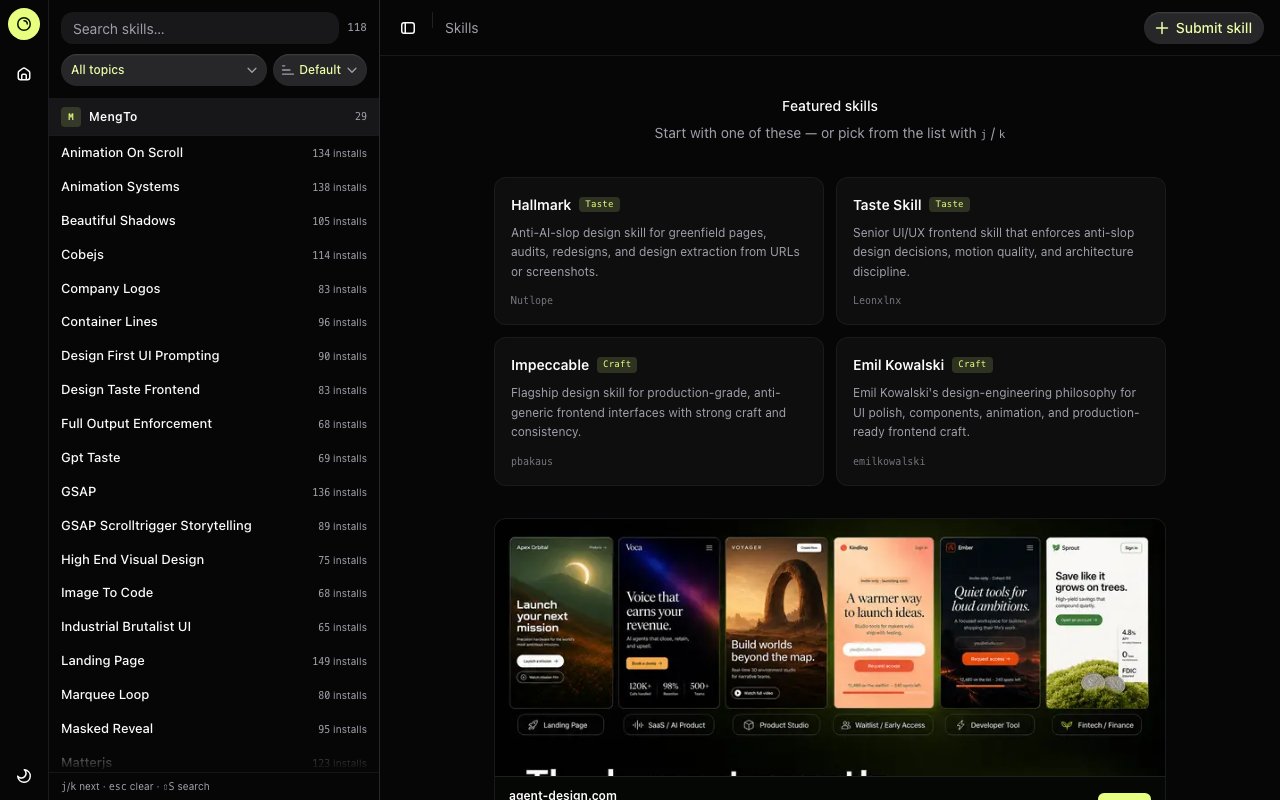
Design Skills Directory is a curated catalog of design specifications and prompt templates that help AI coding assistants generate interfaces with genuine visual character rather than the generic, templated aesthetics that have become recognizable hallmarks of AI generated code. The directory aggregates over 100 design skills created by designers and developers who've studied what makes AI output look bland and documented specific guidelines to counteract those tendencies. Each skill contains detailed instructions that AI agents like Claude, Cursor, v0, Bolt, and Lovable can reference when building frontend interfaces. The core problem it addresses is familiar to anyone who's used AI coding tools extensively. Generated interfaces technically work, but they share an unmistakable sameness. By feeding specific design skills into an AI coding session, developers can push their generated output toward distinctive visual directions.
Each skill in the directory focuses on a particular aspect of design or development practice, and the collection spans an impressive range of concerns. Frontend implementation techniques cover everything from component architecture to responsive behavior patterns. Visual design principles address color theory, spacing systems, and compositional balance. Motion and animation systems include detailed guidance for integrating libraries like GSAP and Three.js with proper timing and easing. Design systems thinking helps teams establish consistent foundations that extend across projects. Typography guidance covers OKLCH color handling for perceptually uniform color manipulation and type scaling systems that maintain proportional harmony. Craft level details address the subtle refinements that separate polished professional interfaces from technically functional but visually flat output.
Skills come with live before and after demonstrations showing the concrete difference they make when applied to the same starting point. These comparisons make it immediately clear whether a skill addresses problems relevant to a particular project. Gallery examples show the skill applied to actual interfaces rather than abstract demonstrations, providing realistic expectations for what incorporating the skill might produce. Install counts indicate community adoption, helping developers identify skills that others have found valuable versus experimental entries that haven't been widely tested. This transparency helps developers evaluate whether a particular skill aligns with the aesthetic direction they're pursuing.
The directory organizes skills through a three pane explorer interface that makes browsing practical even as the library grows. Users can browse by creator to find additional skills from someone whose work they've appreciated. Topic area filters cover categories like motion, accessibility, performance, and visual taste, letting developers quickly narrow to relevant capabilities. Direct search handles cases where developers know roughly what they want and just need to locate the specific skill. Skills are hosted as Git based specifications, so integrating them into an AI workflow typically involves sharing the skill guidelines with the coding assistant at the start of a session or referencing them during prompts about specific design challenges.
Frontend developers working with AI coding tools represent the primary audience. These developers have experienced the frustration of AI generated interfaces that technically function correctly but lack visual personality or professional polish. Design teams building specifications intended for AI consumption will also find value in studying how existing skills are structured and formatted, using the directory as a reference for creating their own guidelines. The skills range from high level aesthetic directions like anti generic design principles that push against common AI tendencies, to specific implementation patterns for particular animation libraries or accessibility requirements.
Notable entries in the collection include skills focused specifically on avoiding what some call AI slop in greenfield pages and redesign projects, motion systems covering both fundamental animation principles and specific library implementations, and accessibility and performance auditing guidelines. The variety means developers can compose multiple skills for a single project, perhaps combining a visual taste skill that establishes aesthetic direction with a motion system skill that handles animation implementation and an accessibility audit skill that catches common compliance issues. This composability lets teams build coherent design language across AI assisted development sessions without starting from scratch each time.
The directory itself appears to be free to browse and use, with skills available for anyone building AI assisted interfaces. Some creators offer commercial design templates and expanded resources through connected services, but accessing the directory catalog and its skill specifications carries no apparent cost. For developers frustrated by the sameness of AI generated interfaces who aren't ready to abandon AI assistance entirely, this resource provides a practical middle path toward output meaningfully closer to what a thoughtful human designer would create.
Key Features
- 118+ curated agent skills
- Three-pane explorer interface
- Before and after demos
- Topic and creator filtering
- Keyboard navigation support
- Links to live skill galleries
Pros & Cons
What we like
- Directly improves AI coding tool output quality
- Organized by topic and creator for easy discovery
- Demos show real before and after results
- Covers motion, accessibility, and visual systems
Room for improvement
- No pricing or terms visible on site
- Quality varies by individual skill author
- Requires compatible AI coding tool
- Skill installation process not documented on main page
Frequently Asked Questions
What is Design Skills Directory?
Is Design Skills Directory free?
Who is Design Skills Directory for?
What tools does it work with?
Best For
Featured in
Alternatives to Design Skills Directory
View all
Framer
Visual website builder that lets designers ship production-grade marketing sites with real CMS, SEO controls, and code components.

Apatero Studio
Creator studio for AI image, video, audio, 3D, and avatars. Every model worth using, in one workspace.

Pixel Painters
Unlimited graphic design subscriptions built only for churches and ministries
Reviews (11)
Recommended without reservation
Came to Design Skills Directory after getting frustrated with what I had before. Got real value out of topic and creator filtering. What stands out is how little babysitting it needs. Recommending it to people in a similar spot.
Finally something that fits
Have been running Design Skills Directory for a while, here is where I land. The defaults are sensible, so I was not fighting settings on day one. Found it works best for exploring community-contributed agent skills.
Pulled its weight from week one
Have been running Design Skills Directory for a while, here is where I land. It does what it says, which is rarer than it should be.
Solid daily driver
Came to Design Skills Directory after getting frustrated with what I had before. It slotted into my routine without much fuss.
Powerful once it clicks
Started using Design Skills Directory casually, now it is pinned in my dock. Their take on organized by topic and creator for easy discovery is genuinely good. One thing that bugs me is skill installation process not documented on main page.
Quietly excellent
Three months of Design Skills Directory later, here is what holds up. The before and after demos is more useful than I expected.
Two months in, no regrets
Design Skills Directory has quietly become part of my daily flow. Their take on before and after demos is genuinely good. Worth it for what I get out of it.
Quietly excellent
Came to Design Skills Directory after getting frustrated with what I had before. It slotted into my routine without much fuss. The defaults are sensible, so I was not fighting settings on day one. Mostly using it for improving default output from cursor or claude code. It earns its place in my stack.
Two months in, no regrets
Started using Design Skills Directory casually, now it is pinned in my dock. The core workflow is smooth once you are set up. It earns its place in my stack.
Decent with some rough edges
Three months of Design Skills Directory later, here is what holds up. What stands out is how it handles directly improves ai coding tool output quality. Support actually answered when I had a question, which surprised me. It would be a five if not for requires compatible ai coding tool. Glad I made the switch.
Finally something that fits
Tried Design Skills Directory on a side project first, then rolled it out everywhere. Their take on covers motion, accessibility, and visual systems is genuinely good. What stands out is how little babysitting it needs. Found it works best for finding design patterns for specific styles. It earns its place in my stack.
Badge builder
Add Design Skills Directory to your website
Choose a badge style and size, preview it here, then copy the generated HTML. Badge images are self-contained SVGs and do not require an external script.

<a href="https://toolindex.net/tools/design-skills-directory?ref=badge" target="_blank" rel="noopener">
  <img src="https://toolindex.net/badge/design-skills-directory/medium.svg" alt="Design Skills Directory - Listed on Tool Index" width="180" height="50" />
</a>How to use the badge
- 1. Pick the style, size, and theme that fit your layout.
- 2. Copy the generated HTML from the code block.
- 3. Paste it into your footer, homepage, or press page.
Standard badge available
The standard listing badge is available now. Score and circle badges are limited to tools currently ranked in the top 10 of a category.
Badge clicks return visitors to this profile with a referral tag so the source remains identifiable.
Related Tools
Apatero Studio
Creator studio for AI image, video, audio, 3D, and avatars. Every model worth using, in one workspace.

Tailwind CSS
Rapidly build custom designs without leaving your HTML

Figma
Collaborative interface design tool

Marvel
Lightweight prototyping platform for turning images and screens into clickable mobile and web prototypes.
Work on Design Skills Directory? Request listing access or correction