DeskMakeover
Restyle every Windows desktop icon in one click with nine hand-tuned visual looks
Gallery
About DeskMakeover
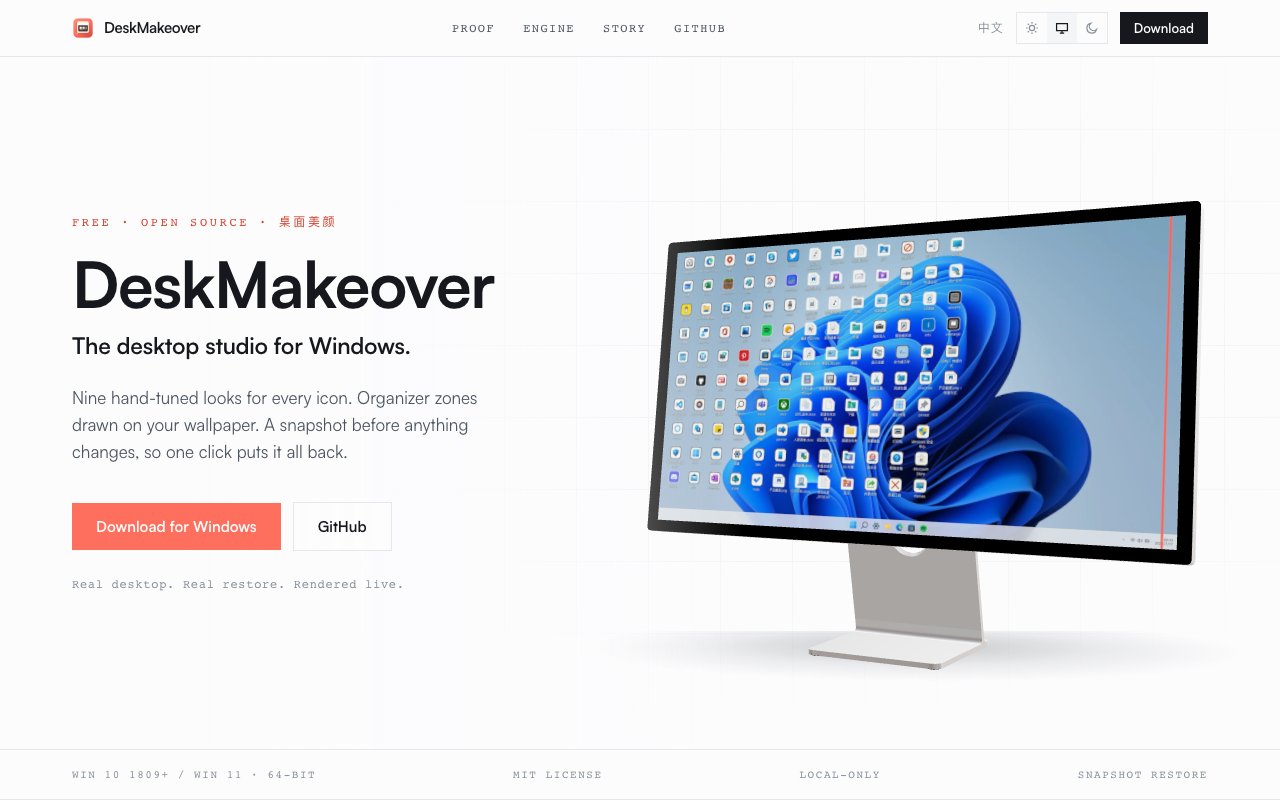
DeskMakeover is a Windows desktop customization tool that restyles every icon on your desktop with one click and lets you draw organizer zones directly onto your wallpaper. It ships with nine hand tuned visual looks, each designed to give your desktop a cohesive aesthetic rather than the patchwork of mismatched icons that accumulates over months of installs, shortcuts, and downloaded apps. The app runs on Windows 10 version 1809 and later, as well as Windows 11, and requires no account creation, no internet connection, and no ongoing subscription. Everything runs locally on your machine with no data leaving your computer.
The problem it addresses is visual clutter and inconsistency. A typical Windows desktop collects icons from dozens of sources over time, and those icons rarely share a design language. Some are flat and modern following current Microsoft guidelines, some are glossy with gradients from a decade ago, some are sixteen pixels stretched to sixty four and look terrible at any size because the original designer never anticipated high resolution displays. Over time the desktop becomes a collage of mismatched styles that no amount of wallpaper swapping can fix because the icons themselves remain jarring. DeskMakeover unifies that mess by applying a consistent visual treatment to every icon on screen, and it does so in a way that you can reverse instantly if you change your mind or want to try a different look without worrying about breaking anything.
The nine included styles cover a wide range of tastes and workflows. Squircle gives icons rounded square frames with soft edges that feel modern and approachable. Blueprint renders them in technical drawing style with grid lines and annotations for a distinctive nerdy aesthetic. Pixel Era delivers a retro low resolution look that evokes classic operating systems from the eighties and nineties. Gleam adds subtle light reflections for a polished professional appearance. Glaze applies a glassy overlay that makes icons pop against any background wallpaper. Die Cut pops icons out with sharp edges and drop shadows. Porthole frames them in circular windows. Scrapbook scatters them on paper textures like a physical corkboard you might pin notes to. Creekstone sets them against natural stone backgrounds for an organic feel. Each style can be applied per type, so you might choose one look for program shortcuts, another for folders, and a third for individual files, mixing and matching until the desktop feels intentional.
Beyond icon restyling, DeskMakeover lets you draw wallpaper zones. These are translucent panels that render directly into the wallpaper image itself, which means they don't run as a background process chewing CPU and memory resources the way overlay apps do. You can use zones to visually separate work apps from personal apps, or to carve out a clean area for active projects while keeping the rest of your desktop organized by category. The zones stay even when you change wallpapers, and they adjust automatically if you swap themes or switch between light and dark mode. They're baked into the wallpaper file, not floating windows you have to manage.
The app uses what it calls a purpose built, fully deterministic pixel pipeline. Before applying any transformation, it analyzes each icon and chooses the right treatment for its resolution, color profile, and transparency regions. This keeps results consistent across icons that shipped with wildly different production quality, from professional app icons designed by dedicated teams to quick utility tools that never had a designer touch them and use a default template. A live studio mode shows a real time preview of your desktop as you tweak settings, so you can experiment with different styles and zone placements without committing changes until you're satisfied with the result. You see exactly what you'll get before you apply.
Snapshots and restore make the whole system reversible. DeskMakeover takes an automatic backup before every change, and a single click rolls you back to the original state exactly as it was. That lowers the risk of experimenting. If a style doesn't click after a day of use, you revert and try another without hunting through system folders or editing the registry manually. The safety net encourages exploration rather than punishing it, which means you're more likely to find a look you actually enjoy rather than settling on the first passable option.
Access is completely free under an MIT license. There's no account creation required, no telemetry phoning home about your desktop layout, and no cloud upload of your icon data. The app runs entirely locally and keeps everything on your machine. For anyone who cares about desktop aesthetics on Windows but doesn't want to spend hours in icon editing software or worry about breaking system files, DeskMakeover offers a quick, safe, and visually satisfying solution that makes the difference immediately visible the moment you apply a style.
Key Features
- Nine preset icon styling looks
- Customizable shape and plate finish
- Snapshot and instant restore
- Live desktop preview mirror
- Wallpaper zone panel rendering
- No telemetry or cloud dependency
Pros & Cons
What we like
- Completely free and MIT licensed
- Restores originals with a single click
- Runs locally with no data collection
- Real time preview before committing changes
Room for improvement
- Windows only, no macOS or Linux support
- New release, smaller user community
- Limited to desktop icons, not file explorer
- Requires 64 bit Windows 10 1809 or newer
Frequently Asked Questions
What is DeskMakeover?
Is DeskMakeover free?
Does DeskMakeover collect any data?
Can I undo changes after styling my icons?
Best For
Featured in
Alternatives to DeskMakeover

Framer
Visual website builder that lets designers ship production-grade marketing sites with real CMS, SEO controls, and code components.

Apatero Studio
Creator studio for AI image, video, audio, 3D, and avatars. Every model worth using, in one workspace.

Pixel Painters
Unlimited graphic design subscriptions built only for churches and ministries
Reviews (9)
Two months in, no regrets
DeskMakeover has quietly become part of my daily flow. Got real value out of live desktop preview mirror. It fits well for organizing icons into labeled wallpaper zones. No regrets so far.
Pulled its weight from week one
Tried DeskMakeover on a side project first, then rolled it out everywhere. Got real value out of runs locally with no data collection. It has shaved real time off my week. Hard to imagine going back to my old setup.
Two months in, no regrets
Found DeskMakeover on a Show HN thread and I am glad I clicked. The interface stays out of my way, which I appreciate. Support actually answered when I had a question, which surprised me. Mostly using it for refreshing a cluttered desktop in minutes. Hard to imagine going back to my old setup.
Exactly what I needed
DeskMakeover solves a real problem for me without making a fuss about it. What stands out is how little babysitting it needs. Mostly using it for refreshing a cluttered desktop in minutes. No regrets so far.
Genuinely impressed
DeskMakeover has quietly become part of my daily flow. It does what it says, which is rarer than it should be. Recommending it to people in a similar spot.
Exactly what I needed
Picked DeskMakeover for the price, stayed for the quality. Their take on snapshot and instant restore is genuinely good. Setup was painless and I was productive the same day. It earns its place in my stack.
Recommended without reservation
Three months of DeskMakeover later, here is what holds up. The customizable shape and plate finish is more useful than I expected. Worth it for what I get out of it.
Finally something that fits
Tried DeskMakeover on a side project first, then rolled it out everywhere. The defaults are sensible, so I was not fighting settings on day one. Support actually answered when I had a question, which surprised me. It fits well for trying different visual styles without permanent changes. Would sign up again without thinking twice.
Powerful once it clicks
Picked DeskMakeover for the price, stayed for the quality. What stands out is how it handles wallpaper zone panel rendering. Mostly using it for refreshing a cluttered desktop in minutes. My only gripe is requires 64 bit windows 10 1809 or newer. It earns its place in my stack.
Badge builder
Add DeskMakeover to your website
Choose a badge style and size, preview it here, then copy the generated HTML. Badge images are self-contained SVGs and do not require an external script.

<a href="https://toolindex.net/tools/deskmakeover?ref=badge" target="_blank" rel="noopener">
  <img src="https://toolindex.net/badge/deskmakeover/medium.svg" alt="DeskMakeover - Listed on Tool Index" width="180" height="50" />
</a>How to use the badge
- 1. Pick the style, size, and theme that fit your layout.
- 2. Copy the generated HTML from the code block.
- 3. Paste it into your footer, homepage, or press page.
Standard badge available
The standard listing badge is available now. Score and circle badges are limited to tools currently ranked in the top 10 of a category.
Badge clicks return visitors to this profile with a referral tag so the source remains identifiable.
Related Tools
Apatero Studio
Creator studio for AI image, video, audio, 3D, and avatars. Every model worth using, in one workspace.

Tailwind CSS
Rapidly build custom designs without leaving your HTML

Figma
Collaborative interface design tool

Marvel
Lightweight prototyping platform for turning images and screens into clickable mobile and web prototypes.
Work on DeskMakeover? Request listing access or correction