
Digital Surface
Mac capture and retrieval system that makes your screen history and meetings searchable
Gallery
About Digital Surface
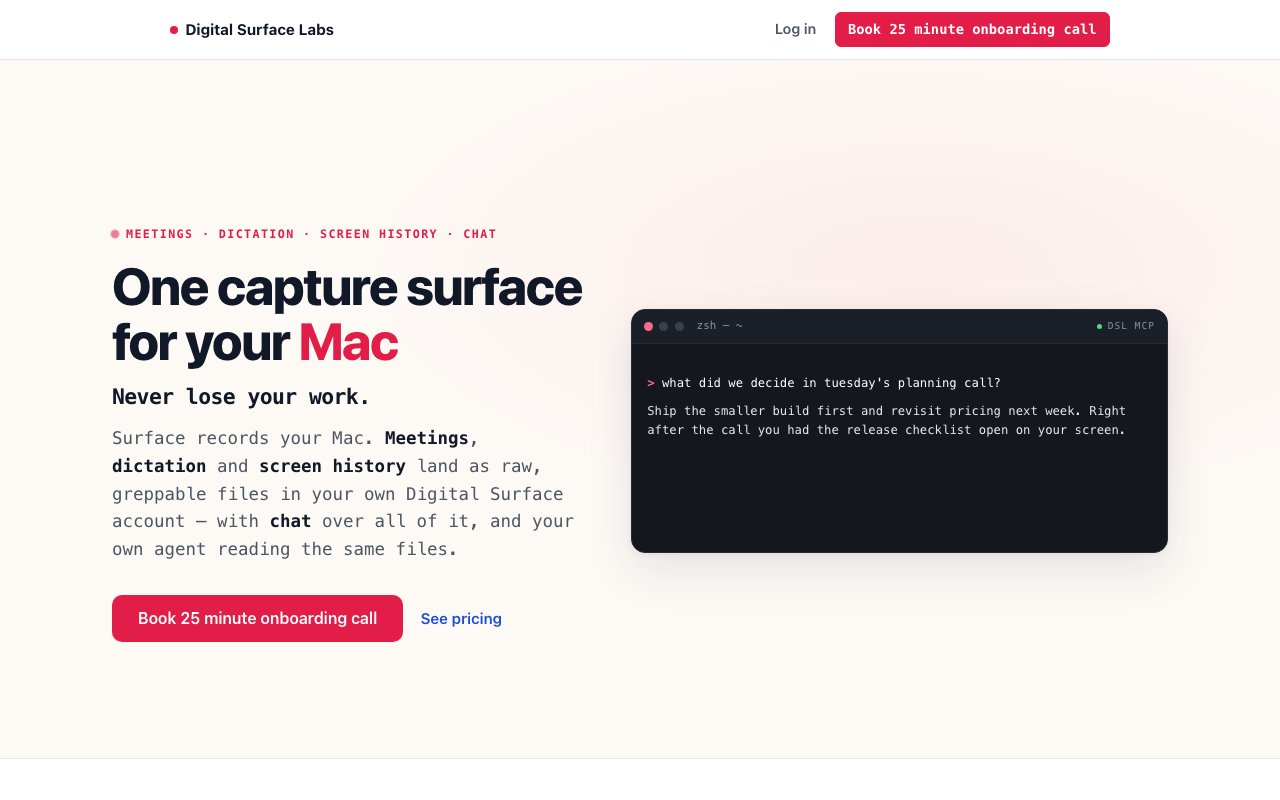
Digital Surface captures and organizes the scattered information from your workday into a searchable personal archive that AI agents can actually access. It records meetings, transcribes dictation, preserves screen history through OCR, and lets you query everything through a Claude powered chat interface. The core problem it addresses is that valuable context gets lost constantly throughout knowledge work, whether it's something mentioned in a call three weeks ago that's suddenly relevant, a terminal command you ran but can't remember, or decisions made in conversations that never got documented anywhere. This tool builds a persistent record of your digital activity that becomes genuinely useful for recall and AI assisted work.
The system operates through four capture mechanisms that run on your Mac. Meeting transcription happens automatically without joining calls as a participant, which means it works with whatever video conferencing tool you're using without needing integrations or bot permissions. Transcription happens locally using Whisper or Apple's Speech framework, producing searchable markdown and JSON files that show who said what and what was decided. You end up with timestamped, speaker attributed records of every call without manually taking notes or asking people to repeat themselves.
Dictation works by holding the Globe key and speaking, with transcription handled entirely on your machine. The text lands directly in whatever text field is active at the time, whether that's a notes app, an email draft, a terminal, or a text editor. There are no app specific integrations to configure because it works at the input level. You can speak a thought and have it appear wherever your cursor is, which works surprisingly well for quick capture when typing feels like friction.
Screen history performs periodic OCR to extract text from visible screens while discarding the raw images themselves. Only timestamped text content and app names get retained, which keeps storage reasonable while still enabling searches like finding your terminal history from weeks prior or locating that configuration value you remember seeing in a browser tab. This approach balances utility against privacy concerns since there are no screenshots sitting on disk, just extracted text tied to timestamps and application context.
Everything stays encrypted with AES-256-GCM per user. The system redacts secrets before storage and excludes password managers from capture entirely. Raw audio files remain on your local machine until transcription completes successfully, only then getting uploaded if cloud sync is enabled. When you want to find something, the chat interface queries your captured files using Anthropic's Claude, citing sources so you can see exactly which meeting transcript or screen capture provided each answer. This citation approach builds trust since you can verify what the AI tells you against the original record.
One particularly useful feature involves agent integration through MCP. Your own Claude instance can access these files via an MCP server, enabling personal AI agents to analyze your work history without tokens counting against Digital Surface's usage limits. This transforms the product from a search tool into infrastructure that makes your AI assistants genuinely aware of what you've been working on. When you ask your agent about a project, it can pull from meeting notes, screen captures, and dictated thoughts rather than operating with no context about your actual work.
The Starter plan costs twenty dollars monthly and includes five dollars of model credits, enough for roughly thirty to one hundred chats or similar activity levels, plus ten gigabytes of storage. The Pro plan at two hundred dollars monthly provides fifty dollars in credits and one terabyte of storage for heavier usage or longer retention. Both include the desktop capture application, and overage credits are available at cost plus ten percent when monthly allocations run out. Pages, history, and connected sources remain unlimited across both tiers.
Engineers, designers, and anyone managing complex workflows where historical context matters will get the most value here. The product positions itself for knowledge workers who need to recall decisions, conversations, and screen activity from days or weeks prior without relying on memory or manual note taking. A twenty five minute onboarding call with a founder helps configure capture settings for your specific workflow and points your agents at the captured surface.
Key Features
- OCR-based screen history with image discard
- Meeting transcription without a bot in the call
- Globe-key voice dictation processed locally
- Chat interface with cited source retrieval
- MCP server for Claude and Codex agent access
- AES-256-GCM encryption with automatic secret redaction
Pros & Cons
What we like
- All capture processing runs locally on your Mac
- Chat answers cite exact sources from your history
- Agents can query your data without uploading to external APIs
- Automatic redaction of secrets and password managers
Room for improvement
- Mac only, no Windows or Linux support
- Monthly subscription starts at twenty dollars
- Model usage pooled and metered, not unlimited
- Requires onboarding call to get started
Frequently Asked Questions
What is Digital Surface?
Is Digital Surface free?
Does Digital Surface upload my data to the cloud?
Who is Digital Surface for?
Best For
Featured in
Alternatives to Digital Surface
View all
CalendHub
Smart scheduling and calendar management for teams
Kevin Gabeci Toolkits
Seven AI toolkits for writing books, making music, cutting video, and building agents.

Eased Into AI
Learn AI from zero. No jargon, no hype, just steps that work.

Fix It Gently
Calm, plain-English fixes for everyday tech problems.
Reviews (0)
Badge builder
Add Digital Surface to your website
Choose a badge style and size, preview it here, then copy the generated HTML. Badge images are self-contained SVGs and do not require an external script.

<a href="https://toolindex.net/tools/digital-surface?ref=badge" target="_blank" rel="noopener">
  <img src="https://toolindex.net/badge/digital-surface/medium.svg" alt="Digital Surface - Listed on Tool Index" width="180" height="50" />
</a>How to use the badge
- 1. Pick the style, size, and theme that fit your layout.
- 2. Copy the generated HTML from the code block.
- 3. Paste it into your footer, homepage, or press page.
Standard badge available
The standard listing badge is available now. Score and circle badges are limited to tools currently ranked in the top 10 of a category.
Badge clicks return visitors to this profile with a referral tag so the source remains identifiable.
Related Tools

Confluence
Atlassian's long-running team wiki that anchors many enterprise knowledge stacks
Asana
Project management for teams that live in projects, tasks and dependencies
Kevin Gabeci Toolkits
Seven AI toolkits for writing books, making music, cutting video, and building agents.

Logseq
An open-source outliner notes app where every bullet is a first-class block
Work on Digital Surface? Request listing access or correction