
DigitalShelf
A personal library for books and films you can curate and share with anyone
Gallery
About DigitalShelf
DigitalShelf is a personal library platform that lets people curate and share their book collections with anyone on the web. The idea is straightforward but surprisingly underserved in a world full of complex book tracking apps. You add the books you've read, arrange them on virtual shelves, mark your favorites, and then share a link so friends, followers, or strangers can browse what you've been reading. It's a social layer for book lovers who want to show off their taste without writing full reviews, maintaining a blog, or dealing with algorithmic recommendations that miss the point of what makes reading personal.
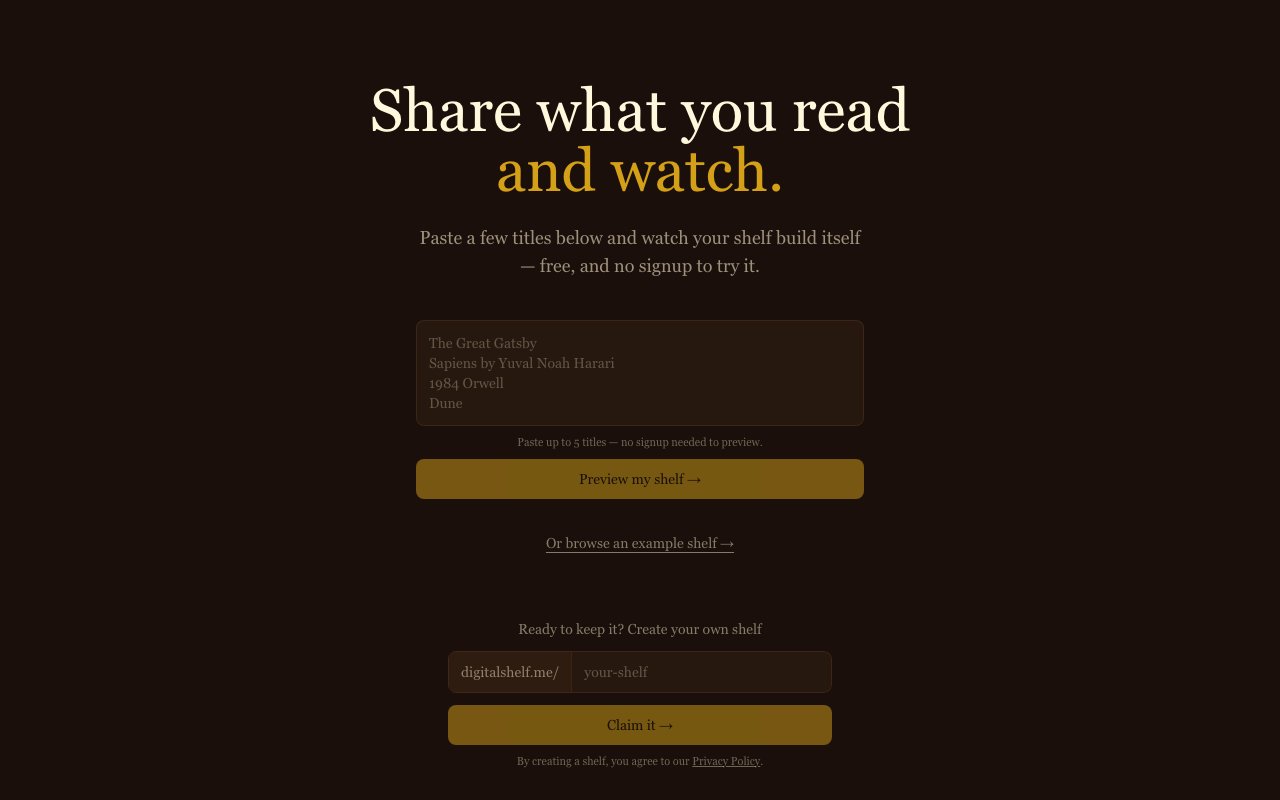
The platform works by letting users paste book titles directly into a text box on the homepage. You don't need to sign up or hand over an email address just to see what your shelf would look like. Paste up to five titles and the system generates a visual preview instantly. Books appear in a grid layout with proper 2:3 cover proportions, stacked across multiple shelf rows with wooden plank dividers that give the whole thing a cozy library aesthetic. The visual design matters here because the entire point is making your collection look good enough to share. If you like what you see after the preview, you can create an account to save and claim your collection permanently. Once saved, your shelf lives at a unique URL you can drop into social bios, link trees, Substack footers, or email signatures. Anyone with the link can browse without needing their own account.
There's a starring system for marking favorites, which helps visitors quickly identify the books you'd actually recommend versus the ones you just happened to finish. This subtle distinction matters when someone visits your shelf looking for their next read. They can scan your starred picks first rather than wading through everything you've touched in the last year. The visual hierarchy does the heavy lifting so you don't need to write explanations or mini-reviews for each title. A star says enough.
DigitalShelf targets readers who enjoy the social dimension of books but don't want the commitment of platforms like Goodreads. There's no pressure to rate everything on a five-star scale, write thoughtful reviews that nobody reads, or engage with recommendation algorithms that push popular titles you've already heard of. It's more of a display case than a tracking tool. The difference matters if you're the kind of reader who finishes a book and just wants to add it to a collection without turning the experience into homework. Bookstagrammers, newsletter writers, podcast hosts who discuss books, and anyone with a reading habit they want to share publicly will find this useful. It's also handy for people who get asked for recommendations constantly and want a single link to point everyone toward instead of typing out the same list repeatedly.
The approach differs from traditional book tracking services because it prioritizes presentation over data. You're not logging reading dates, tracking page counts, setting yearly goals, or monitoring progress percentages. There are no streaks to maintain or badges to earn. The focus is entirely on what your collection looks like and how easily someone else can explore it. This makes it faster to set up, simpler to understand, and much less of a chore to maintain over time. Add a book when you finish it, star it if you loved it, move on with your day. The friction is minimal by design.
Film tracking appears alongside books on the homepage, suggesting you can mix movies and books on the same shelf. This dual-medium approach is unusual since most platforms specialize in one or the other. Letterboxd handles movies, Goodreads handles books, and combining them in the same space is surprisingly rare. Whether that integration feels cohesive or awkward depends on your personal taste, but it does mean you can showcase your entire media diet rather than splitting it across multiple services. Someone visiting your shelf sees what you've been watching and reading in one place.
The service is free to try without creating an account. The full pricing structure isn't prominently displayed on the site, which typically indicates either a freemium model with optional paid features down the road or a completely free tool built as a passion project. Either way, the zero-friction entry point means you can test whether DigitalShelf fits your needs before committing any personal information or payment details. Try the preview, see if you like the aesthetic, and decide from there.
Key Features
- Automatic cover art and metadata fetching
- Separate shelves for books and films
- Star favorites for quick recommendations
- Reading status tracking with to-read lists
- Shareable public URL for each shelf
- No signup required to preview a shelf
Pros & Cons
What we like
- Builds a visual shelf automatically from titles you paste in
- Separate organization for books and films
- Clean, shareable link for bios and signatures
- Free with no hidden paid tier
Room for improvement
- No social or community features like reviews or friends
- Personal project with a single maintainer
- Limited to books and films, not other media
- No mobile app, browser only
Frequently Asked Questions
What is DigitalShelf?
Is DigitalShelf free?
Who is DigitalShelf for?
How does DigitalShelf get book and film data?
Best For
Featured in
Alternatives to DigitalShelf
View all
CalendHub
Smart scheduling and calendar management for teams
Kevin Gabeci Toolkits
Seven AI toolkits for writing books, making music, cutting video, and building agents.

Eased Into AI
Learn AI from zero. No jargon, no hype, just steps that work.

Fix It Gently
Calm, plain-English fixes for everyday tech problems.
Reviews (0)
Badge builder
Add DigitalShelf to your website
Choose a badge style and size, preview it here, then copy the generated HTML. Badge images are self-contained SVGs and do not require an external script.
<a href="https://toolindex.net/tools/digitalshelf?ref=badge" target="_blank" rel="noopener">
  <img src="https://toolindex.net/badge/digitalshelf/medium.svg" alt="DigitalShelf - Listed on Tool Index" width="180" height="50" />
</a>How to use the badge
- 1. Pick the style, size, and theme that fit your layout.
- 2. Copy the generated HTML from the code block.
- 3. Paste it into your footer, homepage, or press page.
Standard badge available
The standard listing badge is available now. Score and circle badges are limited to tools currently ranked in the top 10 of a category.
Badge clicks return visitors to this profile with a referral tag so the source remains identifiable.
Related Tools

Confluence
Atlassian's long-running team wiki that anchors many enterprise knowledge stacks
Asana
Project management for teams that live in projects, tasks and dependencies
Kevin Gabeci Toolkits
Seven AI toolkits for writing books, making music, cutting video, and building agents.

Logseq
An open-source outliner notes app where every bullet is a first-class block
Work on DigitalShelf? Request listing access or correction