
Dispositio
Terminal project planner that stores your whole roadmap as plain Markdown
Gallery
About Dispositio
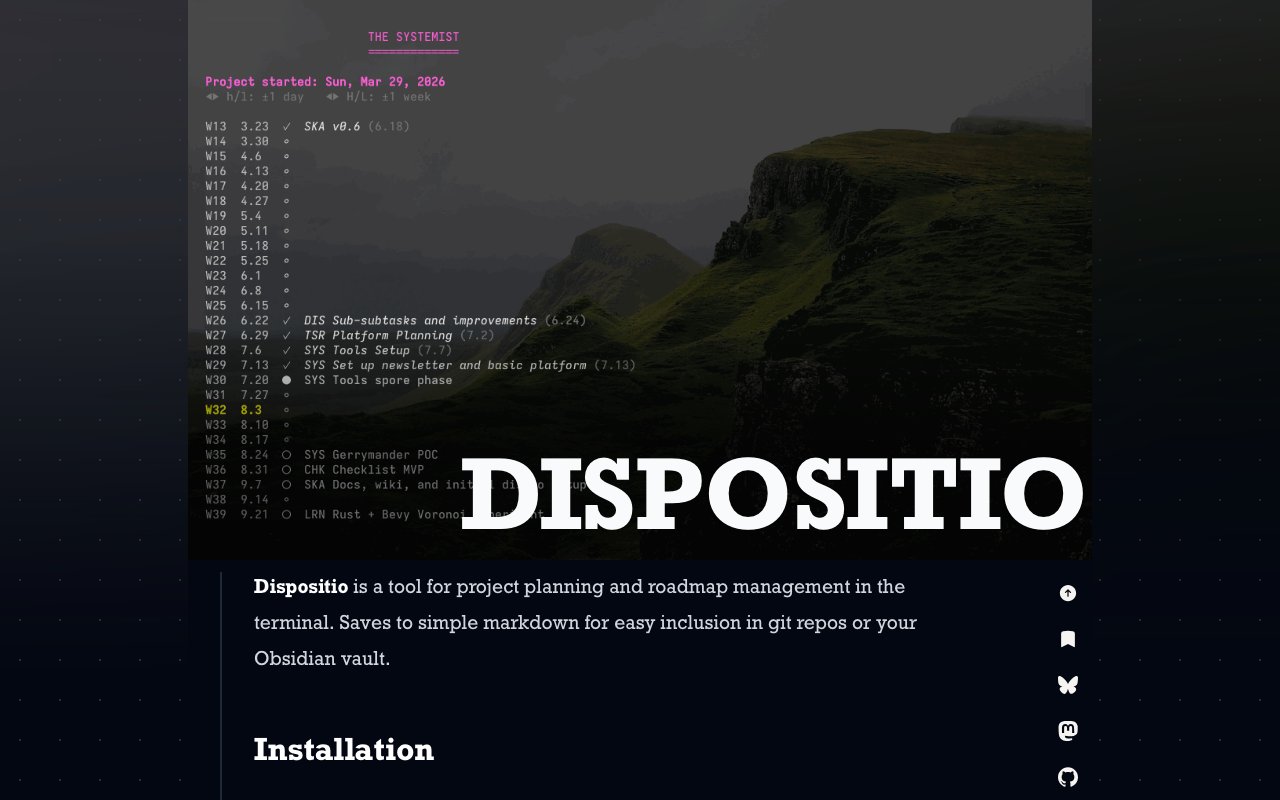
Dispositio is a project planning and roadmap tool that lives in your terminal instead of a browser tab. You lay out milestones, tasks, and subtasks in a keyboard-driven interface, and the whole plan is saved as a plain Markdown file, ROADMAP.md by default. That single design decision does a lot of work. Your roadmap sits in the same git repo as your code, diffs cleanly in pull requests, and drops straight into an Obsidian vault or any other Markdown-aware system without an export step, an account, or a sync service. The file stays readable and editable by humans, so the app is a convenient view over your plan rather than the only door into it.
The problem it goes after is the gap between heavyweight project management suites and a flat to-do list. Most planning tools want to be a destination, with boards, logins, and notifications pulling you back in, plus the constant risk that your data is stuck inside somebody's product roadmap. Dispositio treats planning as a file you own. You open the terminal app when you want to think about the plan, and the rest of the time the plan is just text that anyone can read on GitHub or in any editor without installing a thing. If the app disappeared tomorrow, your roadmap would still be sitting in your repo, perfectly legible, and because it's deliberately simple Markdown, nothing stops you from reading it or tweaking it by hand in any editor.
How it works is straightforward. A project gets a start date, then a sequence of milestones, each with a duration measured in weeks. From those durations Dispositio builds an automatic timeline, showing estimated dates, week numbers, and year breaks, so you can see when things actually land rather than guessing. Under each milestone you organize tasks and subtasks in a hierarchy, progress bars track how much of each milestone is done, and completed milestones get their own visual marker. The first incomplete milestone is highlighted as the current one, marked with a solid circle that extends if the completion date slips, which keeps schedule drift visible on screen instead of buried in your optimism. There's also a workload readout that calculates tasks per weekday, a quick sanity check on whether the plan you just drew is humanly achievable in the time you gave it. Working in weeks rather than exact dates keeps the plan honest at the granularity most projects are actually estimated at, and the timeline recomputes as you adjust durations.
Navigation follows terminal conventions. You move with arrow keys or Vim-style hjkl, use shift modifiers for adjustments like changing durations, and pull up a built-in help screen with the question mark key whenever you forget a binding. If you already live in the terminal, there's essentially nothing to learn. The tool is written in Go and installs through the channels you'd expect, a Homebrew tap on macOS, Scoop on Windows, deb, rpm, and apk packages on Linux, plain binary downloads from the GitHub releases page, or a direct go install against the repository.
It fits solo developers and small teams who plan real multi-month efforts but don't want a SaaS tool for it. If your roadmap should live next to your code, be reviewable in a diff, and survive the death of any particular app, this is that shape of tool. It's also a natural fit for people who run their notes and thinking through plain-text systems, since the Markdown output slots into an existing vault as just another document alongside your notes. There's no team layer, no assignments, and no sharing model, which is a limitation for groups but also exactly why it stays simple.
What makes it different from other terminal task managers is the emphasis on time. Plenty of TUI to-do tools track tasks, but Dispositio is built around milestones with durations and a computed timeline, so it answers the harder question of when, not just what. The slipping-milestone indicator and the tasks-per-weekday workload calculation both push in the same direction, toward an honest view of whether the schedule actually holds once you account for the days you really have.
Dispositio is free and open source under the GPL-3.0 license, developed by T. S. Raveling, who publishes it through the Systemist site alongside writing about planning and process. There's no paid tier, no account, and no hosted service, just a binary and a Markdown file you keep. For anyone burned by yet another project tool acquiring, pivoting, or paywalling their data, a roadmap that's just a text file in your own repo is a quietly reassuring place to keep a plan.
Key Features
- Plans stored as plain Markdown
- Automatic timeline from milestone durations
- Hierarchical tasks and subtasks
- Milestone progress bars and slip tracking
- Tasks-per-weekday workload readout
- Vim-style keyboard navigation
Pros & Cons
What we like
- Roadmap lives in your git repo and diffs cleanly
- No account, server, or subscription involved
- Timeline math and workload checks built in
- Installs via Homebrew, Scoop, or Linux packages
Room for improvement
- Terminal-only, no web or mobile view
- Single-player tool with no collaboration features
- Milestone durations only work in weeks
- Young project from a solo developer
Frequently Asked Questions
What is Dispositio?
Is Dispositio free?
How do I install Dispositio?
Who is Dispositio for?
Best For
Featured in
Alternatives to Dispositio

CalendHub
Smart scheduling and calendar management for teams
Kevin Gabeci Toolkits
Seven AI toolkits for writing books, making music, cutting video, and building agents.

Eased Into AI
Learn AI from zero. No jargon, no hype, just steps that work.

Fix It Gently
Calm, plain-English fixes for everyday tech problems.
Reviews (0)
Badge builder
Add Dispositio to your website
Choose a badge style and size, preview it here, then copy the generated HTML. Badge images are self-contained SVGs and do not require an external script.

<a href="https://toolindex.net/tools/dispositio?ref=badge" target="_blank" rel="noopener">
  <img src="https://toolindex.net/badge/dispositio/medium.svg" alt="Dispositio - Listed on Tool Index" width="180" height="50" />
</a>How to use the badge
- 1. Pick the style, size, and theme that fit your layout.
- 2. Copy the generated HTML from the code block.
- 3. Paste it into your footer, homepage, or press page.
Standard badge available
The standard listing badge is available now. Score and circle badges are limited to tools currently ranked in the top 10 of a category.
Badge clicks return visitors to this profile with a referral tag so the source remains identifiable.
Related Tools

Confluence
Atlassian's long-running team wiki that anchors many enterprise knowledge stacks
Asana
Project management for teams that live in projects, tasks and dependencies
Kevin Gabeci Toolkits
Seven AI toolkits for writing books, making music, cutting video, and building agents.

Logseq
An open-source outliner notes app where every bullet is a first-class block
Work on Dispositio? Request listing access or correction