
Docket
Meeting notes system with flat rate pricing and self hosted option
Gallery
About Docket
Docket is a focused meeting notes platform designed specifically for capturing, organizing, and acting on information from regular meetings. Unlike general purpose note taking tools that try to handle everything from spreadsheets to project management, Docket concentrates entirely on the meeting workflow without distracting features. Users create timestamped entries for each meeting, collaborate with attendees in real time, track action items across sessions, and maintain a searchable archive of past discussions that becomes increasingly valuable over time. The platform won Zoom's Marketplace App competition in 2020 and has since raised over $4 million in funding to expand its capabilities.
The core design philosophy centers on what the founders call active note taking, meaning the interface stays minimal enough that users can type with one hand and half an eye on the screen while remaining genuinely engaged with the people in the room or on the call. Too many note taking tools demand so much attention with formatting options and interface complexity that users end up staring at laptops instead of participating in conversations. Docket intentionally strips away distracting features that don't directly serve the meeting context, leaving only what's needed to capture key points quickly without pulling focus from participants. The result is a tool that enhances meetings rather than competing with them for attention.
Action item tracking receives first class treatment within the platform rather than being an afterthought. When someone commits to a task during a meeting, Docket captures who said they would do what and by when with structured fields rather than just text that gets buried in paragraphs. A central dashboard aggregates these actions across all meetings, making it easy to review commitments before the next session or follow up on overdue items. Attribution tracking shows who contributed which notes throughout a discussion, providing accountability and helping teams reconstruct conversations when questions arise about who said what or when a decision was made. This approach transforms meeting notes from static documents into dynamic workflows that connect directly to getting things done.
Integration with existing tools extends Docket's utility well beyond standalone note taking. The platform connects with Zoom, Slack, Evernote, Salesforce, and HubSpot, fitting into workflows rather than demanding users abandon their current tools. The Docket Bot for Zoom brings functionality directly into the video conferencing interface, displaying agendas and recap notes in the Zoom chat during meetings so participants can reference shared context without switching applications. When meetings end, the platform can automatically sync conversation summaries, pain points, qualification answers, and next steps directly into CRM contact and deal records. This automation reduces the manual work of transferring information between systems after every customer call, ensuring data actually makes it into the CRM.
Templates help teams maintain consistent structure across recurring meetings without starting from scratch every time. Users create templates for standups, one on ones, client calls, sprint planning, retrospectives, or any other repeating format, and new entries inherit the template structure while allowing customization for that specific session. Search functionality spans the entire archive, making it possible to find when a particular decision was made, what context surrounded it, and who participated in the discussion. This historical record proves valuable for onboarding new team members who need to understand past decisions, resolving disputes about what was committed to, or simply refreshing memory before follow up meetings.
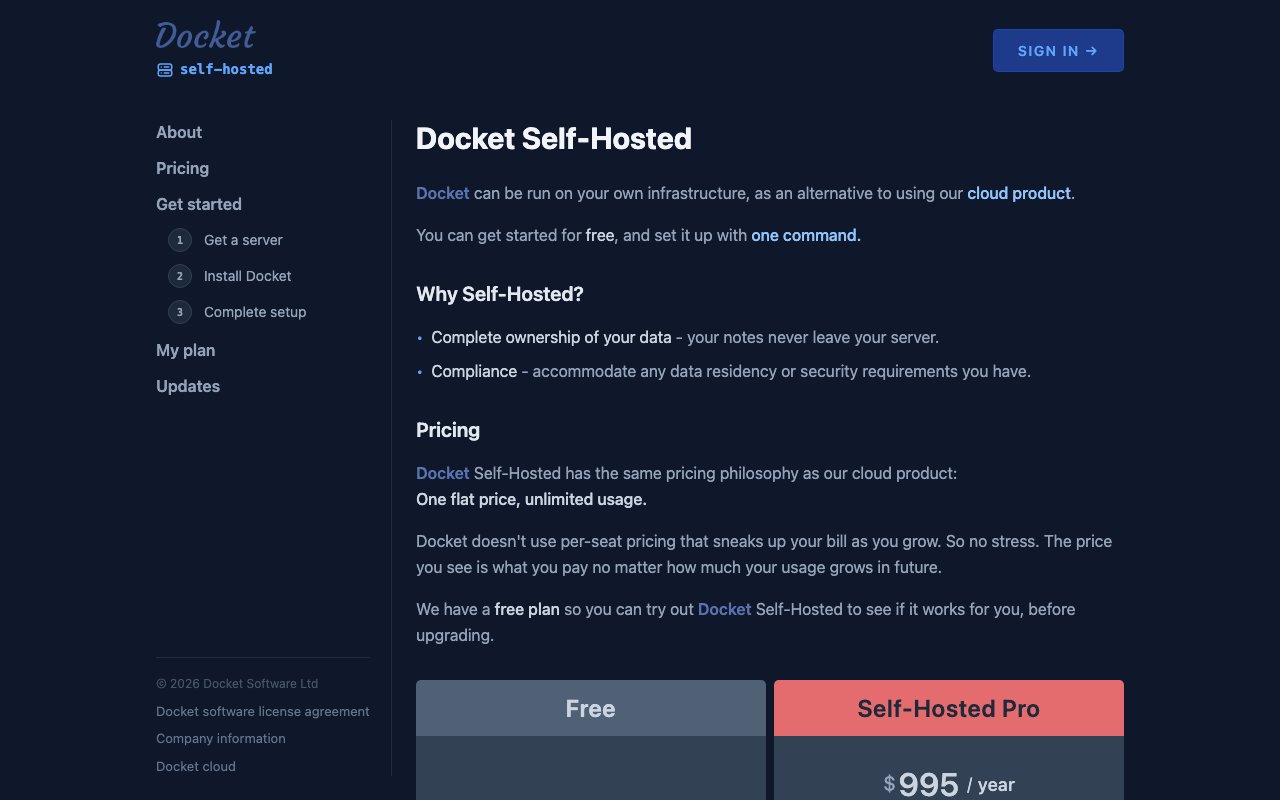
Self hosting options exist for organizations with strict data residency requirements or security policies that prohibit cloud storage of meeting content. Teams can deploy Docket on their own infrastructure, maintaining complete control over where discussion records reside and who can access them. This flexibility makes the platform suitable for industries with compliance constraints like healthcare organizations handling patient information, financial services firms with regulatory obligations, legal practices documenting client matters, or government contractors working on classified programs where meeting notes might contain sensitive information.
The target audience includes professionals who attend frequent meetings and want to maintain genuine engagement while still capturing actionable information efficiently. Sales teams benefit from CRM integration that automatically logs customer interactions without manual data entry. Product teams use it to track decisions and commitments across sprint planning and retrospectives, maintaining institutional memory even as team composition changes. Executives rely on it to maintain visibility into action items across multiple direct reports. Docket offers a free trial without requiring signup or credit card, letting potential users evaluate whether the focused approach matches their meeting workflow before committing to a paid plan.
Key Features
- Workspace based meeting organization
- No signup required to start
- Flat rate pricing regardless of team size
- PDF export with images on paid plans
- Self hosted deployment option
- Audit and compliance tools for Pro
Pros & Cons
What we like
- Flat rate pricing makes costs predictable for teams
- Self hosted option for data residency requirements
- No signup friction to start writing immediately
- Focused scope avoids feature bloat
Room for improvement
- Narrower than general purpose note apps
- Free tier limited to five workspaces and five docs each
- Self hosting details not fully documented publicly
- Smaller user base than established competitors
Frequently Asked Questions
What is Docket?
How does Docket pricing work?
Can I self host Docket?
Do I need an account to use Docket?
Best For
Featured in
Alternatives to Docket
View all
CalendHub
Smart scheduling and calendar management for teams
Kevin Gabeci Toolkits
Seven AI toolkits for writing books, making music, cutting video, and building agents.

Confluence
Atlassian's long-running team wiki that anchors many enterprise knowledge stacks
Kibu
Vertical software for disability service providers covering compliance, documentation, and programming
Reviews (11)
It just works
Tried Docket on a side project first, then rolled it out everywhere. Their take on flat rate pricing regardless of team size is genuinely good. The defaults are sensible, so I was not fighting settings on day one. Hard to imagine going back to my old setup.
Exactly what I needed
Picked Docket for the price, stayed for the quality. The interface stays out of my way, which I appreciate. The core workflow is smooth once you are set up. Would sign up again without thinking twice.
Genuinely impressed
Docket solves a real problem for me without making a fuss about it. It slotted into my routine without much fuss. Found it works best for running a self hosted notes system for sensitive teams. Hard to imagine going back to my old setup.
Recommended without reservation
Came to Docket after getting frustrated with what I had before. Their take on self hosted option for data residency requirements is genuinely good. It slotted into my routine without much fuss. Would sign up again without thinking twice.
Genuinely impressed
Docket has quietly become part of my daily flow. The no signup required to start is more useful than I expected. It earns its place in my stack.
Recommended without reservation
Three months of Docket later, here is what holds up. Where it really wins is audit and compliance tools for pro. The interface stays out of my way, which I appreciate. Mostly using it for running a self hosted notes system for sensitive teams.
Decent with some rough edges
Started using Docket casually, now it is pinned in my dock. It slotted into my routine without much fuss. The defaults are sensible, so I was not fighting settings on day one. It would be a five if not for smaller user base than established competitors. Would sign up again without thinking twice.
Quietly excellent
Three months of Docket later, here is what holds up. What stands out is how it handles flat rate pricing regardless of team size. What stands out is how little babysitting it needs. It fits well for building a compliance record of project meetings.
Exactly what I needed
Picked Docket for the price, stayed for the quality. What stands out is how little babysitting it needs. Mostly using it for documenting recurring team standups and syncs.
Exactly what I needed
Found Docket on a Show HN thread and I am glad I clicked. The workspace based meeting organization is more useful than I expected. The output quality holds up better than I expected. Easy yes for anyone weighing the same trade offs.
Does the job, a few gripes
Three months of Docket later, here is what holds up. The no signup required to start is more useful than I expected. The catch is narrower than general purpose note apps.
Badge builder
Add Docket to your website
Choose a badge style and size, preview it here, then copy the generated HTML. Badge images are self-contained SVGs and do not require an external script.

<a href="https://toolindex.net/tools/docket?ref=badge" target="_blank" rel="noopener">
  <img src="https://toolindex.net/badge/docket/medium.svg" alt="Docket - Listed on Tool Index" width="180" height="50" />
</a>How to use the badge
- 1. Pick the style, size, and theme that fit your layout.
- 2. Copy the generated HTML from the code block.
- 3. Paste it into your footer, homepage, or press page.
Standard badge available
The standard listing badge is available now. Score and circle badges are limited to tools currently ranked in the top 10 of a category.
Badge clicks return visitors to this profile with a referral tag so the source remains identifiable.
Related Tools
Confluence
Atlassian's long-running team wiki that anchors many enterprise knowledge stacks
Asana
Project management for teams that live in projects, tasks and dependencies
Kevin Gabeci Toolkits
Seven AI toolkits for writing books, making music, cutting video, and building agents.

Logseq
An open-source outliner notes app where every bullet is a first-class block
Work on Docket? Request listing access or correction