
Dropper
macOS menu bar app that uploads files to your Cloudflare R2 bucket and generates instant share links
Gallery
About Dropper
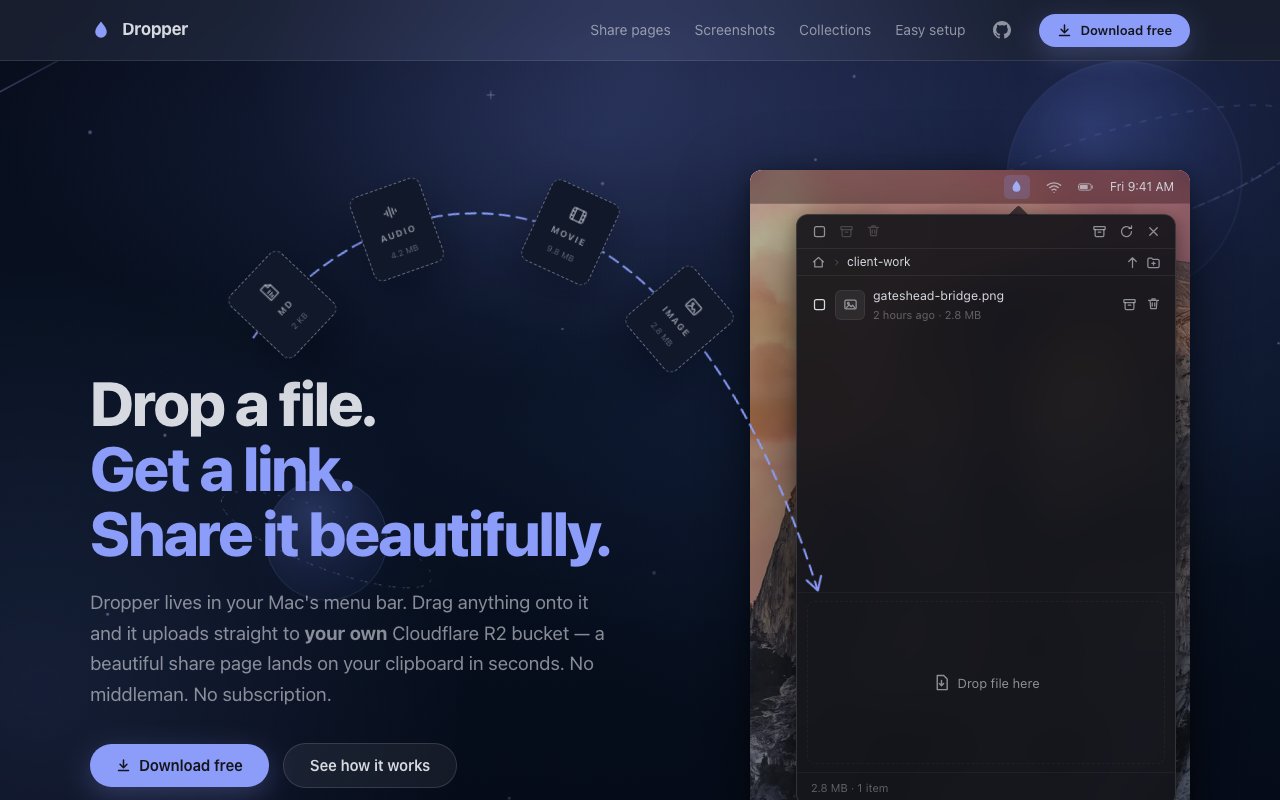
Dropper is a macOS menu bar application that handles file sharing through Cloudflare R2, the S3 compatible object storage service with zero egress fees. The workflow is simple: drag any file onto the menu bar icon, wait a moment for upload, and the shareable link lands in your clipboard ready to paste. Files go directly to your own R2 bucket rather than through any intermediary storage that Dropper controls. This means the app never sees your data, links work even if Dropper disappears as a company, and your storage costs scale with Cloudflare's pricing rather than some monthly subscription that might increase over time or limit your usage arbitrarily.
What makes Dropper more than a basic upload tool is the automatic format conversion that happens before files hit the bucket. HEIC images convert to JPEG so recipients on Windows or Android can view them without special software or hunting for codec downloads. AIFF audio converts to WAV for cross-platform compatibility. MOV and HEVC video files convert to MP4 with H.264, though videos already in H.264 get remuxed rather than re-encoded to preserve quality and complete faster. These conversions happen losslessly where possible, and they solve the constant friction of sending files to people whose devices don't support Apple's preferred formats. You don't have to think about what format the recipient can handle because Dropper normalizes everything automatically.
The share pages themselves are designed thoughtfully rather than being generic file download screens with a button and nothing else. Images display in a dark focused viewer with optional gallery mode and lightbox navigation for collections. Audio files get a SoundCloud style player with computed waveforms showing the track structure. Video plays in a custom player with scrubbing controls that work smoothly even on longer files. Markdown and text files render with proper formatting so documentation or notes display readably without downloading. PDFs embed natively in the browser for immediate viewing. Anything the app doesn't recognize shows as a clean download card with file type and size information. All of this serves from your own bucket so the pages load fast and don't depend on Dropper's servers staying online or performing well.
Collections let you share multiple files through a single link rather than sending several URLs separately. Drag several files at once or add more to an existing collection later after it's already been shared. Items can be reordered by dragging within the collection view, and the resulting page displays everything together in a coherent layout. For designers sending mockup variations to clients or musicians sharing stems with collaborators, this beats the clunky folder download experience that most file sharing services offer where recipients have to download a zip and extract it locally. Each share gets a human readable name combined with an unguessable random suffix, balancing discoverability for you with security against random access. Links don't require accounts or passwords to access, which removes friction for recipients who just want to see what you sent without creating yet another account somewhere.
Organization features keep the link history manageable over time as you accumulate hundreds of shares. Shares can be archived without breaking links, so old uploads stay accessible but don't clutter your dropdown with outdated files from months ago. Important evergreen links pin to the top of the list for quick access when you share the same resources repeatedly. Folder browsing with breadcrumbs helps navigate if you upload entire directory structures for larger projects. For anything involving sensitive files, the unlisted by default approach means links only work for people who have the URL. There's no public gallery, search indexing, or exposure to anyone who doesn't receive the link directly from you.
Built in screenshot annotation lets you capture and mark up screen content before sharing it. This saves the round trip of taking a screenshot, opening it in Preview or another app, adding annotations, saving, and then uploading separately. For designers giving feedback, developers reporting bugs, or anyone who regularly shares annotated screenshots, having this integrated directly into the sharing workflow cuts several steps out of the process.
Setup takes about three minutes through a guided wizard that connects your Cloudflare account, enables your bucket's public r2.dev URL, and stores the API token securely in macOS Keychain rather than in a config file that could be exposed. Custom domains can attach to buckets if you want branded share URLs that use your own domain rather than Cloudflare's default subdomain. Cloudflare's free tier includes 10 GB of storage with zero egress fees, meaning you pay nothing until you exceed that threshold and then only for what you actually store since downloads don't cost extra. The app itself is free with no subscription or premium tier. Source code lives on GitHub under a source available license, so the codebase can be inspected even if the license isn't strictly permissive open source. Requirements are macOS 14 or later running on either Apple silicon or Intel Macs.
Key Features
- Instant upload to your own Cloudflare R2 bucket
- Automatic format conversion for web compatibility
- Built-in screenshot editor with annotations
- SoundCloud-style audio players with waveforms
- Collections to bundle files under one link
- Unguessable URLs with no login walls
Pros & Cons
What we like
- Completely free with no subscription or middleman fees
- Files stay on infrastructure you control
- Automatic conversion makes files browser-friendly
- Clean, polished preview pages for recipients
Room for improvement
- Requires setting up a Cloudflare R2 bucket first
- macOS only, no Windows or Linux version
- Support is through GitHub rather than a traditional help desk
- No mobile app for uploading on the go
Frequently Asked Questions
What is Dropper?
Is Dropper free?
Who is Dropper for?
What file types does Dropper support?
Best For
Featured in
Alternatives to Dropper
View all
CalendHub
Smart scheduling and calendar management for teams
Kevin Gabeci Toolkits
Seven AI toolkits for writing books, making music, cutting video, and building agents.

Confluence
Atlassian's long-running team wiki that anchors many enterprise knowledge stacks
Kibu
Vertical software for disability service providers covering compliance, documentation, and programming
Reviews (10)
Exactly what I needed
Dropper has quietly become part of my daily flow. Where it really wins is unguessable urls with no login walls. It does what it says, which is rarer than it should be. Easy yes for anyone weighing the same trade offs.
Good, with a few caveats
Three months of Dropper later, here is what holds up. Where it really wins is files stay on infrastructure you control. Setup was painless and I was productive the same day. It fits well for building a personal archive of shareable links. My only gripe is no mobile app for uploading on the go. Glad I made the switch.
Solid but not perfect
Dropper has quietly become part of my daily flow. Where it really wins is soundcloud-style audio players with waveforms. Found it works best for sharing screenshots with clients without third party services. It would be a five if not for requires setting up a cloudflare r2 bucket first. Recommending it to people in a similar spot.
Exactly what I needed
Dropper solves a real problem for me without making a fuss about it. The completely free with no subscription or middleman fees is more useful than I expected. Mostly using it for sharing screenshots with clients without third party services. Worth it for what I get out of it.
It just works
Tried Dropper on a side project first, then rolled it out everywhere. Got real value out of built-in screenshot editor with annotations. Found it works best for building a personal archive of shareable links. No regrets so far.
Powerful once it clicks
Started using Dropper casually, now it is pinned in my dock. Got real value out of completely free with no subscription or middleman fees. It fits well for building a personal archive of shareable links. The catch is no mobile app for uploading on the go. Glad I made the switch.
Finally something that fits
Picked Dropper for the price, stayed for the quality. Where it really wins is built-in screenshot editor with annotations. Performance has been steady even when I lean on it hard. It fits well for sending annotated screenshots to teammates. Easy yes for anyone weighing the same trade offs.
Does the job, a few gripes
Dropper has quietly become part of my daily flow. Where it really wins is completely free with no subscription or middleman fees. Found it works best for building a personal archive of shareable links. The catch is support is through github rather than a traditional help desk. Hard to imagine going back to my old setup.
Solid daily driver
Picked Dropper for the price, stayed for the quality. Support actually answered when I had a question, which surprised me. It earns its place in my stack.
Pulled its weight from week one
Dropper solves a real problem for me without making a fuss about it. The automatic conversion makes files browser-friendly is more useful than I expected. The output quality holds up better than I expected. Hard to imagine going back to my old setup.
Badge builder
Add Dropper to your website
Choose a badge style and size, preview it here, then copy the generated HTML. Badge images are self-contained SVGs and do not require an external script.

<a href="https://toolindex.net/tools/dropper?ref=badge" target="_blank" rel="noopener">
  <img src="https://toolindex.net/badge/dropper/medium.svg" alt="Dropper - Listed on Tool Index" width="180" height="50" />
</a>How to use the badge
- 1. Pick the style, size, and theme that fit your layout.
- 2. Copy the generated HTML from the code block.
- 3. Paste it into your footer, homepage, or press page.
Standard badge available
The standard listing badge is available now. Score and circle badges are limited to tools currently ranked in the top 10 of a category.
Badge clicks return visitors to this profile with a referral tag so the source remains identifiable.
Related Tools
Confluence
Atlassian's long-running team wiki that anchors many enterprise knowledge stacks
Asana
Project management for teams that live in projects, tasks and dependencies
Kevin Gabeci Toolkits
Seven AI toolkits for writing books, making music, cutting video, and building agents.

Logseq
An open-source outliner notes app where every bullet is a first-class block
Work on Dropper? Request listing access or correction