
Fetchcheck
Test whether trusted AI crawlers can reach your site through bot protection
Gallery
About Fetchcheck
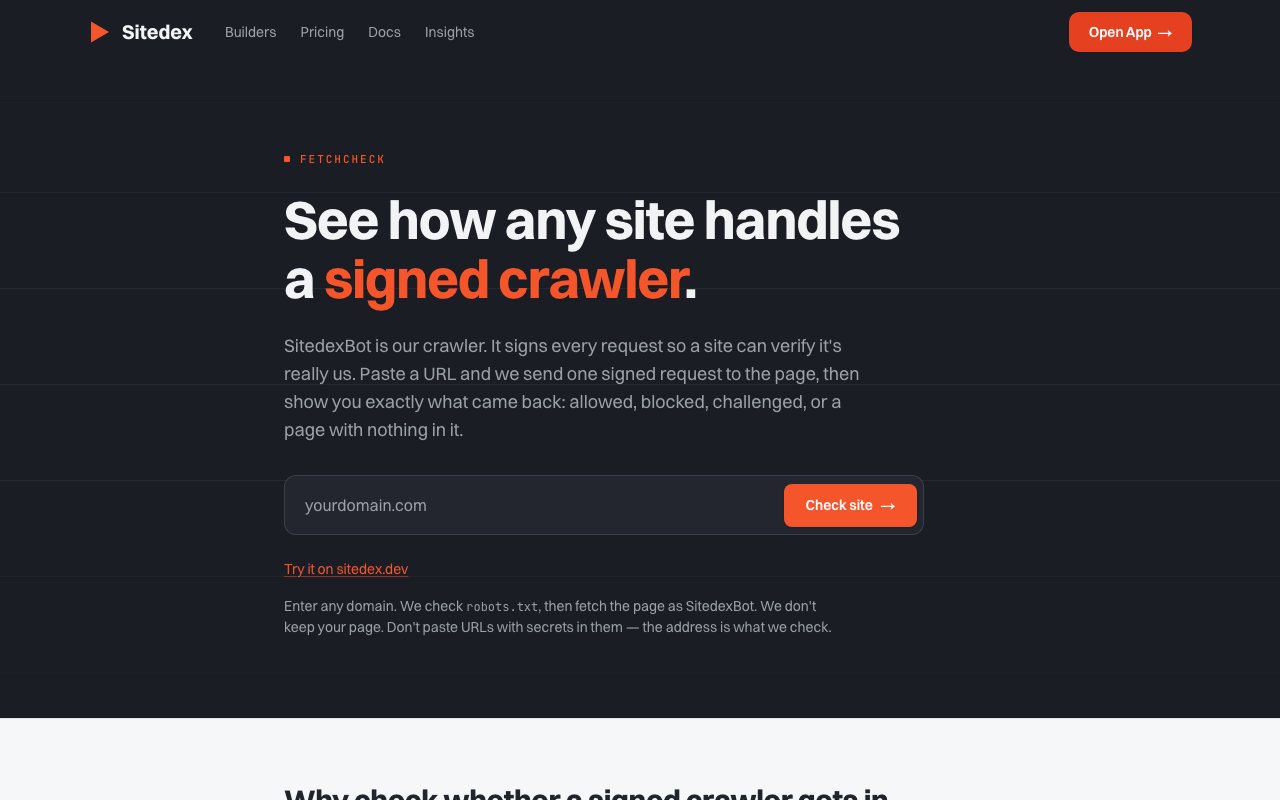
Fetchcheck is a free diagnostic utility from Sitedex that sends a signed crawler request to any website and shows exactly what happens on the other end. Users paste a URL, and the tool reports whether the request was allowed through, blocked outright, challenged with a CAPTCHA or interstitial, or returned a page with no readable content at all. The underlying question it answers is one that website owners and SEO practitioners often cannot answer themselves through their own infrastructure: can trusted AI crawlers actually access my published content, or is my bot protection inadvertently blocking them?
The problem Fetchcheck addresses grows out of the tension between security and discoverability. Modern websites run Cloudflare, Akamai, Sucuri, or custom web application firewall rules that block suspicious traffic before it reaches the origin server. These protections are valuable for stopping scrapers, credential stuffers, and DDoS attacks, but they also catch legitimate crawlers in the crossfire. A blanket bot block might keep bad actors out while simultaneously hiding the site from AI assistants that users rely on for search, summarization, and question answering. The site owner never sees the problem because their browser works fine and their own traffic is allowed through. Fetchcheck simulates what a crawler actually experiences, which is often different from what a browser sees.
When a user submits a URL, Fetchcheck runs up to four requests in sequence. First it fetches the site's robots.txt file to see if crawling is explicitly prohibited for SitedexBot, the crawler identity it uses. If robots.txt allows access, Fetchcheck sends a signed GET request using SitedexBot's cryptographic identity, which is verifiable through publicly available signing keys following the Web Bot Auth standard. This signed request proves the crawler is who it claims to be, not a spoofed user agent string. If that request fails or returns an unexpected response, Fetchcheck follows up with an unsigned retry to determine whether the block targets signed crawlers specifically or applies to all bot traffic regardless of verification. An optional HTTP fallback handles edge cases where HTTPS is unavailable or misconfigured, helping distinguish between a site that is completely down and one that simply does not support secure connections.
The output is detailed but digestible. Users see the HTTP status code, key response headers, and an assessment of whether the returned HTML contained readable content or was an error page, challenge page, or empty response. Fetchcheck explains what it found in plain terms: access granted, access denied, challenge required, or page empty. For failed requests, it clarifies whether the issue is with the signed identity specifically or with bot traffic in general, which helps developers understand whether they need to adjust their WAF rules or whitelist a particular crawler. Crucially, Fetchcheck does not store or republish the page content it retrieves. It displays the diagnostic result and then discards the data, making it safe to test pages that contain sensitive information or sit behind paywalls.
The target audience divides into two overlapping groups. Website owners and publishers use Fetchcheck to verify that their content remains accessible to legitimate AI crawlers after enabling or updating bot protection. They want their site to appear in AI powered search results and be summarized correctly by assistants, which requires that trusted crawlers can reach the pages. If Fetchcheck shows that SitedexBot is blocked, they know to adjust their security settings, whitelist verified crawlers, or reconsider their bot policy. The second group is developers and SEO practitioners managing crawler permissions and WAF configurations. They use Fetchcheck to troubleshoot why an AI assistant cannot answer questions about a particular site or why content is missing from AI search results. Rather than guessing at the cause or waiting for a crawler to retry on its own schedule, they get an immediate answer showing exactly what the crawler sees.
Fetchcheck is completely free with no signup, no account requirement, and no apparent rate limit mentioned on the page. It lives under the Sitedex tools suite alongside other utilities for managing how sites appear to search engines and AI systems. Sitedex itself is a platform for website owners to control their presence in AI and search indexes, and Fetchcheck fits as a diagnostic companion that checks whether the technical prerequisites for that presence are in place. There is no premium tier or paid upgrade, which makes it accessible to anyone who needs a quick check on crawler accessibility.
The value proposition is narrow but clear. If you want to know whether your bot protection rules are inadvertently blocking AI crawlers, or whether a specific page can be reached by a signed crawler identity, Fetchcheck gives you the answer in seconds without requiring server access, log analysis, or configuration changes. It is a simple tool that does one thing well, providing immediate visibility into a problem that otherwise requires waiting and guessing.
Key Features
- Signed crawler request simulation
- Robots.txt pre-check
- Unsigned retry for comparison
- Response status and header reporting
- No page storage or republishing
- Web Bot Auth standard support
Pros & Cons
What we like
- Completely free with no signup required
- Distinguishes signed crawler blocks from general bot blocks
- Discards page data after showing results
- Uses an open standard for verifiable crawler identity
Room for improvement
- Only tests one URL at a time
- Limited to SitedexBot, not all crawler identities
- No API for batch testing
- Narrow focus, only useful for crawler diagnostics
Frequently Asked Questions
What is Fetchcheck?
Does Fetchcheck store my page content?
Is Fetchcheck free?
Why does it send multiple requests?
Best For
Featured in
Alternatives to Fetchcheck
View all
Moz Pro
SEO toolset with keyword research, site audits, link analysis, and the well-known Domain Authority and Page Authority metrics.
Frase
AI-assisted SEO content tool that turns SERP research into briefs, outlines, and optimized drafts inside one editor.

Rank Compound
SEO content that compounds. What actually moved rankings, measured, with the failures shown.

Postdex
An exclusive marketplace for finished, human-made articles. Every piece sells once.
Reviews (0)
Badge builder
Add Fetchcheck to your website
Choose a badge style and size, preview it here, then copy the generated HTML. Badge images are self-contained SVGs and do not require an external script.

<a href="https://toolindex.net/tools/fetchcheck?ref=badge" target="_blank" rel="noopener">
  <img src="https://toolindex.net/badge/fetchcheck/medium.svg" alt="Fetchcheck - Listed on Tool Index" width="180" height="50" />
</a>How to use the badge
- 1. Pick the style, size, and theme that fit your layout.
- 2. Copy the generated HTML from the code block.
- 3. Paste it into your footer, homepage, or press page.
Standard badge available
The standard listing badge is available now. Score and circle badges are limited to tools currently ranked in the top 10 of a category.
Badge clicks return visitors to this profile with a referral tag so the source remains identifiable.
Related Tools

SEOdata.dev
Simple API for keyword search volume, CPC, and competition data
Frase
AI-assisted SEO content tool that turns SERP research into briefs, outlines, and optimized drafts inside one editor.

Surfer SEO
Content optimization tool that scores drafts in real time against the top-ranking pages for any target keyword.
Screaming Frog SEO Spider
Desktop website crawler trusted by SEO professionals for technical audits, broken link checks, and structured data analysis.
Work on Fetchcheck? Request listing access or correction