
FileForge Finder
Local file search tool that searches inside PDFs and Word docs without any cloud connection
Gallery
About FileForge Finder
FileForge Finder is a desktop document search application that lets users locate files by searching the actual text inside them rather than relying solely on file names or folder organization. The tool indexes PDFs and Word documents stored locally on a computer, enabling full text search across potentially thousands of accumulated files without requiring cloud connectivity or sending document content to external servers. For organizations drowning in years of accumulated documents where important information is buried inside files with unhelpful names like final_final_v3.docx, this search capability transforms how quickly staff can locate relevant records. Anyone who's spent frustrating hours hunting through folder hierarchies for a document they know exists but can't find understands the problem FileForge Finder solves.
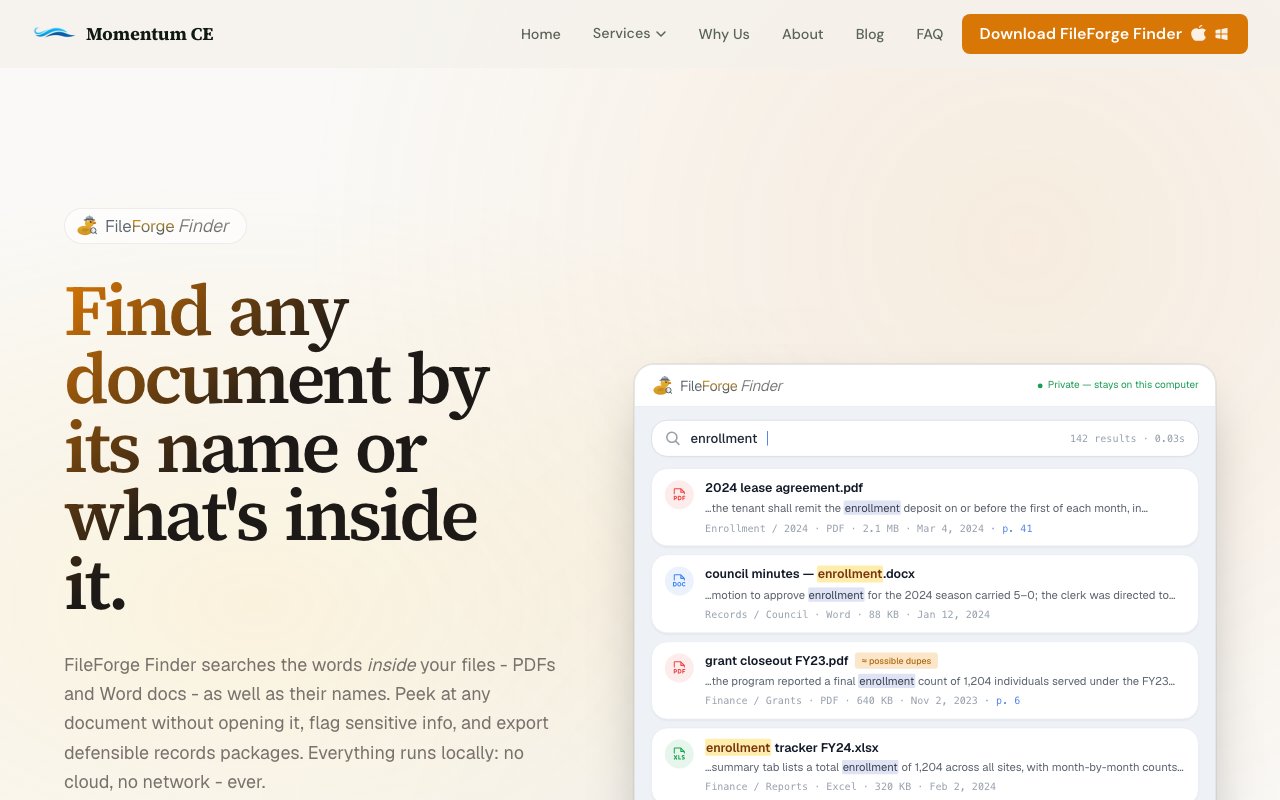
The search interface displays results with matched content snippets alongside file metadata, giving users enough context to identify relevant documents without opening each one individually. When searching for a specific phrase or piece of information, seeing the actual matching text in context helps distinguish between documents that happen to mention a term tangentially versus documents that substantively address the topic being researched. An in app preview function lets users examine documents directly within the application, further reducing the time spent hunting through search results. This preview capability is particularly valuable when a search returns multiple potential matches, as users can quickly scan through previews rather than launching separate PDF viewers or Word instances for each candidate file.
The application runs entirely on the user's computer, processing search queries without sending data anywhere. This local architecture matters substantially for organizations handling sensitive information that shouldn't leave internal systems. Legal documents, personnel records, financial information, and proprietary business data can all be indexed and searched without the security considerations that accompany cloud based document analysis tools. Organizations with strict data governance requirements or regulatory constraints around document handling can deploy FileForge Finder without needing to evaluate third party data practices or negotiate security addendums.
Beyond basic search functionality, FileForge Finder includes tools for identifying sensitive information within document collections. This flagging capability helps organizations audit their file systems for data that might require special handling, whether for regulatory compliance with privacy laws, internal security policies, or preparation for audits and reviews. Being able to identify where sensitive data lives across a document collection is the first step toward appropriate handling, and searching manually through thousands of documents to identify such content would be impractical for most organizations.
The application also supports exporting defensible records packages, a feature targeting organizations that need to produce documentation for legal proceedings, regulatory inquiries, public records requests, or formal audits. Being able to assemble these packages directly from search results streamlines what would otherwise be a tedious manual process of identifying relevant documents, copying them to a collection folder, and documenting the search methodology used. For organizations that receive records requests regularly, this workflow improvement compounds into significant time savings.
FileForge Finder runs on Mac, Windows, and Linux, covering the major desktop operating systems that organizations actually use. This cross platform availability means organizations with mixed computing environments, perhaps Macs for creative staff and Windows for administrative functions, can standardize on a single search solution rather than maintaining different tools for different platforms. The tool targets records management use cases, particularly for tribal governments and small to medium organizations based on the parent company's focus areas. These organizations often accumulate substantial document archives over years of operation but lack the enterprise search infrastructure that larger organizations might deploy through IT departments with dedicated budgets.
An upgraded version called FileForge Finder Plus extends the base application with additional features for organizations with more complex needs. Optical character recognition handles scanned documents where text isn't embedded in the file but exists only as images, a common situation with older records that were digitized from paper. File renaming tools help bring organization to document collections with inconsistent naming conventions. Automated filing capabilities help route documents to appropriate locations based on content analysis. The base version's pricing isn't explicitly stated on the landing page, suggesting interested organizations should contact the company for quotes appropriate to their scale and needs. Given the target market of smaller organizations and government entities, the pricing structure likely reflects budgets typical of those sectors rather than enterprise software pricing that assumes larger deployments.
Key Features
- Full-text search inside PDFs and Word documents
- Document preview without opening native apps
- Sensitivity flagging for confidential files
- Defensible records package export
- Completely offline with no network connection
- Available on Mac and Windows
Pros & Cons
What we like
- Searches inside document content, not just filenames
- Entirely local with no cloud or network dependency
- Fast indexing with sub-second search results
- Preview files without launching external applications
Room for improvement
- Pricing not clearly listed on the website
- OCR for scanned documents requires the paid Finder+ upgrade
- Limited to PDFs and Word docs for content search
- No Linux version available
Frequently Asked Questions
What is FileForge Finder?
Does FileForge Finder work offline?
What platforms does FileForge Finder support?
Is there a free version of FileForge Finder?
Best For
Featured in
Alternatives to FileForge Finder
View all
CalendHub
Smart scheduling and calendar management for teams
Kevin Gabeci Toolkits
Seven AI toolkits for writing books, making music, cutting video, and building agents.

Confluence
Atlassian's long-running team wiki that anchors many enterprise knowledge stacks
Kibu
Vertical software for disability service providers covering compliance, documentation, and programming
Reviews (0)
No reviews yet
Be the first to share your experience with FileForge Finder
Sign in to write a reviewBadge builder
Add FileForge Finder to your website
Choose a badge style and size, preview it here, then copy the generated HTML. Badge images are self-contained SVGs and do not require an external script.

<a href="https://toolindex.net/tools/fileforge-finder?ref=badge" target="_blank" rel="noopener">
  <img src="https://toolindex.net/badge/fileforge-finder/medium.svg" alt="FileForge Finder - Listed on Tool Index" width="180" height="50" />
</a>How to use the badge
- 1. Pick the style, size, and theme that fit your layout.
- 2. Copy the generated HTML from the code block.
- 3. Paste it into your footer, homepage, or press page.
Standard badge available
The standard listing badge is available now. Score and circle badges are limited to tools currently ranked in the top 10 of a category.
Badge clicks return visitors to this profile with a referral tag so the source remains identifiable.
Related Tools
Confluence
Atlassian's long-running team wiki that anchors many enterprise knowledge stacks
Asana
Project management for teams that live in projects, tasks and dependencies
Kevin Gabeci Toolkits
Seven AI toolkits for writing books, making music, cutting video, and building agents.

Logseq
An open-source outliner notes app where every bullet is a first-class block
Work on FileForge Finder? Request listing access or correction