FileLever
Preview folder syncs, backups, archives, and storage cleanup before changing files
Gallery
About FileLever
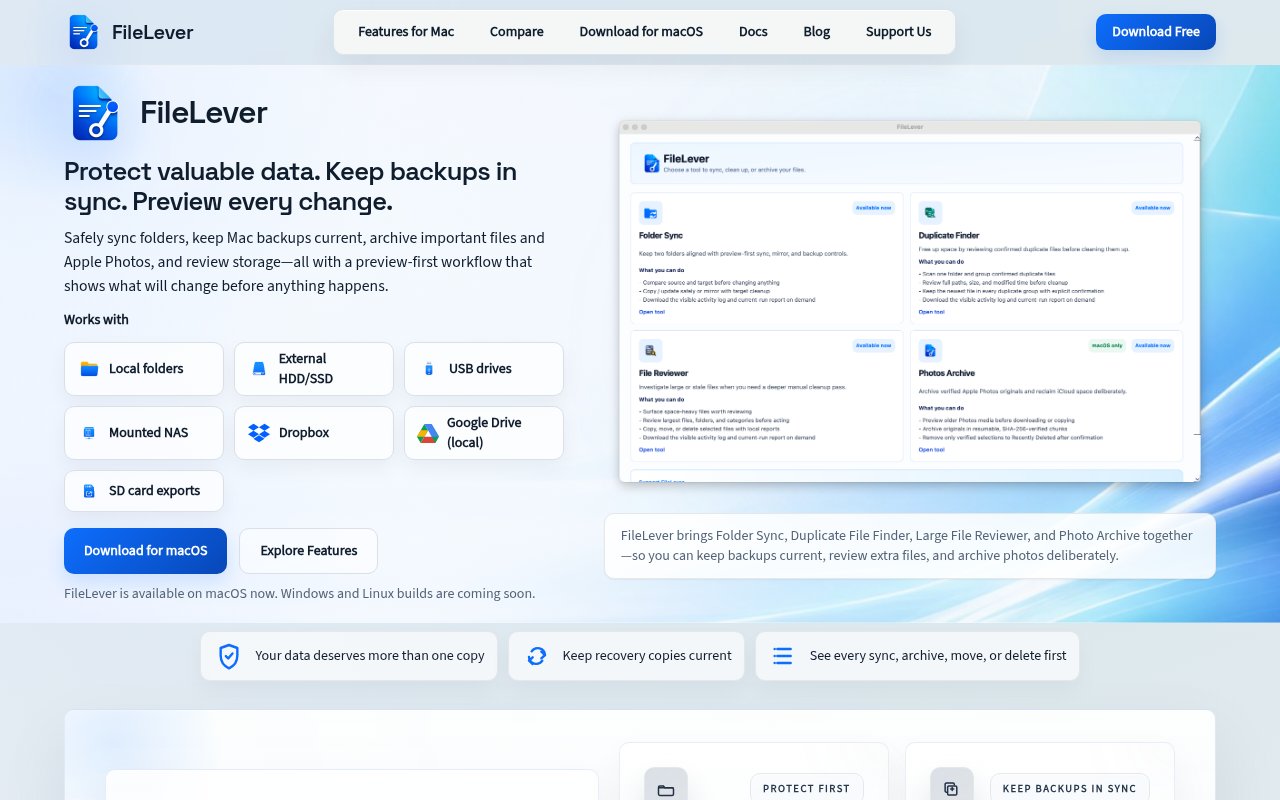
FileLever is a free macOS desktop app for keeping important folders backed up and reclaiming disk space without treating either job as a blind file operation. It brings folder sync, duplicate detection, large file review, and Apple Photos archiving into one local-first interface. Its central idea is simple. Before the app copies, updates, moves, or deletes anything, it shows what it plans to do. That makes it useful when the files at stake are photos, project folders, documents, or other material that would be difficult to replace. Rather than encouraging cleanup first, FileLever starts from the safer premise that a current second copy should exist before extra files are removed.
The folder workflow begins with a source and a target. FileLever compares them and separates new, changed, unchanged, and target-only files, so the user can understand the state of both locations before running a sync. Copy and Update mode brings the destination current without removing files that exist only there. Optional Mirror mode can make the target match the source, but it calls out target-only items in the preview and requires an explicit choice before they are removed. Exclusion rules can skip operating system clutter, caches, generated folders, or custom patterns. This is a practical fit for maintaining a backup on an external drive, refreshing an archive on mounted network storage, or comparing two large folders without manually opening each branch of the directory tree.
Storage cleanup follows the same review-first approach. Duplicate File Finder narrows candidates by size and then checks file contents, rather than assuming that matching names indicate matching data. Results are grouped for review, with file paths visible so the user can decide which copy belongs. Large File Reviewer sorts out storage-heavy videos, archives, installers, and old exports, then lets the user keep, delete, or move selected files into an archive. The interface supports individual and bulk selections when several reviewed files should receive the same action. The Apple Photos workflow handles a related problem. It can select older photos, videos, and edits, preview a year and month archive on a chosen local or external drive, verify completed copies, and leave the separate decision about moving originals to Recently Deleted in the user's hands.
FileLever is aimed at Mac users who manage more files than Finder makes comfortable. Photographers can protect shoots and albums across a Mac and an external drive. Creators can maintain a recovery copy of project folders before clearing finished exports. Professionals can keep document archives current, while people with large personal media collections can compare drives and review duplicates with their paths intact. It works with local folders, internal and external HDD or SSD storage, USB drives, SD card exports, and mounted NAS locations. Dropbox folders can be used directly in supported workflows. Google Drive content works when the Google Drive desktop client has already made those folders available on the Mac.
What distinguishes the app is the consistent preview layer across protection and cleanup. A sync preview shows the direction and status of changes, duplicate review shows exact matches before approval, and large file actions keep the selected paths visible. It doesn't upload local file contents to a FileLever cloud service, and the core work happens against storage the user controls. Direct Dropbox access still stays between the chosen account and the desktop app, according to the site. The current macOS downloads are code signed and notarized, checksums are published, and GitHub Releases provides an alternate mirror and archive. Those details don't remove the need to inspect a mirror or delete plan, but they make the release and review paths unusually transparent for a young utility.
FileLever is free to use, with no feature purchase required and no forced account. The site accepts optional contributions to support development, packaging, documentation, and future releases, rather than charging to unlock the current app. It presently requires macOS 13 or later and offers separate builds for Apple Silicon and Intel Macs, plus a Universal build for people who aren't sure which one they need. Windows and Linux versions are listed as planned, not available. This makes FileLever a focused choice for Mac users who want deliberate, visible file operations today, but it isn't yet a cross-platform backup system or a cloud dashboard for checking jobs away from the computer.
Key Features
- Preview-first folder sync
- Exact duplicate file detection
- Large file review
- Apple Photos archiving
- Optional mirror mode
- Local-first file processing
Pros & Cons
What we like
- Shows planned changes before file operations run
- Combines backup and cleanup workflows in one app
- Checks duplicate contents instead of names alone
- Works across common Mac storage locations
Room for improvement
- Available only on macOS today
- Requires macOS 13 or later
- Google Drive needs local desktop sync
- Mirror mode demands careful review
Frequently Asked Questions
What is FileLever?
Does FileLever upload my files?
Is FileLever free?
Which systems does FileLever support?
Best For
Featured in
Alternatives to FileLever
View all
CalendHub
Smart scheduling and calendar management for teams
Kevin Gabeci Toolkits
Seven AI toolkits for writing books, making music, cutting video, and building agents.

Eased Into AI
Learn AI from zero. No jargon, no hype, just steps that work.

Fix It Gently
Calm, plain-English fixes for everyday tech problems.
Our take
Tool Index Editorial · Sep 2026· 3.5/5
FileLever combines folder sync, duplicate detection, large file review, and Apple Photos archiving in a free Mac app. Its best idea is consistent preview before a copy, move, or delete. We found the distinction between safe copy and update behavior and optional mirror mode clearly explained, which matters when an external drive or photo archive contains the only useful second copy.
It is currently limited to macOS, requires macOS 13 or later, and Google Drive works only through locally synced folders. Mirror mode can still remove target only files if the user approves the wrong plan, so the preview is a safeguard rather than a substitute for care. For Mac users who prefer visible local file operations, this looks practical, though its young track record keeps our rating measured.
Editorial opinion from the Tool Index team, written from the public product pages. Not a user review.
Reviews (0)
Badge builder
Add FileLever to your website
Choose a badge style and size, preview it here, then copy the generated HTML. Badge images are self-contained SVGs and do not require an external script.

<a href="https://toolindex.net/tools/filelever?ref=badge" target="_blank" rel="noopener">
  <img src="https://toolindex.net/badge/filelever/medium.svg" alt="FileLever - Listed on Tool Index" width="180" height="50" />
</a>How to use the badge
- 1. Pick the style, size, and theme that fit your layout.
- 2. Copy the generated HTML from the code block.
- 3. Paste it into your footer, homepage, or press page.
Standard badge available
The standard listing badge is available now. Score and circle badges are limited to tools currently ranked in the top 10 of a category.
Badge clicks return visitors to this profile with a referral tag so the source remains identifiable.
Related Tools

Confluence
Atlassian's long-running team wiki that anchors many enterprise knowledge stacks
Asana
Project management for teams that live in projects, tasks and dependencies
Kevin Gabeci Toolkits
Seven AI toolkits for writing books, making music, cutting video, and building agents.

Logseq
An open-source outliner notes app where every bullet is a first-class block
Work on FileLever? Request listing access or correction